A memory-safe language is a programming language that checks how programs use memory, blocking many common mistakes.
This guide is for students, new developers and managers who keep hearing about memory safety and Rust. You do not need to write code to be affected: if your business buys or builds software, the language it is written in shapes how many of these bugs it may carry.
In short
- Programs keep their working data in memory. Some languages let a program write past the edge of the space it was given.
- Those slips cause a large share of serious security bugs in big products such as Google Chrome and Microsoft software.
- Memory-safe languages, such as Rust, Go, Java, C# and Swift, check memory use for the developer, so whole kinds of these mistakes become far less likely.
- They do not fix every bug. Old code stays, so most teams write new code in a safer language and move the riskiest parts over time.
What you will learn
- Explain what memory safety means in one sentence.
- Spot the difference between a memory-safe and a memory-unsafe language.
- Explain why governments now urge software makers to switch.
- Ask a supplier about their plan for memory safety.
- Working space (memory)
- the part of a computer where a running program keeps the data it is using right now.
- Overspill bug (buffer overflow)
- a mistake where a program writes more data than a space can hold, so it spills into the next space.
- Safer language (memory-safe language)
- a programming language whose rules or checks stop most memory slips before they cause harm.
What is a memory-safe language?
Think of bowling with the bumpers up. You still choose where to throw. But the bumpers stop the ball from rolling into the gutter.
A computer program keeps its data in memory, a bit like rows of labelled boxes. Each box has a set size. Some older languages, such as C and C++, do not check this. A program can put data in the wrong box, or more than a box can hold. Nothing stops it. The extra data spills into the next box. This is called a buffer overflow.
A memory-safe language puts up the bumpers. It checks that data goes only in boxes the program owns, and only as much as fits. If the program tries to break the rule, the language stops it, often with an error message, rather than letting it quietly damage other data.
Where the comparison stops working: bumpers are either up or down for the whole game. Most memory-safe languages let a developer switch some checks off for a small, marked section of code. That section needs extra care.
Why does it matter?
Memory slips are one of the most common causes of serious security holes. An attacker who makes a program write in the wrong place may crash it. In worse cases, they may read its secrets or take control. The Chromium project, which builds the code behind Google Chrome, says around 70% of its serious security bugs are memory safety problems.[1] Microsoft has reported a similar share for the security bugs it fixes each year.[2]
If you are learning to code
What could happen: you learn only C, and nobody explains why its memory rules cause so many bugs.
Check this: try one memory-safe language too, and learn what its checks do for you.
If you manage a software team
What could happen: your team keeps fixing the same kind of crash and security bug, release after release.
Check this: ask which new code is still written in C or C++, and why.
If you buy software
What could happen: a product you depend on needs urgent patches for memory bugs again and again.
Check this: ask the supplier whether they have a published plan for memory safety.
What does it look like?
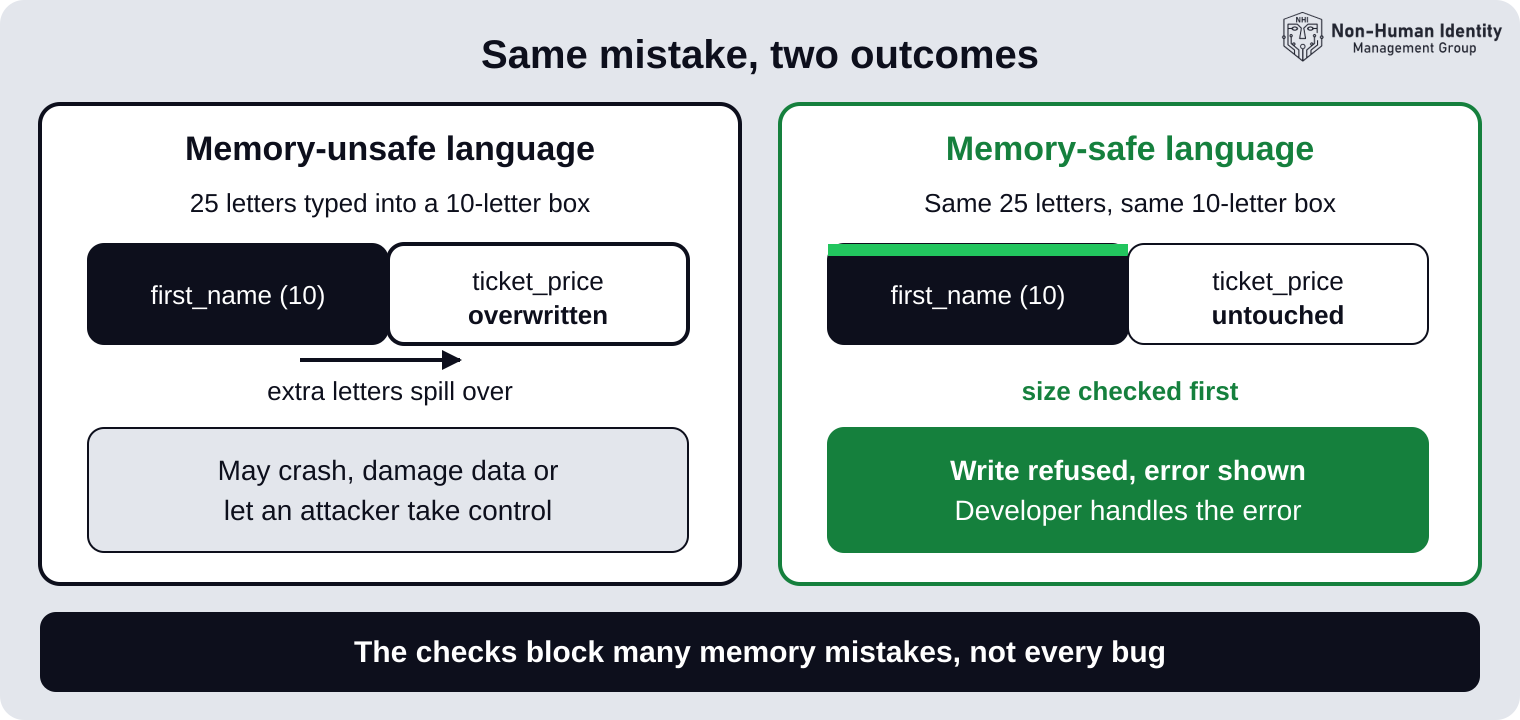
Here is a made-up scenario card. It shows the same mistake handled two ways. It is a picture of the idea, not real code.
Example only. All values are made up.
Booking form for the Teal Studio app
Box "first_name" holds:  10 letters
Box next to it holds:    ticket_price = 0000
Someone types:           FAKE-NAME-EXAMPLE-ABCDEFG  (25 letters)   (1)

Memory-unsafe language:  extra letters spill into ticket_price      (2)
Memory-safe language:    error: name too long, request refused      (3)
- The input is longer than the box was built to hold.
- In a real system, this spill could change other data, crash the app or, in the worst case, let an attacker run their own instructions.
- The language checks the size first, so the spill does not happen. The developer still has to handle the error well.
Why this is risky: in the unsafe case the program carries on as if nothing went wrong, with damaged data next door. Nobody may notice until someone abuses it.
The safer way: use a language that checks box sizes and ownership for you. Where older code has to stay, add testing and hardening around it.[3]
How does it work?
Memory-safe languages use a few kinds of check. Different languages mix them in different ways.
- Size checks. Before the program writes into a box, the language checks the data fits. If not, it refuses.
- Ownership or clean-up rules. Some languages, such as Java, Go and C#, tidy up unused memory for you. This is called garbage collection. Rust uses strict ownership rules instead, checked before the program even runs.
- No using boxes after they are freed. The rules stop a program from reaching back into a box it has already handed back. That slip is called use-after-free.
- A clearly marked escape hatch. When a developer needs to turn some checks off, Rust makes them mark that code as
unsafe. The marking does not turn off all checks, but it tells reviewers where to look hardest.[6]
A worked example
Farah Castell runs product at Teal Studio, a small firm that makes a ticket-booking app. Its fastest part, which handles payments, was written in C years ago.
For the third time this year, Leila Osei, the lead developer, has to rush out a fix. A tester found that a long, odd input could crash the payment part. Leila explains that this is a buffer overflow. It is the same kind of slip as last time, in a different place.
Farah asks what would stop the pattern, not just this one bug. Leila suggests a memory-safe language for new code. She points to a joint paper from security agencies in the US, UK, Australia, Canada and New Zealand. It asks software makers to publish a plan, called a memory-safe roadmap, with dates for moving to safer languages.[3]
They agree a simple plan. All new features are written in Rust. The payment part, which handles outside input, is rewritten first. The rest of the C code stays for now, with extra testing and hardening turned on.
Leila also warns Farah about one limit. Rust will not catch a mistake in the booking rules, such as a refund given twice. Those bugs still need reviews and tests.
Farah is reassured by what Google reported. As Android wrote more new code in memory-safe languages, memory bugs fell from 76% of its security bugs in 2019 to 24% in 2024.[5] Teal Studio is far smaller, but the idea is the same: start with new code.
Myths and mistakes
| What people think | What is true |
|---|---|
| A memory-safe language makes software secure. | It blocks many memory mistakes. Logic errors, weak passwords and bad settings can still happen in any language.[3] |
| We must rewrite everything in Rust at once. | Most teams write new code in a safer language and move the riskiest old parts first. A CISA and NSA guide covers the usual obstacles and ways past them.[4] |
| Rust is the only memory-safe language. | Agency guidance also lists C#, Go, Java, Python and Swift, among others.[3] |
| Good C programmers do not make memory mistakes. | Training helps, but the agencies say it does not remove these bugs.[3] |
| Code marked unsafe has no checks at all. | In Rust, unsafe unlocks a few extra actions. Most other checks still run.[6] |
What can I do this week?
- Find out which languages your main products or projects are written in.
- Ask your team or supplier how many recent security fixes were memory bugs.
- Ask whether new code is written in a memory-safe language, and if not, why not.
- Read the agencies' short paper on memory-safe roadmaps, or pass it to your developers.
- If you are learning, try a small project in one memory-safe language.
Checklist
- I can explain memory safety in one sentence.
- I know which of our products use C or C++.
- New code is written in a memory-safe language where practical.
- The parts that handle outside input are first in line to move.
- Code that turns checks off is marked and reviewed with extra care.
- Remaining C and C++ code has testing and hardening turned on.
- Our suppliers have been asked about their memory-safety plans.
Common questions
Which languages are memory-safe?
Common examples are Rust, Go, Java, C#, Python and Swift. A joint paper from security agencies lists these. C and C++ are the best-known languages that are not memory-safe, because they leave memory checks to the developer. Each language has its own way of keeping memory safe.
Why is everyone talking about Rust?
Rust gives memory safety without automatic clean-up running in the background. That suits fast, low-level code once written in C or C++. Parts of browsers and operating systems are examples. Other safe languages suit many other jobs just as well.
Does a memory-safe language slow programs down?
Sometimes a little, often not enough to matter. Languages with automatic clean-up can add small pauses. Rust does most of its checks before the program runs. For most business apps, the security gain outweighs any speed cost, but teams should test their own case.
Do we have to throw away our old code?
No. Old code that has been tested for years tends to have fewer new bugs than fresh code, Google found.[5] Most plans start by writing new code safely, then move the parts most exposed to outside input. The rest gets extra testing and hardening.
Is this a law?
Not in general. It is guidance from security agencies, such as the US agencies CISA and NSA and the UK's National Cyber Security Centre. They urge software makers to publish a memory-safety plan. Some buyers may ask about it in contracts or questionnaires.
Where next?
Ready for the detail? Read the practitioner guide: Memory-Safe Languages Guide. It goes further into choosing a language, managing the unsafe boundary and building a migration roadmap.
Also useful:
- Buffer Overflows for Beginners
- Memory Corruption Vulnerabilities Guide
- Secure by Design for Beginners
- Rust Security Guide
Related NHI Mgmt Group resources: C and C++ Secure Coding Guide · Fuzzing for Beginners · Secure Coding for Beginners
Key terms
- Memory safety
- A property of software that prevents it from reading or writing memory it should not touch.
- Memory-safe languages
- Programming languages whose rules or checks reduce common memory errors such as buffer overflows.
- Buffer overflow
- A bug where a program writes more data than a space can hold, so it spills into nearby memory.
- Use-after-free
- A bug where a program uses memory after it has been released.
- Garbage collection
- Automatic clean-up of memory that a program no longer uses.
- Rust
- A memory-safe programming language that checks ownership of memory before the program runs.
- Unsafe code
- A marked section of code where some of a language's safety checks are switched off and the developer takes responsibility.
Sources and further reading
- Memory safety. The Chromium Projects. https://www.chromium.org/Home/chromium-security/memory-safety/, accessed 28 Nov 2026.
- A proactive approach to more secure code. Microsoft Security Response Center, 16 July 2019. https://www.microsoft.com/en-us/msrc/blog/2019/07/a-proactive-approach-to-more-secure-code, accessed 28 Nov 2026.
- The Case for Memory Safe Roadmaps. CISA, NSA, FBI, ASD's ACSC, CCCS, NCSC-UK, NCSC-NZ and CERT NZ, December 2023. https://media.defense.gov/2023/Dec/06/2003352724/-1/-1/0/THE-CASE-FOR-MEMORY-SAFE-ROADMAPS-TLP-CLEAR.PDF, accessed 28 Nov 2026.
- Memory Safe Languages: Reducing Vulnerabilities in Modern Software Development. CISA and NSA. https://www.cisa.gov/resources-tools/resources/memory-safe-languages-reducing-vulnerabilities-modern-software-development, accessed 28 Nov 2026.
- Eliminating Memory Safety Vulnerabilities at the Source. Google Online Security Blog, 25 September 2024. https://security.googleblog.com/2024/09/eliminating-memory-safety-vulnerabilities-Android.html, accessed 28 Nov 2026.
- Unsafe Rust. The Rust Programming Language (book), Rust Project. https://doc.rust-lang.org/book/ch20-01-unsafe-rust.html, accessed 28 Nov 2026.