Code scanning tools are programs that read software and point out likely security mistakes.
This guide is for new developers, students and people starting in DevOps, the work of building and running software. You do not need to write code to care: if your business pays for software, these tools are one way its makers catch mistakes early.
In short
- Code scanners read code, borrowed parts and settings, and flag patterns that often cause security holes.
- Different tools look at different things: your own code, open-source parts, containers and hidden passwords.
- Scanners give warnings, not verdicts. Some warnings are wrong, and some problems are missed.
- They work best when they run on every change, and a person reviews what they find.
What you will learn
- Explain what a code scanner does in one sentence.
- Spot which kind of scanner fits which job.
- Read a simple scanner finding.
- Ask your team which scanners run on your code.
- Code checker (static analysis)
- reading code for problems without running it.
- Borrowed code (dependency)
- a ready-made part, often open source, that a program uses instead of writing it from scratch.
- Wrong alarm (false positive)
- a warning about something that turns out to be fine.
What are code scanning tools?
Think of the spelling and grammar checker in a word processor. It reads your writing and underlines words that look wrong. You still decide what to change.
A code scanner does the same for software. It reads the code without running it, which is called static analysis. It compares what it reads with rules about risky patterns. Then it lists each place that matches, with a short reason.
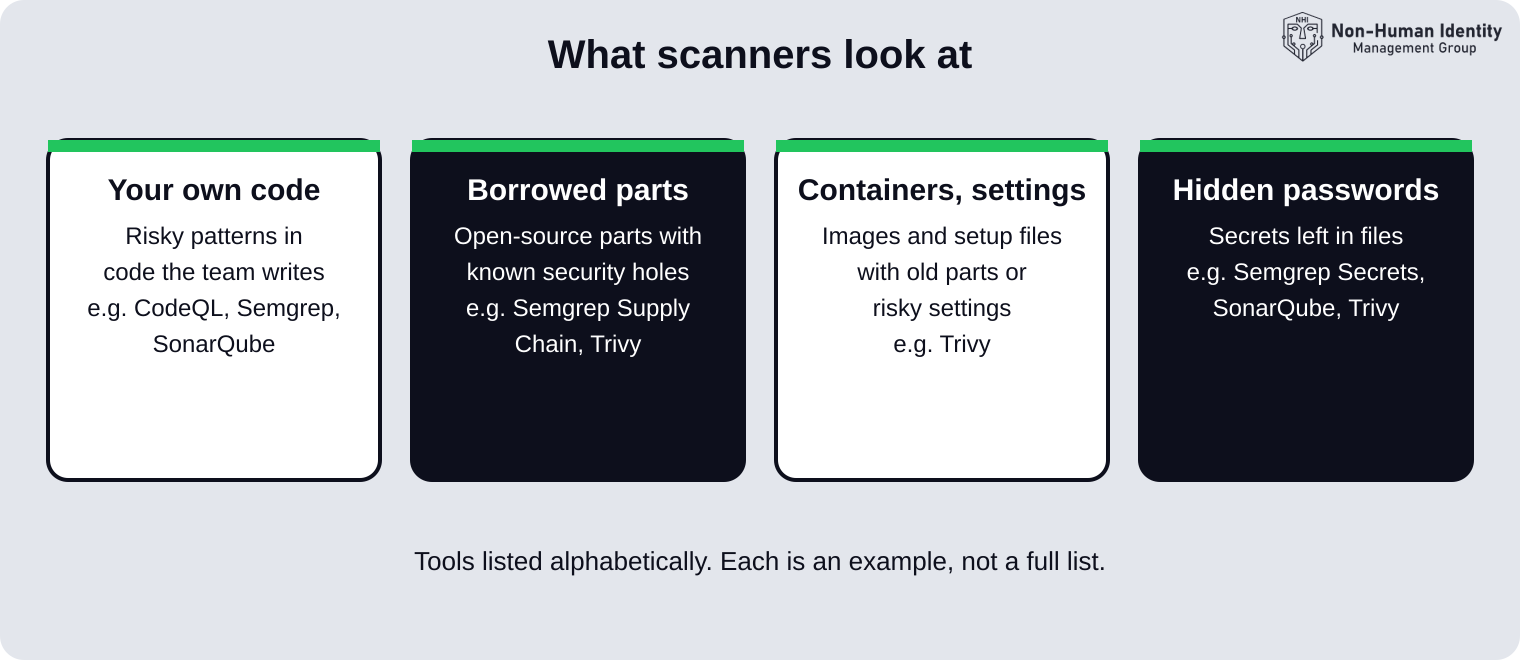
Some scanners read the code a team writes. Others check the borrowed parts, called dependencies, against lists of known security holes. Some also look for passwords left in files, or for risky settings.
Where the comparison stops working: a grammar checker cannot tell whether your argument makes sense. In the same way, a code scanner can miss problems in how a program is meant to work, such as who may see which data. A leading web security charity notes these tools often struggle with login and access problems. It adds that they often raise false alarms.[6]
This is an independent guide from NHI Mgmt Group, based on each tool's public documentation as of November 2026 (see Sources). It is not sponsored or reviewed by any of the tool makers. Product features change, so confirm details against each tool's current documentation.
Why does it matter?
A mistake found early is usually easier to fix than one found after release. Scanners help teams catch common mistakes on every change, not once a year.
If you are learning to code
What could happen: you copy a code snippet that passes user input straight into a database query.
Check this: run a free scanner on your project and read every warning.
If you are new to DevOps
What could happen: a container ships with an old part that has a known security hole.
Check this: scan images and settings before they go live.
Next: Open Source Risk and Software Composition Analysis for Beginners
If you pay for software to be built
What could happen: your supplier has no automatic checks, so simple mistakes reach your customers.
Check this: ask which scanners run, on what, and who fixes what they find.
What does it look like?
Here is a made-up finding. It is the kind of note a scanner leaves on a proposed change.
Example only. All values are made up.
Finding 1 of 3                                  (1)
Rule:      user input used to build a database query (2)
File:      shop/orders.example, line 42         (3)
Severity:  High                                 (4)
Status:    Needs review                         (5)
Suggested: use the database library's safe placeholders
- One of several warnings from a single scan.
- The rule that matched. In a real file, this line would name the risky pattern the tool found.
- Where to look. The developer opens this line and checks it.
- How serious the tool thinks it is. A person confirms this.
- Nobody has decided yet whether this is a true problem or a wrong alarm.
Why this is risky: the warning may be true. If nobody fixes it, a stranger may be able to change what the database does.
The safer way: the developer reads the line and checks the problem. If it is true, they fix it and scan again. If it is a wrong alarm, they mark it with a short reason.
How does it work?
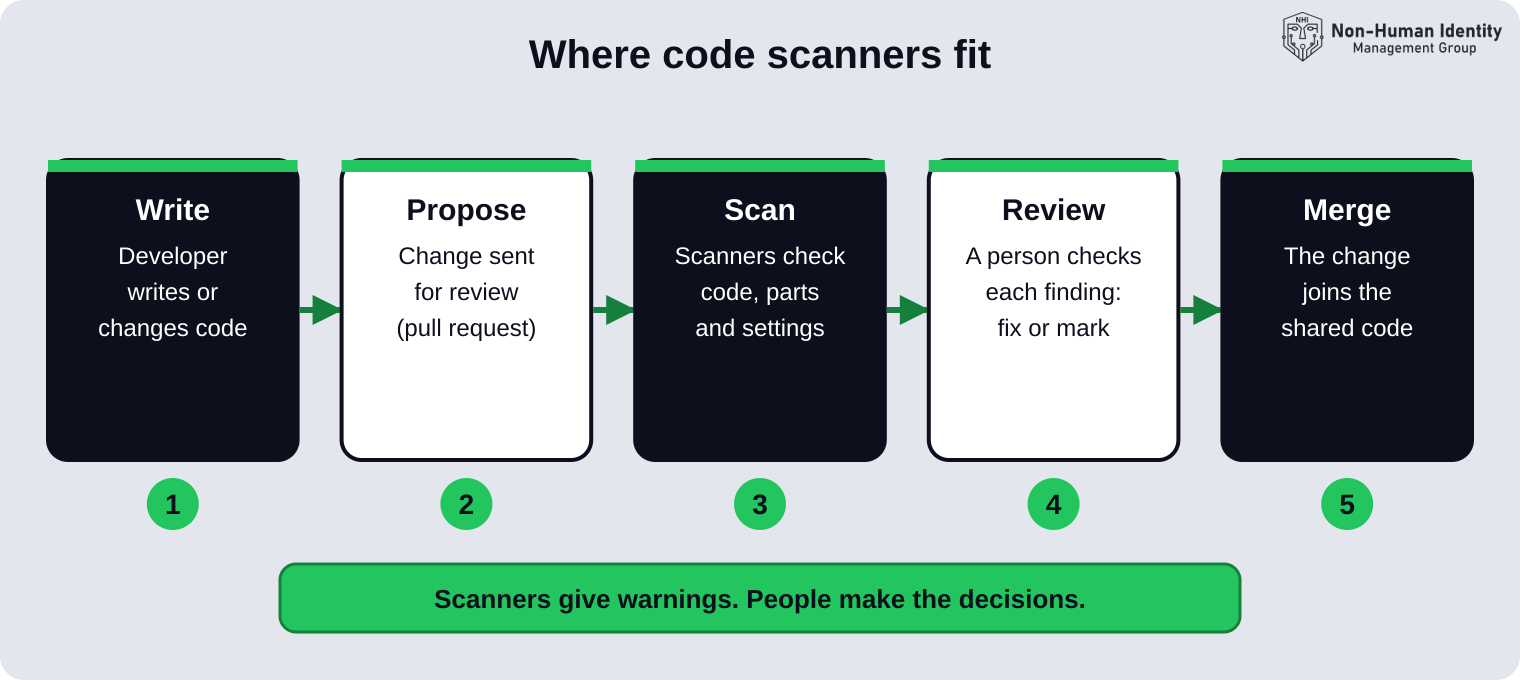
- A change is proposed. A developer suggests a change to the shared code, often as a pull request (a request for others to review it first).
- Scanners run automatically. The team's build system starts the scanners on the change.
- Rules are checked. Each tool compares the code, parts or settings with its rules or with lists of known security holes.
- Findings appear. Results show up next to the change, often as alerts on the line of code.[1]
- A person decides. The developer fixes real problems and marks wrong alarms. Some teams block the change until serious findings are fixed.[3]
Four well-known tools
These four names come up often. We list them in alphabetical order, and the order is not a ranking. Each focuses on different jobs, and many teams use more than one.
- CodeQL is GitHub's code analysis engine. It treats code like data that can be searched with queries, and its results show as code scanning alerts in GitHub.[1]
- Semgrep describes itself as a fast, open-source static analysis tool. Its rules are written to look like the code they search for.[2] The wider Semgrep platform also checks dependencies and secrets.[7]
- SonarQube checks code quality and security, and covers more than 40 programming languages and frameworks. Its quality gate is a pass or fail check on new code.[3]
- Trivy is an open-source security scanner. It can scan container images, files, code projects and more, and looks for known security holes, risky settings, secrets and software licences.[4]
Availability
- CodeQL: available for public repositories on GitHub.com, and for organisation repositories on paid GitHub plans with GitHub Code Security turned on.[1]
- Semgrep: the Community Edition is the open-source engine. The wider Semgrep platform offers Semgrep Code, Supply Chain and Secrets.[2][7]
- SonarQube: the core project is open source under the LGPL licence, and the Community Build supports a subset of its languages.[3] Server and Cloud editions are also offered.[5]
- Trivy: open source under the Apache 2.0 licence.[4]
A worked example
Pia Rosen is the only developer at Teal Brewery, a fictional craft brewer with an online shop. Cyrus Grover has just joined to help run the servers.
One morning Cyrus asks what checks run on the shop's code. "None," says Pia. "I check it myself, when I have time."
They agree to try two free tools on a copy of the project. One reads Pia's own code. The other checks the shop's borrowed parts and the container it runs in.
The first scan lists 31 findings, and Pia feels a moment of panic. Cyrus reminds her of the grammar checker: underlines are suggestions, not verdicts.
They sort the list together. Two findings are true problems. One is a search box that sends text straight to the database. Another is an old borrowed part with a known security hole and a newer safe version. Pia fixes both that week.
Most of the rest are wrong alarms in test files. Pia marks each one with a short reason. A few are style points, which she plans for later.
Next, Cyrus sets the scans to run on every proposed change. Serious findings now block a change until someone reviews them. The list stays short, so they keep reading it.
Myths and mistakes
| What people think | What is true |
|---|---|
| A clean scan means the code is secure. | Scanners find some kinds of mistake well and miss others, such as many login and access problems.[6] |
| Every warning is a real problem. | Some are wrong alarms. A person checks each one and records why it was closed. |
| One tool covers everything. | Tools focus on different jobs. Check what each one scans: your code, borrowed parts, containers or secrets. |
| Turn on every rule on day one. | Start small, with serious rules on new changes, so the team can keep up. |
| Scanning is the security team's job. | Findings are fixed in the code, so developers own most fixes. Security people help set rules. |
What can I do this week?
- List the scanners that run on your code today, and what each one looks at.
- Run one free scanner on a practice or copy project and read the first ten findings.
- For each finding, decide: true problem, wrong alarm or style point.
- Ask whether scans run on every proposed change or only now and then.
- Agree who fixes serious findings and how fast.
Checklist
- We know which scanners run, and on what: own code, borrowed parts, containers, secrets.
- Scans run automatically on every proposed change.
- Serious findings block a change until someone reviews them.
- Wrong alarms are closed with a short written reason.
- Someone owns each finding until it is fixed or closed.
- Rules are reviewed now and then, so the list stays useful.
- We still use code review and testing, because scanners miss some problems.
Common questions
Is a code scanner the same as a virus scanner?
No. A virus scanner looks for known harmful files on a computer. A code scanner reads software that a team is building and flags likely mistakes in it. Both use rules and lists, but they look for very different things.
Are code scanning tools free?
Many have free options. Semgrep Community Edition, SonarQube Community Build and Trivy are open source, and CodeQL is available for public projects on GitHub. Paid editions add features for teams. Check each tool's current plans, because offers change.
What is the difference between SAST and these tools?
SAST is the name for one kind of check: reading code without running it. Several of these tools do SAST. Others check borrowed parts, containers or secrets. So SAST is a job, and these are tools that do one or more jobs.
Why do scanners give so many wrong alarms?
Because they match patterns and cannot fully understand what the code is for. A risky-looking line may be safe in context. Teams reduce noise by starting with serious rules, scanning new changes first and closing wrong alarms with a reason.
Do I need a scanner if I review my own code?
Yes, both help. A scanner checks every change the same way and does not get tired. A person understands what the code is meant to do. Together they catch more than either alone.
Where next?
Ready for the detail? Read the practitioner guide: Open Source AppSec Tools Landscape Guide. It goes further into the wider range of open-source tools, how teams run them safely and how scanner access is managed.
Also useful:
- SAST, DAST and IAST for Beginners
- Open Source Risk and Software Composition Analysis for Beginners
- Secret Scanning for Beginners
- Secure Code Review for Beginners
- SAST, SCA and code scanning tool rollout playbook
Related NHI Mgmt Group resources: Container Image Scanning vs SCA · Infrastructure as Code Security for Beginners · Application Security Engineer for Beginners
Key terms
- Static analysis (SAST)
- Testing that reads source code for security weaknesses without running it.
- Software composition analysis
- Checking the borrowed parts a program uses against lists of known security holes.
- Container image scanning
- Checking a packaged app and everything inside it for known security holes and risky settings.
- False positive
- A warning about something that turns out not to be a problem.
- Pull request
- A request to add a set of code changes to a shared project, so others can review them first.
- CodeQL
- GitHub's code analysis engine, which searches code using queries.
- Semgrep
- A static analysis tool whose rules are written to look like the code they find.
- Trivy
- An open-source scanner for containers, files and code projects.
Sources and further reading
- About code scanning with CodeQL. GitHub Docs, GitHub. https://docs.github.com/en/code-security/code-scanning/introduction-to-code-scanning/about-code-scanning-with-codeql, accessed 28 Nov 2026.
- Semgrep (README). Semgrep, GitHub repository. https://github.com/semgrep/semgrep, accessed 28 Nov 2026.
- SonarQube (README). SonarSource, GitHub repository. https://github.com/SonarSource/sonarqube, accessed 28 Nov 2026.
- Trivy (README). Aqua Security, GitHub repository. https://github.com/aquasecurity/trivy, accessed 28 Nov 2026.
- SonarQube products. SonarSource documentation. https://docs.sonarsource.com/get-to-know-sonar/sonarqube-products.md, accessed 28 Nov 2026.
- Source Code Analysis Tools. OWASP Foundation. https://community.owasp.org/Source_Code_Analysis_Tools, accessed 28 Nov 2026.
- Semgrep documentation. Semgrep. https://docs.semgrep.dev/, accessed 28 Nov 2026.