A hardware security module (HSM) is a special device that keeps encryption keys and uses them inside itself.
This guide is for people new to IT work, students and anyone who keeps hearing "HSM" in meetings. You do not need to run one to be affected: card payments, bank apps and many cloud services rely on HSMs behind the scenes.
In short
- An HSM is a hardened box, or a cloud service built on one, made to hold secret keys and do the maths with them.
- Apps send work to the HSM and get the answer back. The key is designed to stay inside.
- Many HSMs are tested against a US government standard, and you can look up the result in a public list.
- An HSM protects the key itself. You still have to control who is allowed to ask it to use that key.
What you will learn
- Explain what an HSM is in one sentence.
- Spot the difference between storing a key in a file and keeping it in an HSM.
- Check whether a product's HSM has been independently tested.
- Ask who is allowed to use the keys inside your HSM.
- Secret code for scrambling (encryption key)
- a long secret value that locks and unlocks data, or proves who signed something.
- Key safe that does the work (HSM)
- a hardened device that makes, keeps and uses keys so programs never need to hold them.
What is a hardware security module?
Think of a bank cashier behind thick glass. You slide a slip under the window, the cashier stamps it, and you get the slip back. The official stamp stays behind the glass.
An HSM works the same way for software. A program needs a key to scramble data, unscramble it or sign it. Signing means adding a digital mark that proves who sent something. With an HSM, the program sends the data in, the HSM does the job with its key, and the result comes back out. A hardware security module is a computing device that does this kind of maths and gives keys secure storage.[1]
Some HSMs are boxes in a server room or cards inside a server. Others are cloud services, where a provider runs the hardware for you.[4]
Where the comparison stops working: a cashier can be fooled by a fake slip, and an HSM can too. If someone takes over a program that is allowed to use the HSM, they can ask it to sign things. The key stays safe, but it is still being used for the wrong person.
Why does it matter?
Keys protect card payments, website certificates, backups and software updates. If a key is copied, whoever holds the copy may be able to read the data or sign things as you. An HSM makes copying the key much harder, because it is built to keep the key inside and to protect it physically.[2]
If you are new to IT work
What could happen: you find a private key saved in a shared folder "until we sort out the HSM".
Check this: ask which keys must live in the HSM, and report any that sit in files.
If you are studying computing
What could happen: you build a project that keeps its signing key in the code, and the key leaks with the code.
Check this: learn how the cloud key service on your platform keeps keys away from your code.
If you buy technology for a business
What could happen: a supplier says "bank-grade HSM" and you have no way to check it.
Check this: ask for the product's entry in the public list of tested devices.
What does it look like?
Here is a made-up settings file for an app that signs invoices. The top half keeps the key in the file. The bottom half points to a key that lives in an HSM.
Example only. All values are made up.
# Risky: key kept in the app's own files
SIGNING_KEY_FILE=/app/keys/invoice-signing-FAKE.pem   (1)

# Safer: key kept in an HSM
SIGNING_SERVICE=hsm.example.invalid                   (2)
SIGNING_KEY_LABEL=invoice-signing-EXAMPLE-0000        (3)
APP_LOGIN=from-secrets-store                          (4)
- In a real file, this line would point to the private key itself, sitting on the server's disk.
- The address of the HSM, or the cloud service built on one.
- Only the key's name. The key itself stays inside the HSM.
- The app still needs its own credential to use the HSM, and that credential is kept in a secrets store.
Why this is risky: anyone who can read the server's disk, or a backup of it, can copy the key file. They could then sign invoices as the company.
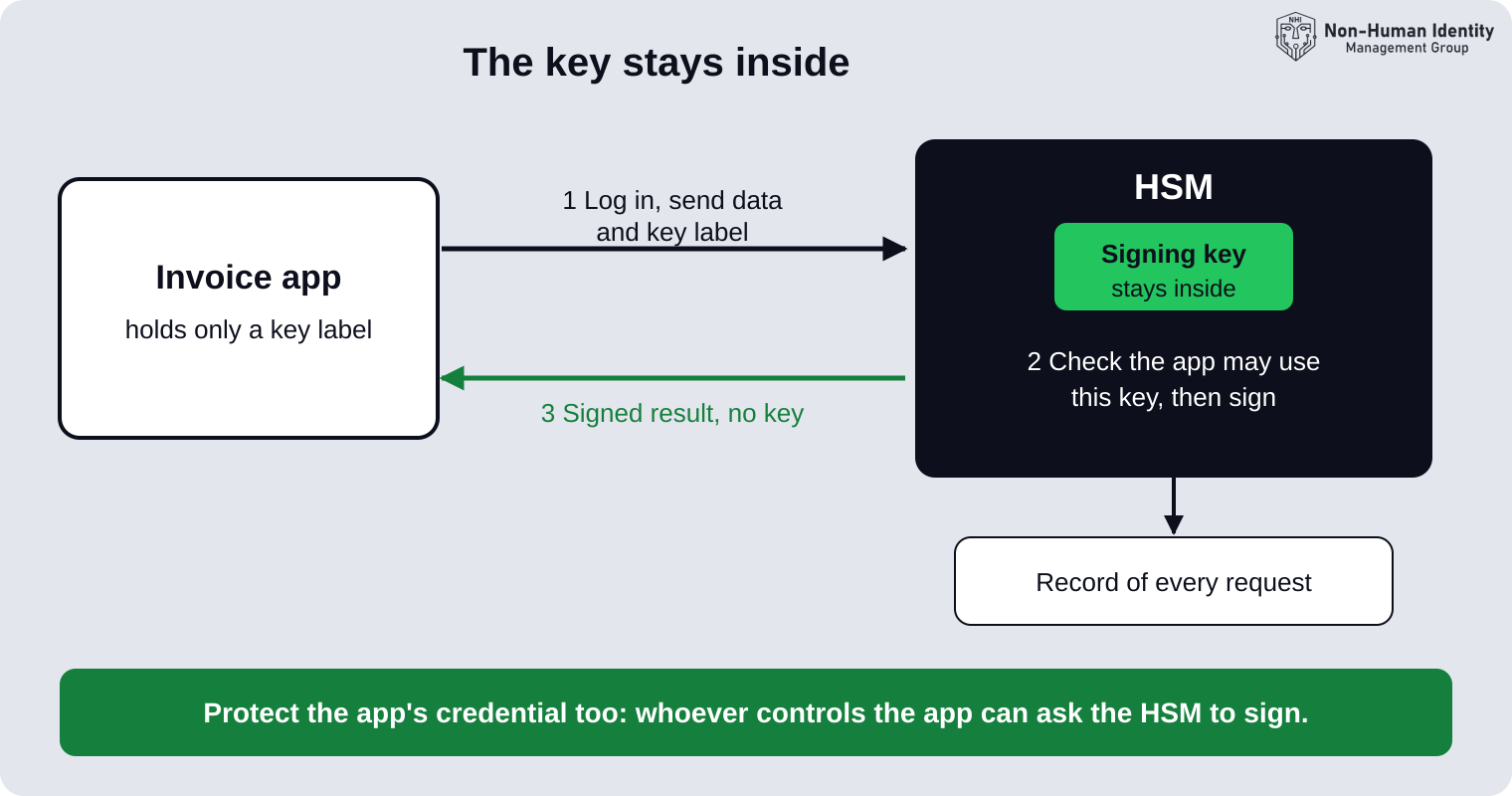
The safer way: the app holds only a label. It asks the HSM to sign each invoice, and the HSM records each request. Only the app's own credential can make that request, so the credential needs care too.
How does it work?
Here is what happens when an app signs something with an HSM.
- The key is made inside. The HSM creates the key itself, so the key does not start life on a normal computer.[1]
- The app logs in. The app proves who it is to the HSM, using a credential the HSM's owner set up.
- The app sends the work. It sends the data to sign, plus the key's label, using a standard way for programs to talk to such devices.[6]
- The HSM does the maths. It checks the app is allowed to use that key, signs the data and keeps a record.
- The answer comes back. The app gets the signed result. The key stays inside the HSM.
How can you tell if an HSM is any good? Many are tested by approved labs against a US government standard for security devices that do this kind of work. That standard has four rising levels of security and covers physical protection.[2] Tested devices go on a public list run by the US and Canadian governments, which anyone can search.[3] HSMs used for card payments have their own industry standard as well.[5]
A worked example
Wanda Engel has just started as a junior IT technician at Basalt Studio, a fictional software firm. Basalt makes an app that sends invoices for small shops. Each invoice is signed, so shops can check it really came from Basalt.
In her first week, Wanda tidies a shared drive. She finds a file called "invoice-signing-key". She does not open it. She messages her manager, Fen Bergmann.
Fen explains. The firm used to keep the signing key on a server. Last year they moved it into a cloud HSM service. The old file should have gone.
Wanda thinks of the cashier behind the glass. If the stamp is still lying on the counter outside, the glass does not help.
Fen checks the file. It is the old key, not the one in the HSM. Even so, the app trusted that old key until last year, so someone could use it to fake older invoices.
They agree three steps. First, they tell the team and record what was found. Second, they ask the developers to confirm the app no longer accepts the old key. Third, they delete the file and check the backups for copies.
Fen also shows Wanda the HSM's records. Each signing request is listed, with the app identity that made it. The records available to them show only the invoice app using the key.
At the end of the week, Fen adds a line to the starter checklist: "Signing keys live in the HSM. If you find one anywhere else, report it."
Myths and mistakes
| What people think | What is true |
|---|---|
| Once a key is in an HSM, nothing can go wrong. | The key is better protected, but anyone who controls an allowed app can still ask the HSM to use it. |
| HSMs are only for banks. | Cloud providers offer HSM-backed services that any business can rent.[4] |
| "Bank-grade" on a website means it was tested. | Testing is listed publicly. Ask for the list entry, not the marketing phrase.[3] |
| An HSM is the same as a security key on a keyring. | Both hold keys in hardware, but a security key logs one person in. An HSM serves many programs and keys. |
| Moving to an HSM cleans up old keys. | Old copies in files and backups stay until someone finds and removes them. |
What can I do this week?
- Ask which of your team's keys live in an HSM or a cloud key service.
- Look for key files in shared drives and report them without opening them.
- Find out who can approve an app's access to the HSM.
- Look up your HSM product in the public list of tested devices.
Checklist
- Important keys are made inside the HSM, not on a normal computer.
- Apps hold only a key label, never the key itself.
- Each app has its own credential for the HSM, kept in a secrets store.
- Someone named owns each key and approves who may use it.
- The HSM's request records are kept and checked.
- Old key files from before the HSM have been found and removed.
- The HSM product's test result has been checked in the public list.
Common questions
What is an HSM used for?
An HSM is used to make, keep and use encryption keys. Common jobs include signing software and documents, protecting card payments, guarding the keys behind website certificates and protecting the master keys that lock other keys. Apps send the work to the HSM rather than holding the key themselves.
Is a cloud key service an HSM?
Sometimes. Cloud providers offer several options. Some are shared services backed by HSMs that the provider runs, and some give you a dedicated HSM you manage yourself.[4] Check the provider's own documentation for which option you are using.
What is the difference between an HSM and a TPM?
Both are hardware that protects keys. A TPM (trusted platform module) is a small chip inside one laptop or server that protects that machine. An HSM is a dedicated device or service that does key work for many programs. See HSM vs TPM vs Secure Enclave.
Can a key ever leave an HSM?
Yes, if it is set up to allow that. HSMs can create, import and export keys, and a key can be wrapped (locked with another key) for backup.[1] We suggest setting your most important keys so they are not copied out unprotected.
Do I need an HSM for a small project?
Usually not your own box. A cloud key service, often backed by HSMs, keeps keys out of your code at a small cost. A dedicated HSM tends to matter when rules, contracts or the value of the key call for it, such as card payments.
Where next?
Ready for the detail? Read the practitioner guide: HSM and Key Management Buyer's Guide. It goes further into requirements, testing levels and the questions to ask suppliers.
Also useful:
- Key Management for Beginners
- Cloud Key Vaults for Beginners
- HSM vs TPM vs Secure Enclave
- Secrets Manager vs KMS vs HSM
Related NHI Mgmt Group resources: HSM Deployment and Operations Guide · Payment HSMs · Cryptographic Key Management Guide
Key terms
- Hardware security module
- A tamper-resistant device or service that makes, stores and uses keys so they stay inside it.
- Encryption key
- A secret value used to lock and unlock data.
- Cloud HSM
- An HSM hosted in a cloud provider's data centre but controlled by the customer.
- FIPS 140-3 validation
- A US government test result showing a device that handles keys meets a set security standard.
- Key management
- Looking after keys through their whole life, from making them to retiring them.
- PKCS#11
- A common way for programs to ask a device such as an HSM to do key work.
Sources and further reading
- What is AWS CloudHSM? AWS CloudHSM User Guide, Amazon Web Services. https://docs.aws.amazon.com/cloudhsm/latest/userguide/introduction.html, accessed 28 Nov 2026.
- FIPS 140-3, Security Requirements for Cryptographic Modules. NIST, 22 March 2019. https://csrc.nist.gov/pubs/fips/140-3/final, accessed 28 Nov 2026.
- Cryptographic Module Validation Program. NIST Computer Security Resource Center. https://csrc.nist.gov/projects/cryptographic-module-validation-program, accessed 28 Nov 2026.
- Key management in Azure. Microsoft Learn, Microsoft. https://learn.microsoft.com/en-us/azure/security/fundamentals/key-management, accessed 28 Nov 2026.
- PIN Transaction Security (PTS) standards, including PTS HSM. PCI Security Standards Council. https://www.pcisecuritystandards.org/standards/pts/, accessed 28 Nov 2026.
- PKCS #11 Specification Version 3.1. OASIS, 23 July 2023. https://docs.oasis-open.org/pkcs11/pkcs11-spec/v3.1/os/pkcs11-spec-v3.1-os.html, accessed 28 Nov 2026.