Secrets management is the practice of storing, handing out, changing and tracking the passwords, keys and tokens that software uses to prove it is allowed to connect to other systems.
Every app, script, cloud service and AI agent that talks to a database or an API needs some kind of credential. This guide is for newcomers, students, career changers and managers who are not security specialists. It explains what a secret is, why secrets leak, how a secrets vault works step by step, a worked example and simple first steps a small team can take this week.
By the end of this guide you will be able to:
- Explain what a secret is and why software needs one.
- Understand why secrets in code, chat and spreadsheets are risky.
- Describe how a vault stores, controls and rotates secrets.
- Identify three practical steps to start managing secrets this week.
Key takeaways
- A secret is a key for software. It is the credential that proves a non-human identity, such as an app or a script, is allowed to act.
- Secrets leak in ordinary places. Code, configuration files, build logs and chat messages are common hiding places, and leaked keys often stay valid for years.
- A vault keeps secrets in one controlled place. It encrypts them, decides who and what may read each one, and records every request.
- How you control a secret depends on how long it lives. Long-lived (static) secrets need changing on a schedule; short-lived (dynamic) ones are controlled by who can obtain them and what they allow.
- Start with an inventory. You cannot protect secrets you do not know you have.
What it is, in plain English
People prove who they are with a username, a password and often a second factor. Software needs to prove who it is too. A web shop needs to connect to its database. A nightly script needs to upload files to cloud storage. An AI agent needs to call a booking system. Each of these is a non-human identity (NHI): an identity with its own account and credentials that belongs to a machine or a piece of software rather than a person. NHI is the umbrella term, with two families: machines and devices, and software workloads such as apps, scripts and AI agents. Some vendors use the phrase "machine identity" for the whole group. See Non-Human Identities for Beginners for the full picture.
The credential that proves an NHI is allowed to act is called a secret. Common examples are API keys, database passwords, access tokens, private keys and certificates. If someone copies a secret, they can usually act as that software, with all of its access.
Secrets management is the discipline of looking after those secrets properly: storing them safely, giving each one only to the software that needs it, changing or expiring them, and keeping a record of who used them.
A helpful comparison is a hotel's key cabinet behind reception. Keys are not left under doormats or taped to doors. Staff check who is asking before handing one over, write down who took which key, and change the locks if a key goes missing. A secrets vault does the same job for software keys. Where the analogy breaks down: a hotel key is a physical object that can only be in one place, while a digital secret can be copied endlessly without anyone noticing, which is why logging and expiry matter so much.
Why it matters to you
- If you run a small business: one leaked key to your cloud account, payment provider or customer database can be enough for an attacker to read data or run up bills in your name.
- If you are new to a security job: finding and cleaning up exposed secrets is one of the most common day-to-day tasks in identity and cloud security teams.
- If you are a manager: secrets are often created by developers and forgotten. Knowing who owns each one, and how quickly it can be changed, is part of being ready for an incident.
Secrets leak far more than most people expect. GitGuardian's State of Secrets Sprawl 2025 report counted 23,770,171 new hardcoded secrets added to public GitHub repositories in 2024, and found that 70% of secrets leaked in 2022 were still valid when the report was written.[1] The same report found at least one plaintext secret in 35% of the private repositories it scanned for customers.[1] In other words, keeping code private is not the same as keeping secrets safe.
The Open Worldwide Application Security Project (OWASP) lists "Secret Leakage" and "Long-Lived Secrets" as two of its top 10 risks for non-human identities (NHI2:2025 and NHI7:2025).[2]
A real incident shows how quickly this goes wrong. In March 2025 a widely used GitHub Actions add-on, tj-actions/changed-files, was altered so that it read secrets from the memory of build machines and printed them into build logs, which anyone could read for public projects.[3] GitHub's advisory told affected teams to revoke and rotate any secrets that appeared in those logs.[3] See the tj-actions CI/CD secrets breach page for the full story.
How it works, step by step
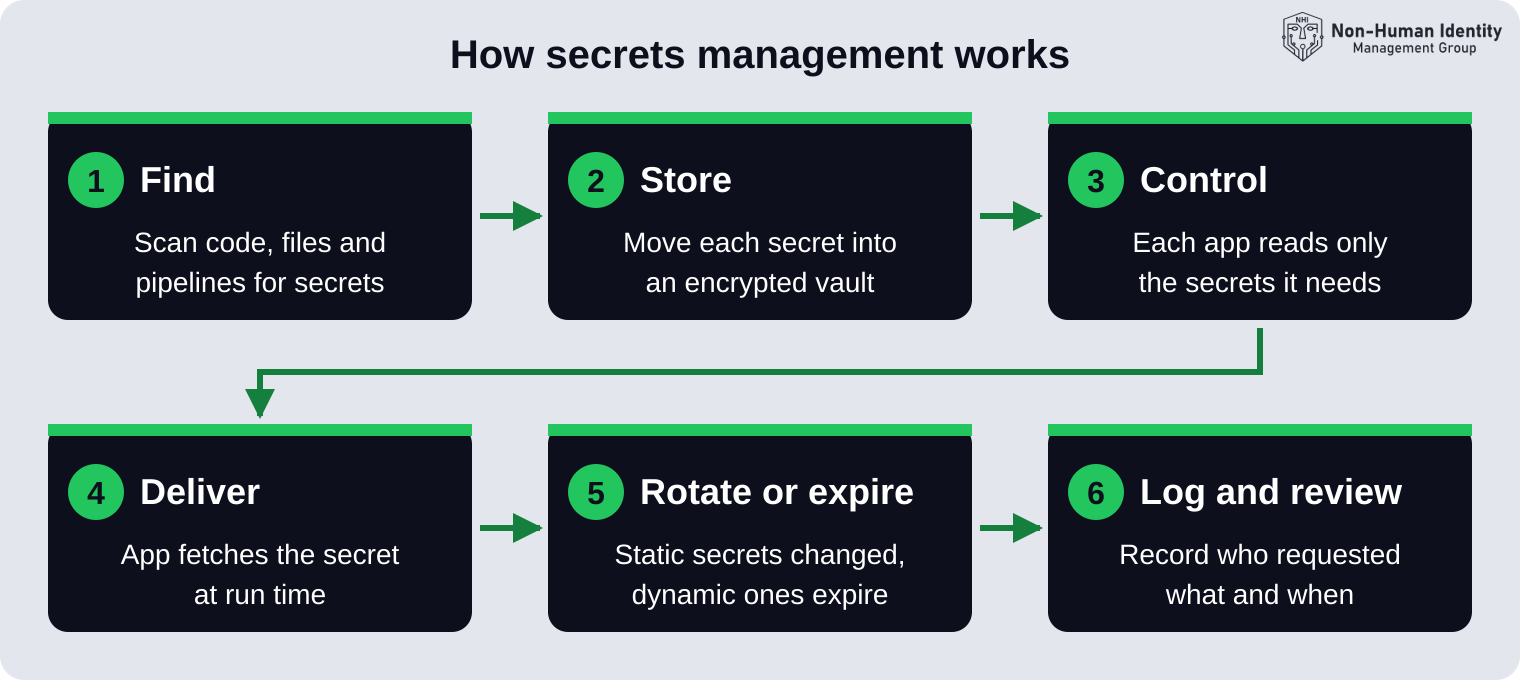
Products differ in detail, but most secrets management follows the same pattern.
- Find your secrets. Search code, configuration files, build systems, shared drives and chat for keys and passwords. Tools called secrets scanners look for patterns that match known key formats. OWASP suggests scanning early, for example before code is committed, and using more than one detection tool.[4]
- Store them in a vault. Move each secret into a central, encrypted store and delete the copies left in code and files. OWASP recommends one standardised place to store, provision, audit and rotate secrets.[4] Remember that deleting a key from code does not make it safe: if it may have been seen, change it.
- Control who can read each secret. Give each application its own identity and allow it to read only the secrets it needs. This is least privilege. OWASP notes that engineers should not have access to all secrets in the system.[4]
- Deliver the secret at run time. Instead of a password sitting in a file, the application asks the vault for it when it starts or when it needs it. AWS, for example, describes replacing hardcoded credentials with a runtime call to its secrets service.[5]
- Change or expire secrets. A static secret stays valid until someone changes it, so it should be rotated on a schedule and straight away after any suspected leak. A dynamic secret is created on demand and expires on its own, so the main controls are who is allowed to obtain it and how much access it grants.[6][7]
- Log and review. Record who and what requested each secret, when, and whether it was allowed. OWASP lists these events, plus failed requests and admin changes, as things an audit trail should capture.[4]
The table below shows how the three largest cloud platforms describe their own secrets services. They are listed alphabetically and only as examples; the order is not a ranking. Dedicated vault products, open source and commercial, do the same job across many platforms.
| Platform | Service | How its documentation describes it |
|---|---|---|
| Amazon Web Services (AWS) | AWS Secrets Manager | Helps you manage, retrieve and rotate database credentials, API keys and other secrets, with automatic rotation schedules, and API calls logged when AWS CloudTrail is turned on.[5] |
| Google Cloud | Secret Manager | Stores API keys, passwords and certificates as versioned secrets, with fine-grained access roles, and encrypts secrets by default in transit and at rest.[8] |
| Microsoft Azure | Azure Key Vault | Stores and controls access to tokens, passwords, certificates, API keys and other secrets, with sign-in through Microsoft Entra ID and access set by role-based access control or access policies.[9] |
Useful distinctions
- Static and dynamic secrets are controlled differently. A static API key is dangerous for as long as it lives, so rotation matters. A dynamic database password that expires after its lease is much less useful to a thief, but you still need to control who can request one and what it can reach.[7]
- A vault solves storage, not sprawl. Putting a secret in a vault does not remove the copies already in old code, laptops and logs. Scanning and clean-up are separate jobs.
- The vault needs its own way in. An application has to prove who it is before the vault hands anything over. That first credential is called secret zero, and OWASP notes it must be stored somewhere other than the vault itself.[4] Using the platform's built-in identity for the workload is a common answer; see The Secret Zero Problem for Beginners.
- Some secrets can be removed altogether. Workloads can often prove their identity with short-lived tokens issued by their platform, so there is no stored key to leak. See Workload Identity Federation for Beginners.
A worked example
Harbour Bakes is a fictional online bakery with 25 staff and a small development team of three. Its website takes orders, stores customer details in a cloud database and sends confirmation emails through an email service.
Lena, the lead developer, runs a free secrets scanner over the company's code repository. It finds four things: the database password in a configuration file, the email service API key in a script, a payment test key in an old branch, and a cloud access key pasted into a team wiki page two years ago. Nobody is sure who created the cloud key.
Lena and the operations manager, Tom, agree a plan:
- Change first: they create new values for all four secrets and switch off the old ones, because the old values may already have been copied. The cloud key turns out to belong to a former contractor's test project, so it is deleted rather than replaced.
- Store centrally: the new database password and email key go into their cloud provider's secrets service. The website reads them at start-up instead of from a file.
- Limit access: the website's identity can read only those two secrets. Lena and Tom can manage the vault, but day-to-day developers cannot read production secrets.
- Rotate and watch: the database password is set to rotate automatically every 90 days, and an alert goes to Tom if a secret is read from somewhere unexpected.
A month later, a developer accidentally commits a new test key. The scanner, now set to run before each commit, flags it before it reaches the shared repository. Leaks can still happen, and the team still has old copies of code on laptops to clean up, but it has made leaks much less likely to go unnoticed and much quicker to fix.
Myths and misunderstandings
| What people think | What is true |
|---|---|
| Our code is private, so secrets in it are safe. | Private code is copied to laptops, build systems and backups, and is often shared with contractors. Plaintext secrets are common in private repositories too.[1] |
| Deleting a leaked key from the code fixes the problem. | Old versions keep the key in the history, and anyone who copied it can still use it. Revoke or change the key, then remove it from code. |
| Once secrets are in a vault, we are done. | A vault is one part. You still need least-privilege access, rotation or expiry, logging and regular scanning for new leaks. |
| Every secret should be rotated every few days. | Rotation is the main control for long-lived secrets. Short-lived secrets expire on their own; for them, focus on who can obtain them and what they can reach. |
| Environment variables are a safe place for secrets. | They are better than hardcoding, but they can end up in logs, crash reports and debugging output. A vault delivering the value at run time is usually safer. |
Key terms
- Secret
- The credential that proves a non-human identity is allowed to act, such as an API key, token, password or certificate.
- Secrets management
- The discipline of securely storing, distributing, rotating and auditing secrets across an organisation's systems and pipelines.
- Secrets vault
- A central, encrypted store for managing secrets such as API keys, passwords, certificates and tokens.
- Non-human identity (NHI)
- An identity with an account and credentials that belongs to a machine, device or software workload, including AI agents, rather than a person.
- Static credential
- A long-lived secret, such as an API key or password, that stays valid until someone changes it.
- Dynamic secret
- A secret created on demand for a task and revoked automatically after use or expiry.
- Secrets rotation
- Replacing credentials on a schedule or after an event so that exposed values stop working quickly.
- Hardcoded secret
- A credential written directly into source code, scripts, configuration files or build assets.
- Secrets sprawl
- The uncontrolled spread of credentials across code, cloud services, tools and chat.
- Secrets scanning
- Automated checks of code, pipelines and cloud environments to find exposed secrets such as API keys and tokens.
- Secret zero
- The first credential needed to reach a secrets store or other protected system.
- Least privilege
- Giving each user, process and system, human or non-human, only the access it needs for its function.
Common questions
What counts as a secret?
Anything software uses to prove it may connect to something: API keys, database passwords, access tokens, private keys, certificates and connection strings that contain a password.[4]
Is a password manager the same as a secrets manager?
Not quite. A password manager is built for people to store and fill in their own passwords. A secrets manager is built for software to fetch credentials automatically, with access rules and logs for each application.
How often should secrets be rotated?
There is no single number. We suggest basing it on risk: the more powerful the secret, the more often it should change, and always straight away after a suspected leak. Where you can, use short-lived secrets that expire on their own instead.
What should I do if a secret leaks?
Revoke or replace it first, then work out where it was used and whether anyone used it. Removing it from the code comes after. See Leaked Secret Response for Beginners.
Do AI agents need secrets management?
Yes. AI agents are NHIs. Many use short-lived tokens, but plenty still run on static API keys, which need the same vaulting, scoping and rotation as any other key.
Do small teams need a dedicated vault product?
Not always. A cloud provider's built-in secrets service, or a well-configured secrets feature in your build tool, can be a sensible start, as long as access is limited and logged.
First steps
Three things you can do this week:
- Scan one repository. Run a secrets scanner over your most important code repository, including its history, and list what it finds.
- Change anything exposed. For each real secret found, create a new value, switch off the old one and move the new value into your cloud provider's secrets service or your build tool's secrets store. Plan the change with the system owner so you can switch back in a controlled, recorded way if something breaks, without restoring the old exposed value.
- Turn on scanning before code is shared. Many code platforms offer push protection or pre-commit checks that block known key formats. Switch it on for new work.
Checklist
- We have a list of our important secrets, with an owner for each one.
- No production secrets sit in code, configuration files, wikis or chat.
- Production secrets are stored in a vault or a platform secrets service.
- Each application can read only the secrets it needs.
- Few people can read production secrets, and that list is reviewed.
- Long-lived secrets have a rotation schedule, and we know how to rotate each one quickly.
- Access to secrets is logged, and someone looks at unusual requests.
- Code is scanned for secrets before it is shared, and older code has been scanned at least once.
Simple measures that show progress: the number of secrets found in code each month (aiming down), the share of production secrets held in a vault, the number of secrets with no named owner, and how long it takes to replace a leaked secret.
Check your understanding
1. What is a secret, in secrets management?
Answer: the credential, such as an API key, token or password, that proves a non-human identity is allowed to act.
2. Why is deleting a leaked key from the code not enough?
Answer: the key stays in the code history and in any copies people have made, so it can still be used until it is revoked or changed.
3. How is a dynamic secret controlled differently from a static one?
Answer: a static secret is rotated on a schedule because it lives until changed; a dynamic secret expires on its own, so the focus is on who can obtain it and what it allows.
4. What does a vault not do on its own?
Answer: it does not find or remove the copies of secrets already spread across code, laptops and logs. Scanning and clean-up are still needed.
Suggested learning pathway
- Start with the basics in Non-Human Identities for Beginners.
- For the most common secret type, read API Keys for Beginners.
- For how secrets end up in code, see Secrets in Code for Beginners.
- For changing secrets safely, see Secrets Rotation for Beginners.
- For what to do when a key escapes, see Leaked Secret Response for Beginners.
- For the full practitioner approach, see the Secrets Management Guide.
- For short-lived credentials in depth, see the Dynamic Secrets and Ephemeral Credentials Guide.
- To build structured skills across the whole topic, take NHI Foundation Level Training.
Standards and references
- The State of Secrets Sprawl 2025. GitGuardian, 2025. https://www.gitguardian.com/state-of-secrets-sprawl-report-2025, accessed 27 Nov 2026.
- OWASP Non-Human Identities Top 10, 2025. OWASP Foundation. https://owasp.org/www-project-non-human-identities-top-10/2025/, accessed 27 Nov 2026.
- GHSA-mrrh-fwg8-r2c3: tj-actions changed-files through 45.0.7 allows remote attackers to discover secrets by reading actions logs (CVE-2025-30066). GitHub Advisory Database, GitHub. https://github.com/advisories/GHSA-mrrh-fwg8-r2c3, accessed 27 Nov 2026.
- Secrets Management Cheat Sheet. OWASP Cheat Sheet Series, OWASP Foundation. https://cheatsheetseries.owasp.org/cheatsheets/Secrets_Management_Cheat_Sheet.html, accessed 27 Nov 2026.
- What is AWS Secrets Manager? AWS Secrets Manager User Guide, Amazon Web Services. https://docs.aws.amazon.com/secretsmanager/latest/userguide/intro.html, accessed 27 Nov 2026.
- SP 800-53 Rev. 5, Security and Privacy Controls for Information Systems and Organizations (IA-5 Authenticator Management). National Institute of Standards and Technology (NIST). https://csrc.nist.gov/pubs/sp/800/53/r5/upd1/final.
- Database secrets engine. HashiCorp Vault documentation, HashiCorp. https://developer.hashicorp.com/vault/docs/secrets/databases, accessed 27 Nov 2026.
- Secret Manager overview. Google Cloud documentation, Google. https://docs.cloud.google.com/secret-manager/docs/overview, accessed 27 Nov 2026.
- About Azure Key Vault. Microsoft Learn, Microsoft, last updated 6 Nov 2026. https://learn.microsoft.com/en-us/azure/key-vault/general/overview, accessed 27 Nov 2026.
Related NHI Mgmt Group resources: Cloud Secrets Managers Guide · Git Secret Scanning Guide · Environment Variables vs Secrets Manager