Key management is the work of looking after encryption keys through their whole life: creating them safely, storing them where only approved systems can use them, replacing them on time and destroying them when they are no longer needed.
Encryption scrambles data so only someone with the right key can read it, which means the key becomes the thing worth stealing. This page sits under the wider topic of encryption, explained in Encryption for Beginners. It is for newcomers, students and managers, and focuses on one narrow question: what happens to a key from the day it is made to the day it is destroyed.
By the end of this guide you will be able to:
- Explain why encryption is only as strong as the way its keys are managed.
- Describe the main stages in the life of a key.
- Identify simple steps to bring keys under control.
Key takeaways
- The key is the real secret. Strong encryption with a badly kept key gives little protection.
- Keys have a life cycle. They are created, stored, used, replaced and finally destroyed, and each stage can go wrong.
- Keys belong in a key service or hardware module, not in code. Keeping keys out of source code and files is one of the simplest big wins.
- Losing a key can be as bad as leaking it. Data encrypted with a lost key cannot be recovered, so backups of keys need as much care as the keys themselves.
What it is, in plain English
A cryptographic key is a long, random value that an encryption method uses to lock and unlock data, or to sign and check it. Key management is the set of rules and tools that decide how keys are made, where they live, who and what can use them, how long they last and how they are retired. NIST, the US standards body, publishes its main guidance on this in SP 800-57, which covers the functions involved in key management and the protection each type of key needs.[1]
Think of the keys to a block of flats. A good landlord cuts keys with a proper machine, keeps the master key in a safe, records who holds a copy, changes the locks when a tenant leaves and melts down old keys rather than throwing them in a drawer. Where the analogy breaks down: a stolen digital key can be copied in an instant without anyone noticing, and if every copy of a digital key is lost, the locked data cannot be opened at all, not even by a locksmith.[2]
This matters because keys are used by software, not only people. A payment system, a backup tool or a cloud service uses keys to protect data automatically. Those systems are non-human identities, and the keys they hold are part of their credentials. See Non-Human Identities for Beginners. Key management is related to, but narrower than, secrets management, which also covers passwords, API keys and tokens.
How it works, step by step
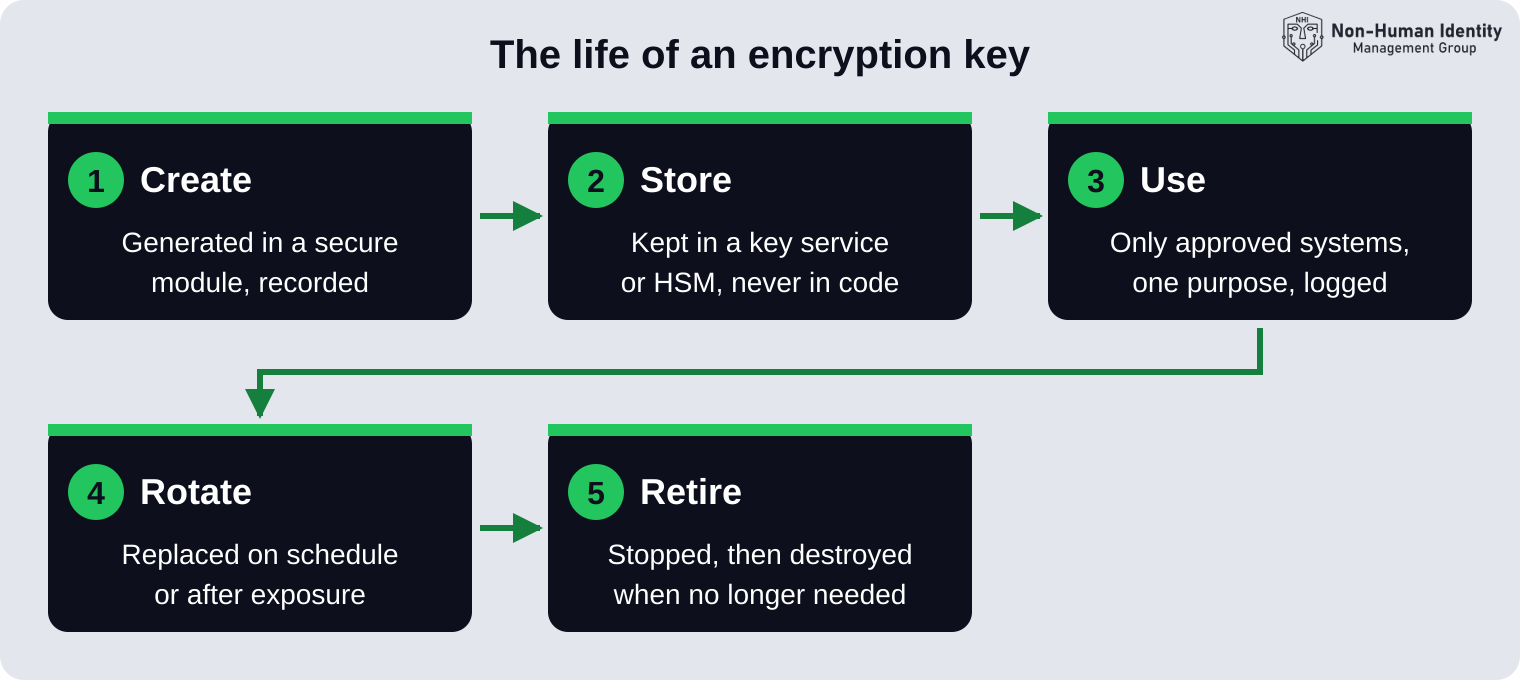
- Create. A key is generated inside a trusted cryptographic module, so it is truly random and never exposed while it is made. OWASP advises generating keys in a module that meets the US FIPS 140-2 or 140-3 standard, and prefers hardware modules over software ones.[2] FIPS 140-3 sets security requirements for cryptographic modules at four rising levels.[4] The new key is recorded in an inventory with its owner and purpose.
- Store. The key is kept in a key management service (a system that creates, stores and controls keys) or a hardware security module (HSM, a tamper-resistant device that keeps keys inside it). OWASP says keys should never be committed to source code, embedded in build files or stored in plain text.[2]
- Use. Only approved systems may ask for the key to be used, and every use is logged. Each key should have one job, such as encrypting data or signing, because limiting a key's use limits the damage if it is compromised.[2]
- Rotate. Every key has a cryptoperiod, the time span during which it is authorised for use.[3] When that period ends, or if the key may have been exposed, a new key replaces it. Shorter cryptoperiods limit how much data one key protects and how long a stolen key is useful.[2]
- Retire and destroy. An old key is first stopped from protecting new data, but may be kept, under tight control, to read older data. When it is no longer needed, every copy, including backups, is destroyed.[2]
Many systems use two layers of keys, called envelope encryption. A data encryption key locks the data, and a key encryption key, kept in the key service, locks the data key. To retire the outer key, the data keys are re-locked under a new one before the old one is destroyed, so the data itself does not all need re-encrypting.[2]
A worked example
Northgate Clinics is a fictional group of five health clinics. Its patient booking app encrypts records in a database. During a review, the new IT lead, Ravi, finds the encryption key written into the app's configuration file, which is also stored in the code repository that six contractors can read.
Ravi takes three steps. First, he moves key handling to the cloud provider's key management service, so the app asks the service to unlock data and never holds the main key in a file. Second, because the old key must be treated as exposed, he creates a new key, re-encrypts the records under it and, once he has checked that every record opens with the new key, destroys the old one. Third, he records the key in a simple inventory with an owner, purpose and a yearly rotation date, and turns on logging so every use of the key is recorded.
This does not make the app safe from every attack, but a copy of the code repository no longer hands over the means to read patient records.
Common mistakes
| Mistake | What to do instead |
|---|---|
| Writing keys into code, configuration files or container images. | Keep keys in a key service or HSM and let applications request their use. |
| Using one key for everything. | Give each key a single purpose, such as encrypting one data store or signing one kind of file. |
| Never replacing keys. | Set a cryptoperiod for each key and rotate on schedule, and straight away after any suspected exposure. |
| No backup of keys that protect stored data. | Back keys up securely, with the same protection as the live key, and test recovery. |
| Forgetting old copies when a key is retired. | Destroy every copy, including backups and archives, once retention needs are met. |
| No list of which keys exist. | Keep an inventory with each key's owner, purpose, location and rotation date. |
Key terms
- Cryptographic key
- A digital value used to encrypt or decrypt data, sign or check it, or authenticate systems.
- Key management
- The controlled life cycle of cryptographic keys, from generation and storage through use and rotation to retirement.
- Cryptoperiod
- The time span during which a specific key is authorised for use.
- Key rotation
- Replacing a key with a new one, on a schedule or after suspected exposure, and moving use over to the new key.
- Hardware security module (HSM)
- A tamper-resistant device or service that generates, stores and uses keys so they never leave it in plain text.
- Key management service (KMS)
- A system that creates, stores, rotates and controls the keys used to protect data and authenticate systems.
- Envelope encryption
- A two-layer pattern in which a data encryption key protects the data and a key encryption key protects the data key.
- Key destruction
- Permanently removing a key, and all its copies, when it is no longer needed.
First steps
Three things you can do this week:
- Search for keys in the wrong place. Ask developers to check code repositories and configuration files for keys. Any key found there should be treated as exposed and replaced.
- Start a key inventory. List the keys you know about, with an owner, purpose, where each is stored and when it was last replaced.
- Check your key service settings. If you use a cloud key management service, check who can use and manage each key, and whether automatic rotation is available and turned on.
Checklist
- No keys are stored in source code, configuration files or images.
- Important keys live in a key management service or HSM.
- Each key has one purpose, a named owner and a cryptoperiod.
- Keys are rotated on schedule and straight away after any suspected exposure.
- People who manage keys are separate from the systems that use them, where practical.
- Every use of an important key is logged and someone reviews unusual use.
- Keys that protect stored data are backed up securely and recovery has been tested.
- Retired keys are destroyed, including backups, once they are no longer needed.
Suggested learning pathway
- Start with the umbrella topic: Encryption for Beginners.
- For the difference between encoding, encryption and hashing, read Encoding, Encryption and Hashing for Beginners.
- For passwords, API keys and tokens, read Secrets Management for Beginners.
- For replacing credentials on a schedule, read Secrets Rotation for Beginners.
- For certificates and the keys behind them, read Machine Identities and Certificates for Beginners.
- For the full practitioner view, including HSMs, access control and compromise response, see the Cryptographic Key Management Guide.
Standards and references
- SP 800-57 Part 1 Rev. 5, Recommendation for Key Management: Part 1, General. National Institute of Standards and Technology (NIST), May 2020. https://csrc.nist.gov/pubs/sp/800/57/pt1/r5/final.
- Key Management Cheat Sheet. OWASP Cheat Sheet Series, OWASP Foundation. https://cheatsheetseries.owasp.org/cheatsheets/Key_Management_Cheat_Sheet.html, accessed 27 Nov 2026.
- Glossary: cryptoperiod. NIST Computer Security Resource Center. https://csrc.nist.gov/glossary/term/cryptoperiod, accessed 27 Nov 2026.
- FIPS 140-3, Security Requirements for Cryptographic Modules. National Institute of Standards and Technology (NIST), 22 March 2019. https://csrc.nist.gov/pubs/fips/140-3/final.
Related NHI Mgmt Group resources: Encryption Key Compromise Playbook · Backup Encryption Key Management · BYOK, HYOK and External Key Management Guide