An identity attack path is a chain of small permissions that leads from an ordinary account to powerful access.
This guide is for anyone who wants to understand how one stolen account can lead to much more. You do not need a technical background. It is written for defenders: it explains what to look for and fix, not how to attack.
In short
- Each link in the chain can look harmless, such as a group that can reset some passwords. Together, the links can reach admin rights.
- Software accounts, such as service accounts and automation roles, often sit in the middle of a path.
- Defenders draw accounts and permissions as a map, called a graph, to see routes that lists hide.
- Fix the spots where many routes meet first, and map again after big changes.
What you will learn
- Explain how small permissions can add up to big access.
- Spot the common kinds of link in an attack path.
- Check who can control your most powerful accounts.
- Ask for one path to be broken and the change recorded.
- Allowed actions (permissions)
- what an account may do, such as read a folder or reset a password.
- Most valuable systems (crown jewels)
- the accounts, systems and data that would do the most harm in the wrong hands.
- Meeting point (choke point)
- a place where several routes pass through, so one fix can close many.
What is an identity attack path?
Think of stepping stones across a river. No single stone gets you across. But a line of them, each a short step from the last, takes you all the way to the far bank.
Every account at work has permissions, things it is allowed to do. Some are about data, like reading a folder. Others give control over other accounts, like resetting a password or adding someone to a group.
Those control permissions are the stepping stones. If account A can reset account B's password, whoever holds A can become B. If B can change C, the chain goes on.
Not every account belongs to a person. Software also signs in, using a non-human identity, or NHI, such as a service account or an automation role. Paths often run through these, because they tend to have broad rights and little oversight.
Microsoft describes attack paths as routes an attacker could take from an entry point to critical assets.[1]
Where the comparison stops working: you can see stepping stones from the bank. In an IT system the links are spread across directories, cloud settings and group lists, so they often stay hidden until someone maps them.
Why does it matter?
Attackers often do not need to break anything. With one stolen account, they can follow whatever path already exists. Your job is to make sure there are as few as possible.
If you run a small business
What could happen: one phished staff account leads to full control, because old permissions were never cleaned up.
Check this: ask your IT provider who can reset your admin accounts' passwords.
If you are new to security work
What could happen: you review accounts one by one and miss a route that only shows when they are joined up.
Check this: for each account, ask "what can this control?", not just "what can this read?".
If you look after software accounts
What could happen: a service account in an admin group turns any leak of its password into admin access.
Check this: list service accounts in admin groups and give each a named owner.
If you manage a security team
What could happen: a long list of permission problems never gets fixed, because nobody knows where to start.
Check this: ask for the few meeting points that close the most routes, and fix those first.
What does it look like?
Here is a made-up path, written the way a defender might note it after a mapping session.
Example only. All values are made up.
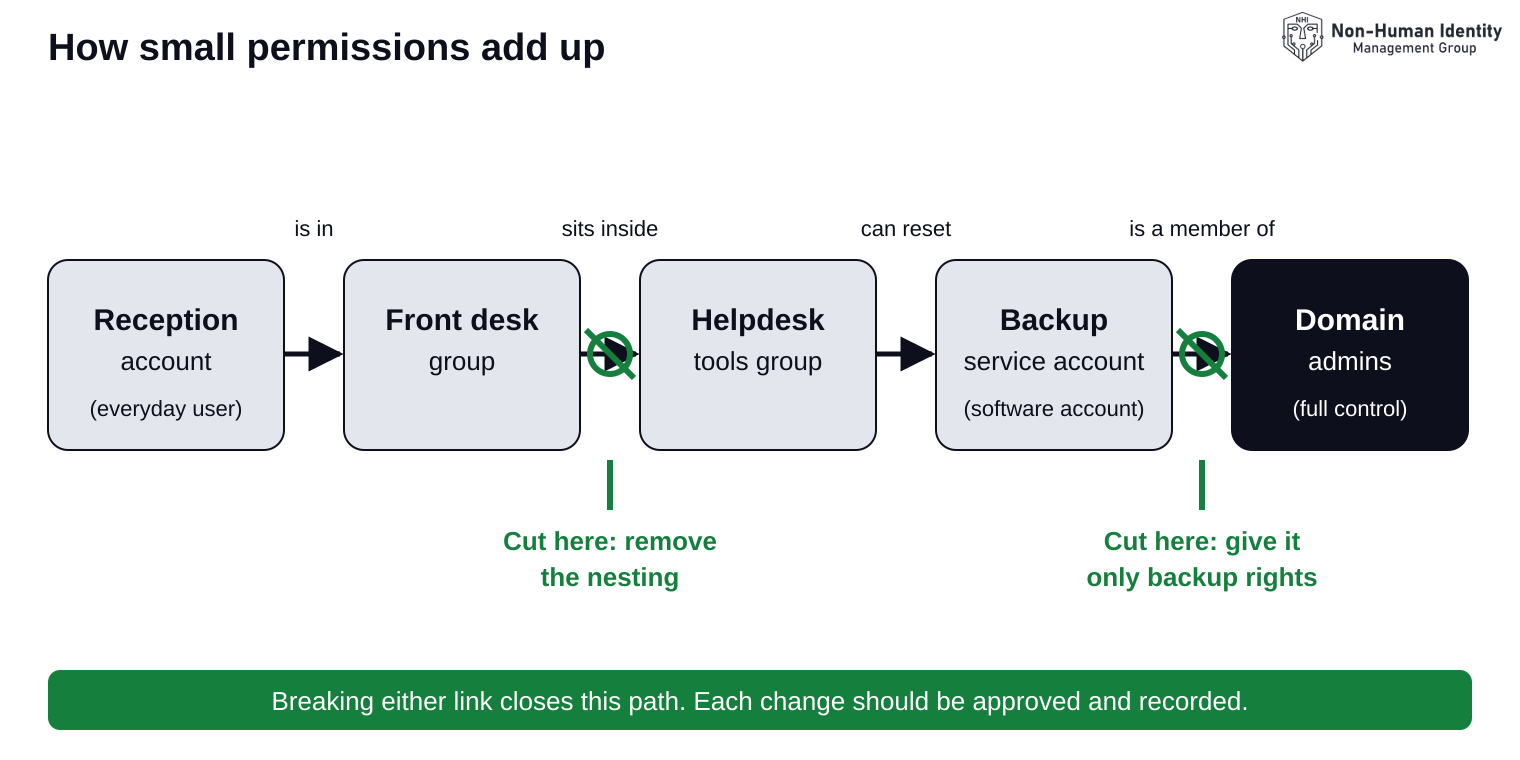
Start:  [email protected]                   (1)
  is a member of     group "Front-Desk-EXAMPLE"
  which sits inside  group "Helpdesk-Tools-EXAMPLE"  (2)
  which can reset    passwords in folder "IT-EXAMPLE" (3)
  which holds        svc-backup-EXAMPLE              (4)
  which is a member of  "Domain Admins"              (5)
Result: an everyday account can reach full control
- An ordinary account. In a real file, this line would name a real member of staff.
- A group placed inside another group, called nesting. Members of the inner group quietly gain the outer group's rights.
- A control permission: whoever can reset a password can become that account.
- A software account, used for backups.
- The top admin group, which controls the whole directory.
Why this is risky: nobody meant reception staff to reach admin rights, but each step was allowed.
The safer way: remove the nesting, and give the backup account only the backup rights it needs. Either change breaks this path.
How does it work?
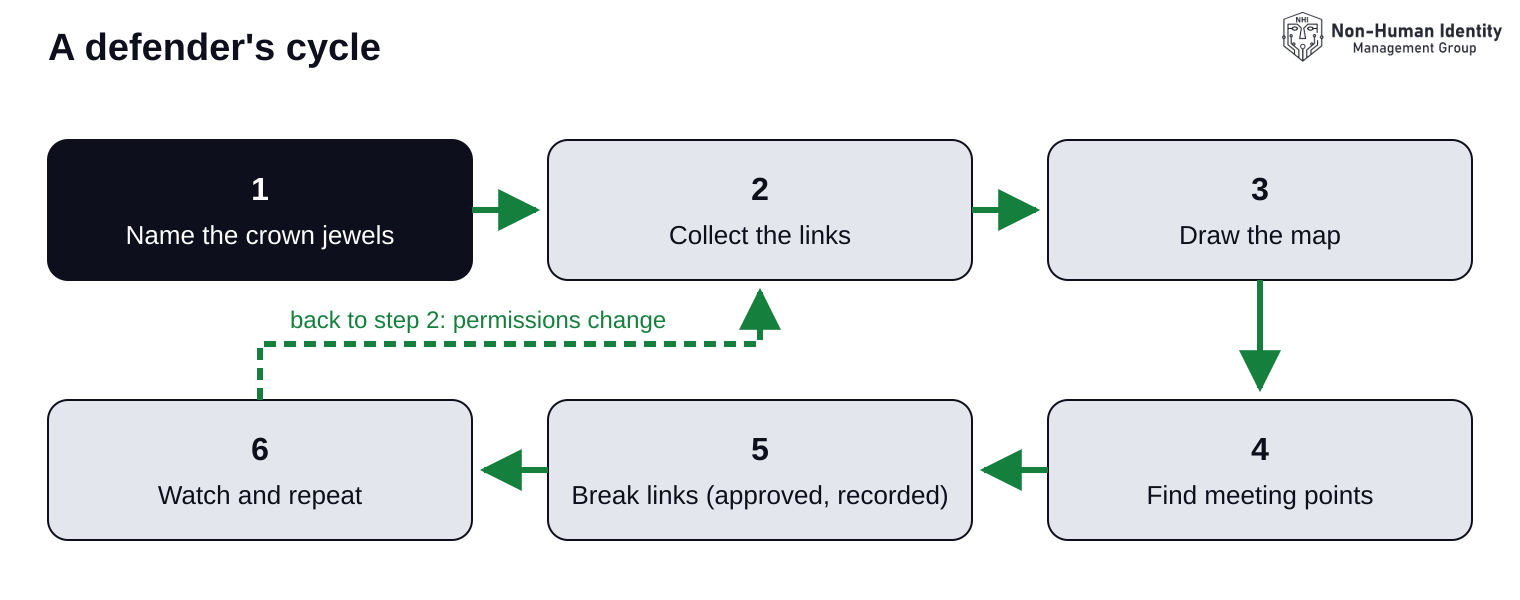
This is how defenders find and break attack paths. The steps are much the same whatever tool you use.
- Name your crown jewels. List the admin roles, identity systems and key data that would do the most harm in the wrong hands.
- Collect the links. Gather who is in which group, who can reset or change which accounts, and which software accounts hold which rights.
- Draw the map. Show accounts as dots and permissions as arrows. This map is called an identity graph. Tools can draw it, and a small team can start on a whiteboard. The open-source tool BloodHound, for example, uses graph theory to reveal hidden and often unintended relationships.[2]
- Find routes and meeting points. Look for routes from ordinary accounts to the crown jewels. Microsoft notes that securing the points where routes meet addresses several paths at once.[1]
- Break the links. Remove the permission that is not needed, as an approved and recorded change, with a short, time-limited way back if something important breaks.
- Watch and repeat. Alert on changes to admin groups, and map again after big changes.
Microsoft's advice for admin access asks organisations to stop lower levels from gaining control of higher ones.[3] An attack path is, in effect, a gap in that ladder.
A worked example
Felix Wojcik is the new IT security lead at a made-up group of four health clinics with 120 staff. He wants to know how far a phished reception account could go.
He does not test it by attacking. He reads the directory's own reports and draws the links on a whiteboard.
He finds a route with four links. Reception staff are in a "Front desk" group. Years ago, that group was placed inside a "Helpdesk tools" group so staff could unlock printers.
"Helpdesk tools" can reset passwords for every account in an IT folder. That folder holds the backup service account, which is a member of the top admin group.
Nobody meant reception to reach admin rights, but the path existed. Felix breaks it in two places, each as an approved and recorded change.
He removes the nesting and gives reception a narrow printer permission instead. He also takes the backup account out of the admin group, gives it only the backup rights it needs and names an owner for it.
He sets an alert for any change to the admin group and books another mapping session for next quarter.
This does not make the clinics safe from every threat. A phished account can still read that person's email and files, and the first map may have missed other paths. But the most direct route from an everyday account to full control is gone.
Myths and mistakes
| What people think | What is true |
|---|---|
| If no ordinary account is an admin, we are fine. | Accounts can reach admin rights indirectly, through groups, reset rights or roles that can change other roles. |
| Attack paths are only an old office network problem. | Cloud platforms, online apps and build pipelines have their own paths, often through software accounts. |
| Service accounts are low risk because nobody signs in as them. | They often hold broad rights and long-lasting passwords, which makes them useful links in a path. |
| We need an expensive tool before we can start. | Tools help at scale, but a small team can map its top admin groups and service accounts by hand. |
| Once we fix the paths, the job is done. | Every new group, role or account can open a new path, so mapping has to be repeated. |
What can I do this week?
- List your crown jewels. Write down your top admin groups and roles, and who is in each one, including through nested groups.
- Check the software accounts. Find service accounts and automation roles that sit in admin groups or can change permissions, and name an owner for each.
- Ask who can reset admin passwords, and keep that right with a small, separate group of trusted admins.
- Break one path. Pick the clearest route you found, remove one link, record the change and tell the owner of the account.
Checklist
- I can explain how small permissions can add up to big access.
- We know which groups, roles and accounts are our crown jewels.
- We can list every member of our top admin groups, including through nesting.
- Rights to reset or change admin accounts sit with a small, separate group.
- No service account is in a top admin group without a written reason and an owner.
- Changes to admin groups and roles send an alert.
- We map paths again at least every quarter and after big changes.
Common questions
Is an attack path the same as a vulnerability?
Not quite. A vulnerability is usually a flaw in software that needs a fix from the maker. An attack path is often made of permissions that work exactly as set up, just more widely than anyone meant. You fix it by changing your own settings.
Where should we look first?
Start with who can control your top admin groups and roles, directly or through other groups. Then look at service accounts that hold admin rights. These two places often hold the shortest routes from an everyday account to full control.
Is mapping attack paths the same as a penetration test?
No. A penetration test is an approved attempt to break in. Attack path mapping reads your own permission data to find routes, without attacking anything. The two can support each other: mapping finds likely routes, and a test can confirm whether they work in practice.
Do AI agents create attack paths?
They can. An AI agent that acts on its own is a kind of software account. If it is given broad tools or permissions, it becomes another link a path could run through. Give agents narrow access and a named owner, like any other account.
How often should we map again?
We suggest at least every quarter, and after big changes such as a merger, a new cloud account or a move to a new directory. Alerts on admin group changes help between mapping sessions, because a single new membership can open a new route.
Where next?
Ready for the detail? Read the practitioner guide: Identity Attack Paths Guide. It goes further into the kinds of link that build paths, how mapping tools model them and how to rank fixes.
Also useful:
- Privilege Escalation for Beginners
- Lateral Movement for Beginners
- Directory Services and Active Directory for Beginners
- BloodHound and Active Directory Attack Path Guide
- NHI Foundation Level Training
Related NHI Mgmt Group resources: Attack Path Analysis vs Attack Surface Management · Attack Path Management vs Vulnerability Management · Active Directory Tiering vs Red Forest
Key terms
- Identity attack path
- A chain of accounts and permissions that leads from an ordinary identity to powerful access.
- Choke point
- A place where several attack paths meet, so one fix can close several routes.
- Identity graph
- A map that joins up accounts, permissions and systems to show how access really flows.
- Nested group
- A group placed inside another group, so its members quietly gain the outer group's rights.
- Privilege escalation
- Gaining more access than an account was first given.
- Lateral movement
- Moving from a first foothold to other systems, often by reusing passwords or trust.
- Tier 0
- The identity systems and accounts that could control the whole environment if taken over.
- Least privilege
- Giving each account only the access it needs, for only as long as it needs it.
Sources and further reading
- Review attack paths. Microsoft Security Exposure Management documentation, Microsoft Learn. https://learn.microsoft.com/en-us/security-exposure-management/review-attack-paths, accessed 28 Nov 2026.
- BloodHound. SpecterOps, GitHub repository. https://github.com/SpecterOps/BloodHound, accessed 28 Nov 2026.
- Enterprise access model. Microsoft privileged access documentation, Microsoft Learn. https://learn.microsoft.com/en-us/security/privileged-access-workstations/privileged-access-access-model, accessed 28 Nov 2026.