Privilege escalation is when someone who already has limited access to a computer, application or cloud account finds a way to gain more powerful access than they were given, such as administrator rights.
This guide is for newcomers, students, career changers and managers who are not security specialists. It explains in plain English why attackers try to raise their access, the main routes they use, a worked example from a fictional company and practical steps to make escalation harder and easier to spot. It stays at concept level and covers Windows, Linux and cloud systems in general terms. It does not describe attack techniques in detail; deeper practitioner guides are linked at the end.
By the end of this guide you will be able to:
- Explain what privilege escalation is and why attackers need it.
- Describe the difference between vertical and horizontal escalation.
- Identify the common weaknesses that make escalation possible.
- Understand which everyday controls reduce the risk and how to watch for it.
Key takeaways
- Attackers rarely start at the top. They usually get in with an ordinary account and then try to raise their access to reach what they want.
- Escalation feeds on weaknesses you can fix. Unpatched software, loose settings, shared admin passwords and too many admin accounts are the usual routes.
- Least privilege shrinks the prize. If everyday accounts hold no admin rights, a stolen account is worth less to an attacker.
- Watch the moment access changes. New admin group members and unusual elevation are some of the clearest warning signs you can monitor.
- Software accounts count too. Service accounts and other non-human identities with broad rights are attractive escalation targets.
What it is, in plain English
Every account has a level of access, called its privileges. A standard user account can do everyday work but cannot change how the system works. An administrator on Windows, or the root account on Linux and other Unix-like systems, can change almost anything: install software, read any file, create accounts and switch off security tools.
Privilege escalation is the step where an attacker, or a malicious insider, moves from a low level of access to a higher one they should not have. MITRE ATT&CK, a public catalogue of attacker behaviour, lists it as its own tactic, Privilege Escalation (TA0004). It describes adversaries entering with unprivileged access and then needing higher permissions, often by taking advantage of system weaknesses, misconfigurations and vulnerabilities.[1] Examples of the higher access it lists include SYSTEM or root level, local administrator and user accounts with admin-like access.[1]
There are two kinds:
- Vertical privilege escalation: moving up, for example from a standard user to administrator.
- Horizontal privilege escalation: moving sideways into another user's access at a similar level, for example reading a colleague's records in an application because the app does not check whose records they are.
A helpful comparison is a hotel. A guest's key card opens one room. Vertical escalation is finding the manager's master key behind the reception desk. Horizontal escalation is discovering that your card also opens the room next door. Where the analogy breaks down: in a computer, the "master key" is often not a physical object but a forgotten setting, an old software flaw or a password saved in the wrong place, and the attacker may find it in seconds with automated searching.
Why it matters to you
- If you run a small business: if staff work every day with admin rights on their laptops, an attacker who tricks one person may not need to escalate at all. Removing everyday admin rights is one of the cheapest protections available.
- If you are new to a security job: spotting escalation, such as a new member of an admin group, is a routine task in security monitoring, and understanding it helps you read incident reports.
- If you are a manager: escalation is often the step that turns a small incident on one laptop into a company-wide one, so how many admin accounts you have, and how they are protected, is a business risk question.
The US Cybersecurity and Infrastructure Security Agency (CISA) and the National Security Agency (NSA) published a joint advisory listing the ten most common misconfigurations their red and blue teams find. Poor separation of user and administrator privileges is second on the list, and weak patch management, poor credential hygiene and overly permissive access to network shares also appear.[2] The advisory describes "privilege creep", where accounts collect unnecessary access over time, and warns that using domain administrator accounts for routine tasks increases their exposure to theft. In one assessment it reports, the team compromised a domain in under a business day after phishing a user whose account had administrative permissions.[2]
How it works, step by step
This is the pattern defenders see, described at a high level so you can recognise and interrupt it.
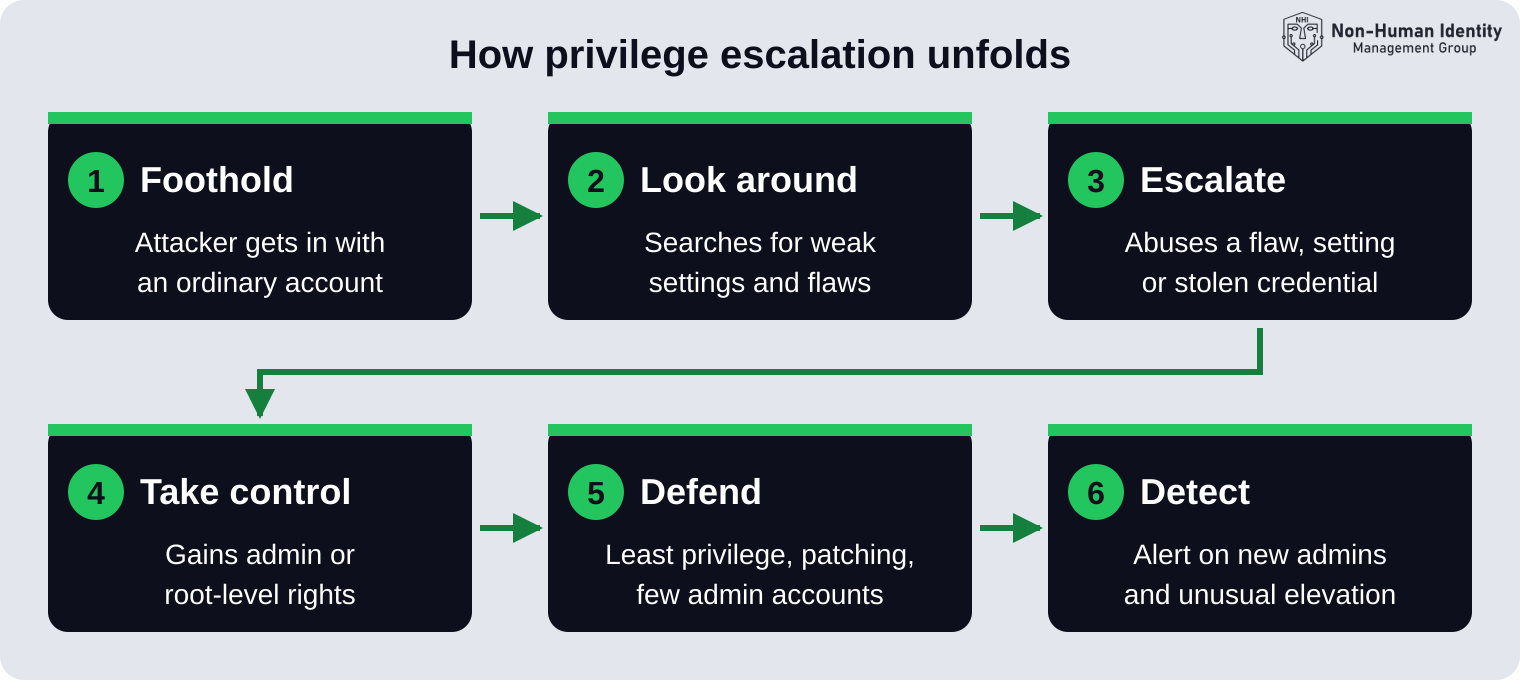
- Foothold. The attacker gains an ordinary account, for example through a phishing email, a reused password or malware on a laptop. ATT&CK tracks the misuse of real, stolen accounts as Valid Accounts (T1078), which can be used for initial access and for escalation.
- Look around. Using that account, the attacker looks for weaknesses: missing updates, files or services anyone can change, passwords saved in scripts, or groups with more rights than they need.
- Escalate. The attacker uses one of those weaknesses. Common routes include exploiting an unpatched software flaw (ATT&CK T1068, Exploitation for Privilege Escalation), abusing built-in elevation features that are loosely set up (T1548, Abuse Elevation Control Mechanism), or reusing an administrator's password or credential found on the machine.
- Take control. With admin or root rights, the attacker may create new accounts, switch off security tools, steal more credentials and move to other systems.
- Defend. Defenders reduce the routes in advance: least privilege, prompt patching, unique local admin passwords and few, well-protected admin accounts.
- Detect. Defenders watch for the signs: new members of admin groups, unusual use of elevation, and admin activity from accounts that do not normally have it.
The table below links common routes to the everyday controls that make them harder.
| Common route | Plain-English example | Control that reduces it |
|---|---|---|
| Unpatched software flaw | An old bug in the operating system lets a normal user run code as administrator | Prompt patching, starting with known exploited vulnerabilities |
| Everyday admin rights | Staff browse and read email while logged in as local administrator | Standard user accounts for daily work; separate admin accounts |
| Shared local admin password | Every laptop has the same local admin password, so one stolen copy opens them all | A unique, regularly rotated password per device |
| Loose permissions | A program that runs with high rights can be changed by any user | Tight file, service and share permissions; regular reviews |
| Over-privileged service accounts | An application account with domain admin rights has its password in a script | Least privilege for software accounts; secrets kept in a vault |
| Broken checks in an application | Changing a number in a web address shows another customer's order | Server-side access checks on every request |
Everyday controls on different platforms
Operating systems and platforms name these controls differently. Some examples, listed alphabetically by platform:
- Cloud platforms: roles and permission policies decide what each identity can do. Permissions that let an identity change its own roles or create new credentials can be used to escalate, so they deserve the closest review. See How to Find IAM Privilege Escalation Paths in AWS for one platform in depth.
- Linux and Unix: sudo lets an authorised user run a command as root or another account, according to a security policy (by default the sudoers file), and can log successful and failed attempts.[5] Keeping sudo rules narrow, rather than allowing "run anything", reduces escalation routes.
- Windows: User Account Control (UAC) lets users sign in with a standard user token and asks for consent before an action runs with administrator privileges; Microsoft says it limits the access malicious code has to run with administrator privileges.[3] Windows LAPS automatically manages and rotates a unique local administrator password per device, which Microsoft says helps protect against pass-the-hash and lateral-traversal attacks.[4]
Useful distinctions
- Escalation is not the same as lateral movement. Escalation is gaining higher rights; lateral movement is moving to other systems. Attackers often alternate between the two. See Lateral Movement vs Privilege Escalation.
- A consent prompt is not a security boundary on its own. If a user is already a local administrator, they may simply click "yes". Removing everyday admin rights matters more than the prompt.
- Non-human identities are part of the picture. A service account is an account used by software rather than a person, and is one of the main types of non-human identity.[7] If it holds broad rights and its password sits in a script, anyone who reads the script can use those rights. See Non-Human Identities for Beginners.
- Least privilege is the principle; escalation is the attack. NIST lists least privilege as control AC-6 in its SP 800-53 security control catalogue.[8] Applying it well leaves attackers fewer rights to steal and fewer routes upward.
A worked example
Harbour Freight Services is a fictional logistics firm with 120 staff and a small IT team led by Amira.
A warehouse supervisor, Dan, receives a convincing email and enters his password on a fake sign-in page. An attacker now has Dan's ordinary account. Dan is not an administrator, but the attacker signs in to a shared office computer with his details and starts looking around.
- The weakness: an old maintenance script on a shared drive contains the password of a service account used for backups. That account is a member of the server administrators group, far more than backups need.
- The escalation: the attacker uses the service account's password to sign in with administrator rights on a file server, then adds a new account to the local Administrators group.
- The detection: Amira's team had set an alert for Windows event 4732, which records a member being added to a security-enabled local group; Microsoft suggests monitoring it for high-value groups such as Administrators.[6] The alert fires within minutes.
- The response: the team disables the new account and Dan's account, changes the service account's password, ends active sessions and starts checking what the attacker touched.
Afterwards, Amira removes the service account from the administrators group and gives it only the backup rights it needs, moves its password into the company's password vault, deletes the old script and turns on unique local admin passwords for every device. The alert did not stop the attacker getting in, and the team still has to investigate what was accessed, but it caught the escalation early and showed exactly which weaknesses to fix.
Myths and misunderstandings
| What people think | What is true |
|---|---|
| Attackers only care about admin accounts, so ordinary accounts do not matter. | Most attacks start with an ordinary account and escalate from there.[1] Protecting every account matters. |
| Privilege escalation always needs a clever software exploit. | Often it does not. Misconfigurations, too many admin accounts and passwords left in files are frequent routes.[2] |
| A consent prompt means users cannot become admin by accident. | If a user is already a local admin, approving the prompt is one click. Standard accounts for daily work are the stronger control. |
| Escalation is only a Windows problem. | It affects Linux, cloud platforms and web applications too; the routes and names differ. |
| Once we have patched, we are safe. | Patching closes software flaws, but settings, credentials and excessive rights also need regular review. |
Key terms
- Privilege escalation
- Gaining higher permissions than originally held, for example from a standard user to local administrator, by abusing vulnerabilities or misconfigurations.
- Vertical privilege escalation
- Moving upward into a more powerful role, such as from standard user to administrator.
- Horizontal privilege escalation
- Moving without permission from one user's access to another user's access at a similar level.
- Least privilege
- The principle that each user, process and system, human or non-human, has only the access it needs, for only as long as needed.
- Standard user account
- A limited account for everyday work that cannot make broad system changes without elevated approval.
- Root account
- The highest privilege account on Unix and Linux systems, able to access all files, commands and resources.
- Sudo
- A Linux and Unix command that lets an authorised user run a specific command with elevated privileges, usually as root.
- Service account
- An account used by applications, automated tools or services rather than a person; a main category of non-human identity.
- Misconfiguration
- A setting that leaves a resource less protected than intended, such as overly broad permissions.
- Lateral movement
- Techniques an attacker uses to move from a first foothold to other systems, often reusing stolen credentials.
Common questions
What is privilege escalation in simple terms?
It is gaining more access than you were given, such as an ordinary user becoming an administrator. Attackers do it to reach data and systems their first account could not.
What is the difference between vertical and horizontal privilege escalation?
Vertical means moving up to a more powerful role. Horizontal means moving sideways into another user's access at the same level.
How do attackers usually escalate privileges?
By abusing system weaknesses, misconfigurations and vulnerabilities, according to MITRE ATT&CK.[1] In practice that often means unpatched software, loose permissions or administrator credentials left where an ordinary user can find them.
What is the single most useful defence for a small organisation?
We suggest starting by removing everyday admin rights, so staff work as standard users and use a separate admin account only when needed. Pair it with prompt patching.
How can we tell if someone has escalated privileges?
Watch for new members of admin groups, admin activity from accounts that do not normally have it and unusual use of elevation tools. On Windows, event 4732 records a member added to a security-enabled local group.[6]
Can privilege escalation happen in the cloud?
Yes. In cloud platforms, permissions that let an identity change its own roles or create new credentials can be used to gain more access, so they need careful review.
First steps
Three things you can do this week:
- Count your admins. List every account in the Administrators, Domain Admins or root-equivalent groups on your main systems, including service accounts, and remove any that do not need to be there.
- Remove everyday admin rights. Pick one team and move them to standard user accounts for daily work, with a separate admin account for the few people who need it. If something breaks, any temporary return of admin rights should be approved, recorded and given an end date.
- Turn on one alert. Set up a notification when anyone is added to a top admin group, and agree who checks it.
Checklist
- Staff do daily work with standard user accounts, not admin accounts.
- Admins use a separate account for admin tasks.
- We know every member of our top admin groups, and the list is short.
- Each device has a unique local administrator password that is rotated.
- Security updates are applied promptly, starting with known exploited flaws.
- Service accounts have only the rights they need, and their passwords are not stored in scripts.
- Sudo or equivalent rules allow specific commands, not "run anything".
- We are alerted when someone joins a top admin group.
- We review admin rights at least every quarter.
Simple measures that show progress: the number of accounts with admin rights, the share of staff working as standard users, the time to apply security updates, and how quickly admin group changes are reviewed.
Check your understanding
1. What is the difference between vertical and horizontal privilege escalation?
Answer: vertical means gaining a more powerful role, such as administrator; horizontal means reaching another user's access at the same level.
2. Why does removing everyday admin rights help?
Answer: if an attacker steals an everyday account, they get no admin rights straight away and must find another route upward, which takes time and can be detected.
3. Why are service accounts a common escalation target?
Answer: they often hold broad rights, and their passwords may be stored in scripts or files that ordinary users can read.
4. Name one sign that privilege escalation may have happened.
Answer: a new member added to an admin group, or admin activity from an account that does not normally have it.
Suggested learning pathway
- Start with the principle that limits escalation in Least Privilege for Beginners.
- Learn how admin access is managed in Privileged Access Management for Beginners.
- See how attackers chain access in Identity Attack Paths for Beginners.
- Understand why updates matter in Patch Management for Beginners.
- For Windows in depth, see the Windows Privilege Escalation Techniques Guide.
- For Linux in depth, see the Linux Privilege Escalation Techniques Guide.
- For the attacker tactic as catalogued by MITRE, see ATT&CK Privilege Escalation Tactic.
Standards and references
- Privilege Escalation, TA0004. MITRE ATT&CK. https://attack.mitre.org/tactics/TA0004/, accessed 27 Nov 2026.
- NSA and CISA Red and Blue Teams Share Top Ten Cybersecurity Misconfigurations, advisory AA23-278A. Cybersecurity and Infrastructure Security Agency (CISA) and National Security Agency (NSA). https://www.cisa.gov/news-events/cybersecurity-advisories/aa23-278a, accessed 27 Nov 2026.
- User Account Control overview. Microsoft Learn, Microsoft. https://learn.microsoft.com/en-us/windows/security/application-security/application-control/user-account-control/, accessed 27 Nov 2026.
- What is Windows LAPS? Microsoft Learn, Microsoft. https://learn.microsoft.com/en-us/windows-server/identity/laps/laps-overview, accessed 27 Nov 2026.
- sudo manual page. Sudo project. https://www.sudo.ws/docs/man/sudo.man/, accessed 27 Nov 2026.
- 4732(S): A member was added to a security-enabled local group. Microsoft Learn, Microsoft. https://learn.microsoft.com/en-us/previous-versions/windows/it-pro/windows-10/security/threat-protection/auditing/event-4732, accessed 27 Nov 2026.
- Non-Human Identities for Beginners. NHI Mgmt Group. https://nhimg.org/what-are-non-human-identities-beginners-guide, accessed 27 Nov 2026.
- SP 800-53 Rev. 5, Security and Privacy Controls for Information Systems and Organizations. National Institute of Standards and Technology (NIST). https://csrc.nist.gov/pubs/sp/800/53/r5/upd1/final.
Related NHI Mgmt Group resources: Cloud Privilege Escalation Incident Playbook · Least Privilege Techniques Guide · Service Accounts for Beginners