Lateral movement is how an attacker spreads from the first computer they break into to other computers nearby.
This guide is for anyone who has heard that "one infected laptop took down the whole office" and wondered how. You do not need to run a network to be affected: the password you use at work, and where you type it, can decide how far an intruder gets.
In short
- Breaking into one computer is often only the start. Attackers then look around and try to reach more.
- They mostly reuse passwords and logins they find, so their activity can look like normal staff work.
- Shared passwords, accounts with too much access and open internal networks make spreading easier.
- Separate passwords, limited access, walls inside the network and watching the logs make it harder.
What you will learn
- Explain lateral movement in one sentence.
- Spot the habits that help an attacker spread.
- Check how far one stolen login could reach in your organisation.
- Ask your IT team or supplier the right questions about it.
- First way in (initial access)
- the first computer or account an attacker manages to get into.
- Spreading inside (lateral movement)
- using that first way in to reach other computers and accounts.
- Login details (credentials)
- the usernames, passwords and keys that prove who you are to a system.
What is lateral movement?
Think of a thief who slips into one office in a large building. In a desk drawer they find a ring of keys, and they start trying them on every other door.
Lateral movement works the same way on a computer network. A network is the set of computers in an organisation that can talk to each other. Once an attacker controls one computer, they look for credentials (login details) saved on it. Then they use those details to log in to the next machine, and the next.[2]
"Lateral" just means sideways. The attacker is not breaking in again from outside. They move across from the inside. Often they head for the systems that hold money, customer records or the keys to everything else.[1]
Where the comparison stops working: a thief trying doors is easy to see on a camera. An attacker using a real staff login can look like that member of staff doing their normal job.
Why does it matter?
Spreading is often what turns a small problem into a big one. One clicked link might affect one laptop. If the attacker can spread, they may reach the files, the backups and the accounts that run the whole network.[1]
If you work in an office
What could happen: you use the same password for email and the shared drive, so one stolen password opens both.
Check this: use a different password for each work system, and use a password manager if your employer provides one.
Next: Phishing for Beginners
If you run a small business
What could happen: every computer shares one admin password, so an attacker who finds it on one PC can open them all.
Check this: ask your IT supplier whether each computer has its own admin password.
If you are new to IT work
What could happen: you log in to an ordinary laptop with a powerful admin account, and its login details stay behind on that laptop.
Check this: use a normal account for everyday work and the admin account only where it is needed.
If you manage a team
What could happen: nobody notices an account logging in to dozens of machines at 3am, because nobody is looking.
Check this: ask who reviews unusual logins, and how quickly they would act.
What does it look like?
Defenders often spot lateral movement in the login records. These are lists of who logged in where, and when. Here is a made-up extract for a small firm.
Example only. All values are made up.
time   account          from         to
09:12  b.lee            LAPTOP-07    MAIL-SERVER       normal work
02:41  b.lee            LAPTOP-07    FILES-01          (1)
02:44  b.lee            LAPTOP-07    FILES-02          (1)
02:47  admin-EXAMPLE    FILES-02     BACKUP-01         (2)
02:49  admin-EXAMPLE    FILES-02     PC-0000 to PC-0040 (3)
- A staff login is used at night. It reaches file servers that person does not use.
- A stronger account now appears. It starts from a file server, not a person's laptop.
- One account touches forty computers in two minutes. That is far faster than a person can work.
Why this is risky: each line on its own could pass as normal. Together they show someone hopping from machine to machine. They pick up stronger logins on the way.
The safer way: a staff account can reach only the systems that person needs. The admin account cannot be used from file servers. An alert fires when one account touches many machines at once.
How does it work?
Every attack is different, but the pattern often looks like this.[2]
- The first way in. The attacker gets into one computer or account, often through a phishing email or a stolen password.
- Looking around. They explore the network to see which other computers exist and what they hold.
- Collecting logins. They look for passwords and login details saved on that first computer or found in files.
- The next hop. They use those details, often with the normal tools IT staff use, to log in to another machine.[2]
- Repeat and climb. They repeat steps 2 to 4 until they reach an account with wide control or the data they came for.
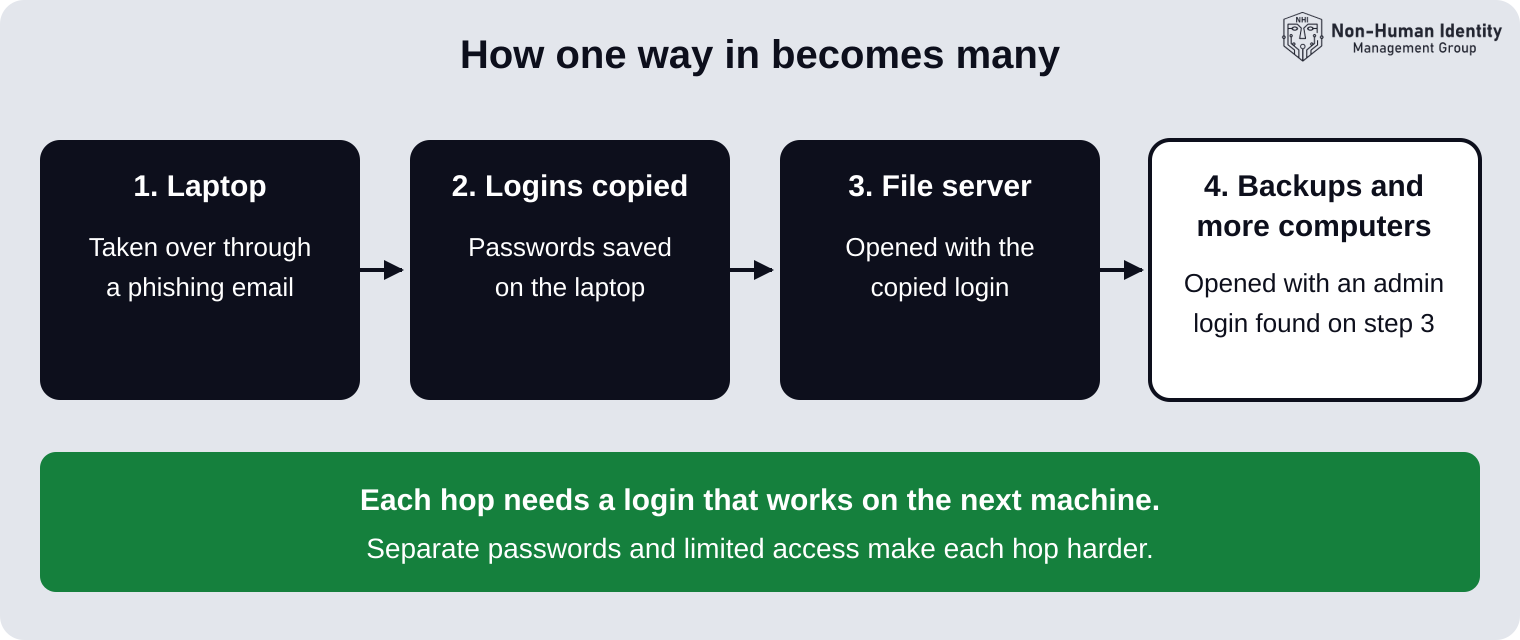
Why does reusing logins work so well? Many organisations give the local admin account on every computer the same password. Microsoft says attackers can use this shared password to move across a network. Its built-in Windows feature, called Windows LAPS, gives each computer its own admin password and changes it regularly.[3]
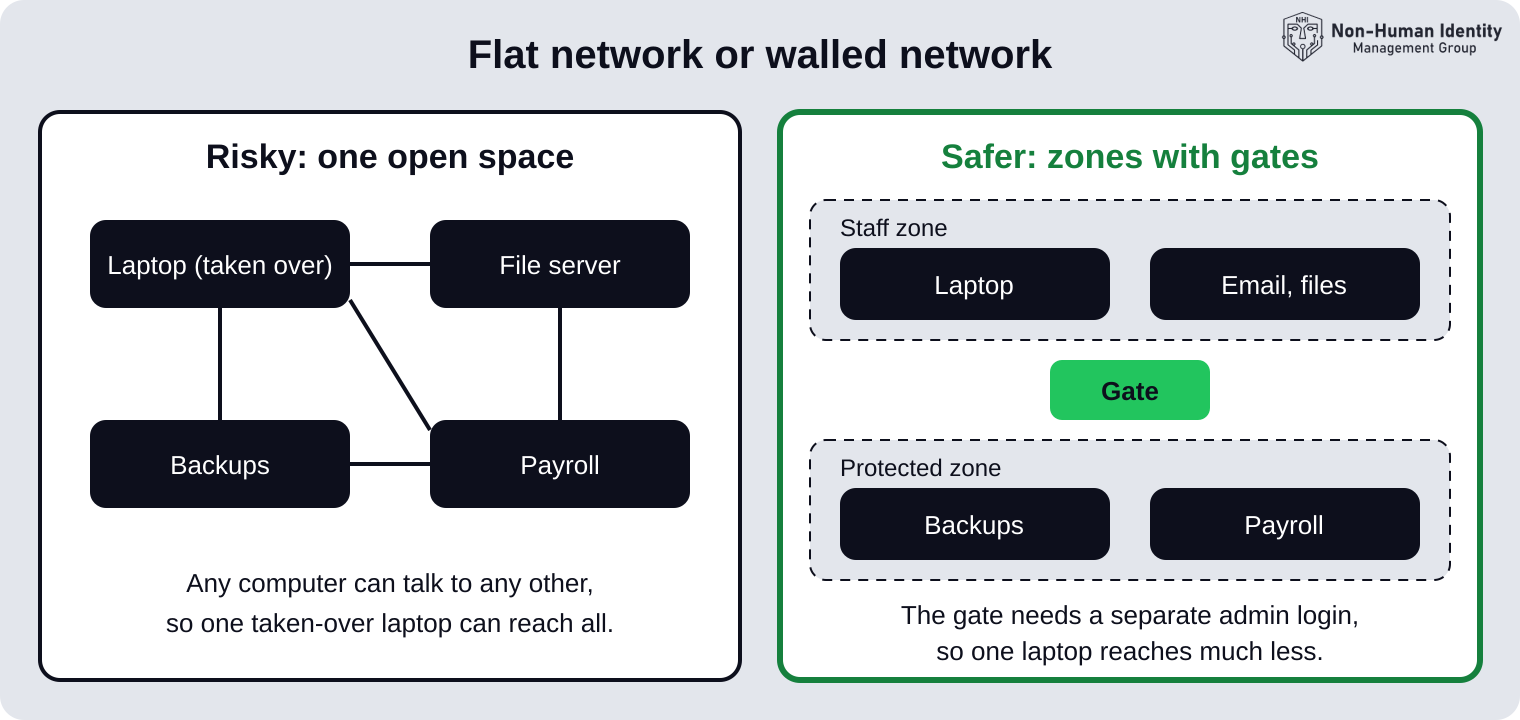
The other big help to an attacker is a flat network. That is a network with no walls inside, where any computer can talk to any other. The UK's National Cyber Security Centre suggests putting important systems in separate parts of the network, each with its own controls. It also says no single account should be able to reach every device.[1]
A worked example
Pinecrest Insurance is a fictional firm with forty staff. Brandon Lee works in claims. One Monday he opens an email that looks like a parcel notice and types his password into the page it links to.
On Tuesday night, someone uses Brandon's login from his own laptop. They copy a spreadsheet called "IT passwords" from a shared folder. One line holds the admin password used on every office computer.
With that password, the intruder logs in to the file server, then to the backup server. In the morning, staff find that dozens of files will not open.
Aisha Grant runs IT for Pinecrest. She remembers the ring of keys. The intruder did not break forty locks. They found one key that fitted every door.
Aisha unplugs the backup server from the network first, so the damage does not spread further. She resets Brandon's password and the shared admin password. Then she calls the firm's IT security supplier for help with the clean-up and checks which backups are still safe.
Afterwards, Aisha makes three changes. Each computer now gets its own admin password, changed automatically by a tool. The backups sit behind their own gate with a separate login. And an alert now fires when one account logs in to many computers in a short time.
She also deletes the "IT passwords" spreadsheet and moves those details into a proper password store. The next time a login is stolen, it should open much less.
Myths and mistakes
| What people think | What is true |
|---|---|
| Once the attacker is in, it is too late to do anything. | Each hop is a chance to slow them down or spot them. Limits inside the network buy time.[1] |
| Attackers need special hacking tools to spread. | They often use real logins and the normal tools IT staff use, which is why it can look like routine work.[2] |
| Our firewall keeps them out, so we are fine. | A firewall at the edge does little once someone is already inside. Walls inside the network matter too. |
| Using the same admin password everywhere is easier to manage. | It is easier for attackers as well. One copy can open every machine.[3] |
| Only big companies have to worry about this. | Small networks are often flat, so an attacker can reach everything in a few steps. |
What can I do this week?
- Change any work password you also use somewhere else.
- Search shared folders for files with names like "passwords" and move the contents into a password store.
- Ask your IT team or supplier whether each computer has its own admin password.
- Ask whether backups can be reached from ordinary staff computers.
- Find out who would notice one account logging in to many machines at night.
Checklist
- Every person has a different password for each work system.
- Logins for important systems also need a second check, such as a code on a phone.
- Each computer has its own local admin password, changed regularly.
- Admin accounts are used only for admin work, not for email or browsing.
- Staff accounts reach only the systems that person needs.
- Backups and payroll sit in a separate part of the network with their own login.
- Someone reviews unusual logins and knows what to do next.
- No passwords are kept in spreadsheets, documents or chat messages.
Common questions
Is lateral movement the same as hacking in?
No, it comes after. Getting in is the first step, through a phishing email or a stolen password. Lateral movement is what the attacker does next: using that first computer to reach others. Defences for each step differ, so it helps to plan for both.
How is it different from privilege escalation?
They are partners. Privilege escalation means gaining more power on a system, such as becoming an admin. Lateral movement means reaching more systems. Attackers often do both, using a stronger login to hop further. See Privilege Escalation for Beginners.
Does antivirus catch lateral movement?
Sometimes, but not reliably. Attackers often use real logins and built-in tools, which do not look like a virus. Watching who logs in where, and limiting what each account can reach, adds protection that antivirus alone may not give. See Antivirus for Beginners.
Can it happen in the cloud too?
Yes. In cloud services, attackers may hop between apps and accounts using stolen keys or tokens rather than between office computers. The same ideas help: give each account only the access it needs, and watch for logins that look out of place.
What should I do if I think it is happening?
Report it to your IT or security contact straight away, with what you saw and when. Do not try to investigate on your own. Quick reporting gives the team a chance to cut off the attacker before they reach more machines.
Where next?
Ready for the detail? Read the practitioner guide: Lateral Movement Guide. It goes further into the techniques attackers use, how to harden remote admin tools and how to detect and measure movement in your logs.
Also useful:
- Network Segmentation for Beginners
- Privilege Escalation for Beginners
- Least Privilege for Beginners
- Ransomware for Beginners
Related NHI Mgmt Group resources: Network Segmentation Guide · Zero Trust for Beginners · Incident Response for Beginners
Key terms
- Lateral movement
- Moving from a first taken-over computer or account to other systems in the same network.
- Initial access
- The first way an attacker gets into an organisation, such as a phishing email or a stolen password.
- Credential reuse
- Using the same password or key on more than one system, so one stolen copy opens several doors.
- Privilege escalation
- Gaining more power on a system than you were given, such as moving from a normal user to an admin.
- Network segmentation
- Splitting a network into zones with controlled traffic between them, so trouble in one zone is less likely to reach the others.
- Least privilege
- Giving each person or program only the access it needs, and no more.
- Dwell time
- How long an attacker stays inside before they are found or removed.
Sources and further reading
- Preventing lateral movement. National Cyber Security Centre (UK), published 8 Feb 2018, reviewed 10 Mar 2021. https://www.ncsc.gov.uk/guidance/preventing-lateral-movement, accessed 28 Nov 2026.
- Lateral Movement, tactic TA0008. MITRE ATT&CK, last modified 11 Aug 2025. https://attack.mitre.org/tactics/TA0008/, accessed 28 Nov 2026.
- What is Windows LAPS? Microsoft Learn, Microsoft, last updated 16 Sep 2026. https://learn.microsoft.com/en-us/windows-server/identity/laps/laps-overview, accessed 28 Nov 2026.