Identity governance means keeping track of who has access to what, who approved it, and when it should end.
This guide is for anyone who has heard the term at work and wants to know what it means and how it differs from IAM. You do not need to be in IT to be part of it: if you manage people or own a system, you will be asked to approve and review access.
In short
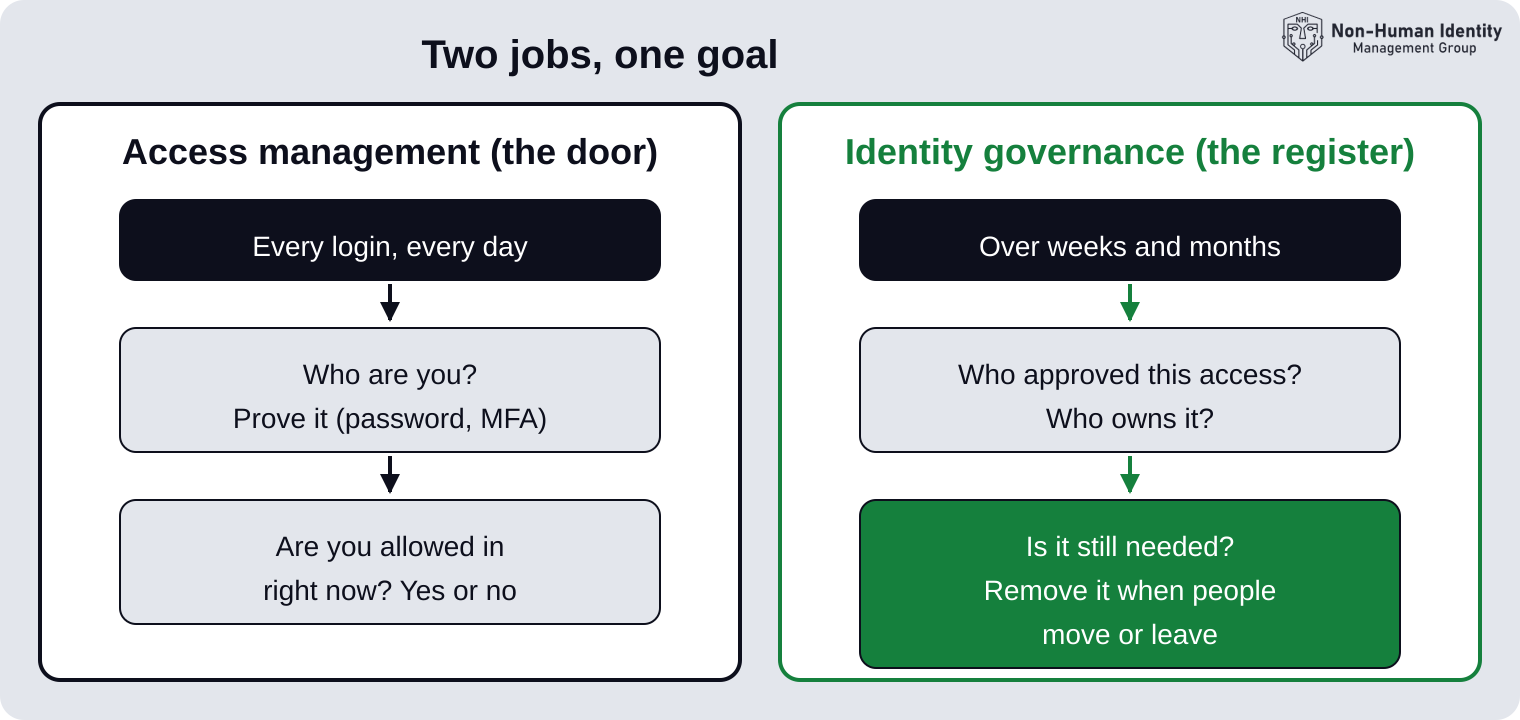
- Access management checks each login. Identity governance checks, over time, whether that access should exist at all.
- It covers three moments: when people join, when they change jobs and when they leave.
- Every piece of access should have a reason, an approver and an owner who reviews it.
- Access that is no longer needed is a risk, so regular reviews remove it.
What you will learn
- Explain identity governance in one sentence.
- Explain how it differs from access management and IAM.
- Spot access that should have been removed.
- Check what you are signing off when you approve or review access.
- Who can get in (IAM)
- identity and access management, the tools and rules that control who can use which systems.
- Keeping the record straight (identity governance)
- the approvals, owners and reviews that keep access correct over time.
- Checking access is still needed (access review)
- a regular check where a manager or owner confirms or removes access.
What is identity governance?
Think of a sports club and its membership register. The register shows who is a member, who signed them up and which facilities they can use. Each year, the club checks it and removes people who have left.
Identity governance works the same way for an organisation's systems. Staff, contractors and even software get access to email, files and business apps. Identity governance keeps the record of that access. It asks who said yes to each piece of access and who owns it. It also asks if the access is still needed, and if it was removed on time.
It is part of identity and access management, or IAM. IAM is the wider job of controlling who can use which systems. Part of IAM is access management: checking a login and letting a person in. Identity governance is the other half. Over weeks and months, it decides if that person should have the access at all.
Microsoft puts it as a few simple questions. Who should have access to what? What are they doing with it? Can auditors check that the controls work?[1]
Where the comparison stops working: a club register changes slowly. In a business, people join, move and leave every week, and one person may hold access to dozens of systems.
Why does it matter?
Access tends to pile up. People change teams and keep their old access, and leavers' accounts get missed. Microsoft notes that too much access can lead to security problems and to audit findings.[2]
If you manage a team
What could happen: you approve a review without reading it, and a leaver keeps access to customer files.
Check this: look at each name and each item. Remove anything you cannot explain.
If you work in HR
What could happen: IT is told about a leaver weeks late, so their account stays open.
Check this: agree how and when IT hears about starters, movers and leavers.
If you are new to IT or security
What could happen: you give access because someone asked, with no record of who approved it.
Check this: log every grant with the approver, the reason and an end date if it is temporary.
If you own a business system
What could happen: nobody knows who should have access, so everyone keeps it.
Check this: keep a list of who has access to your system and why.
What does it look like?
Here is a made-up page from an access review. A manager is asked to confirm whether each person still needs their access.
Example only. All values are made up.
Access review: Payroll app (EXAMPLE)   Owner: finance manager
Person            Access         Approved by   Status
[email protected]  Edit pay       FAKE-0001     Current staff
[email protected]  Edit pay       (none)        Moved to sales   (1)
[email protected]  View reports   FAKE-0002     Left in March    (2)
svc-export          Read all       (none)        No owner         (3)
- This person moved team but kept the right to change pay, and nobody recorded who approved it.
- In a real file, this line would contain a leaver's account that still works.
- A software account, used by a program and not a person. It can read everything, and nobody looks after it.
Why this is risky: three of the four lines give access that nobody can explain. A leaver's account can be misused. A forgotten software account can be taken over without anyone noticing.
The safer way: the manager removes the mover's and leaver's access, and names an owner for the software account. Next time, leavers are removed on their last day, and every grant records who approved it.
How does it work?
Identity governance follows access through its whole life. These are the usual steps.
- Joining. A new starter gets the access their job needs, often based on a set role for that job.
- Asking for more. When someone needs extra access, they request it, and a manager or system owner approves or refuses.
- Reviewing. At regular times, managers or owners check who has access and confirm or remove it.[2]
- Moving. When someone changes job, they get the new access and the old access is taken away.
- Leaving. When someone leaves, their access is removed, ideally on their last day.
- Proving it. The records show who approved what and when, so auditors can check the controls.[1]
Small organisations can do this with a spreadsheet and a calendar reminder. Larger ones often use identity governance tools, sometimes called IGA, which connect to many systems and send reviews to the right people. A UK government scheme for small businesses lists user access control as one of its five basic controls.[3]
The same steps apply to software accounts too. Programs, scripts and AI tools also hold access, and they need an owner and a review just like people do.
A worked example
Alba Jovanovic is the operations manager at Dovecote Cafe, a fictional group of three cafes with thirty staff. Aleksander Oyelaran looks after its IT.
A large catering client asks Dovecote to show how it controls access to staff and customer records. Alba realises she cannot answer. She knows who works there, but not who can open what.
Aleksander exports a list of everyone with access to the shared files and booking system. Alba thinks of her old tennis club and its membership register. "We need one of those," she says, "and we need to check it."
The list has some surprises. Two people who left last year still have accounts. A junior who moved from payroll to reception can still edit payroll. A shared account called "scanner" can read every folder, and nobody knows who set it up.
Aleksander disables the two leavers' accounts that day. Alba asks the payroll lead to confirm what the junior needs now, and the old access is removed. Aleksander traces the scanner account to the office printer and limits it to one folder. Alba names herself as its owner.
Then they set up a simple routine. HR emails Aleksander on each starter's first day and each leaver's last day. Every three months, each team lead gets a list of their team's access to confirm. Alba keeps the approvals in a shared folder.
When the client asks again, Alba can show the list, the approvals and the last review date. The client is satisfied, and the business's access is tidier than it has been for years.
Myths and mistakes
| What people think | What is true |
|---|---|
| Identity governance and IAM are the same thing. | Identity governance is one part of IAM. It decides whether access should exist; access management checks each login. |
| If we have single sign-on, we have governance. | Single sign-on controls how people log in. It does not, by itself, review or remove access people no longer need. |
| Access reviews are a box-ticking exercise. | A review where everything is approved without reading misses the point. Remove anything nobody can explain. |
| Only people need governing. | Software accounts, scripts and AI tools hold access too. Give each one an owner and review it. |
| Governance needs an expensive tool. | Tools help at scale. A small firm can start with a list, named owners and a regular review. |
What can I do this week?
- Pick one important system and ask for a list of everyone who can use it.
- Check that list for leavers and people who have moved jobs.
- Name an owner for that system who will review the list regularly.
- Ask HR and IT how quickly a leaver's access is removed.
Checklist
- Each important system has a named owner.
- Every access request records who asked, who approved and why.
- New starters get access based on their role, not copied from a colleague.
- Movers lose old access when they gain new access.
- Leavers lose access on their last day.
- Access is reviewed regularly, and reviewers remove what they cannot explain.
- Software accounts have an owner and are included in reviews.
- Records of approvals and reviews are kept and easy to find.
Common questions
What is the difference between identity governance and IAM?
Identity governance is one part of IAM. IAM covers all of the work of controlling who can use which systems, including the login itself. Identity governance is the part that approves, checks and removes access over time. It also keeps the records that show the job was done well.
What does IGA stand for?
IGA stands for identity governance and administration. It is the name often used for the tools and steps that handle requests for access, approvals, reviews and removals. When people say "an IGA tool", they usually mean software that does this across many systems at once.
How often should access be reviewed?
At least once a year is a common starting point. We suggest checking risky systems, such as payroll or admin accounts, more often. Some regulations and contracts set their own timings, so check what applies to your organisation.
I have been asked to review access. What should I do?
Read each line and ask whether that person still needs that access for their job today. Remove anything you cannot explain, and ask the system owner if you are unsure. Approving everything without checking can leave risky access in place.
Does identity governance apply to software and AI tools?
Yes. Programs, scripts and AI tools often have their own accounts and keys. Like people, they need an owner, a reason for their access and a regular check. These are called non-human identities, and they are often the ones nobody remembers.
Where next?
Ready for the detail? Read the practitioner guide: Access Governance vs Access Management. It goes further into how the two halves connect, the failure modes of each and a phased way to put governance in place.
Also useful:
- Access Reviews for Beginners
- Joiner, Mover, Leaver for Beginners
- Identity and Access Management for Beginners
- NHI Governance for Beginners
- Segregation of Duties Guide
Related NHI Mgmt Group resources: Identity Governance Maturity Model · Joiner-Mover-Leaver Guide · Identity Governance (IGA) Glossary
Key terms
- Identity governance
- The approvals, owners and reviews that decide who should have access and when it ends.
- Identity governance and administration (IGA)
- The policies, processes and tools used to manage and govern access across many systems.
- Identity and access management (IAM)
- The wider field of controlling who or what can access systems, data and services.
- User access review
- A regular check that each account still needs the access it has.
- Joiner, mover, leaver
- The process that gives, changes and removes access as people start, change jobs and leave.
- Privilege creep
- The slow build-up of access beyond what a person or program needs.
- Orphaned account
- An account that still works but has no clear owner or purpose.
Sources and further reading
- What is Microsoft Entra ID Governance? Microsoft Learn, Microsoft, updated 8 May 2026. https://learn.microsoft.com/en-us/entra/id-governance/identity-governance-overview, accessed 28 Nov 2026.
- What are access reviews? Microsoft Learn, Microsoft, updated 12 March 2026. https://learn.microsoft.com/en-us/entra/id-governance/access-reviews-overview, accessed 28 Nov 2026.
- Cyber Essentials overview. National Cyber Security Centre (UK). https://www.ncsc.gov.uk/cyberessentials/overview, accessed 28 Nov 2026.