Liveness detection is a check that a real, present person is in front of the camera.
This guide is for anyone who has been asked to take a selfie or a short video to open an account, and wondered what the app is checking. It also helps small firms that use these checks to sign up customers or staff.
In short
- Many apps compare a selfie with the photo on your ID. Liveness detection checks the selfie came from a live person, not a photo, screen or mask.
- Attackers may hold a fake up to the camera, or feed a fake video straight into the app. These need different defences.[1]
- AI-made faces, called deepfakes, make both kinds of trick easier.[1]
- Good checks look at the face and also at whether the video came from a real camera.
What you will learn
- Explain what a liveness check does in one sentence.
- Tell a fake held up to the camera from a fake fed into the app.
- Spot the signs of a well run selfie check.
- Ask a supplier how their check copes with deepfakes.
- Selfie check (face match)
- comparing your selfie with the photo on your ID document.
- Live person check (liveness detection)
- making sure the selfie came from a real, present person.
- Fake video fed in (injection attack)
- slipping a made-up video into the app so the real camera is skipped.
What is liveness detection?
Think of a bank clerk checking your passport at the counter. They look at the photo, then at you. They also notice if you are holding up a picture of someone else, or wearing a mask.
Apps do this remotely. First, a face match compares your selfie with the photo on your ID. That only says the two faces look alike. It does not say a real person was there.
Liveness detection fills that gap. It checks that the face came from a live person in front of the camera at that moment. Some checks ask you to turn your head or follow a dot. Others work quietly in the background, looking for signs of a printed photo or a screen.
The formal name for these checks is presentation attack detection. A presentation attack is a fake shown to the camera, such as a photo, a replayed video, a mask or a deepfake on a screen.[2]
Where the comparison stops working: the clerk sees you with their own eyes. An app only sees what the phone sends it. If the video is swapped before it arrives, the app may never know a camera was skipped.
Why does it matter?
Selfie checks guard bank accounts, phone contracts, job hires and account recovery. A fake that gets through can open an account in someone else's name. US government guidance now asks providers to look for deepfakes fed in through fake cameras.[1]
If you are opening an account online
What could happen: a fraudster uses your stolen ID photo to open an account in your name.
Check this: keep ID photos off social media and out of chat messages.
If you run a small online business
What could happen: your sign-up check accepts a photo of a screen, and fraud costs you money.
Check this: ask your supplier whether their check has been tested by an independent lab.
If you hire staff remotely
What could happen: a candidate passes a video check using someone else's face.
Check this: confirm identity again, in person or by a trusted route, before giving access.
Next: Biometrics for Beginners
What does it look like?
Here is a made-up summary of what one selfie check might record behind the scenes.
Example only. All values are made up.
Check ID:        EXAMPLE-0000-FAKE
Customer:        [email protected]
Face match:      selfie looks like ID photo   (1)
Liveness:        live person likely           (2)
Camera source:   virtual camera detected      (3)
Result:          sent for human review        (4)
- The two faces look alike. On its own, this does not prove a person was there.
- The face shows no obvious signs of a photo, screen or mask.
- The video came from a software camera, not the phone's own camera. This is a warning sign of a fed-in video.
- Because one signal looks wrong, a trained person checks the case.
Why this is risky: if the app had looked only at the face, a fed-in deepfake might have passed. Face checks judge the picture, not where it came from.[1]
The safer way: the check looks at the face and at the camera. If signals disagree, a trained person reviews the case before the account opens.
How does it work?
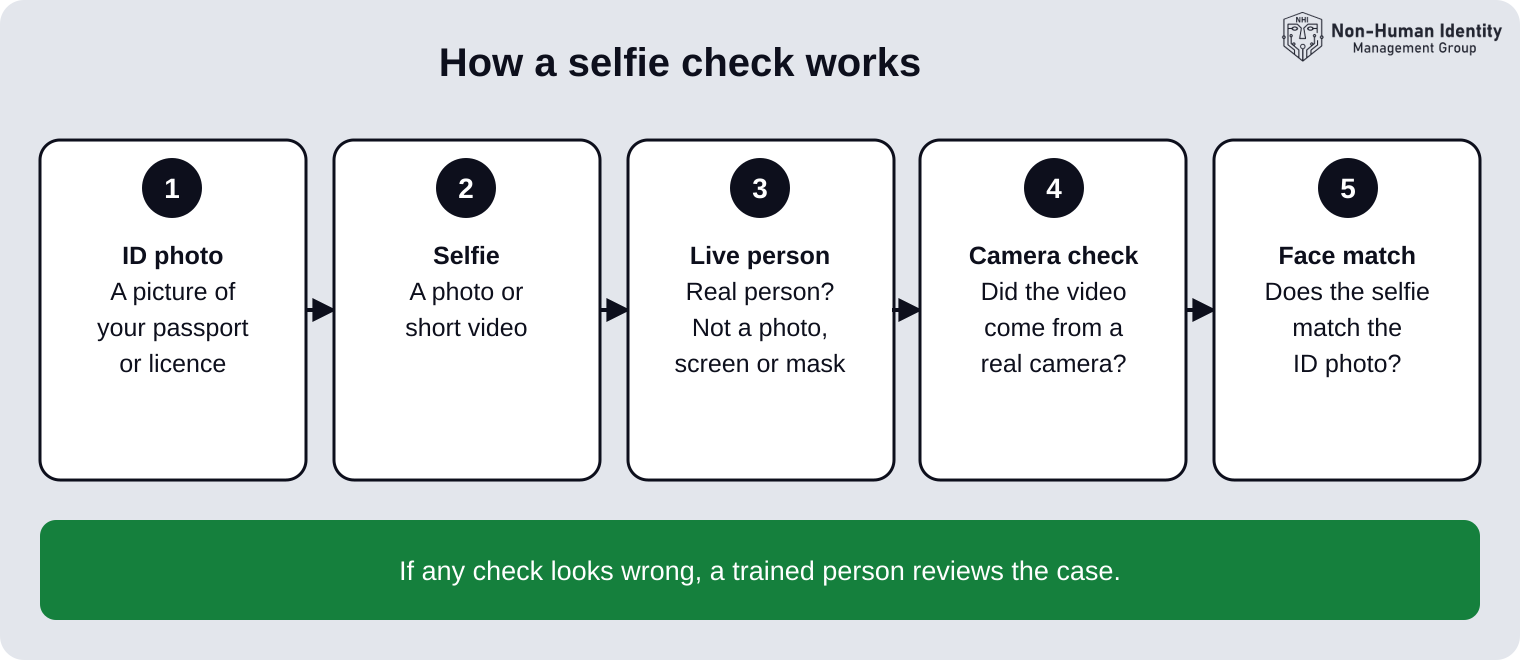
Here is a typical remote selfie check, step by step.
- Photo of the ID. You take a picture of your passport or driving licence.
- The selfie. You take a selfie or short video. Some apps ask you to move or blink.
- The live person check. The system looks for signs of a photo, screen, mask or deepfake held up to the camera.[2]
- The camera check. The system checks the video came from a real camera on a real device, not a software camera or a fake phone.[1]
- The face match. Your selfie is compared with the photo on your ID.
- The decision. The account opens, or the case goes to a person for review.
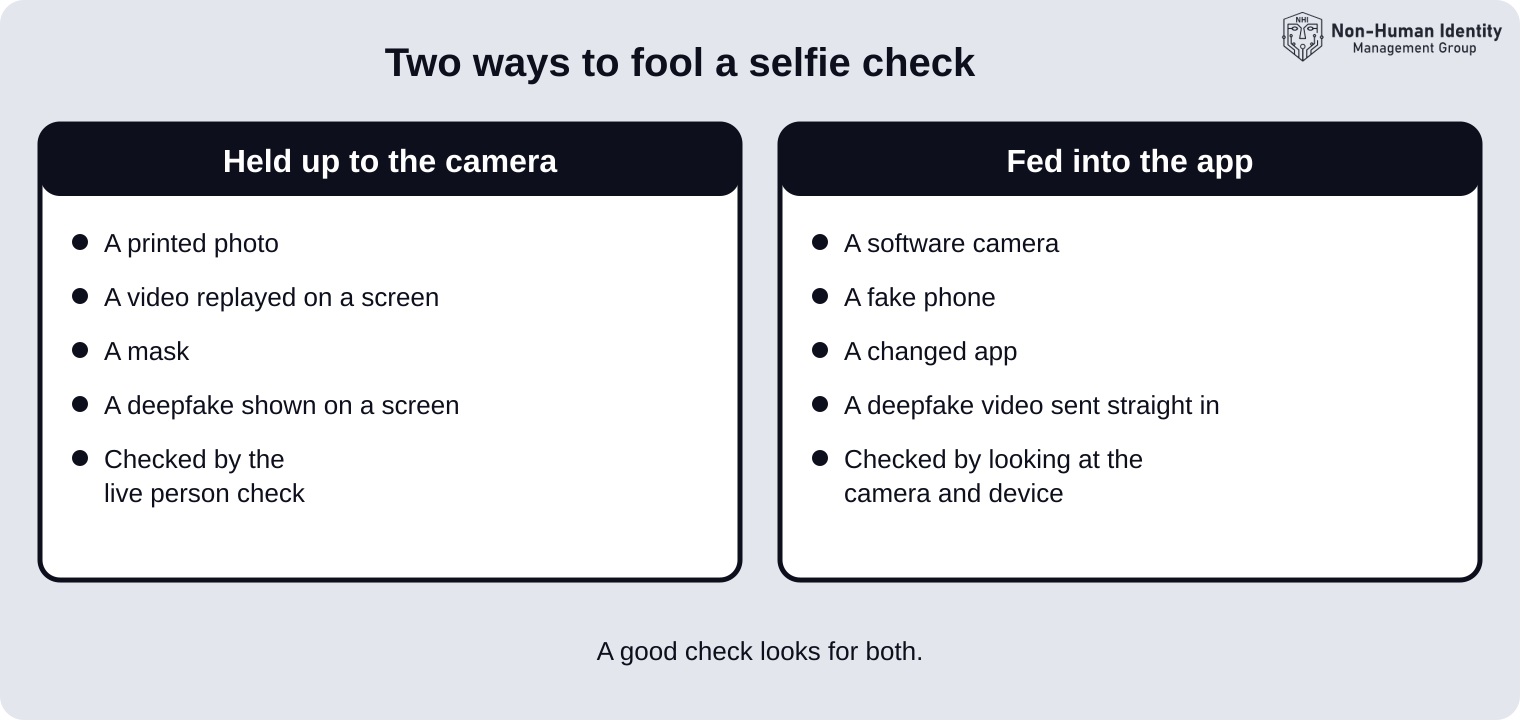
The two kinds of trick need different defences. A presentation attack shows a fake to the real camera. Europe's cyber security agency groups these as photos, replayed videos, 3D masks and deepfakes.[3] An injection attack skips the camera and feeds fake video straight into the app. US guidance asks providers to detect software cameras, fake devices and changed phones, and to check media for signs of editing.[1]
A worked example
Zola Varga wants to open an account with a new online bank. The app asks for a photo of her driving licence, then a short selfie video.
She holds her phone up and turns her head when asked. Zola thinks of the bank clerk at the counter. The app is doing the same job, only remotely.
Her account opens in a few minutes. She never sees the checks running in the background.
A few weeks later, someone tries to open an account at the same bank using a stolen licence photo. They use a deepfake video of the licence holder's face, fed in through a software camera on a laptop.
The face looks right, and the deepfake turns its head on cue. But the camera check flags that the video did not come from a real camera. The case goes to Otto Pereira, a fraud analyst at the bank.
Otto sees the software camera warning and a face that matches the licence a little too perfectly. He declines the application and marks the licence as possibly stolen.
The bank contacts the real licence holder through details it already holds. She had posted a photo of her new licence online. She takes it down and reports the attempt.
Myths and mistakes
| What people think | What is true |
|---|---|
| If the face matches the ID, the person is real. | A face match only says two pictures look alike. Liveness checks whether a live person was there. |
| Asking people to blink or turn stops deepfakes. | Prompts help against still photos, but a fed-in fake skips the camera. Checking where the video came from adds a second line of defence.[1] |
| Liveness detection catches every fake. | Checks are tested against known attacks and have error rates.[2] New tricks appear, so human review still matters. |
| Only banks need to care. | Selfie checks are used for phone contracts, job hires, age checks and account recovery too. |
| A stolen ID photo is harmless without the person. | It can be paired with an AI-made face. Keep ID photos private.[4] |
What can I do this week?
- Remove any photos of your ID documents from social media and chat messages.
- If your business uses selfie checks, ask the supplier whether they detect fed-in video.
- Ask whether their check has been tested by an independent lab, and when.
- Make sure unclear cases go to a trained person, not straight to approval.
Checklist
- The check looks for photos, screens, masks and deepfakes held up to the camera.
- The check also looks for software cameras, fake devices and changed apps.
- The supplier can show independent test results.
- Unclear or mixed results go to a trained reviewer.
- Staff who review cases know the signs of manipulated video.
- People are told how their face data is used and kept.
- Confirmed fraud cases are fed back to the supplier.
Common questions
Why does my bank app ask me to turn my head?
It is checking that a live person is there. Moving on request is harder to fake with a still photo. Some apps skip the movement and check quietly in the background instead. Both aim to tell a real face from a picture, screen or mask.
Can a deepfake beat liveness detection?
Sometimes. A deepfake shown on a screen may be caught by the live person check. One fed straight into the app can skip the camera, so good systems also check the video came from a real camera. No single check catches everything.
What is the difference between a face match and liveness detection?
A face match asks whether two faces look alike, such as your selfie and your ID photo. Liveness detection asks whether the selfie came from a live person at that moment. A strong check uses both.
Is my selfie stored after the check?
Sometimes, for a set time. Some companies keep it for fraud checks or legal reasons. The privacy notice should say what is kept and for how long. If it is unclear, ask the company before you go ahead.
What should I do if a selfie check keeps failing?
Try again in good light, with a plain background and nothing covering your face. If it still fails, ask the company for another way to prove who you are. Many offer a manual check or a visit in person.
Where next?
Ready for the detail? Read the practitioner guide: Deepfake-Resistant Identity Verification Guide. It goes further into the testing standards, how to design a layered check and which numbers to track.
Also useful:
- Biometric Liveness and Presentation Attack Detection Guide
- Biometric Injection Attacks
- Face Matching vs Liveness Detection
- Biometrics for Beginners
- Deepfakes and AI Fraud for Beginners
Related NHI Mgmt Group resources: Document Verification vs Liveness Detection · Identity Verification vs Authentication · Spotting Deepfake Scams Guide
Key terms
- Liveness detection
- A check that a face or other body sample came from a real, present person.
- Presentation attack
- Showing a fake, such as a photo, screen or mask, to a camera or sensor.
- Injection attack detection
- Checks that the video or image really came from a genuine camera, not fed in by software.
- Deepfake
- A fake image, video or voice made with AI to look or sound like a real person.
- Face verification
- Comparing one face with another, such as a selfie with an ID photo.
- Virtual camera injection
- Using a software camera to feed fake video into an app instead of a real camera.
- Identity verification
- Checking that a person is who they say they are, often with an ID and a selfie.
Sources and further reading
- NIST Special Publication 800-63A-4, Digital Identity Guidelines: Identity Proofing and Enrollment (sections on biometric collection and on injection attacks and forged media). National Institute of Standards and Technology. https://pages.nist.gov/800-63-4/sp800-63a.html, accessed 28 Nov 2026.
- ISO/IEC 30107-3:2023, Information technology, Biometric presentation attack detection, Part 3: Testing and reporting. International Organization for Standardization, January 2023. https://www.iso.org/standard/79520.html, accessed 28 Nov 2026.
- Remote Identity Proofing: Attacks and Countermeasures. ENISA, 20 January 2022. https://www.enisa.europa.eu/publications/remote-identity-proofing-attacks-countermeasures, accessed 28 Nov 2026.
- Criminals Use Generative Artificial Intelligence to Facilitate Financial Fraud (PSA241203). Federal Bureau of Investigation, Internet Crime Complaint Center, 3 December 2024. https://www.ic3.gov/PSA/2024/PSA241203, accessed 28 Nov 2026.