A malicious package is a ready-made piece of code, shared online, that has been built or changed to cause harm.
This guide is for students, new developers and anyone who manages people who write code. You do not need to write code to be affected: if your business pays for software, that software is likely built from many shared packages.
In short
- Developers build apps from shared building blocks called packages, downloaded with one short command.
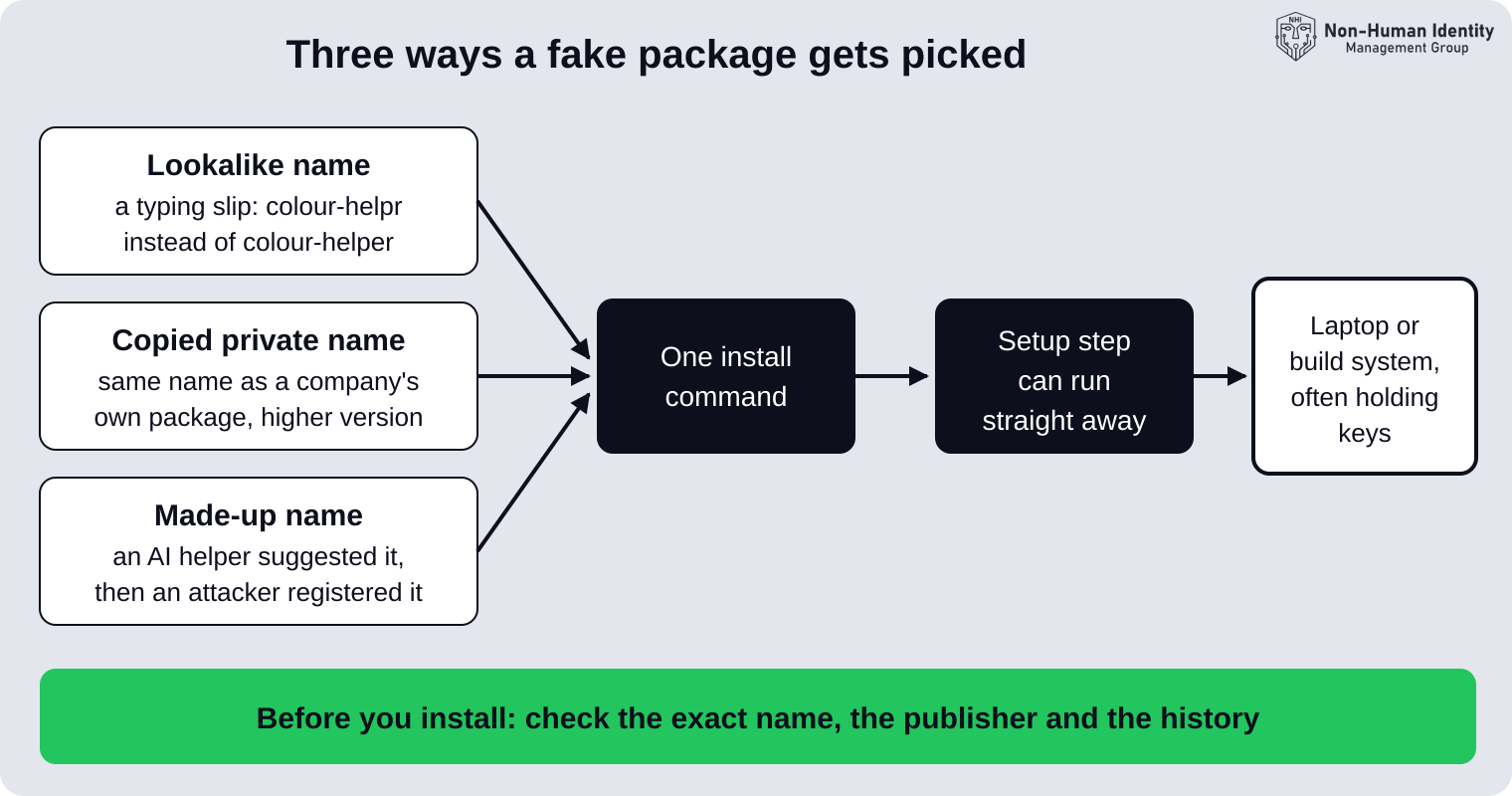
- Attackers publish harmful packages with lookalike names, names copied from a company's private code, or names AI tools have made up.
- Some packages can run their own setup steps the moment they are installed, before anyone uses them.
- Check the exact name, the publisher and the history before you install, and remove a package once it is flagged as harmful.
What you will learn
- Explain what a package is and how a harmful one gets installed.
- Spot the warning signs of a fake package.
- Check a package before adding it to a project.
- Ask your team how they choose and watch the packages they use.
- Shared building block (package)
- a ready-made bundle of code that other people can download and use in their own software.
- Online library of packages (registry)
- a website that stores packages and hands them out, such as npm for JavaScript or PyPI for Python.
- Download helper (package manager)
- a tool that fetches and installs packages from a registry with one command.
What is a malicious package?
Think of a fake brand on a supermarket shelf. The packaging looks almost the same as the one you meant to buy. You only notice the spelling once you are home.
Developers rarely write everything from scratch. They add packages, ready-made pieces of code that do one job, such as reading dates or sending email. A package manager fetches them from an online registry with one short command.
Anyone can usually publish to a public registry. Most packages are honest. A malicious package is one that has been made, or changed, to do harm. It might steal passwords and keys, or let an attacker into the computer.
Where the comparison stops working: a fake product sits on the shelf until you pick it up and use it. Some packages can run setup steps the moment they are installed, before anyone has used them.[1]
Why does it matter?
Packages are installed on developers' laptops and on the build systems that make the final app. Both often hold passwords and keys. One bad package can reach all of them.
If you are a student or learning to code
What could happen: you mistype a package name, or copy one from a chatbot, and install a fake.
Check this: look the package up on the registry website before you install it.
If you are a developer at work
What could happen: a public package with the same name as your company's private one is installed instead.
Check this: ask whether your private package names are reserved or tied to your private registry.
Next: SBOMs for Beginners
If you manage a software team
What could happen: nobody knows which packages are in your apps when a warning names one.
Check this: ask for a list of the packages each app uses, and how the team is alerted to bad ones.
Next: Open Source Risk and Software Composition Analysis for Beginners
What does it look like?
Here is a made-up view of a registry website. One package is popular. Two are fakes.
Example only. All values are made up.
PACKAGE              PUBLISHER        FIRST PUBLISHED  WEEKLY DOWNLOADS
colour-helper        example-team     2016             2,000,000
colour-helpr         new-user-0000    last Tuesday     40            (1)
colour-helper-pro    new-user-0000    last Tuesday     12            (2)

colour-helpr setup step: "postinstall": "run setup-EXAMPLE"         (3)
- One letter missing from the popular name. A brand new publisher. This trick is called typosquatting.
- A likely-sounding "extra" version from the same new publisher.
- In a real file, this line would contain a command that runs by itself when the package is installed.
Why this is risky: one typing slip installs the fake. Its setup step runs straight away.
The safer way: copy the exact name from the project's own website. Check the publisher and history. Be wary of packages that run their own setup steps.
How does it work?
Most malicious packages reach a computer in one of a few ways.
- Lookalike names. The attacker publishes a package with a name one slip away from a popular one, and waits for typing mistakes. This is called typosquatting.
- Copied private names. Companies often use private packages with names only they use. If an attacker publishes a public package with the same name and a higher version number, some set-ups install the public one instead. This is called dependency confusion.[2]
- Made-up names. AI coding helpers sometimes suggest packages that do not exist. A 2024 study found this in at least 5.2% of suggested packages from commercial models, and 21.7% from open models.[3] An attacker can register a made-up name and wait.
- The install. The developer runs one command. The package manager downloads the package, and the packages that package needs.
- The setup step. Some package managers let a package run its own commands during install. The npm documentation says ordinary packages should almost never need these steps.[1]
Registries and security teams do remove harmful packages once they find them. GitHub, for example, publishes warnings about malware found on npm. Its documentation says a flagged package has no safe version, so the advice is to remove it and find a replacement.[4]
A worked example
Vik Falk is a computer science student building a small web app for a class project. His tutor, Odile Pajari, has asked everyone to explain each package they use.
Vik asks an AI chatbot how to add dark mode. It suggests a package with a neat name and a one-line install command. He is about to paste it in.
He remembers the fake brand on the shelf. So he searches for the name on the registry website first. There is a package with that exact name. But a new account published it last week. It has almost no downloads and no project website.
That does not prove it is harmful. It is enough to make him stop. He looks for the tool the chatbot probably meant and finds a well-known one, years old, with a linked project website and an active team.
Vik installs that one instead, copying the name from its own website. He also notes that the newer package has a setup step that runs on install, and mentions it in his write-up.
In class, Odile shows the group how to report a suspicious package to the registry. She asks everyone to keep a short list of their packages, with where each one came from. Vik's write-up becomes the example she shares.
Myths and mistakes
| What people think | What is true |
|---|---|
| If it is on the official registry, it must be safe. | Anyone can usually publish. Registries remove harmful packages once they are found, which can take time. |
| I would never install it, so I am fine. | Your packages pull in their own packages, so you may get ones you never chose. |
| Nothing happens until I use the code. | Some packages run setup steps the moment they are installed.[1] |
| A package an AI suggested must exist. | AI helpers sometimes suggest names that do not exist, and attackers can register them.[3] |
| Updating a flagged package will fix it. | A package flagged as malware has no safe version. Remove it and find a replacement.[4] |
What can I do this week?
- Look up each new package on the registry website before you install it.
- Copy package names from the project's own website, not from memory or a chatbot.
- Turn on malware and security alerts where your code is stored, if your service offers them.
- Ask your team whether private package names are protected from public lookalikes.
- Keep a list of the packages each project uses.
Checklist
- New packages are checked for exact name, publisher, age and activity before install.
- Names come from the project's own website or registry page.
- Private package names are tied to the private registry.
- Setup steps that run on install are reviewed or switched off where possible.
- Malware and security alerts are on for each project.
- Each project has a list of the packages it uses.
- Everyone knows how to report a suspicious package.
Common questions
What is typosquatting?
Typosquatting is giving a harmful package a name that looks like a popular one, with a small spelling change. A missing letter or a swapped dash is typical. The attacker hopes someone types the name wrong. Copying names from the project's own website helps avoid it.
What is dependency confusion?
Dependency confusion is when a build installs a public package instead of a company's private one with the same name. It can happen when a set-up checks public and private registries and prefers the higher version number. Tying private names to the private registry helps reduce the risk.
Can I switch off install setup steps?
Often, yes. npm, for example, has a setting that stops it running the setup scripts packages ask for.[5] Some packages genuinely need a setup step, so test before you switch it off for a whole team. The practitioner guide covers the options.
What should I do if I installed a bad package?
Remove it, and tell your security contact or tutor straight away. We suggest treating the computer as if passwords and keys on it may have been copied, and changing them. Check whether the same package reached any other projects or build systems.
Is this the same as a supply chain attack?
It is one kind. A supply chain attack is any attack that arrives through something you trust and did not build. Malicious packages are a common route. See Supply Chain Attacks for Beginners.
Where next?
Ready for the detail? Read the practitioner guide: Malicious Package and Dependency Confusion Guide. It goes further into registry settings, install controls and how to detect and respond to a bad package.
Also useful:
- Supply Chain Attacks for Beginners
- Software Supply Chain Security for Beginners
- Self-Spreading Package Worms for Beginners
- Open-Source Maintainer Takeovers for Beginners
- Choosing Open Source Packages for Beginners
Related NHI Mgmt Group resources: Dependency Intake Review Checklist · Dependency Pinning vs Version Ranges · Secrets in Code for Beginners
Key terms
- Package manager
- A tool that fetches, installs and updates packages from a registry.
- Package registry
- A website that stores packages and hands them out to people who install them.
- Typosquatting
- Giving a harmful package a name that looks like a real one, with a small spelling change.
- Dependency confusion
- When a build installs a public package instead of the intended private one with the same name.
- Slopsquatting
- Registering a package name that AI tools made up, so people who follow the AI install it.
- Install script
- A setup step a package can run by itself when it is installed.
Sources and further reading
- scripts (lifecycle scripts and best practices). npm Docs, npm, Inc. https://docs.npmjs.com/cli/v10/using-npm/scripts, accessed 28 Nov 2026.
- Dependency Confusion: How I Hacked Into Apple, Microsoft and Dozens of Other Companies. Alex Birsan, 9 February 2021 (research done with the companies' permission or through bug bounty programmes). https://medium.com/@alex.birsan/dependency-confusion-4a5d60fec610, accessed 28 Nov 2026.
- We Have a Package for You! A Comprehensive Analysis of Package Hallucinations by Code Generating LLMs. Spracklen et al., arXiv 2406.10279, 2024, revised 2025 (USENIX Security 2025). https://arxiv.org/abs/2406.10279, accessed 28 Nov 2026.
- About the GitHub Advisory database (malware advisories). GitHub Docs, GitHub. https://docs.github.com/en/code-security/security-advisories/working-with-global-security-advisories-from-the-github-advisory-database/about-the-github-advisory-database, accessed 28 Nov 2026.
- config (ignore-scripts). npm Docs, npm, Inc. https://docs.npmjs.com/cli/v10/using-npm/config, accessed 28 Nov 2026.