A package manager is a tool that downloads and installs ready-made code for a software project.
This guide is for students, new developers and anyone who works with people who build software. You do not need to write code to be affected: most apps your business uses are built from many downloaded packages.
In short
- Developers rarely write everything themselves. They add shared building blocks called packages.
- A package manager, such as npm for JavaScript or pip for Python, fetches packages from an online library called a registry.
- One install can bring in dozens of other packages, and some packages can run setup steps as they install.
- A record of exact versions, called a lockfile, plus a quick check before each new package, keeps things predictable.
What you will learn
- Explain what a package manager does in one sentence.
- Spot the files that list a project's packages.
- Check a package before you add it.
- Ask your team how they keep package versions under control.
- Shared building block (package)
- a bundle of ready-made code that other people can download and use.
- Online library of packages (registry)
- a website that stores packages and hands them out, such as npm or PyPI.
- Exact version record (lockfile)
- a file that notes the exact version of every package a project installed.
What is a package manager?
Think of an app store on your phone. You search for an app by name, tap install, and it arrives. You do not visit the maker or copy files by hand.
A package manager does the same job for code. A developer types one short command with a package name. The tool finds that package in a registry, downloads it and puts it in the project.
Each programming language tends to have its own. Many JavaScript developers use npm. It has a website, a command-line tool and a registry. Its makers describe its registry as "a large public database of JavaScript software".[1] Python developers use pip, which installs from the Python Package Index, known as PyPI.[2]
Where the comparison stops working: phone app stores usually review apps before they appear. On many public code registries, anyone can publish, and checks happen mostly after a package is live.
Why does it matter?
Package managers save a huge amount of time. They also mean a project runs code written by strangers, often without anyone reading it.
If you are learning to code
What could happen: you copy an install command from a forum or chatbot and add a package you know nothing about.
Check this: look the package up on the registry website before you install it.
If you work in a small development team
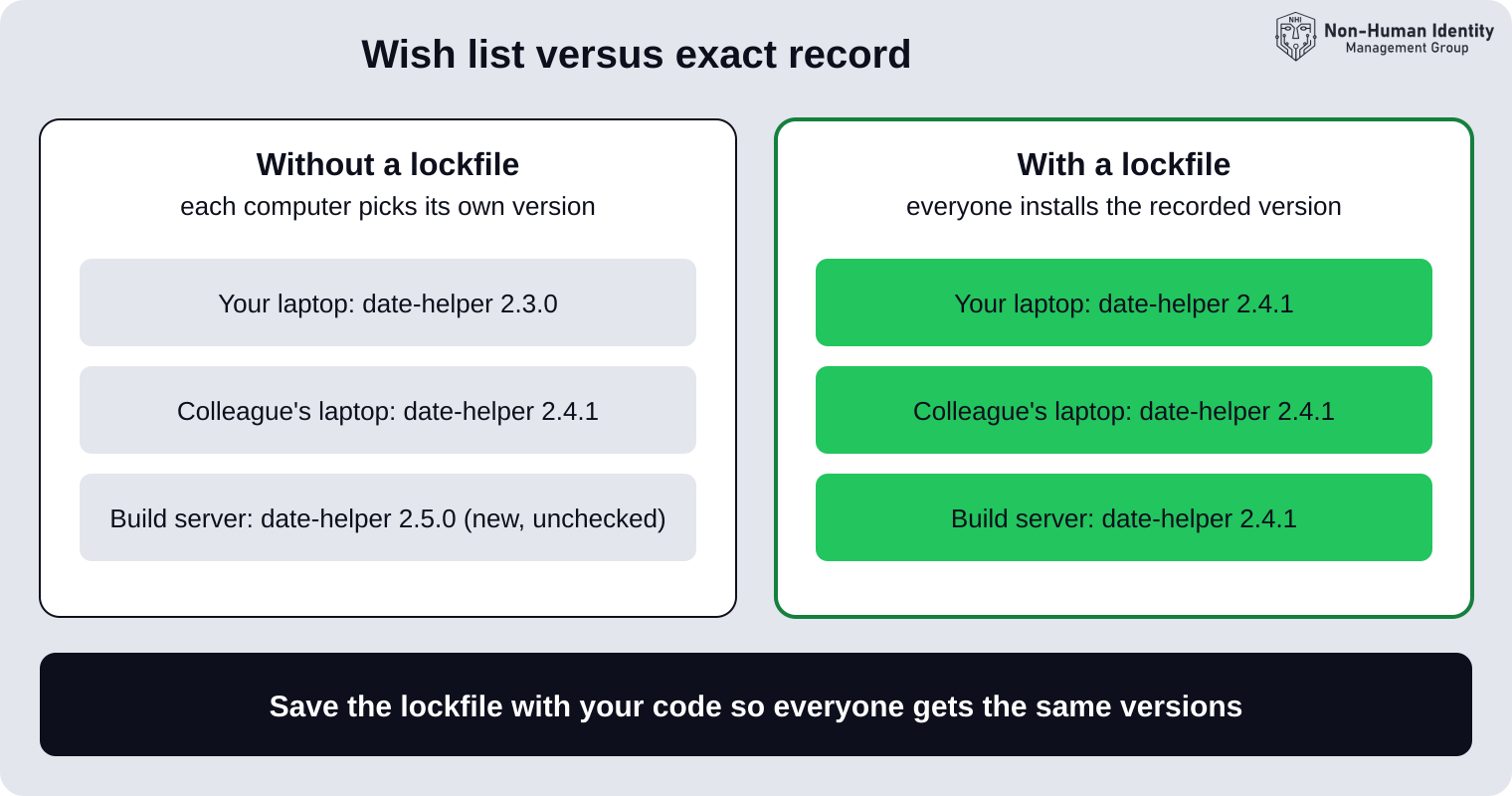
What could happen: your laptop and the build server install slightly different versions, and a bug or bad update slips in.
Check this: make sure the project's lockfile is saved with the code.
If you manage people who build software
What could happen: a warning names a package, and nobody can say quickly whether your apps use it.
Check this: ask whether each app has an up-to-date list of its packages.
Next: Open Source Risk and Software Composition Analysis for Beginners
What does it look like?
Most projects keep two files. One says what the project wants. The other records what was actually installed. Here is a made-up pair, shortened.
Example only. All values are made up.
# wish list (in npm this is package.json)
"date-helper-example": "^2.1.0"        (1)
"mail-sender-example": "3.0.4"         (2)

# exact record (in npm this is package-lock.json)
date-helper-example   2.4.1            (3)
tiny-format-example   1.0.9            (4)
- The ^ sign means "version 2.1.0 or any newer version 2". The project accepts updates it has not seen yet.
- An exact version. Only 3.0.4 will do.
- The version that was really chosen last time the project installed.
- A package nobody asked for by name. The date helper needs it, so it came along. In a real file, there would often be hundreds of lines like this.
Why this is risky: without the exact record, each new install may pick newer versions, including ones nobody has checked.
The safer way: save the lockfile with the code, and install from it, so every computer gets the same versions.
How does it work?
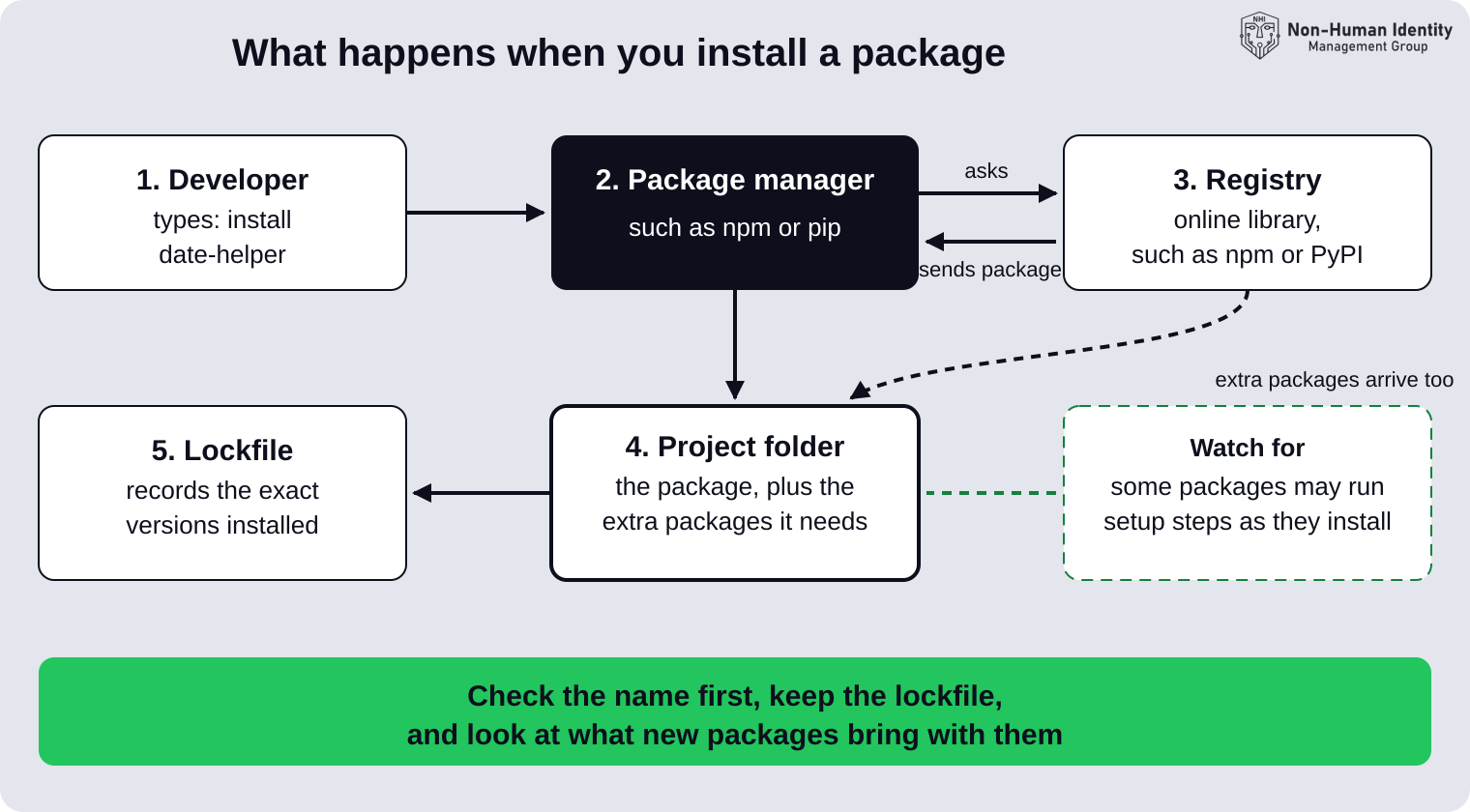
Here is what usually happens when a developer adds a package.
- The request. The developer types an install command with the package name. The wish list file is updated.
- The lookup. The package manager asks the registry for that name and picks a version that fits the rules in the wish list. Version numbers often follow a pattern of three parts: big changes, new features, then small fixes.[3]
- The extras. The package lists other packages it needs. These are called transitive dependencies. The tool fetches those too, and the ones they need.
- The setup steps. Some package managers let a package run its own commands while it installs. The npm documentation says ordinary packages should almost never need a pre-install or install step.[4]
- The record. The tool writes the exact versions into the lockfile. The npm documentation says this file is meant to be committed. That means saved into the project's shared history, so later installs produce the same set.[5]
Package managers can also check for known problems. For example, the npm audit command sends a list of a project's packages to the registry. It then reports known security issues.[6] It only knows about problems that have already been reported, so it does not replace a check before you install.
A worked example
Dana Kowal is a second-year student building a small web app to track study hours. Her project supervisor, Wren Mbeki, has asked each student to explain how their project is put together.
Dana needs to show dates nicely. A forum post suggests a package and gives a one-line install command. Before running it, she opens the registry website and searches for the exact name. The package is several years old, has a linked project website and is updated often. That looks reasonable, so she installs it.
Afterwards, she looks at her project folder. She asked for one package, but dozens of new folders have appeared. She opens the lockfile and sees why: the date package needed others, and those needed more.
When Dana shows Wren, Wren asks two questions. Is the lockfile saved with the code? And did anything run setup steps during install? Dana checks. The lockfile had been left out by mistake, so she adds it. None of her packages list an install step.
A week later, a classmate copies her project to help test it. Because the lockfile is there, his computer installs the same versions hers did. The app behaves the same on both machines.
Wren uses Dana's write-up in the next class. She asks everyone to check names on the registry first, keep their lockfile, and note which packages each project uses.
Myths and mistakes
| What people think | What is true |
|---|---|
| I only installed one package. | One package can bring in many others that it needs. Check the lockfile to see them all. |
| Everything on the registry has been checked. | Anyone can usually publish to a public registry. Harmful packages are removed when found, which can take time. |
| Nothing runs until I use the code. | Some packages run setup steps while they install.[4] |
| The lockfile is clutter, so I can leave it out. | It is what lets other computers install the same versions. Save it with the code.[5] |
| A clean audit means my packages are safe. | An audit reports known issues only. New or unreported problems will not show. |
What can I do this week?
- Look up the next package you plan to add on the registry website, and check its name, age and activity.
- Open one of your projects and find the wish list file and the lockfile.
- Make sure the lockfile is saved with the code.
- Run your package manager's audit or security check, if it has one, and read what it says.
- Ask a colleague or tutor how your team decides which packages to allow.
Checklist
- New packages are looked up on the registry before install.
- Package names are copied from the project's own website, not typed from memory.
- Each project has a lockfile saved with its code.
- Builds install from the lockfile, not fresh each time.
- Packages that run setup steps on install are noticed and reviewed.
- A security check or audit runs regularly.
- Someone owns the list of packages each app uses.
Common questions
Is npm a package manager or a registry?
Both, in a way. The name npm covers a website, a command-line tool and a public registry of JavaScript packages.[1] The tool is the package manager. The registry is the online library it downloads from. Other tools can use the same registry.
What is the difference between pip and PyPI?
The first is the tool and the second is the library. The Python guide calls pip the recommended installer. Its most common job is installing packages from the Python Package Index, PyPI.[2] You type pip commands, and pip fetches the packages from PyPI.
Why did one install add so many folders?
Because packages need other packages. The one you named lists what it depends on, and the package manager fetches all of them, plus what those depend on. These indirect packages are called transitive dependencies. Your lockfile shows the full list.
What is a virtual environment in Python?
It is a separate space for one project's packages. The Python packaging guide says it installs packages in an isolated place for one application. So upgrading one project does not break another.[2] It keeps projects apart. It is not a security barrier.
Should I always use the newest version?
Not automatically. New versions often fix bugs and security issues, so staying reasonably current helps. But a brand new release has had little time to be checked. We suggest updating on purpose, reading what changed, and letting the lockfile record the result.
Where next?
Ready for the detail? Read the practitioner guide: Package Registry Security Comparison Guide. It goes further into how npm, PyPI and other registries differ on publishing controls, name ownership and safe ways to install.
Also useful:
- Malicious Packages for Beginners
- Lockfiles and Version Pinning for Beginners
- Transitive Dependencies for Beginners
- Software Supply Chain Security for Beginners
- npm Install-Time Security Guide
Related NHI Mgmt Group resources: Dependency Intake Review Checklist · Dependency Pinning vs Version Ranges · Secrets in Code for Beginners
Key terms
- Package manager
- A tool that fetches, installs and updates packages from a registry.
- Package registry
- A website that stores packages and hands them out to people who install them.
- Lockfile
- A file recording the exact version of every package a project installed, so later installs match.
- Transitive dependency
- A package your project uses indirectly because another package needs it.
- Semantic versioning
- A three-part version number pattern: big changes, new features, then small fixes.
- Install script
- A setup step a package can run by itself when it is installed.
Sources and further reading
- About npm. npm Docs, npm, Inc. https://docs.npmjs.com/about-npm, accessed 28 Nov 2026.
- Installing Packages. Python Packaging User Guide, Python Packaging Authority. https://packaging.python.org/en/latest/tutorials/installing-packages/, accessed 28 Nov 2026.
- Semantic Versioning 2.0.0. semver.org. https://semver.org/, accessed 28 Nov 2026.
- scripts (lifecycle scripts and best practices). npm Docs, npm, Inc. https://docs.npmjs.com/cli/v10/using-npm/scripts, accessed 28 Nov 2026.
- package-lock.json. npm Docs, npm, Inc. https://docs.npmjs.com/cli/v10/configuring-npm/package-lock-json, accessed 28 Nov 2026.
- npm audit. npm Docs, npm, Inc. https://docs.npmjs.com/cli/v10/commands/npm-audit, accessed 28 Nov 2026.