Medical device security means protecting connected medical machines so they keep working safely and patient data stays private.
This guide is for clinicians, students, patients and anyone new to health IT. It covers the security side only and is not medical advice. If you use a device at home, your care team is the right first contact.
In short
- Many medical devices now run software and connect to a network, so they can have security weaknesses like any computer.
- For a medical device, a security problem can become a safety problem, because care may depend on the device working.
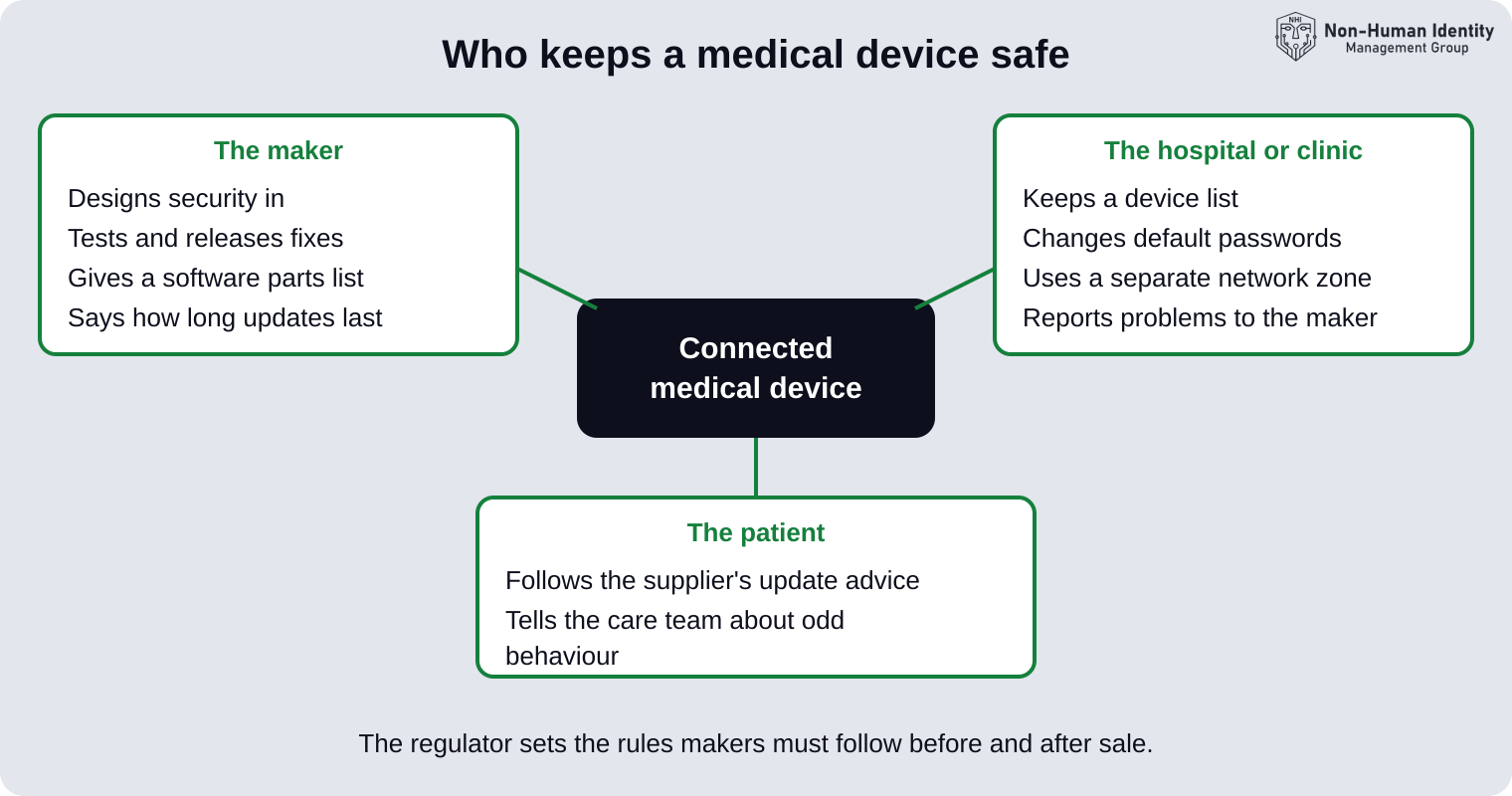
- The maker, the hospital or clinic, and the patient each look after a different part of keeping a device safe.
- Makers usually have to approve software changes, so a hospital often cannot simply install an update itself.
What you will learn
- Explain why a connected medical device needs security as well as safety checks.
- Spot the questions to ask before a new device joins a network.
- Explain who does what: the maker, the hospital or clinic, and the patient.
- Check what to do if a safety notice names a device you use.
- Connected medical device
- a medical machine, such as a pump, monitor or scanner, that runs software and links to a network.
- Software update (patch)
- a fix from the maker that changes a device's software, often to close a security gap.
- Parts list for software (SBOM)
- a list of the software pieces inside a product, so people can check them for known problems.
What is medical device security?
Think of a lift in a busy building. People rely on it every day, and it has safety checks built in. The building owner cannot rewire it, so the lift company's engineer does the repairs.
Connected medical devices are similar. Infusion pumps, patient monitors, scanners and some implants run software. Many link to a hospital network, a phone app or the internet. That makes them easier to use, but it also means a stranger may be able to reach them.
The FDA is the US body that approves medical devices. It says devices can face cyber threats that may affect how safely and well they work.[1] Security here means keeping out people who should not get in. It also means stopping anyone from changing, misusing or blocking the device.[1]
Where the comparison stops working: a broken lift is easy to notice. A device with a security problem may look normal while someone quietly reads its data or changes how it behaves.
Why does it matter?
When an office laptop is attacked, work stops. When a medical device is attacked, care can be slowed or harmed. So regulators see device security as part of patient safety.
In January 2025 the FDA warned about flaws in some patient monitors. It said someone could crash a monitor or control it from far away. The monitors could also send patient data out of the hospital.[3]
If you are a nurse, doctor or other clinician
What could happen: a device shows readings that do not match the patient in front of you.
Check this: report odd device behaviour to clinical engineering or IT, as well as treating the patient.
If you use a medical device at home
What could happen: your device or its phone app needs an update or a setting change after a safety notice.
Check this: ask your care team or the device supplier before changing anything yourself.
Next: Implantable and Home-Use Medical Device Security Guide
If you are a student or new to health IT
What could happen: a new device is plugged into the main network with its default password unchanged.
Check this: ask whether every device is on a list, with an owner and a support end date.
If you buy equipment for a clinic
What could happen: you buy a device whose maker stops sending updates two years later.
Check this: ask how long the maker will support the device with security updates, in writing.
What does it look like?
Here is a made-up check a small clinic might fill in. It is done before a new device joins the network.
Example only. All values are made up.
New device check: EXAMPLE eye camera, model FAKE-100
Connects to: clinic Wi-Fi and maker's cloud     (1)
Default admin password changed?   NO           (2)
Security updates promised until:  not stated   (3)
Software parts list (SBOM) given? NO           (4)
Who installs updates?             maker only   (5)
- In a real file, this line would list every network the device uses.
- A default password is often printed in the manual, so others can look it up.
- Without a support date, the clinic cannot plan for when updates stop.
- Without a parts list, it is harder to check the device when a new flaw is announced.
- This is normal for medical devices, so the clinic needs a contact at the maker.
Why this is risky: the device would join with a known password. Nobody knows how long fixes will come. Nobody can check its parts.
The safer way: get the support date and parts list before you buy. Change the default password. Put the device on its own part of the network.
How does it work?
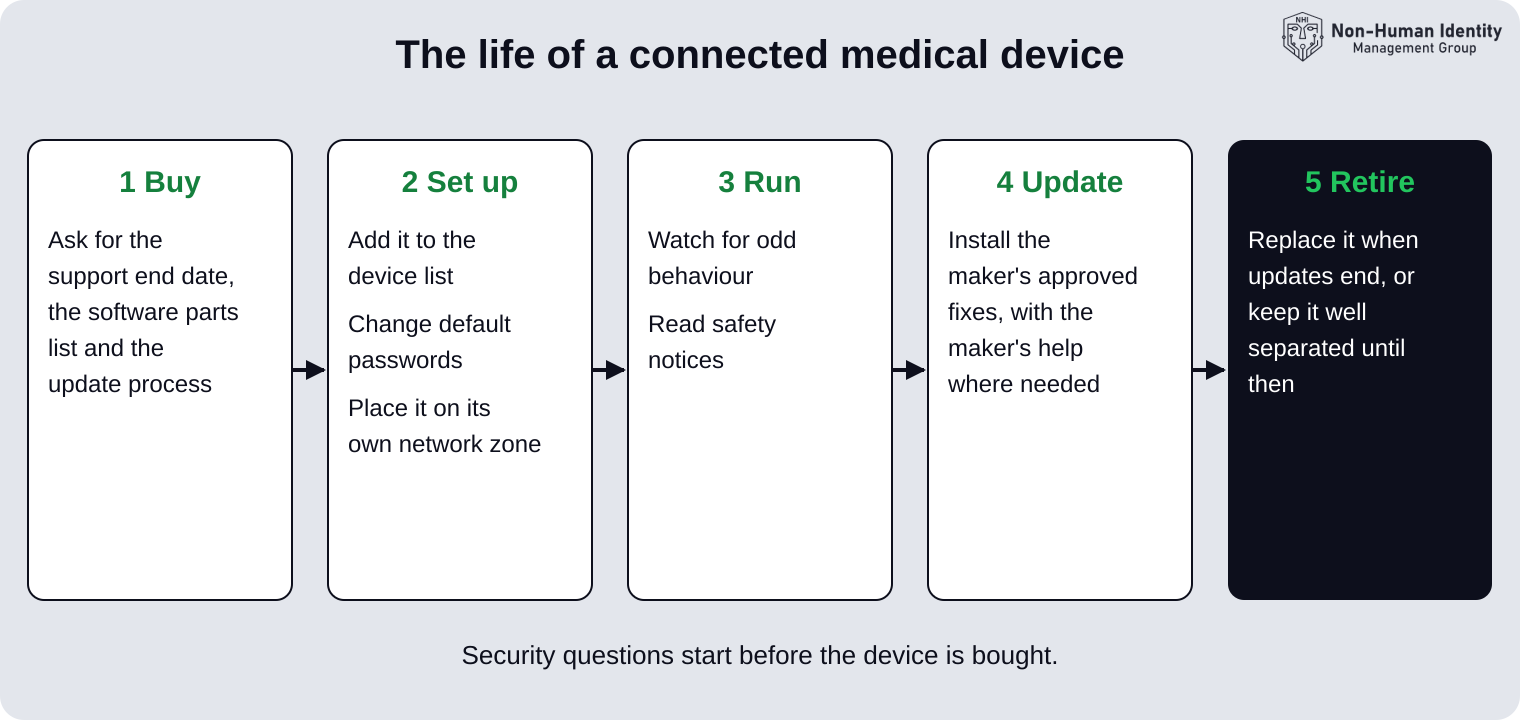
Keeping a device safe is shared across its whole life, from design to the day it is retired.
- The maker designs it. The FDA says building security in from the start helps a device stay secure over its life.[1] Since 29 March 2023, US makers of devices that connect to the internet must send the FDA a plan for handling flaws. They must also send a software parts list.[2]
- The regulator checks it. In the US the FDA regulates device security.[2] In the EU, official guidance under the medical device rules explains what makers should do about security.[4]
- The hospital or clinic runs it. It keeps the device on a list, changes default passwords and places it on a separate part of the network. EU guidance says operators should keep security in place while the device is used, and tell the maker quickly about any suspected security event.[4]
- The maker fixes it. When a flaw is found, the maker tests and releases the fix. The FDA says the maker is responsible for checking all software design changes.[2] So the hospital usually waits for the maker's approved update.
- The patient plays a part. EU guidance encourages patients to use "cyber smart behaviour", such as following the supplier's advice on updates.[4]
- Someone retires it. When updates stop, the device is replaced or kept well apart from other systems until it can be.
Security also has to fit around care. EU guidance gives an example. In an emergency, staff must be able to reach an implanted heart device without limits. In normal use, strong protection should still be in place.[4] A lock that keeps out a doctor in a crisis is a safety risk in itself.
A worked example
Jonah Okafor runs Teal Opticians, a fictional high street practice with six staff. He plans to buy a new eye camera. It takes photos of the back of the eye and sends them online for review.
Jonah thinks of the lift in his building. He would never let a lift be fitted without knowing who services it. So he asks the supplier's engineer, Mira Haddad, three questions before he signs.
First, how long will the camera get security updates? Mira checks and puts a date in the quote. Second, can she send a list of the software inside it? She says the maker can provide one on request. Third, who installs updates? Mira explains that only the maker's approved updates should go on, and she will arrange them.
When the camera arrives, Mira changes the default admin password with Jonah watching. Jonah's IT helper puts the camera on its own part of the Wi-Fi, apart from the till and the staff laptops. Jonah adds the camera to a simple list with the support date and Mira's contact details.
A year later, the maker sends a notice about a security fix. Jonah does not try to install it himself. He calls Mira, who books a visit and applies the approved update.
Nothing dramatic happened. That is the point: the right questions at the start made the later fix simple.
Myths and mistakes
| What people think | What is true |
|---|---|
| Medical devices are the maker's problem only. | Makers, hospitals and clinics, and patients each have a part. EU guidance says they share the job of keeping the setting secure.[4] |
| The hospital can patch a device like any PC. | Makers are responsible for checking software changes, so updates usually come from or through the maker.[2] |
| More locks always make a device safer. | Controls that block staff in an emergency can harm patients. Security has to fit around care.[4] |
| If a device works, it is secure. | A device can work normally while it has a flaw. Read safety notices and keep devices on a list. |
| Patients should install fixes themselves straight away. | Follow your care team or supplier. In one 2025 notice the FDA told patients not to install the fix themselves.[3] |
What can I do this week?
- Find out who looks after medical devices where you work. This team is often called clinical engineering.
- Ask if there is a list of connected devices, each with an owner and a support end date.
- Ask whether medical devices sit on their own part of the network.
- If you use a device at home, ask your care team how you will hear about safety notices.
- Learn how to report odd device behaviour where you work.
Checklist
- Every connected medical device is on a list with an owner.
- Each device has a known support end date for security updates.
- Default passwords are changed before a device goes live.
- Medical devices sit on their own part of the network.
- Updates come from the maker or are approved by the maker.
- Staff know how to report odd device behaviour.
- Someone reads the regulator's safety notices and checks them against the device list.
- Buying rules ask for a software parts list and an update plan.
Common questions
Can a hacker take control of a medical device?
Sometimes, if the device has a serious flaw and can be reached over a network. In 2025 the FDA warned that flaws in certain patient monitors could let someone control them remotely. Such cases are taken seriously, which is why devices are kept separate, updated and watched.
Should I stop using my home device if I hear about a flaw?
Talk to your care team first, rather than stopping on your own. Stopping a device can carry its own health risk. Safety notices usually say what patients should do, and your care team can tell you whether your device is affected.
Why can the hospital not just update the device?
Because a software change can affect how a medical device works, the maker is responsible for checking it. So updates usually come from the maker or with its approval. In the meantime, the hospital can reduce risk by keeping the device on its own part of the network.
What is a software parts list, and why does it matter?
It is a list of the software pieces inside a product, often called an SBOM. When a flaw is found in a common piece, the list helps hospitals see which devices may be affected. In the US, makers of internet-connected devices must provide one to the FDA.
Is this the same as patient privacy?
They overlap but are not the same. Privacy is about who may see patient data. Device security also covers keeping the device working correctly. A flaw can expose data, stop a device or change how it behaves, so both matter.
Where next?
Ready for the detail? Read the practitioner guide: Medical Device Security Guide. It goes further into US and EU rules, buying documents such as security data sheets, network zoning for devices and recovery planning.
Also useful:
- SBOMs for Beginners
- Network Segmentation for Beginners
- FDA Medical Device Cybersecurity Guide
- EU MDR Cybersecurity and MDCG 2019-16 Guide
Related NHI Mgmt Group resources: Hospital Clinical Network Segmentation Guide · Implantable and Home-Use Medical Device Security Guide · Medical Device Procurement Security Checklist
Key terms
- Internet of Medical Things
- Connected medical devices that share data with hospital systems, apps or cloud services.
- Patch
- A software or firmware update that fixes a fault or closes a security gap.
- Software Bill of Materials
- A list of the software pieces inside a product, used to check for known problems.
- Network Segmentation
- Splitting a network into zones with controlled traffic between them, so a problem in one zone spreads less easily.
- Legacy Software
- Software still in use after its maker has stopped fully supporting it.
- Vulnerability
- A weakness in software, settings or design that someone could misuse.
Sources and further reading
- Cybersecurity (medical devices). US Food and Drug Administration. https://www.fda.gov/medical-devices/digital-health-center-excellence/cybersecurity, accessed 28 Nov 2026.
- Cybersecurity in Medical Devices Frequently Asked Questions (FAQs), including section 524B of the FD&C Act. US Food and Drug Administration. https://www.fda.gov/medical-devices/digital-health-center-excellence/cybersecurity-medical-devices-frequently-asked-questions-faqs, accessed 28 Nov 2026.
- Cybersecurity Vulnerabilities with Certain Patient Monitors from Contec and Epsimed: FDA Safety Communication. US Food and Drug Administration, 30 January 2025, updated 2 July 2025. https://www.fda.gov/medical-devices/safety-communications/cybersecurity-vulnerabilities-certain-patient-monitors-contec-and-epsimed-fda-safety-communication, accessed 28 Nov 2026.
- MDCG 2019-16 Rev.1, Guidance on Cybersecurity for medical devices. Medical Device Coordination Group, European Commission, December 2019, revised July 2020. https://health.ec.europa.eu/document/download/b23b362f-8a56-434c-922a-5b3ca4d0a7a1_en?filename=md_cybersecurity_en.pdf, accessed 28 Nov 2026.