A national digital ID is a government-backed way to prove who you are online or on your phone.
This guide is for members of the public, students of policy and anyone new to identity work. If you run a business, you may be asked to accept one of these IDs from customers, or to use one yourself for tax and other government tasks.
In short
- Countries build digital ID in different ways: a government sign-in account, an ID number checked against a central record, or an ID wallet app.
- Most start with a one-off identity check, then let you sign in again and again with that proof.
- The account or app becomes very valuable, so protect it like your bank login.
- Scam messages often copy these services. Go to the official site or app yourself.
What you will learn
- Explain the three main kinds of national digital ID.
- Spot the difference between proving who you are and signing in.
- Check that a digital ID message or app is the official one.
- Ask what details a service gets when you use your digital ID.
Scheme details here were checked against official sources on 28 November 2026. Schemes change often, so check the official site for your country.
- Checking who you are (identity proofing)
- the one-off check, often with photo ID and a selfie, that links a real person to an account.
- How sure the check is (assurance level)
- a measure of how strongly an ID or sign-in has been checked.
- The service that relies on it (relying party)
- the website or office that accepts your digital ID and acts on it.
What is a national digital ID?
Think of a trusted referee on a job application. The referee knows you well, so employers believe what they say without meeting you. A national digital ID works the same way: the government, or a body it trusts, vouches for you.
First, someone checks who you are, often once, with documents or a face scan. After that, services can rely on the result. You do not have to show your passport to every office.
Schemes come in three broad kinds. Some are a government sign-in account, such as GOV.UK One Login, Login.gov in the US or Singpass in Singapore. Some are an ID number checked against a central record, such as India's Aadhaar. Others are an ID wallet app, such as the EU Digital Identity Wallet. Some schemes mix these.
Where the comparison stops working: a referee speaks once. A digital ID can be used again and again, so whoever controls your account or phone can use your identity too.
Why does it matter?
A digital ID can save time and cut paperwork. It also becomes a single key to many services, which makes it a target.
If you use government services online
What could happen: a fake text sends you to a copy of the sign-in page, and a stranger takes over your account.
Check this: type the official address yourself or open the official app. Do not use links in messages.
If you are studying policy
What could happen: you compare schemes as if they were the same, and miss big differences in data, law and choice.
Check this: for each scheme, ask who runs it, what it stores, and whether it is optional.
If your business accepts digital ID
What could happen: you ask for more details than you need, and then must protect data you never used.
Check this: request only the details and the level of checking each task needs.
What does it look like?
Here is a made-up scenario card. It shows the questions worth asking about any digital ID scheme you are offered.
Example only. All values are made up.
SCENARIO: "Example Land Digital ID" (FAKE scheme)
Who runs it?        Example Land identity office       (1)
How do I join?      Photo ID + face scan in the app    (2)
How do I sign in?   Password + code, or app approval   (3)
What do services get? Name, date of birth, address    (4)
Is it optional?     Yes, paper route still offered     (5)
Message received: "Your ID expires! Verify at example.invalid" (6)
- A public body, or a firm it has approved, should run the scheme.
- The one-off identity check. This is when the account is linked to you.
- Your everyday sign-in. A second check, such as a code or app approval, adds protection.
- What a service receives. Some schemes let you share less, such as only your age.
- Whether you can still use another route.
- A typical scam message. In a real message, this line would contain a link to a fake site.
Why this is risky: the message uses fear to rush you to a fake site, where your details and codes can be stolen.
The safer way: ignore the link. Open the official app or type the official address, and check your account there.
How does it work?
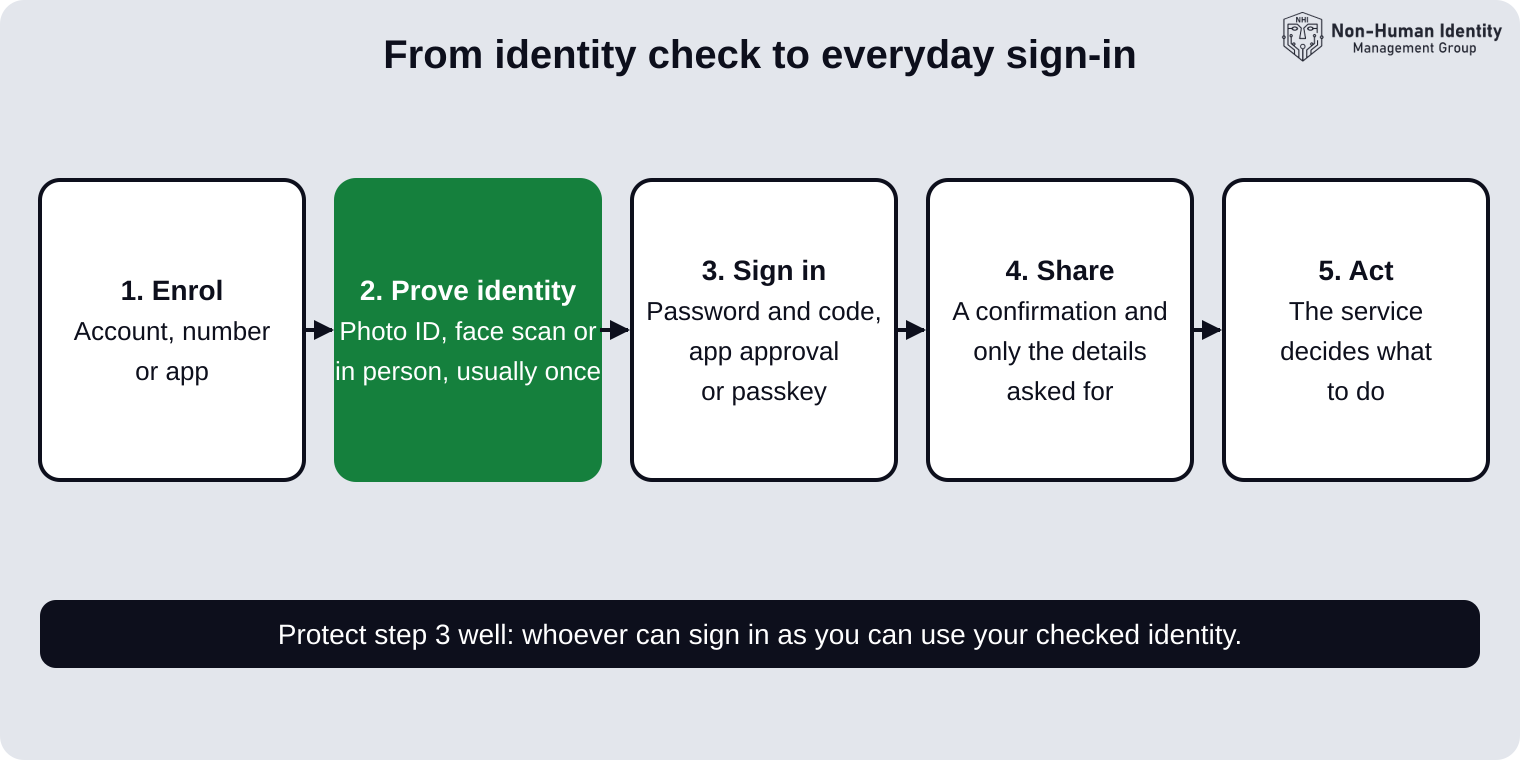
Details vary by country, but most schemes follow similar steps.
- Enrol. You set up an account, get a number or install an app. India's Aadhaar, for example, records fingerprints, iris scans and a face photo at enrolment.[4]
- Prove who you are. The scheme checks your evidence. Login.gov may ask for a photo of your ID and a picture of you, with an in-person option at some US post offices.[2]
- Sign in. When a service needs you, you sign in or approve a request. Singpass offers app approval and passkeys, a sign-in that stays on your device.[3]
- Share. The service receives a confirmation and, where needed, some details about you. Some wallets let you show only your age.[5]
- Act. The service decides what to do. Login.gov notes it does not decide whether you qualify for an agency's services.[2]
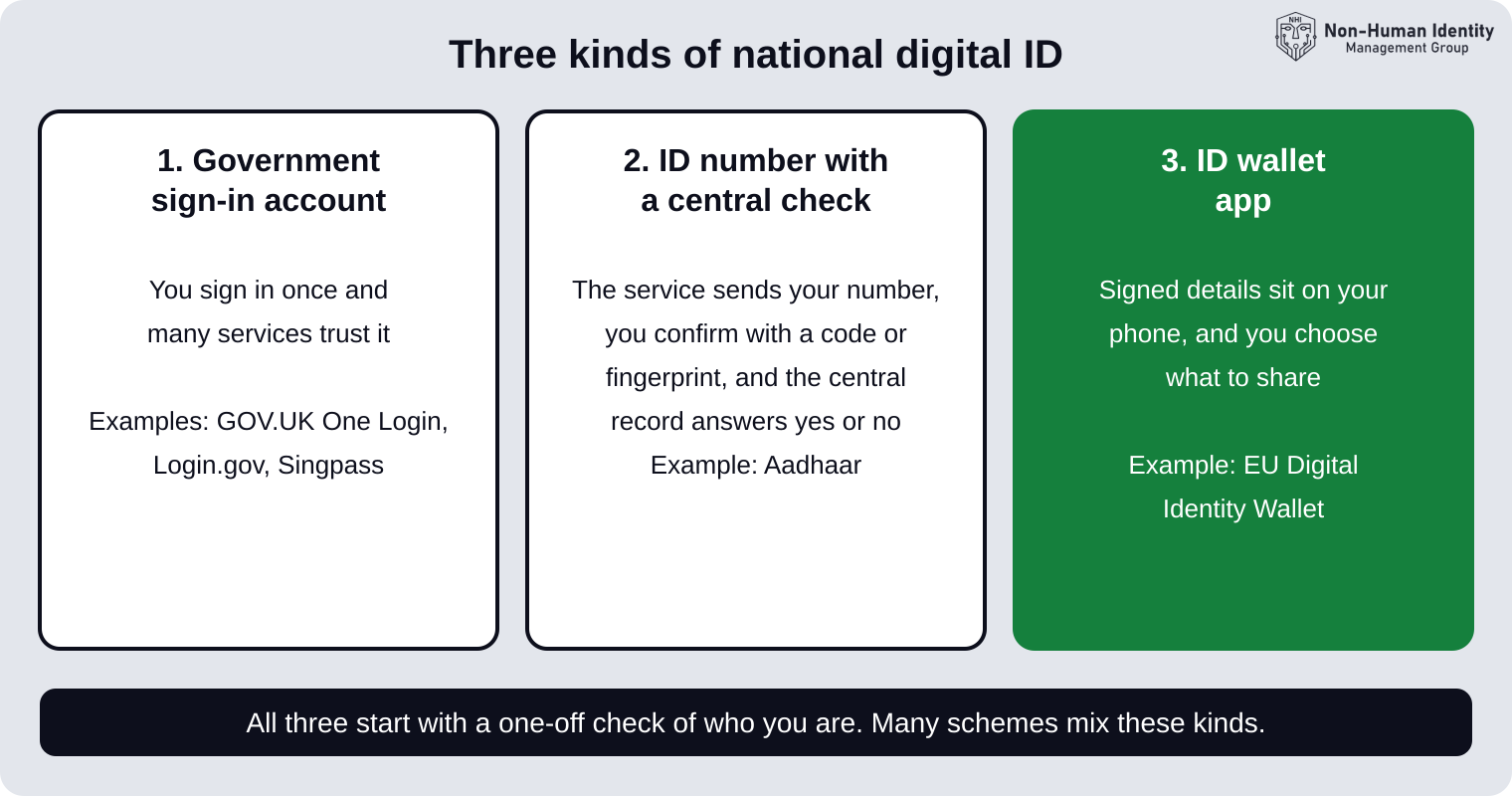
The government sign-in account is the most common kind for public services. In the UK, GOV.UK One Login is set to replace other ways of signing in to GOV.UK services. It does not yet work with all of them.[1]
A worked example
Wanda Kader runs Slate Florist, a fictional flower shop in Leeds. She needs to sign in to a government service to sort out her business tax. The service asks her to use GOV.UK One Login.
Wanda has never proved her identity online before. She goes to the official GOV.UK website, not a link from a message. She follows the official steps to prove her identity with her photo ID. Then she sets a strong password and chooses an authenticator app for her codes.
Her nephew, Cyrus Ueda, is studying public policy. He tells her that other countries do this differently. In Singapore, people approve sign-ins in one app. In India, a twelve-digit number can be checked against a central record. In the EU, wallets on phones are arriving.
A week later, Wanda gets a text. It says her "digital ID will be suspended" and gives a link. She does not tap it. Instead, she opens the official app and signs in. There are no warnings and no unknown activity in the records available to her. She deletes the text and reports it as spam.
Cyrus adds one more tip. Each time a service asks for her details, she should check what it wants. A tax service may need her address. A shop checking age should not.
None of this makes Wanda's account safe from every attack. But she joined through the official route, protects her sign-in with a second check, and knows how to spot the scam that copies it.
Myths and mistakes
| What people think | What is true |
|---|---|
| A digital ID is just a photo of my passport on my phone. | Schemes use checked accounts, numbers or signed data that services can verify. A photo of a document is easy to fake. |
| Every country's digital ID works the same way. | They differ in who runs them, what they store and whether they are optional. Check the official site for your country. |
| Once my identity is checked, my account is safe. | The check links the account to you. Your sign-in still needs a strong password and a second check. |
| Official messages always include a link to sign in. | Scam messages often do. Open the app or type the address yourself instead. |
| A business should collect everything the ID offers. | Ask only for what the task needs. Some wallets can share just your age.[5] |
What can I do this week?
- Find the official website or app for your country's digital ID and bookmark it.
- If you have an account, turn on the strongest sign-in option it offers.
- Look at the services linked to your account and the recent activity.
- Tell family members not to tap digital ID links in texts or emails.
Checklist
- I joined through the official app store or official website.
- My account uses a strong, unique password.
- A second check, such as an app approval, code or passkey, is turned on.
- I open the official app or type the address myself, not via links in messages.
- I read what each service is asking for before I share.
- I know how to report a lost phone or a suspected break-in to the scheme.
- Our business asks only for the details and checking level each task needs.
Common questions
Do I have to use a national digital ID?
Not always. It depends on the country and the service. India says residents may choose to enrol in Aadhaar.[4] Some services offer a paper or in-person route as well. Check the rules on the official site for your country and the service you need.
Is a digital ID the same as a passport or citizenship?
No. A digital ID proves who you are to a service. It does not, by itself, prove nationality. UIDAI, for example, says an Aadhaar number does not confer any right of citizenship or domicile.[4]
Does the government see every service I use?
Not always, and the design matters. A sign-in account usually knows which services you sign in to through it. Wallet designs aim to share data straight from your phone, with a record you can see. The EU says its wallet will show your history in a privacy dashboard.[5]
When will the EU wallet be ready?
Soon, in most member states. The European Commission says each member state will offer at least one version of the wallet by 2026. It says the wallets are set to launch at the end of 2026.[5] Check your own country's official site for its date.
Can a business use my digital ID without me?
It should not. Schemes are designed so that you sign in or approve each share. If a service or app asks you to hand over your password or codes, stop. Use the scheme's own sign-in screen only.
Where next?
Ready for the detail? Read the practitioner guide: National Digital ID Schemes Map. It goes further into how schemes signal checking levels, the duties on services that accept them, and the laws behind each one.
Also useful:
Related NHI Mgmt Group resources: eIDAS 2.0 and the European Digital Identity Framework Guide · India Aadhaar and Digital Public Infrastructure · UK Digital Verification Services Trust Framework Guide
Key terms
- National digital identity
- A government-backed identity people use to prove who they are across public and private services.
- Identity proofing
- Checking that a person is who they claim to be, often with photo ID and a face check.
- Assurance level
- How confident a service can be that an identity check or sign-in is right.
- Relying party
- The service that accepts your digital ID and acts on the result.
- GOV.UK One Login
- The UK government's sign-in and identity service for public services.
- Aadhaar
- India's twelve-digit identity number, linked to a central record of personal and biometric details.
- EUDI Wallet
- The EU Digital Identity Wallet, an app for holding and sharing official ID and documents.
- Data minimisation
- Collecting and keeping only the personal details a task needs.
Sources and further reading
- Using your GOV.UK One Login. GOV.UK. https://www.gov.uk/using-your-gov-uk-one-login, accessed 28 Nov 2026.
- What is Login.gov? Login.gov, US General Services Administration. https://www.login.gov/what-is-login/, accessed 28 Nov 2026.
- Singpass: Singapore's national digital identity. Singpass, Government of Singapore. https://www.singpass.gov.sg/main/, accessed 28 Nov 2026.
- About your Aadhaar. Unique Identification Authority of India (UIDAI). https://uidai.gov.in/en/my-aadhaar/about-your-aadhaar.html, accessed 28 Nov 2026.
- EU Digital Identity Wallet Home. European Commission. https://ec.europa.eu/digital-building-blocks/sites/display/EUDIGITALIDENTITYWALLET/EU+Digital+Identity+Wallet+Home, accessed 28 Nov 2026.