A digital identity wallet is a phone app that holds signed proofs about you and shares only what you approve.
This guide is for anyone who has heard about ID on your phone and wants to know what it means. You do not need any technical background. If your business checks customers' ID, wallets may change what you ask for and what you keep.
In short
- A wallet holds official details about you, such as a driving licence, signed by the body that issued them.
- A checker can confirm the details came from that body and have not been changed.
- Many wallets let you share one fact, such as "over 18", without your full date of birth.
- Your phone lock now guards your ID, so use a strong one and read every request before you approve it.
What you will learn
- Explain what a digital identity wallet does when you show ID with your phone.
- Spot a request that asks for more than the job needs.
- Explain what a wallet can prove, and what it cannot.
- Check that your phone and wallet are set up safely.
- Signed ID details (credential)
- a set of facts about you, stamped by the body that issued them so changes can be spotted.
- The body that gives you the ID (issuer)
- for example a licensing agency, a government office or a university.
- The one who checks (relying party)
- the shop, website or office that asks to see your proof.
What is a digital identity wallet?
Think of the card holder in your pocket, but with one extra trick. When a bar asks your age, you could slide out a card that says only "over 18" and nothing else.
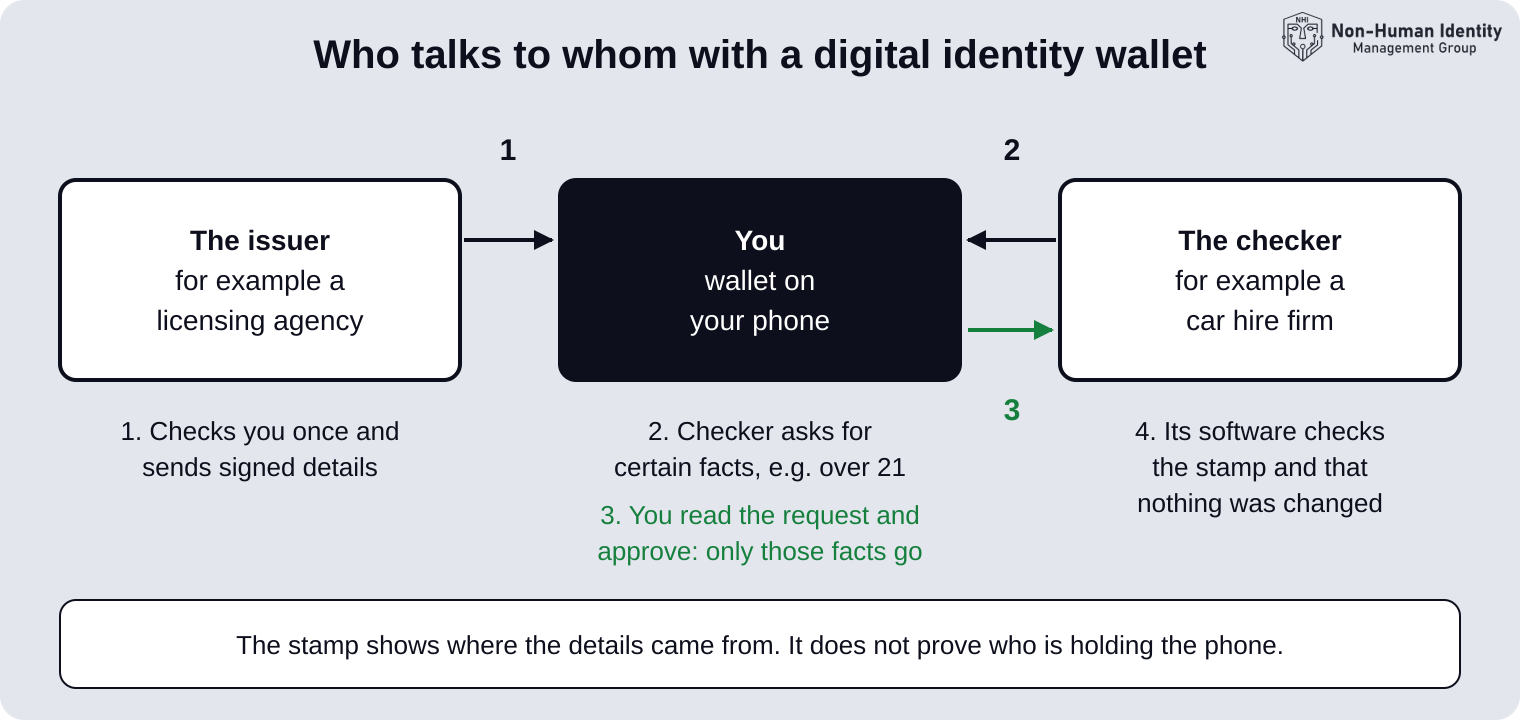
A digital identity wallet is an app on your phone that does this. An official body, called the issuer, puts a credential into it. That is a set of facts about you, such as your name and licence type. The issuer adds a digital signature, a kind of tamper-proof stamp made with maths. You are the holder: you keep the credential and decide when to show it.
When a service asks for proof, your wallet shows you who is asking and what they want. You approve or say no. If you approve, the wallet sends just those details. The service, called the relying party, checks the stamp with its software.
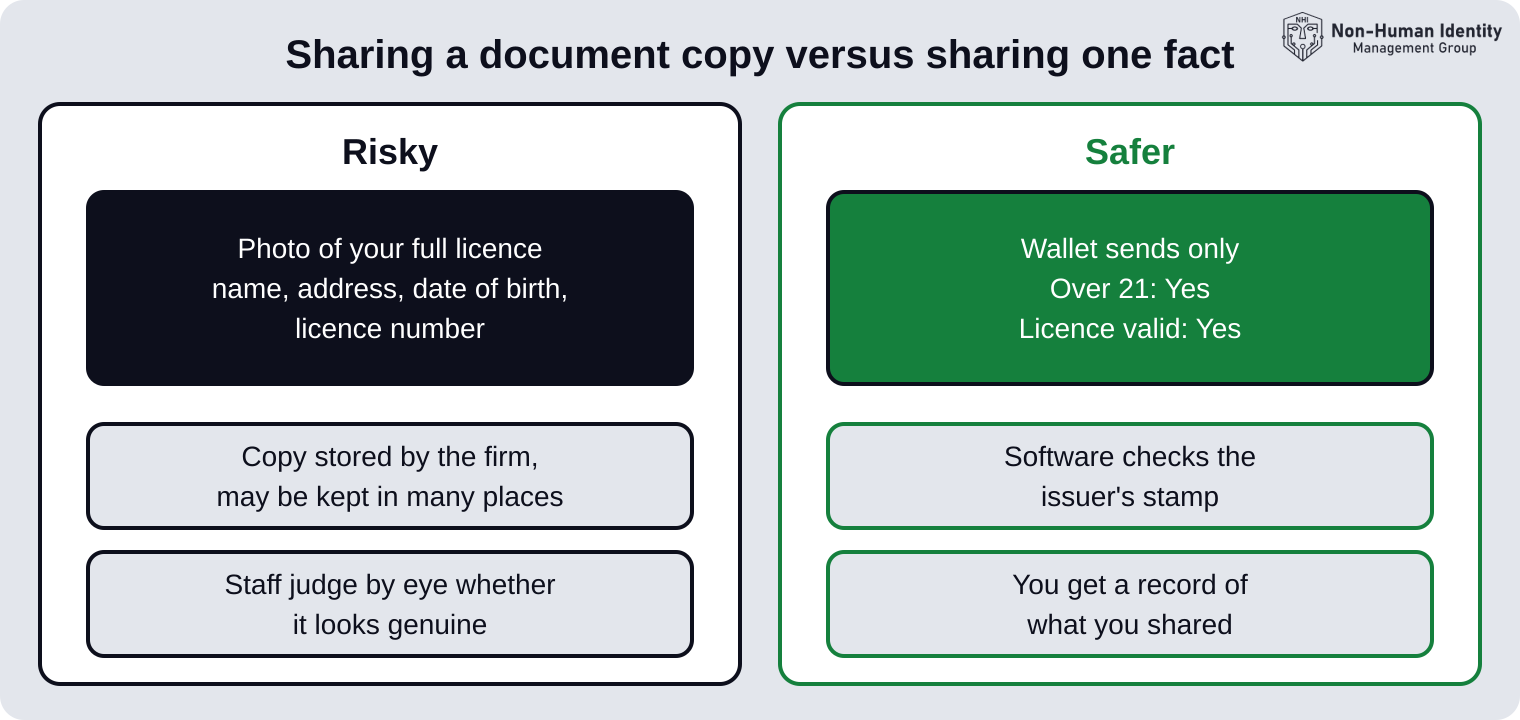
Sharing just one detail is called selective disclosure. The European Commission gives the example of proving your age without showing your exact birth date.[2]
Where the comparison stops working: a plastic card can be copied or faked with care. A signed credential is checked by software, so a change to any detail should show up. But the stamp proves who issued the details. It does not prove that the person holding the phone is the right person.
Why does it matter?
Today, many firms ask you to upload photos of your documents. Those copies then sit in many places. A wallet can let you share less, and let the checker trust what it gets.
If you use ID in daily life
What could happen: you approve a request in a hurry and share more than you meant to.
Check this: read who is asking and what they want before you press approve.
Next: Phishing for Beginners
If you run a business that checks ID
What could happen: you keep copies of full documents you never needed, and they become a target.
Check this: list which facts each check really needs, such as "over 18" only.
If you are new to IT or security work
What could happen: staff are asked to "verify their wallet" through a fake link.
Check this: teach people to open the wallet app themselves, never from a link in a message.
What does it look like?
Here is a made-up request screen, the kind a wallet shows before you share anything.
Example only. All values are made up.
Share from your wallet?
Requested by: Example Car Hire Ltd (example.com)   (1)
They are asking for:
  Name: EXAMPLE PERSON
  Licence categories: B
  Licence valid until: 01/01/2099
  Over 21: Yes                                     (2)
Not requested: home address, date of birth          (3)
[ Decline ]          [ Approve with fingerprint ]   (4)
- In a real screen, this line would show the name of the service asking. Check it matches the app or desk you are using.
- Only the fact that you are over 21 is shared, not your birth date.
- Details the service did not ask for stay in your wallet.
- Nothing is sent until you unlock and approve.
Why this is risky: people often press approve without reading. A fake or nosy service could ask for more than it needs, and you would hand it over.
The safer way: read the "Requested by" line and the list each time. If the request is bigger than the job, decline.
How does it work?
Screens and names differ between wallets and countries, but a typical journey looks like this.
- Set up the wallet. You install a wallet app, or use one built into your phone, and protect it with your phone's PIN, fingerprint or face unlock.
- Prove who you are once. The issuer checks you are the real person. This step is called identity proofing. It might mean scanning your passport and taking a selfie.
- Receive the credential. The issuer sends the signed details to your wallet. They are often tied to a key kept on your phone, which is called device binding.
- A service asks. A shop, website or office asks for certain details, such as "over 18".
- You review and approve. The wallet shows who is asking and what for. You unlock it and agree, or decline.
- The checker verifies. The service's software checks the issuer's stamp and that the details have not been changed.
For driving licences on phones, an international standard sets out how the phone and a reader talk to each other.[3] A US government cyber security centre says these licences rest on public key cryptography, a way of stamping data so others can check it. It says this makes them checkable by software and allows the potential for selective disclosure.[4]
In the European Union, a law that came into force on 20 May 2024 sets rules for a European Digital Identity Wallet.[1] The Commission says each member country will offer at least one wallet, built to common rules, by 2026. It says the wallet is planned to be free for users.[2]
What a wallet can show: that a trusted issuer stated these facts and that they have not been changed. With device binding, it can also show they come from the holder's phone. What it cannot show on its own: that the issuer's first checks were right, or that the person tapping the phone has not been tricked.
A worked example
Jarrah Wojcik is 24 and wants to hire a car for a weekend away. In the past, the hire app asked for photos of both sides of the licence and a selfie. Then Jarrah waited for someone to check them by hand.
This time the app offers "share from your wallet". The wallet opens and shows the request. The hire firm wants a name, licence type, the licence end date and proof of being over 21. It does not ask for a home address.
Jarrah thinks of the card holder: show only the card that is needed. The firm's name on the screen matches the app, so Jarrah unlocks with a fingerprint and approves. The firm's system checks the stamp and confirms the booking.
That evening a text arrives. "Your wallet needs verifying. Tap here." Jarrah does not tap. Instead Jarrah opens the wallet app directly. There is no warning inside it, and the app's history shows only the car hire share. Jarrah deletes the text.
At the desk on Saturday, staff still check Jarrah's face against the booking. The wallet did not remove every check. But the firm now holds less of Jarrah's data, and Jarrah has a record of what was shared, with whom and when. The EU law expects its wallets to keep a log like this.[5]
Myths and mistakes
| What people think | What is true |
|---|---|
| A wallet is just a photo of my ID. | It holds signed details that software can check, not a picture to judge by eye. |
| I have to share everything on my licence. | Many wallets let you share only the facts asked for, such as your age.[2] |
| A short PIN is fine for my phone. | Your phone lock now guards your ID. Use a strong PIN and your phone's fingerprint or face unlock. |
| A message asking me to verify my wallet is from the wallet. | Open the wallet app yourself. Do not follow links in messages. |
| If I lose my phone, my ID is gone. | Learn your wallet's recovery steps before you need them, and keep your physical documents. |
What can I do this week?
- Check your government's official website for its digital ID or digital driving licence plans.
- Set a strong phone PIN and turn on fingerprint or face unlock.
- Turn on your phone's find, lock and wipe feature.
- If you run a service, write down which ID facts each check really uses.
Checklist
- I install wallet apps only from the official app store or my government's official site.
- My phone has a strong PIN and fingerprint or face unlock.
- I read who is asking and what they want before I approve.
- I open the wallet app myself, never from a link in a message.
- I know how to lock, recover or remove my wallet if my phone is lost.
- I look at my wallet's history now and then for shares I do not recognise.
- I keep my physical ID, as wallets are not accepted everywhere.
Common questions
Is a digital identity wallet safe?
It can be safer than sending photos of documents, because you share less and the checker can confirm the details are genuine. The main everyday risks are a weak phone lock, a lost phone with no recovery plan, and approving a request without reading it.
Does the wallet send my whole ID every time?
Not if the wallet supports selective disclosure. It sends only the facts you approve, such as being over 18. The request screen shows what is being asked for, so you can decline if a service wants more than the job needs.
Will I have to use a wallet?
Not for private services in the EU. The EU law says users should be under no obligation to use the wallet to access private services.[5] Rules elsewhere vary, so check your own government's official website. We suggest keeping your physical documents, because many places still ask for them.
What happens if I lose my phone?
Lock or wipe it using your phone's find feature, then follow your wallet provider's recovery steps. Your phone lock helps stop a finder using the wallet. Learn the recovery steps now, before you need them, and keep your physical documents as a back-up.
Is a digital identity wallet the same as a payment wallet?
No. A payment wallet holds bank cards for paying. An identity wallet holds signed facts about you, such as a licence or proof of age. Some phone apps do both, but the ID part follows its own rules and checks.
Where next?
Ready for the detail? Read the practitioner guide: Digital Identity Wallets Guide. It goes further into how wallets are built, how relying parties connect to them and the security choices behind device binding and recovery.
Also useful:
- Decentralised Identity for Beginners
- Identity Proofing for Beginners
- Citizen Digital Wallet Safety Guide
- Mobile Driving Licence (mDL) Guide
- eIDAS 2.0 and the European Digital Identity Framework Guide
Related NHI Mgmt Group resources: Digital Identity Wallet Fraud Risks Guide · EUDI Wallet Architecture and Reference Framework Guide · Digital Identity Wallet and Verifiable Credentials
Key terms
- Digital identity wallet
- Software that stores signed credentials and shares the ones you approve.
- Credential issuer
- The body that creates and signs a credential, such as a licensing agency.
- Holder
- The person who keeps credentials in a wallet and decides when to show them.
- Relying party
- The service that receives the proof and decides whether to accept it.
- Selective disclosure
- Sharing only the identity details needed for one decision.
- Identity proofing
- Checking a person is who they claim to be before a credential is issued.
- Device binding
- Tying a credential to a key on one device, so it is harder to use from another.
Sources and further reading
- Regulation (EU) 2024/1183 of the European Parliament and of the Council of 11 April 2024 amending Regulation (EU) No 910/2014 as regards establishing the European Digital Identity Framework. EUR-Lex, Publications Office of the European Union. https://eur-lex.europa.eu/eli/reg/2024/1183/oj/eng, accessed 28 Nov 2026.
- EU Digital Identity Wallet Home. European Commission. https://ec.europa.eu/digital-building-blocks/sites/display/EUDIGITALIDENTITYWALLET/EU+Digital+Identity+Wallet+Home, accessed 28 Nov 2026.
- ISO/IEC 18013-5:2021 Personal identification, ISO-compliant driving licence, Part 5: Mobile driving licence (mDL) application. International Organization for Standardization, September 2021. https://www.iso.org/standard/69084.html, accessed 28 Nov 2026.
- Digital Identities: Mobile Driver's License (mDL). National Cybersecurity Center of Excellence (NCCoE), NIST. https://www.nccoe.nist.gov/projects/digital-identities-mdl, accessed 28 Nov 2026.
- Regulation (EU) 2024/1183, recitals 13 (common dashboard and transaction log), 57 (no obligation to use a wallet for private services) and 59 (selective disclosure). EUR-Lex, Publications Office of the European Union. https://eur-lex.europa.eu/legal-content/EN/TXT/HTML/?uri=OJ:L_202401183, accessed 28 Nov 2026.