NHI discovery means finding every account and key your software uses, and an inventory is the list you keep.
This guide is for anyone who looks after systems, pays for them or is new to security work. You do not need to be technical to be affected: every app your business connects to another app usually adds a software account or key.
In short
- Software signs in to other systems with its own accounts and keys, called non-human identities (NHIs).
- Most organisations have many of these, spread across cloud services, business apps and code.
- Discovery is the search. The inventory is one list with an owner, purpose and last-used date for each.
- Start with your most important systems, then repeat the search on a schedule, because new ones keep appearing.
What you will learn
- Explain the difference between discovery and an inventory.
- Spot the places where software accounts and keys tend to hide.
- Check what details each entry in the list should hold.
- Ask who keeps your organisation's list up to date.
- Non-human identity (NHI)
- a digital identity, or the credential behind it, that represents a machine, application, automated process, service or AI agent, so it can authenticate, carry out tasks and connect to other systems without a person.
- The search (discovery)
- looking through each system to find those accounts and keys.
- The list (inventory)
- one kept-up-to-date record of everything the search found.
What is NHI discovery and inventory?
Think of a stocktake of every key in a large building. You walk round each room and find every key, including the spare taped under a desk. Then you write each one in a key register.
The register says which door each key opens, who is responsible for it and when it was last used.
Software works the same way. Programs sign in to other systems using a non-human identity (NHI). This could be a service account, which is an account used by a program, not a person. It could also be an API key (a secret code one program shows another), a cloud role or an AI agent. Discovery is the search for all of them. The inventory is the list where you record what you found.
Where the comparison stops working: a physical key sits in one place. A software key can be copied into code, settings files and laptops. One account can also have several keys at once. So a good search looks for the account, its keys and what it is allowed to do.
NHI Mgmt Group treats this as continuous discovery and inventory, the second of the seven stages in looking after a software identity. "Continuous" matters: new accounts and keys appear all the time, so the search is repeated, not done once. The NHI Lifecycle Management Guide covers all seven stages.[4]
Why does it matter?
You cannot protect an account you do not know about. Changing keys, reviewing access and removing old accounts all start with the list.
Forgotten accounts are a known risk. A non-profit security group publishes a list of the top risks for software accounts. Its first risk is old software accounts that are not removed properly. It warns about accounts left active after their owner leaves.[1]
If you run a small business
What could happen: an old key for your email or payment service still works, and nobody remembers it exists.
Check this: ask each supplier for a list of the keys and accounts they set up for you.
Next: API Keys for Beginners
If you are new to IT work
What could happen: an auditor asks for your list of software accounts, and there is none.
Check this: find out which systems can export a list of accounts and keys.
If you manage a team
What could happen: nobody can say how many software accounts exist, or which could hurt the business if stolen.
Check this: name one person to keep the list and agree how often it is refreshed.
What does it look like?
Here are three made-up rows from a small inventory, kept in a shared spreadsheet.
Example only. All values are made up.
Name            | Kind        | Owner     | Used for        | Last used  | Secret kept in   (3)
shop-orders-app | cloud role  | Web team  | Read orders     | yesterday  | none needed
mail-key-01     | API key     | (blank)   | (unknown)       | 2024-03-01 | vault/FAKE-0000  (1)
backup-svc      | service acct| IT lead   | Nightly backup  | today      | vault/EXAMPLE    (2)
- No owner, no known purpose and not used for a long time. This row needs attention first.
- A healthy row: a named owner, a clear purpose and recent use.
- In a real file, this column would contain a pointer to a vault entry, never the secret itself.
Why this is risky: the mail key may still work, but nobody knows who uses it or whether it is needed. If it leaked, nobody would know where to start.
The safer way: find an owner for the mail key, or turn it off and watch for anything that breaks. Then delete it.
How does it work?
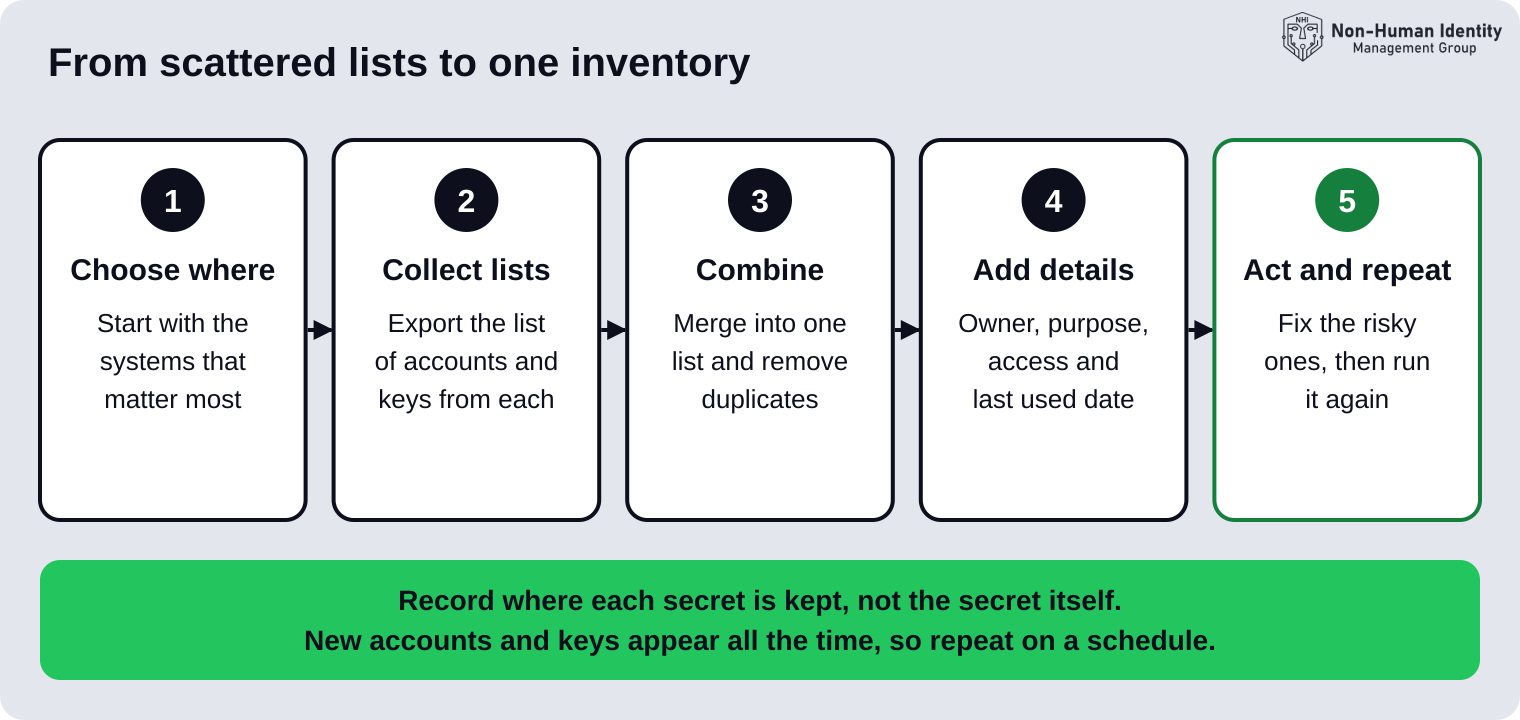
Tools differ, but a basic search follows the same steps.
- Choose where to look. Start with your main cloud service, your staff directory, your code store and the business apps that hold your most sensitive data.
- Collect the lists. Many systems can export one. For example, AWS offers a credential report. It lists each user account and the status of its passwords and keys, including when each key was last used.[2]
- Combine them. Merge the lists into one inventory, so the same account seen in two places becomes one row.
- Add the details. For each row, record the owner, purpose, access and last-used date. Record where a secret is kept, never the secret itself.
- Act on it. Find owners for rows with none, review unused accounts and look at the most powerful ones first.
- Repeat. Run the search again on a schedule. Microsoft notes it is hard to track when a software identity is created or when it should be removed.[3]
Common places to look include cloud accounts, the staff directory, connected business apps, build systems (tools that test and release code automatically) and code files. AI tools are a newer place to check, because staff can create keys for them quickly.
A worked example
Coastfield Nursery is a fictional plant nursery with a website shop, a delivery app and an accounts package. Ines Grieve, the office manager, is asked by the insurer how many software accounts the business has.
She does not know. She asks Hiro Mwangi, the part-time IT contractor, to help.
They start small. Hiro exports the list of accounts and keys from the cloud service that runs the shop. He also checks the admin pages of the delivery app and the accounts package for connected apps.
Ines puts everything into one spreadsheet. They find nineteen entries, not the five she expected.
For each row, Hiro adds what it is for and when it was last used. Ines adds an owner. Three keys have no owner and have not been used for over a year. One was made by a web designer who left two years ago.
They do not delete them straight away. Hiro turns them off first and watches for a week. Nothing breaks, so they delete them.
Ines adds a calendar reminder to repeat the search every three months. She also asks every supplier to tell her when they create a new key. The insurer gets a clear answer, and the nursery has a list it can keep up to date.
Myths and mistakes
| What people think | What is true |
|---|---|
| We only have a handful of software accounts. | Most teams find more than they expect. Every connected app can add one. |
| One search is enough. | New accounts appear all the time. Repeat the search on a schedule. |
| The inventory should hold the passwords too. | Record where each secret is kept, not the secret itself. |
| An unused account is harmless. | If its key still works, anyone who finds the key may be able to use it. |
| Delete everything you do not recognise at once. | Turn it off first and watch for problems, then delete it. |
What can I do this week?
- Pick your three most important systems and export their lists of accounts and keys.
- Put them in one spreadsheet with columns for owner, purpose and last used.
- Mark any row with no owner or no use for a long time.
- Ask suppliers to list the keys and accounts they created for you.
- Set a reminder to repeat the search.
- Take NHI Mgmt Group's free maturity assessment to see how far along your wider approach is.
Checklist
- There is one inventory of software accounts and keys.
- Each row has an owner, a purpose and a last-used date.
- The inventory records where secrets are kept, not the secrets.
- Cloud services, business apps, code stores and build systems are all covered.
- Rows with no owner or no recent use are reviewed.
- Unused accounts are turned off before they are deleted.
- The search is repeated on a set schedule.
Common questions
What is the difference between discovery and an inventory?
Discovery is the search. An inventory is the result you keep. Discovery finds accounts and keys across your systems. The inventory records each one with its owner, purpose, access and last use, and you update it each time you search again.
Do I need a special tool to start?
No, a spreadsheet is enough to start. Many cloud services and business apps can export their own lists. Specialist tools help when you have many systems, because they collect and merge the lists for you and repeat the search automatically.
How often should we repeat the search?
Regularly, on a schedule that fits how fast you change. We suggest at least every three months for a small business, and more often where new apps and keys appear weekly. Also search after a supplier leaves or a project ends.
What should I do with an account nobody owns?
Try to find an owner first, by checking what it is used for and who created it. If nobody claims it, turn it off and watch for problems. If nothing breaks after a sensible period, delete it and record the decision.
Where next?
Ready for the detail? Read the practitioner guide: NHI Discovery Across Cloud, SaaS, CI/CD and On-Premises Environments. It goes further into where to search on each kind of platform, which tools help and how to handle what you find.
Also useful:
- NHI Inventory Reconciliation
- Service Account Inventory Template
- NHI Ownership for Beginners
- Non-Human Identities for Beginners
- NHI Foundation Level Training
Related NHI Mgmt Group resources: Orphaned and Dormant Accounts · NHI Risks for Beginners · NHI and AI Governance Maturity Model
Key terms
- Non-human identity (NHI)
- A digital identity, or the credential behind it, that represents a machine, application, automated process, service or AI agent, so it can authenticate, carry out tasks and connect to other systems without a person.
- NHI discovery
- Finding the software accounts and keys across your systems.
- NHI inventory
- The kept-up-to-date record of every software account and key you have found.
- Service account
- An account used by a program or tool, not by a person.
- API key
- A secret code a program uses to prove it may use another service.
- Orphaned NHI
- A software account that is still active but has no clear owner or purpose.
- Shadow NHI
- A software account created outside the normal process, so the security team does not know about it.
Sources and further reading
- NHI1:2025 Improper Offboarding. OWASP Non-Human Identities Top 10, OWASP Foundation. https://owasp.org/www-project-non-human-identities-top-10/2025/1-improper-offboarding/, accessed 28 Nov 2026.
- Generate credential reports for your AWS account. AWS Identity and Access Management User Guide, Amazon Web Services. https://docs.aws.amazon.com/IAM/latest/UserGuide/id_credentials_getting-report.html, accessed 28 Nov 2026.
- What are workload identities? Microsoft Learn, Microsoft. https://learn.microsoft.com/en-us/entra/workload-id/workload-identities-overview, accessed 28 Nov 2026.
- NHI Lifecycle Management Guide. Lalit Choda, NHI Mgmt Group, updated 27 October 2026. https://nhimg.org/nhi-lifecycle-management-guide, accessed 28 Nov 2026.