NHI ownership means every software account has a named person who answers for it.
This guide is for anyone who manages people, systems or suppliers, or who is new to security work. You do not need to be technical to own one: the owner decides whether the account is still needed, and that is a business choice.
In short
- Software signs in with its own accounts and keys, and each one needs a named person responsible for it.
- Accounts with no owner are rarely checked, and their keys are rarely changed or removed.
- Name an owner when the account is made, record a backup and move ownership when people leave.
- Before removing an account nobody owns, turn it off first and watch for problems.
What you will learn
- Explain what it means to own a software account.
- Spot an account that has no owner.
- Check what should happen when an owner leaves.
- Ask who owns the software accounts your team relies on.
- Non-human identity (NHI)
- a digital identity, or the credential behind it, that represents a machine, application, automated process, service or AI agent, so it can authenticate, carry out tasks and connect to other systems without a person.
- Named person responsible (owner)
- the person who answers for why the account exists and when it should go.
- Account with no owner (orphaned)
- an account that still works, but nobody is responsible for it.
What is NHI ownership?
Think of the sign-out sheet for power tools in a workshop. Each tool taken out has a name next to it. If a drill goes missing, you know who to ask.
Software accounts need the same kind of sheet. A program signs in to other systems with a non-human identity (NHI). Examples are a service account (an account used by a program) and an API key (a secret code one program shows another).
The owner is the named person who answers for that account. They say why it exists, check it still has the right access and agree when it should be removed. The owner does not have to do every task. They are the person who answers for it.
Where the comparison stops working: a drill is easy to see and sits in one place. A software account is invisible to most staff, and copies of its key can sit in code and on laptops. So ownership works best alongside a full list of your accounts.
NHI Mgmt Group treats this as classification and ownership, the third of the seven stages in looking after a software identity. Each account gets an owner and a note of how much harm it could do, so the riskiest are dealt with first. The NHI Lifecycle Management Guide covers all seven stages.[4]
Why does it matter?
People come and go, but software accounts keep working. When nobody is responsible, an account is not checked, its keys are not changed and it is not removed when its job ends.
After a breach at a supplier, Cloudflare said it failed to change one service token and three service accounts. It said they were mistakenly believed to be unused. Cloudflare said this was how the attacker first got in.[3] Read our Cloudflare Thanksgiving Breach 2023 page for the full story.
If you run a small business
What could happen: the person who set up your shop's connections leaves, and nobody knows which keys they made.
Check this: ask who now looks after each connection your business relies on.
If you are new to IT work
What could happen: you find a risky account and spend days working out who it belongs to.
Check this: when you create an account, write down its owner and its purpose.
If you manage a team
What could happen: a team member leaves, and the accounts they owned keep running with nobody watching.
Check this: add "hand over software accounts" to your leaver checklist.
What does it look like?
Here is a made-up ownership record for one software account, as it might appear in a team's list.
Example only. All values are made up.
Account:          invoices-sync (service account)
Purpose:          Copies paid invoices into the accounts app
Business owner:   Finance manager                      (1)
Technical owner:  EXAMPLE-former-staff (left in 2025)  (2)
Backup owner:     (blank)                              (3)
Last confirmed:   never                                (4)
- The business owner decides whether the account is still needed.
- In a real file, this line would contain the name of the person who looks after its keys and settings. Here that person has left.
- No backup owner, so nobody covers absence or a departure.
- Nobody has ever confirmed the account is still needed.
Why this is risky: nobody is changing the account's keys or checking its access. If it were misused, nobody would be watching for it.
The safer way: name a new technical owner and a backup from the same team. Then ask the owners to confirm the account is still needed.
How does it work?
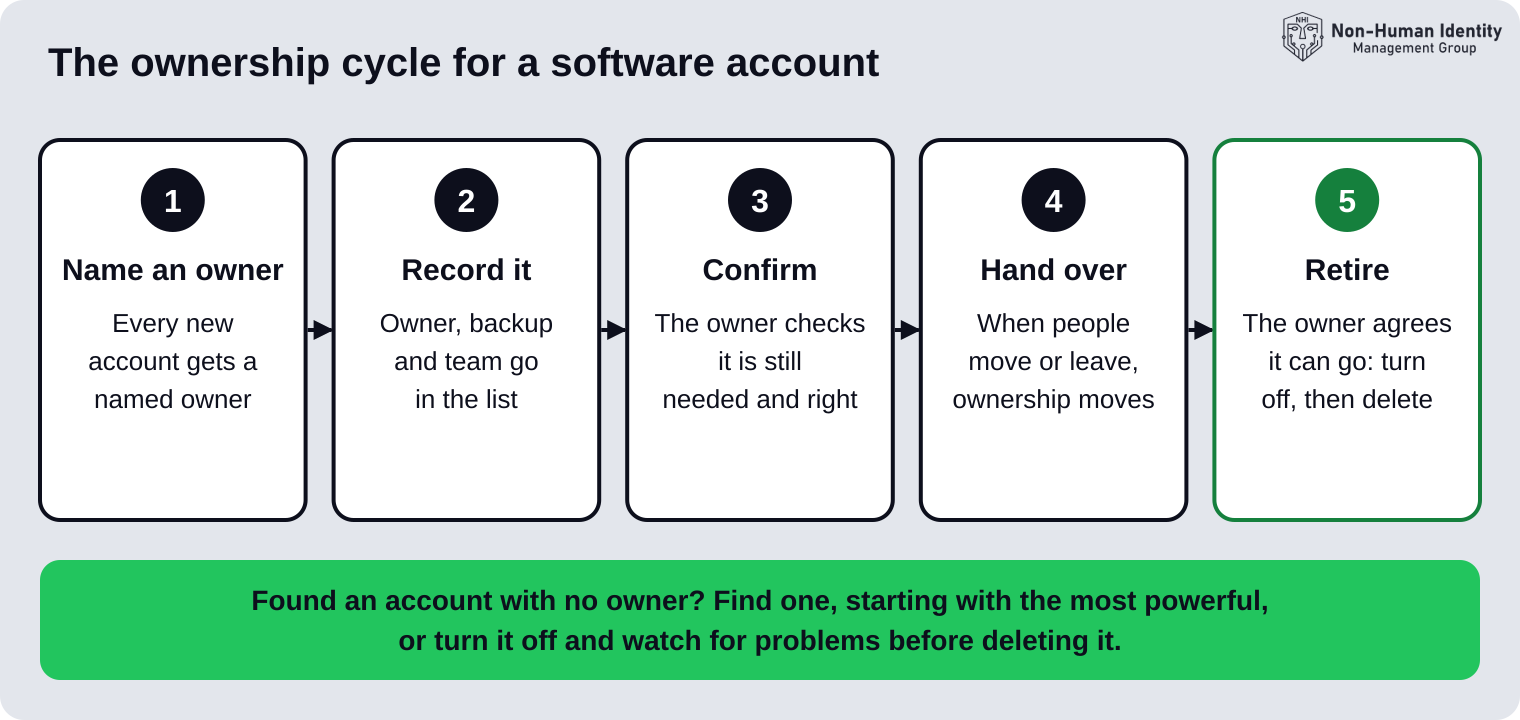
- Name an owner at the start. Whoever asks for a new account names a business owner, a technical owner and the owning team. We suggest no account is made without them.
- Record it. Store the owners in your list of accounts and, where the system allows, as a label on the account itself.
- Confirm on a schedule. Owners confirm the account is still needed, its access is still right and they are still the right owner. This is called ownership attestation (a formal check that the owner is still correct). A security group's top risks list advises regular checks like this.[1]
- Hand over when people move. When an owner changes job or leaves, their accounts move to a new owner. Any keys the person could see are changed.
- Retire with the owner's agreement. When the owner says the account is no longer needed, it is turned off, watched for problems and then deleted.
The creator is not always the right owner. In Microsoft's cloud directory, a user who registers an app is automatically added as its owner.[2] That person may move on, so the creator should not be the only record of ownership.
A worked example
Ines Okonkwo has just become operations manager at a fictional online furniture shop. In her first week, the accounts app stops receiving paid invoices.
The cause is a software account called invoices-sync, whose key has expired. Ines asks who owns it, but nobody knows.
Hiro Quigley, the shop's IT lead, checks the records and finds the account was made by a developer who left last year. No backup owner was ever named.
Ines remembers the workshop sign-out sheet, where a tool with no name next to it is nobody's job.
So they fix the invoices first. Hiro issues a new key and stores it in the shop's vault, a locked store for passwords and keys. Ines becomes the business owner, because finance depends on it. Hiro becomes the technical owner, and a colleague in his team is named as backup.
Then they look wider. Hiro lists every software account and adds an owner column. Four accounts have no owner. Two are still needed, so Ines finds owners for them. The other two are turned off and watched for a month, and nothing breaks, so they are deleted.
Last, Ines adds "hand over software accounts" to the leaver checklist. She also books a twice-yearly check where owners confirm their accounts.
Myths and mistakes
| What people think | What is true |
|---|---|
| The IT team owns all software accounts. | IT may run them, but a business owner should decide whether each one is needed. |
| Naming a team is enough. | Name a person too, backed by a team, so someone answers and someone covers. |
| Whoever created it is the owner. | Creators move on. Record the owner on purpose and keep it current. |
| An account with no owner can be deleted at once. | Turn it off first and watch for problems. Something may still depend on it. |
| Ownership is set once and forgotten. | Owners change. Confirm ownership on a schedule and when people move. |
What can I do this week?
- Pick your ten most important software accounts and write down who owns each.
- Name a backup owner for any account with only one person.
- Add "hand over software accounts" to your leaver and mover checklists.
- Find any account whose owner has left, and assign a new one.
Checklist
- Every software account has a named business owner and technical owner.
- Every account also has a backup owner or owning team.
- Owners are recorded in the list of accounts and, where possible, on the account.
- Owners confirm their accounts on a set schedule.
- Leaver and mover checklists include handing over software accounts.
- Accounts with no owner are found and given one, or turned off.
- Accounts are turned off and watched before they are deleted.
Common questions
Who should own a software account?
Usually two people. A business owner, such as the manager of the service it supports, decides whether it is needed. A technical owner, such as an engineer, looks after its keys and settings. A backup or owning team covers absence and departures.
What happens when an owner leaves?
Their accounts should move to a new owner as part of the normal leaver process. Any keys the person could see should be changed. If this step is missed, the accounts keep running with nobody watching them, which is how many accounts end up with no owner.
Does the owner have to be technical?
No, not the business owner. Their job is to say why the account exists and whether it is still needed. The technical owner handles keys and settings. Together they cover both the business reason and the day-to-day care.
How often should owners confirm their accounts?
On a regular schedule. We suggest at least twice a year, and more often for powerful accounts. Owners should also confirm when they change job, when a project ends or when a supplier relationship ends.
Where next?
Ready for the detail? Read the practitioner guide: NHI Ownership Guide. It goes further into owner roles, how to record ownership on each platform and how to run handovers and confirmation checks at scale.
Also useful:
- NHI Ownership Attestation Campaigns Guide
- What to do when the owner of a service account leaves
- NHI Discovery and Inventory for Beginners
- Non-Human Identities for Beginners
- NHI Foundation Level Training
Related NHI Mgmt Group resources: Orphaned and Dormant Accounts · NHI Ownership RACI · Ownership for Orphaned and Abandoned AI Agents
Key terms
- Non-human identity (NHI)
- A digital identity, or the credential behind it, that represents a machine, application, automated process, service or AI agent, so it can authenticate, carry out tasks and connect to other systems without a person.
- Service account ownership
- Naming a business or technical owner who is accountable for a software account.
- Orphaned NHI
- A software account that is still active but has no clear owner or purpose.
- Ownership attestation
- A formal check where the owner confirms they are still responsible for an account.
- Ownership drift
- When the recorded owner no longer matches who really looks after the account.
- Offboarding
- Retiring a software account safely when it is no longer needed, including removing its keys.
Sources and further reading
- NHI1:2025 Improper Offboarding. OWASP Non-Human Identities Top 10, OWASP Foundation. https://owasp.org/www-project-non-human-identities-top-10/2025/1-improper-offboarding/, accessed 28 Nov 2026.
- Overview of enterprise application ownership in Microsoft Entra ID. Microsoft Learn, Microsoft. https://learn.microsoft.com/en-us/entra/identity/enterprise-apps/overview-assign-app-owners, accessed 28 Nov 2026.
- Thanksgiving 2023 security incident. The Cloudflare Blog, Cloudflare, 1 February 2024. https://blog.cloudflare.com/thanksgiving-2023-security-incident/, accessed 28 Nov 2026.
- NHI Lifecycle Management Guide. Lalit Choda, NHI Mgmt Group, updated 27 October 2026. https://nhimg.org/nhi-lifecycle-management-guide, accessed 28 Nov 2026.