An open source licence is the set of rules that says how you may use, change and share free code.
This guide is for students, new developers and anyone whose business ships an app or website. You do not need to write code to be affected: if a supplier builds software for you, it almost certainly contains open source parts, and each one comes with a licence. This guide explains licences in general terms and is not legal advice.
In short
- Open source code is free to use, but it is not rule-free. Its licence sets the conditions.
- Permissive licences, such as MIT and Apache 2.0, mostly ask you to keep the copyright and licence notices.
- Copyleft licences, such as the GPL, can ask you to share your own source code when you give the software to others.
- Code with no licence at all is not free to reuse. Keep a list of the parts you use and their licences.
What you will learn
- Explain what an open source licence is in one sentence.
- Tell a permissive licence from a copyleft licence.
- Spot the moment when a licence starts to ask something of you.
- Ask your team or supplier which licences are inside your software.
- Ready-made code (open source package)
- code that anyone may use, change and share under its licence.
- Light-touch rules (permissive licence)
- a licence that lets you do almost anything if you keep its notices.
- Share-alike rules (copyleft licence)
- a licence that asks you to pass on the same freedoms when you share the code.
What is an open source licence?
Think of a recipe a friend shares with you. At the bottom of the card is a note. It asks you to say where the recipe came from. Another friend's card asks more. If you hand out your version, you must share your recipe too.
Open source code comes with a note like that, called a licence. It is a legal permission from the people who wrote the code. Without it, the law treats code like a book or a song: the author keeps the rights, and you need permission to copy it.[2]
To count as open source, a licence must meet a published set of ten rules. They include letting anyone share the code, see the source and make changes, without picking who may use it.[4] Inside those rules, licences ask for quite different things in return.
Where the comparison stops working: a recipe note is a friendly request. A licence is a legal agreement, and breaking its conditions can mean you lose the right to use the code.
Why does it matter?
Most apps are built from many open source parts, and each part brings its own licence. Missing a condition can cost time, money or trust, even when nobody meant any harm.
If you are learning to code
What could happen: you copy code from a public project with no licence and build your portfolio on it.
Check this: look for a LICENSE file in the project before you reuse anything.
If you pay someone to build your app
What could happen: your app ships with a part whose licence asks you to share your own code.
Check this: ask your supplier for a list of the parts used and their licences.
Next: SBOMs for Beginners
If you run an online service
What could happen: you change a part under a network licence and run it for customers without offering its source.
Check this: list which parts you have changed, and what licence each one uses.
Next: Open Source Risk and Software Composition Analysis for Beginners
What does it look like?
Many teams keep a short report of the parts inside an app. Here is a made-up one for a small booking app.
Example only. All values are made up.
# parts report for the EXAMPLE booking app
EXAMPLE-dates     2.1   licence: MIT            (1)
EXAMPLE-web       5.0   licence: Apache-2.0     (2)
EXAMPLE-charts    3.4   licence: GPL-3.0-only   (3)
EXAMPLE-chat      1.2   licence: AGPL-3.0-only  (4)
EXAMPLE-helper    0.9   licence: (none found)   (5)
- A permissive licence. Keep the copyright and licence notice with the code.
- Also permissive. Keep the notices and say if you changed the files.
- A copyleft licence. If you hand out an app built with it, the app's source may need to be shared too.
- A network copyleft licence. Running a changed copy as an online service can bring in the share rule.
- No licence found. In a real file, this line would mean there is no clear permission to reuse the part.
Why this is risky: the last three lines each need a decision. A team that never reads the report will miss them. Short names such as "MIT" come from a shared list called SPDX, so every tool means the same licence by the same name.[5]
The safer way: agree which licences your team may use freely. Agree which need a review first. Decide what to do with parts that have no licence. Then check the report each time parts change.
How does it work?
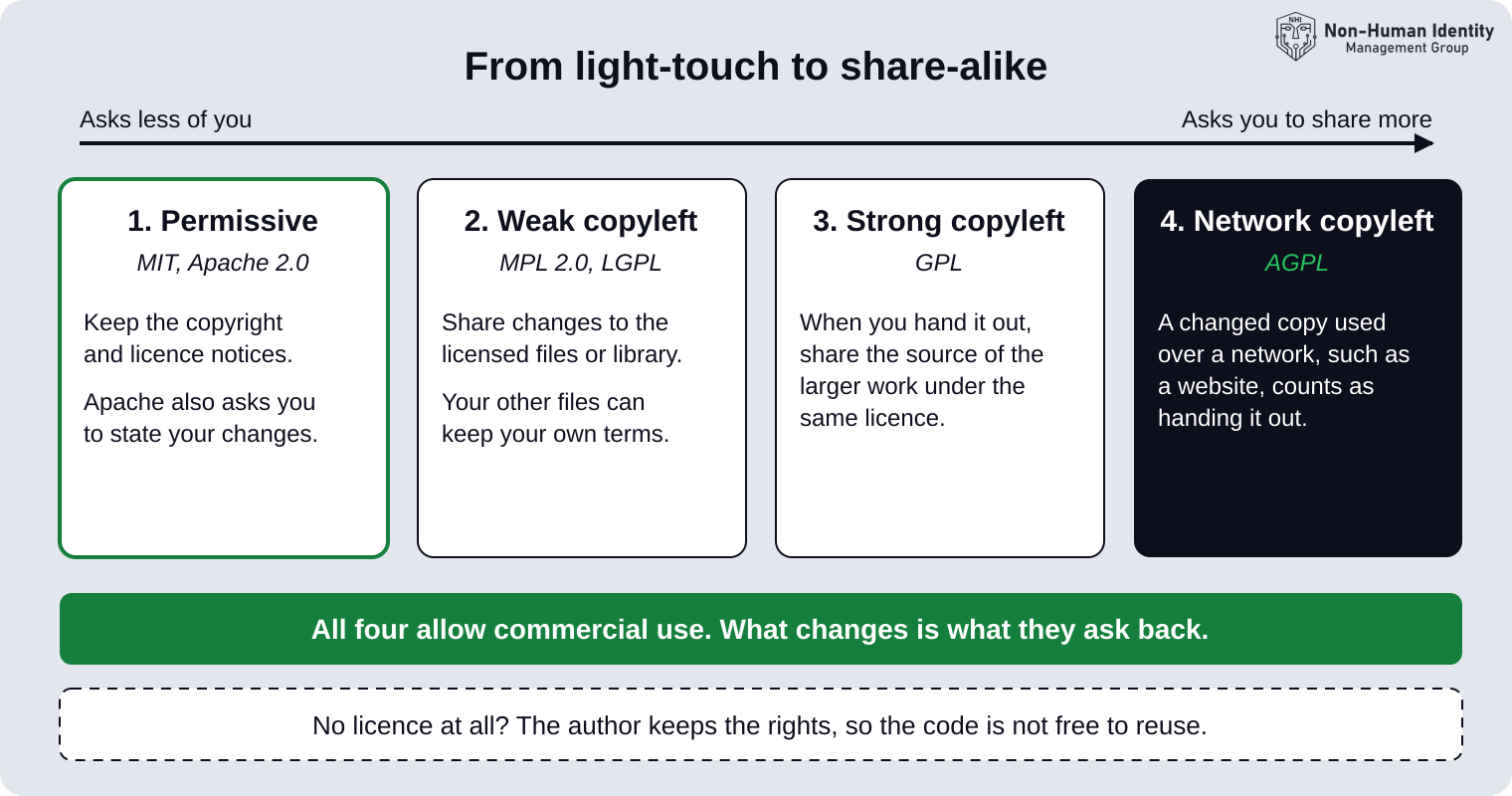
Most licences sit somewhere on a line from "do almost anything" to "share alike, even online".
- Permissive licences. MIT lets you use, change, share and sell the code. Its main condition is to keep the copyright and licence notice.[1]
- Permissive with extras. Apache 2.0 also asks you to state your changes. It gives you an express right to use the authors' patents, and it does not let you use their trade marks.[1]
- Weak copyleft. Licences such as the Mozilla Public License ask you to share changes to their own files. Your other files can stay under your own terms.[1]
- Strong copyleft. The GPL asks that a larger work containing the code is released under the same licence, with its source, when you share it.[1]
- Network copyleft. The AGPL treats letting people use a changed copy over a network, such as a website, like handing it out. So its source must be offered too.[1]
All five kinds allow commercial use, and all of them come with no warranty.[1] What changes is what they ask back. The duties mostly start when you share the software with others, not when you simply use it.
A worked example
Odile Zamora runs Willow Interiors, a fictional design studio. She pays a freelance developer, Marek Erikson, to build a booking app that customers download to their phones.
Before launch, a large client asks Odile a question she cannot answer. "Which open source licences are in the app?"
Odile remembers the recipe cards. Free code is not rule-free. So she asks Marek for a parts report.
Marek runs a free tool that lists every part and its licence. Most parts use MIT or Apache 2.0. For those, he adds their notices to a "credits" screen inside the app.
One part, a chart drawer, uses the GPL. The app will be handed out to customers, so the share-alike rule could apply to the whole app. Marek swaps it for a chart part with a permissive licence that does the same job.
Another small part has no licence file at all. Marek writes to its author and asks them to add one. Until they reply, he takes the part out.
Odile sends the client the list, with a note of the two changes. She also adds a line to Marek's contract: new parts must be checked against an agreed licence list before they go in.
The client is satisfied. Odile did not need to become a lawyer. She needed a list, a few rules and a habit of asking. For the one tricky case, she keeps the option of asking a legal adviser.
Myths and mistakes
| What people think | What is true |
|---|---|
| Open source means no rules. | Every open source licence has conditions. Even the shortest ask you to keep notices.[1] |
| If it is on GitHub, I can reuse it. | Being able to see or copy code is not permission. With no licence, the author keeps the rights.[2] |
| Open source cannot be used in paid products. | MIT, Apache 2.0 and the GPL all allow commercial use. The GPL adds conditions when you share the software.[1] |
| We only run it on our servers, so licences do not matter. | Mostly true, except for network licences such as the AGPL, where a changed copy used online counts.[1] |
| We checked the licence once, so we are done. | New parts arrive and old ones get updated. Check the licences again each time the list changes. |
What can I do this week?
- Ask your developer or supplier for a list of the parts in your app and their licences.
- Look for any part marked "no licence" and decide whether to remove or replace it.
- Check that your app or website shows the notices its permissive parts ask for.
- Write down a short rule: which licences are fine, which need a review, and who decides.
Checklist
- We keep an up-to-date list of the open source parts in each app we ship.
- Each part on the list shows its licence by its standard short name.
- Copyright and licence notices are kept and shown where the licence asks.
- Copyleft and network copyleft parts are reviewed before use.
- Parts with no licence are not used until permission is clear.
- Licences are checked again whenever parts are added or updated.
- Suppliers who build software for us follow the same rules, in writing.
Common questions
What is the difference between MIT and GPL?
MIT is permissive: keep its notice and you may use the code almost any way, including in closed products. The GPL is copyleft: if you share software that contains GPL code, the larger work must also be shared under the GPL with its source. Both allow commercial use.
Can I use open source code in a product I sell?
Usually, yes. MIT, Apache 2.0 and the GPL all allow commercial use. What differs is what each asks in return, from keeping notices to sharing your own source code. Check each part's licence before you ship, and ask a legal adviser about anything unclear.
What if a project has no licence?
Treat it as not free to reuse. Without a licence, the author keeps the usual copyright, so you have no clear permission to copy, change or share it. A missing licence is often an oversight, so asking the author to add one is a good first step.
Do I need to share my code if I use the GPL?
Only in some cases. Using GPL code privately, inside your own organisation, does not usually trigger the share rule. Handing the software to others does. For the AGPL, letting people use a changed copy over a network can also count. Get legal advice for your own case.
Where do I find a project's licence?
Look for a file called LICENSE, often with .txt or .md at the end, in the project's top folder. Some projects name the licence in their README file instead.[3] Package listings and parts reports usually show a short licence name, such as MIT or Apache-2.0.
Where next?
Ready for the detail? Read the practitioner guide: Open Source Licence Compliance Guide. It goes further into licence compatibility, licence data in SBOMs and how to set up a formal compliance programme.
Also useful:
- Open Source Risk and Software Composition Analysis for Beginners
- SBOMs for Beginners
- Software Supply Chain Security for Beginners
- Open Source Software Policy Template
Related NHI Mgmt Group resources: Open Source Security Guide · Top 10 Open Source Software Risks · Open-Weight Model Licence Tracker
Key terms
- Open source licence
- A legal agreement that sets out how open source code may be used, changed and shared.
- Permissive licence
- A licence, such as MIT or Apache 2.0, that mainly asks you to keep its notices.
- Copyleft licence
- A licence that asks you to share your version under the same terms when you hand it out.
- SPDX
- A shared standard that, among other things, gives each licence a short, fixed name such as MIT or GPL-3.0-only.
- SBOM
- A list of the parts inside a piece of software, which can also record each part's licence.
- Transitive dependency
- A part your software uses because another part you chose needs it. It brings its own licence too.
Sources and further reading
- Licenses (MIT, Apache 2.0, GPLv3, AGPLv3, LGPLv3, MPL 2.0). Choose a License, GitHub. https://choosealicense.com/licenses/, accessed 28 Nov 2026.
- No License. Choose a License, GitHub. https://choosealicense.com/no-permission/, accessed 28 Nov 2026.
- Licensing a repository. GitHub Docs, GitHub. https://docs.github.com/en/repositories/managing-your-repositorys-settings-and-features/customizing-your-repository/licensing-a-repository, accessed 28 Nov 2026.
- The Open Source Definition, version 1.9. Open Source Initiative. https://opensource.org/osd, accessed 28 Nov 2026.
- SPDX License List, version 3.29.0. SPDX, Linux Foundation. https://spdx.org/licenses/, accessed 28 Nov 2026.