Secure coding is the practice of writing software in ways that reduce the chance of creating flaws an attacker can exploit, using a small set of safe habits every time you write or change code.
This guide is for people learning to code, junior developers, students, career changers and managers who look after software teams. It explains the core habits in plain English: treating outside data with suspicion, keeping data separate from commands, checking permissions on the server, handling errors carefully and keeping secrets out of code. It does not teach any one programming language, and it contains no attack techniques.
By the end of this guide you will be able to:
- Explain what secure coding means and why it matters.
- Understand why outside data should never be trusted.
- Describe six habits that reduce common software flaws.
- Identify simple checks to add to your own work this week.
Key takeaways
- Treat outside data as untrusted. Anything that comes from a user, a file, another system or the network may be wrong or hostile.
- Keep data and commands apart. Many serious flaws happen when data is mixed into a database query or web page and gets treated as instructions.
- Check permissions on the server. Checks in the browser or app screen help users, but they can be bypassed.
- Fail quietly and log loudly. Show users a plain error message and keep the detail in your logs.
- Use your tools and your team. Frameworks, code scanners, secret scanning and peer review each catch different mistakes.
What it is, in plain English
Every program takes something in, does some work and gives something back. Secure coding means writing that program so it keeps doing only what you intended, even when the input is strange, broken or deliberately hostile.
Most security flaws are not exotic. They are ordinary mistakes that happen to be useful to an attacker: a missing check, a shortcut that mixes data into a command, a password left in the code. A vulnerability is a flaw or weakness that can be abused, and secure coding is about not creating them in the first place.
A helpful comparison is food hygiene in a kitchen. A good cook washes hands, keeps raw and cooked food apart and checks temperatures, not because every meal is dangerous but because those habits make problems much less likely. Secure coding habits work the same way. Where the analogy breaks down: food does not try to poison you on purpose, while some of the people sending data to your program are actively looking for the one place you forgot a check.
Secure coding is one part of the wider discipline of application security. The UK National Cyber Security Centre (NCSC) sets out eight principles for secure development, including "secure development is everyone's concern", "produce clean and maintainable code" and "plan for security flaws".[1]
Why it matters to you
- If you run a small business: the developers or suppliers who build your website or app make these choices every day. Asking whether they follow secure coding practices is a fair and useful question.
- If you are new to a development or security job: these habits are expected in code reviews and interviews, and they are much easier to learn early than to unlearn later.
- If you are a manager: flaws found while code is being written are usually far cheaper to fix than flaws found after release, and secure coding is the cheapest point to catch them.
The same few mistakes keep appearing. MITRE's 2025 list of the 25 most dangerous software weaknesses puts cross-site scripting first, SQL injection second and missing authorisation fourth.[7] Each of those is addressed by a habit in this guide. The Open Worldwide Application Security Project (OWASP) reports that every application in its 2025 Top 10 testing data had some form of broken access control, where users can act outside their permitted rights.[9]
How it works, step by step
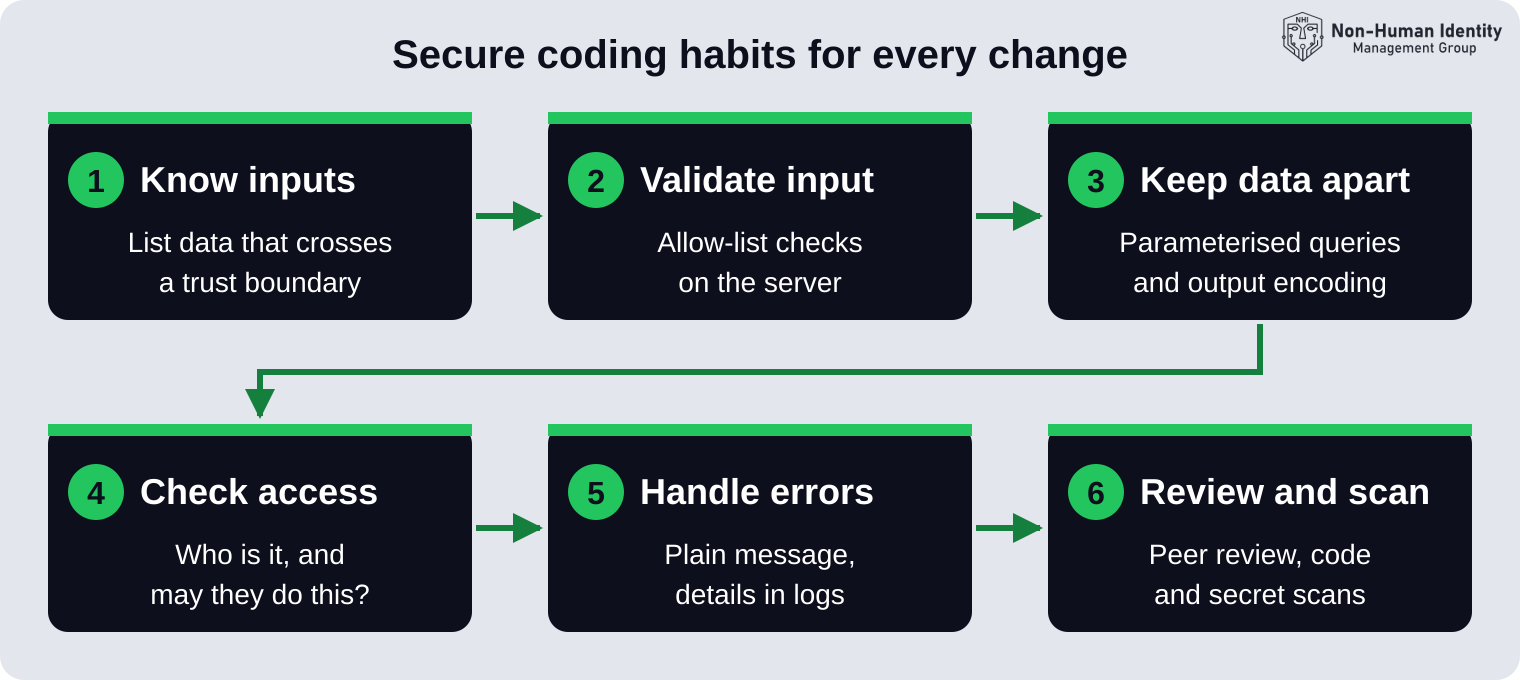
These six habits apply to most languages and most kinds of software. Use them each time you write or change a feature.
- Know where your data comes from. List every input: form fields, web addresses, uploaded files, cookies, messages from other systems. Anything that crosses from outside into your code is crossing a trust boundary and should be treated as untrusted.
- Validate input. Input validation means checking that data has the type, format and range you expect before using it. OWASP advises defining what you accept and rejecting everything else (an allow-list), rather than trying to spot every bad value. Validation must run on the server, because checks in the browser can be bypassed.[2]
- Keep data and commands apart. When you send data to a database, use parameterised queries: the database receives the query and the data separately, so the data is handled as data and is not read as part of the command.[3] When you show data on a web page, use output encoding, which converts it into a form the browser displays as text instead of running it as code.[4]
- Check access on the server, every time. For each request, confirm who the user is (authentication) and whether they may do this specific thing to this specific record (authorisation). OWASP advises denying by default and enforcing checks in trusted server-side code.[9]
- Handle errors safely. Show users a short, plain message and keep the technical detail, such as stack traces and versions, in server logs. OWASP notes that detailed errors can help attackers learn about your system.[5]
- Review and scan before you merge. Ask a colleague to review the change, run a code scanner and check for passwords or keys left in the code. Code hosting services can scan repositories for leaked credentials; GitHub, for example, scans the full history of public repositories for free and raises an alert so the credential can be replaced.[8]
The table links each habit to the kind of flaw it helps reduce. It is a simplified view; real flaws often need more than one habit.
| Habit | Flaw it helps reduce | Related weakness (CWE) |
|---|---|---|
| Parameterised queries | SQL injection: data changes a database command | CWE-89 |
| Output encoding | Cross-site scripting: data runs as code in a visitor's browser | CWE-79 |
| Server-side access checks | Missing authorisation: users reach data or actions they should not | CWE-862 |
| Input validation | Malformed or unexpected data causing errors or wrong results | CWE-20 |
| Safe error handling | Error messages exposing internal details | CWE-209 |
| Keeping secrets out of code | Hard-coded passwords and keys | CWE-798 |
Useful distinctions
- Validation is not the main defence against injection. OWASP treats input validation as useful but separate: parameterised queries address SQL injection and context-aware output encoding addresses cross-site scripting.[2]
- Encoding depends on where the data goes. Data placed in a web page, a page attribute, a script or a web address each needs its own encoding rules.[4] Most modern frameworks encode template output by default; problems often start when a developer switches that protection off.[4]
- Authentication is not authorisation. Knowing who someone is does not tell you what they may do. Many access flaws come from checking that a user is logged in but not that the record belongs to them.
- Escaping by hand is a last resort. OWASP strongly discourages manually escaping database input in place of parameterised queries.[3]
A worked example
Northgate Community Library is a fictional library service. Leo, a junior developer, is adding a feature that lets members search the catalogue and see their own loans.
His first draft builds the search by joining the member's search words directly onto a database query, shows any database error on screen, and loads a member's loans using a number taken from the web address.
His colleague Grace reviews the change before it is merged and asks three questions: what happens if the search box contains unexpected characters, what does a visitor see if the database fails, and what stops one member changing the number in the address to view another member's loans?
Leo changes the code:
- Search: uses a parameterised query, and checks that the search text is not empty and not longer than 100 characters.
- Errors: shows "Sorry, something went wrong, please try again" and writes the details to the server log.
- Loans: takes the member from their logged-in session on the server and only returns loans that belong to that member.
The team's code scanner also flags a database password Leo had pasted into a settings file while testing. He moves it into the library's secrets store, and the team replaces the password because it had been pushed to the shared repository. The review did not make the feature flawless, but it caught three common mistakes before any member's data was exposed.
Myths and misunderstandings
| What people think | What is true |
|---|---|
| Checking input in the browser is enough. | Browser checks help users, but they can be bypassed. The server must check the same data.[2] |
| Blocking a few "dangerous" characters makes input safe. | Block lists miss cases and can reject real data, such as names with apostrophes. Use allow-lists plus parameterised queries and encoding.[2] |
| Our framework handles security for us. | Frameworks give useful defaults, such as automatic encoding, but they do not decide who may see which record, and they can be switched off. |
| Secure coding is a separate job for security experts. | It is part of everyday development. Security specialists help, but developers make most of the decisions that matter. |
| A code scanner finds all the problems. | Scanners are good at some patterns and weak at others, such as business logic and access rules. Peer review and testing are still needed. |
Key terms
- Secure coding
- Writing software in ways that reduce the chance of introducing exploitable flaws, using safe patterns, validating input and handling errors carefully.
- Vulnerability
- A flaw or weakness in code, logic, settings or design that can be abused.
- Input validation
- Checking that data matches the type, format and range an application expects before it is used.
- Parameterised queries
- A way to send data to a database separately from the command, so the data is not mixed into the query.
- Output encoding
- Converting untrusted data into a safe form before showing it, so a browser displays it as text rather than running it.
- Injection
- A class of flaw where outside input is treated as code or a command instead of data, as in SQL injection.
- The decision about what an identity that has signed in is allowed to do.
- Hard-coded credentials
- Passwords, keys or tokens written directly into code or configuration files, where they are hard to change and easy to leak.
- Secure code review
- A review that looks for ways code could be misused, focusing on data flow, trust boundaries and access checks.
- Common Weakness Enumeration (CWE)
- A MITRE catalogue of types of software and hardware weakness, such as CWE-89 for SQL injection.
Common questions
What is secure coding in simple terms?
It is writing code with a few safe habits so that unexpected or hostile input cannot make your program do something you did not intend.
Which secure coding habit should I learn first?
We suggest starting with two: use parameterised queries for every database call, and check on the server that the user may access the specific record they asked for.
Is there a list of secure coding practices I can follow?
Yes. The OWASP Top 10 Proactive Controls (2024) lists ten techniques for developers, such as implementing access control, validating all input and handling exceptions, and keeping components secure.[6] Your organisation may also have its own coding standard.
Does secure coding apply to every programming language?
Yes. The habits in this guide apply widely, but each language has its own risky features, so language-specific guidance is worth reading next.
What should I do if I find a password in our code?
Tell the owner, replace the password or key with a new one, and move it into a secrets store. Deleting it from the latest version is not enough, because it stays in the code history.[8]
How does secure coding fit with security testing?
Secure coding reduces the number of flaws written; testing finds some of those that slip through. NIST's Secure Software Development Framework includes both producing well-secured software and responding to vulnerabilities.[10]
First steps
Three things you can do this week:
- Find your database calls. Search your code for places where text is joined onto a query, and switch them to parameterised queries.
- Turn on secret scanning. Enable it in your code hosting service and replace any credential it finds.
- Add three questions to code review: where does this data come from, who is allowed to do this, and what does the user see if it fails?
- Check your error pages. Make sure users see a plain message, not technical detail.
Checklist
- All database calls use parameterised queries or a safe library that does this for us.
- Input is validated on the server using allow-lists.
- Template output encoding is on, and any place it is switched off has been reviewed.
- Every request that touches a record checks that the user may access that record.
- Users see plain error messages; details go to server logs.
- No passwords, keys or tokens are stored in source code, and secret scanning is switched on.
- Every change is reviewed by a second person before it is merged.
- A code scanner runs on new changes and someone acts on its findings.
Check your understanding
1. Why must input be validated on the server and not only in the browser?
Answer: browser checks can be bypassed, so only checks on the server can be relied on.
2. What does a parameterised query do?
Answer: it sends the command and the data to the database separately, so the data is treated as data and not as part of the command.
3. What is the difference between authentication and authorisation?
Answer: authentication confirms who someone is; authorisation decides what they are allowed to do.
4. Why is deleting a leaked password from the latest code not enough?
Answer: it remains in the code history, so it should be replaced with a new one.
Suggested learning pathway
- SQL Injection for Beginners: a related beginner guide to read next.
- Application Security for Beginners: a related beginner guide to read next.
- Mobile App Security for Beginners: a related beginner guide to read next.
- For how security fits into cloud-hosted apps, start with Cloud Security for Beginners.
- For keeping passwords and keys out of code, read Secrets in Code for Beginners.
- For safer connections between apps, read API Security for Beginners.
- For the full practitioner view, see the Secure Coding Guide.
- For developer-focused controls, see the OWASP Top 10 Proactive Controls.
- For reviewing code for security, see the Secure Code Review Guide.
- For a language example, see the TypeScript and JavaScript Secure Coding Guide.
Standards and references
- Secure development and deployment guidance. National Cyber Security Centre (NCSC), published 22 November 2018. https://www.ncsc.gov.uk/collection/developers-collection, accessed 27 Nov 2026.
- Input Validation Cheat Sheet. OWASP Cheat Sheet Series, OWASP Foundation. https://cheatsheetseries.owasp.org/cheatsheets/Input_Validation_Cheat_Sheet.html, accessed 27 Nov 2026.
- SQL Injection Prevention Cheat Sheet. OWASP Cheat Sheet Series, OWASP Foundation. https://cheatsheetseries.owasp.org/cheatsheets/SQL_Injection_Prevention_Cheat_Sheet.html, accessed 27 Nov 2026.
- Cross Site Scripting Prevention Cheat Sheet. OWASP Cheat Sheet Series, OWASP Foundation. https://cheatsheetseries.owasp.org/cheatsheets/Cross_Site_Scripting_Prevention_Cheat_Sheet.html, accessed 27 Nov 2026.
- Error Handling Cheat Sheet. OWASP Cheat Sheet Series, OWASP Foundation. https://cheatsheetseries.owasp.org/cheatsheets/Error_Handling_Cheat_Sheet.html, accessed 27 Nov 2026.
- OWASP Top 10 Proactive Controls 2024. OWASP Foundation. https://top10proactive.owasp.org/archive/2024/the-top-10/, accessed 27 Nov 2026.
- 2025 CWE Top 25 Most Dangerous Software Weaknesses. MITRE, page last updated 15 December 2025. https://cwe.mitre.org/top25/archive/2025/2025_cwe_top25.html, accessed 27 Nov 2026.
- About secret scanning. GitHub Docs, GitHub. https://docs.github.com/en/code-security/secret-scanning/introduction/about-secret-scanning, accessed 27 Nov 2026.
- A01:2025 Broken Access Control, OWASP Top 10:2025. OWASP Foundation. https://top10.owasp.org/2025/A01_2025-Broken_Access_Control/, accessed 27 Nov 2026.
- Secure Software Development Framework (project page). National Institute of Standards and Technology (NIST). https://csrc.nist.gov/projects/ssdf, accessed 27 Nov 2026.
Related NHI Mgmt Group resources: Secure Coding Standard Template · Secure Code Review Checklist · OWASP Cheat Sheet Series