PHP security means writing and running PHP code so strangers cannot misuse your website.
This guide is for people learning PHP, and for anyone who owns a small site built with it. You do not need to write code to be affected: if a freelancer built your booking form or shop in PHP, these mistakes may be sitting in it.
In short
- PHP is a common language for building websites. Most PHP break-ins come from a few well-known mistakes.
- The big ones: trusting what visitors type, showing error messages, weak password storage, open file uploads and old PHP versions.
- PHP has built-in tools for each one, such as prepared statements and password hashing.
- Keep PHP on a supported version and ask your developer which of these habits they follow.
What you will learn
- Explain the five common PHP mistakes in plain words.
- Spot risky lines in a simple PHP form handler.
- Check which PHP version your site runs and when its support ends.
- Ask your developer the right questions about their code.
- Visitor input
- anything a visitor sends to your site, such as text typed into a form.
- Safe query (prepared statement)
- a way to ask the database a question that keeps the visitor's words apart from the command.
- Scrambled password (password hash)
- a one-way scrambled copy of a password, stored in place of the password itself.
What is PHP security?
Think of a shop counter. Customers hand notes across it, and staff act on them. A good assistant reads each note with care. A careless one does whatever the note says, even "open the till".
PHP is a programming language that runs on the web server. It builds the pages your visitors see and handles what they send back, like a contact form or a login. Every note from a visitor arrives at the PHP counter.
PHP security is the set of habits that make the assistant careful. Check what comes in. Keep visitor words away from commands. Store passwords scrambled. Keep the software up to date.
Where the comparison stops working: a shop assistant sees the person handing over the note. A website cannot see who sent a request, and a program can send thousands of notes a minute.
Why does it matter?
Many small business websites, booking forms and shop systems are written in PHP. A mistake in a short form handler can expose a whole customer list.
If you are learning PHP
What could happen: a tutorial habit, like pasting form text straight into a database query, ends up in a live site.
Check this: use prepared statements and escape output from your very first project.
If a freelancer built your site
What could happen: the site works fine for years, while the PHP version under it stops getting security fixes.
Check this: ask which PHP version the site runs and who updates it.
If you look after hosting
What could happen: error messages shown on screen give an attacker file paths and database names.
Check this: make sure errors go to a log file on live sites, not to the page.
What does it look like?
Here is a made-up PHP form handler for a bakery's order page. It has five common mistakes in it.
Example only. All values are made up.
// order.php for the example bakery site
ini_set('display_errors', 1);                        (1)
$name = $_POST['name'];
$sql = "SELECT * FROM orders WHERE name = '$name'";   (2)
echo "Thanks, " . $name;                             (3)
$stored = md5($_POST['password']);                   (4)
move_uploaded_file($tmp, "uploads/" . $file);        (5)
// server runs PHP 7.4 (example only)
- Errors are shown on the page, so a visitor may see file paths and database details.
- The visitor's text is pasted into the database command. This opens the door to SQL injection.
- The visitor's text is shown back without escaping. This opens the door to cross-site scripting.
- The password is stored with a fast, old scrambling method instead of a proper password hash.
- Any file is saved, with the visitor's own file name, into a folder the web server can run.
Why this is risky: each line trusts the visitor. Together they let a stranger read data, plant a script, crack stored passwords or upload a hidden program. The PHP version in the note also no longer gets fixes from the PHP project.[1]
The safer way: use a prepared statement for the query.[2] Escape text before you show it.[3] Store passwords with PHP's own password hashing.[4] Log errors instead of showing them.[5] Accept only the file types you need, and save them under a new name.[6]
How does it work?
Here is what happens when a visitor sends a form to a PHP site, and where each safe habit fits.
- The visitor sends something. It might be a name, a password or a photo. Treat all of it as untrusted.
- PHP checks it. Is it the right length and type? This is called input validation. It catches mistakes, but it is not enough by itself.
- PHP talks to the database. A prepared statement sends the command and the visitor's words separately, so the words cannot change the command. The PHP manual warns that any part of a query built from raw input can still be attacked.[2]
- PHP builds the reply page. Escaping (turning special characters like < into harmless text) means a visitor's words show as words, not as code.[3]
- PHP stores what it must. Passwords go through
password_hash, which scrambles them one way and adds a random salt (extra random data) for you.[4] Files go outside the public web folder, renamed by the server.[6] - The server underneath stays current. Each PHP version gets two years of full support, then two years of security fixes only. After that, the PHP project says users should upgrade, as they may be exposed to unfixed flaws.[1]
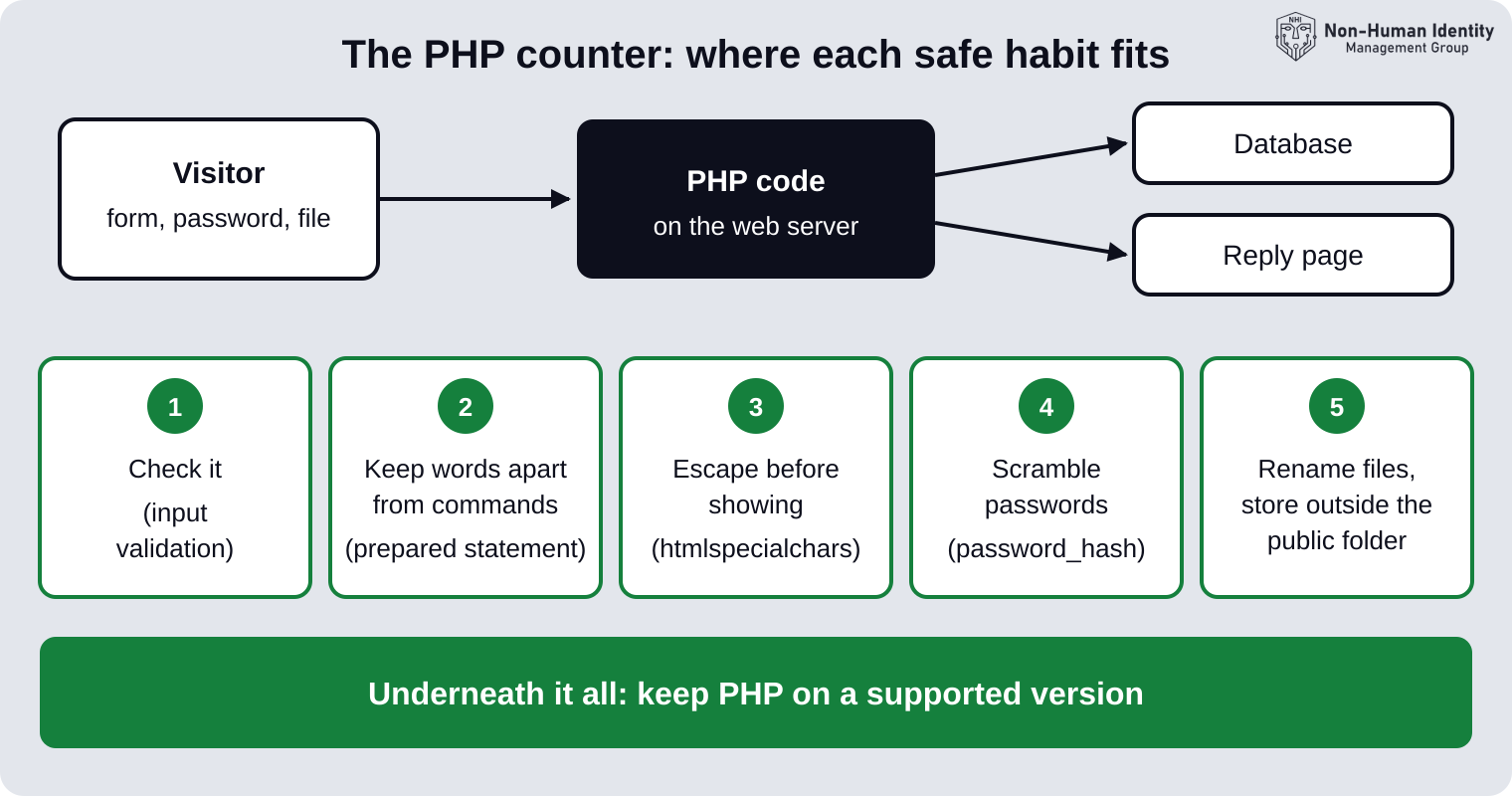
Many PHP sites use a ready-made system such as WordPress, or a framework (a toolkit that handles common jobs). These often provide safe ways to query the database and show text. The same habits still apply to any code you add yourself, such as a plugin or a custom form.
A worked example
Orla Jensen runs Ochre Bakery, a fictional shop that takes cake orders online. Her nephew, Anil Jovanovic, built the order form in PHP five years ago while he was at college.
One morning Orla sees an odd order. The customer name box holds a long string of symbols and the word SELECT. She remembers the shop counter: someone was testing whether her assistant would follow a note.
She calls Anil. He opens his old code and finds the problem straight away. The form pastes the name into the database command. He rewrites the query as a prepared statement, so names are kept apart from the command.
While he is there, he checks the rest. The order page shows names back without escaping, so he adds htmlspecialchars. The staff login stores passwords with md5, an old fast method, so he switches to password_hash and asks staff to set new passwords.
Then Anil looks at the hosting panel. The site runs a PHP version that has passed its end of life. He tests the form on a supported version first, then switches over.
Last, he turns off on-screen errors and checks the logs for signs that data was taken. He finds no sign of it in the records available to him, but tells Orla to keep watching.
Orla adds one line to her supplier notes: "Check the PHP version every six months."
Myths and mistakes
| What people think | What is true |
|---|---|
| PHP is insecure, so the language is the problem. | Most problems come from how code is written and kept up to date. PHP has built-in tools for the common risks. |
| Checking the input is enough. | Checks help, but the database query and the output also need their own protection. |
| md5 or sha1 is fine for passwords. | Use password_hash and password_verify. They are built for passwords and handle the salt for you.[4] |
| If the site still works, the PHP version is fine. | An old version can keep working long after security fixes have stopped.[1] |
| Error messages help visitors. | On live sites they can leak details. Log them for staff instead.[5] |
What can I do this week?
- Find your site's PHP version in the hosting panel and compare it with the official supported list.
- Ask your developer whether every database query uses prepared statements.
- Check that on-screen errors are turned off on the live site.
- Ask how staff and customer passwords are stored.
- List every form that accepts file uploads, and remove any you no longer need.
Checklist
- The site runs a PHP version that still gets security fixes.
- Database queries use prepared statements, never pasted-in visitor text.
- Visitor text is escaped before it is shown on a page.
- Passwords are stored with
password_hash, not md5 or sha1. - Live sites log errors to a file and do not show them on screen.
- Uploads accept only the file types needed, are renamed and are stored outside the public folder.
- Plugins, themes and libraries are updated on a schedule.
- Someone named is responsible for updates and checks.
Common questions
Is PHP still safe to use?
Yes, when it is kept up to date and written with care. The PHP project still releases supported versions with security fixes. Most break-ins come from old versions, outdated plugins and well-known coding mistakes, not from choosing PHP itself.
How do I find out which PHP version my site uses?
Look in your hosting control panel, which usually shows the PHP version and lets you change it. You can also ask your host or developer. Then compare it with the supported versions list on the official PHP website.
What is the difference between validating and escaping?
Validating checks that input looks right when it arrives, such as a number in a number box. Escaping makes text safe at the moment you use it, such as showing it on a page. You need both, because valid-looking text can still hold harmful characters.
Does WordPress handle all of this for me?
Partly. WordPress core gives developers safe ways to query the database and show text, and it can update itself. Plugins, themes and custom code written for your site still need the same habits, and the PHP version under it still needs updating.
What should I do if I think my PHP site was hacked?
Tell your host and developer straight away, and change admin and database passwords. Ask them to look for unknown files in upload folders and to restore from a clean backup if needed. Our web shells guide covers what to look for.
Where next?
Ready for the detail? Read the practitioner guide: PHP and WordPress Security Guide. It goes further into PHP server settings, WordPress core hardening and the secrets stored in a site's settings file.
Also useful:
- SQL Injection for Beginners
- Cross-Site Scripting for Beginners
- Website Security for Beginners
- Unsupported PHP versions
- PHP web shells
Related NHI Mgmt Group resources: PHP Configuration Hardening · PHP Type Juggling Guide · Web Application Attacks Guide
Key terms
- Input validation
- Checking that what a visitor sends has the expected type, length and format.
- Prepared statement
- A database query that sends the command and the visitor's values separately.
- SQL injection
- An attack where typed text changes a database command.
- Cross-site scripting (XSS)
- An attack where a visitor's text runs as code in other people's browsers.
- Password hashing
- Storing a one-way scrambled copy of a password in place of the password.
- Web shell
- A hidden script planted on a web server that lets an attacker control it.
Sources and further reading
- Supported Versions. The PHP Group. https://www.php.net/supported-versions.php, accessed 28 Nov 2026.
- Prepared statements and stored procedures. PHP Manual, The PHP Group. https://www.php.net/manual/en/pdo.prepared-statements.php, accessed 28 Nov 2026.
- htmlspecialchars. PHP Manual, The PHP Group. https://www.php.net/manual/en/function.htmlspecialchars.php, accessed 28 Nov 2026.
- password_hash. PHP Manual, The PHP Group. https://www.php.net/manual/en/function.password-hash.php, accessed 28 Nov 2026.
- Runtime configuration: error handling (display_errors, log_errors). PHP Manual, The PHP Group. https://www.php.net/manual/en/errorfunc.configuration.php, accessed 28 Nov 2026.
- File Upload Cheat Sheet. OWASP Cheat Sheet Series, OWASP Foundation. https://cheatsheetseries.owasp.org/cheatsheets/File_Upload_Cheat_Sheet.html, accessed 28 Nov 2026.