SAP security means controlling who can do what in a firm's SAP system, and checking it.
This guide is for people new to SAP: new hires in SAP teams, finance staff, managers who approve access and trainee auditors. You do not need to be technical. If your firm pays suppliers, runs payroll or ships goods through SAP, the access rules in it protect real money.
In short
- In SAP, what you can do depends on the roles given to your user, not on your job title.
- Each role is a bundle of permissions, called authorisations, that SAP checks every time you try an action.
- Some all-powerful access exists, and it needs tight control because one person could change almost anything.
- For emergencies, firms use "firefighter" access: borrowed, approved, time-limited and checked by someone else afterwards.
What you will learn
- Explain what a role and an authorisation are in SAP.
- Spot access that is too powerful for one person to hold.
- Explain how firefighter access works and who checks it.
- Ask the right questions when you approve or review SAP access.
This is an independent guide from NHI Mgmt Group, based on SAP's public documentation as of November 2026. It is not sponsored or reviewed by SAP. Product features change, so confirm settings against SAP's current documentation.
- Bundle of permissions (role)
- a set of actions that fit one kind of job, given to many users at once.
- Single permission (authorisation)
- permission to do one particular thing in SAP, such as post an invoice.
- Emergency access (firefighter ID)
- a powerful SAP user that staff borrow for a short, approved, recorded task.
What is SAP security?
Think of staff uniforms in a hospital. A new nurse does not get a personal rule book. She puts on the nurse's uniform, and the nurse's rules come with it.
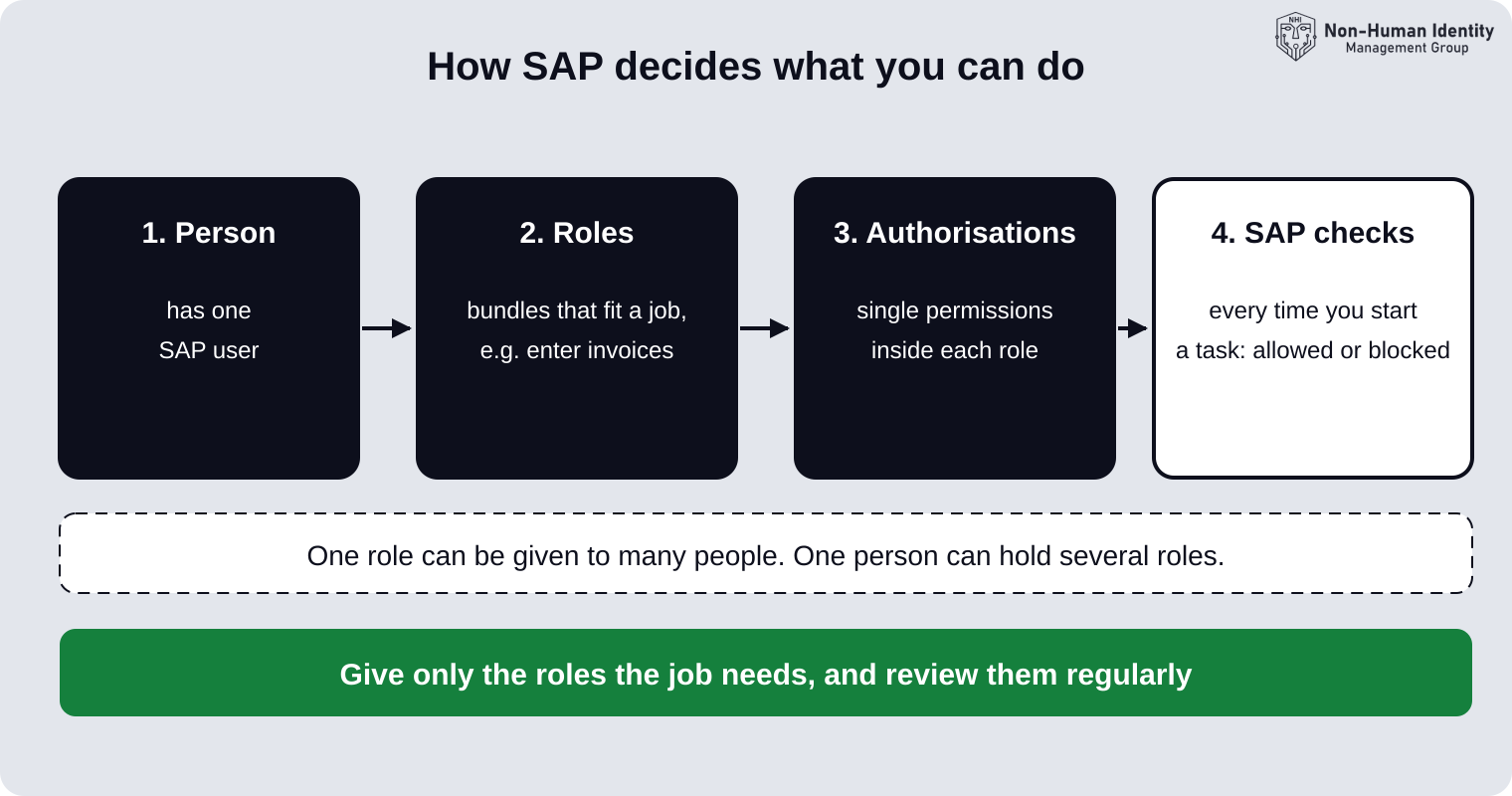
SAP works in a similar way. SAP is business software that many large firms use for finance, buying, stock, sales and HR. Each person gets a user, and the user gets one or more roles. A role is like a uniform: it says which screens and actions come with that job.
Inside each role sit authorisations. SAP describes an authorisation as permission to perform a certain action in the system.[1] When you try something, SAP checks whether your user holds the right authorisation. If not, the action is blocked.[1]
SAP security is the work of giving out the right roles, keeping powerful access rare, and checking what people did with it.
Where the comparison stops working: you can see a uniform across a ward. You cannot see SAP roles by looking at someone. A person can quietly collect several roles over the years, and only a report shows it.
Why does it matter?
SAP often holds a firm's bank details, payments, salaries and stock. In 2021 a US government security agency issued a warning about attacks on SAP systems. It said attacks on poorly secured ones could lead to data theft, fraud and disruption.[5]
If you have just joined an SAP team
What could happen: you are given a copy of a colleague's access "to get started", and it includes far more than you need.
Check this: ask for roles that match your job, and say if a screen lets you do something you should not.
If you work in finance
What could happen: one person can both add a new supplier and pay it, so a fake supplier could be paid.
Check this: make sure creating a supplier and paying it need two different people.
If you approve or review access
What could happen: you sign off a list of role names without knowing what they allow.
Check this: ask for each role in plain words, and question any user with very wide access.
What does it look like?
Here is a made-up summary of one person's SAP access, the kind of thing a reviewer might see.
Example only. All values are made up.
User:      EXAMPLE_USER_01  (Accounts payable clerk)
Roles:     Z_EXAMPLE_AP_INVOICE_ENTRY              (1)
           Z_EXAMPLE_VENDOR_MAINTAIN               (2)
           Z_EXAMPLE_PAYMENT_RUN                   (2)
Profiles:  SAP_ALL                                 (3)
Last used: never used: Z_EXAMPLE_PAYMENT_RUN       (4)
- A role that fits the job: entering supplier invoices.
- Two roles that together let one person add a supplier and pay it.
- In a real system, this line would show a powerful profile that SAP lists among those holding critical authorisations.[2]
- A role the person has never used, which suggests it may not be needed.
Why this is risky: this clerk could create a supplier, approve its bank details and pay it alone. The powerful profile means they could also change almost anything else.
The safer way: the clerk keeps only the invoice role. Supplier changes and payments sit with different people. The powerful profile is removed, and any urgent need goes through firefighter access instead.
How does it work?
Here is how access usually flows in an SAP system that runs on SAP's classic business platform.
- A user is created. An administrator sets up a user for each person. SAP's guide names the screen used for this as User Maintenance.[6]
- Roles are built. A security team builds roles in a tool SAP calls the profile generator, inside Role Maintenance.[6] It creates the authorisations a role needs, and one role can serve many users.[1]
- Roles are given out. A manager or role owner approves a request, and the role is added to the user.
- SAP checks every action. When the person starts a task, SAP checks their authorisations. A missing one blocks the action.[1]
- Access is reviewed. Managers confirm, often twice a year, that each person still needs each role. Unused or risky roles are removed.
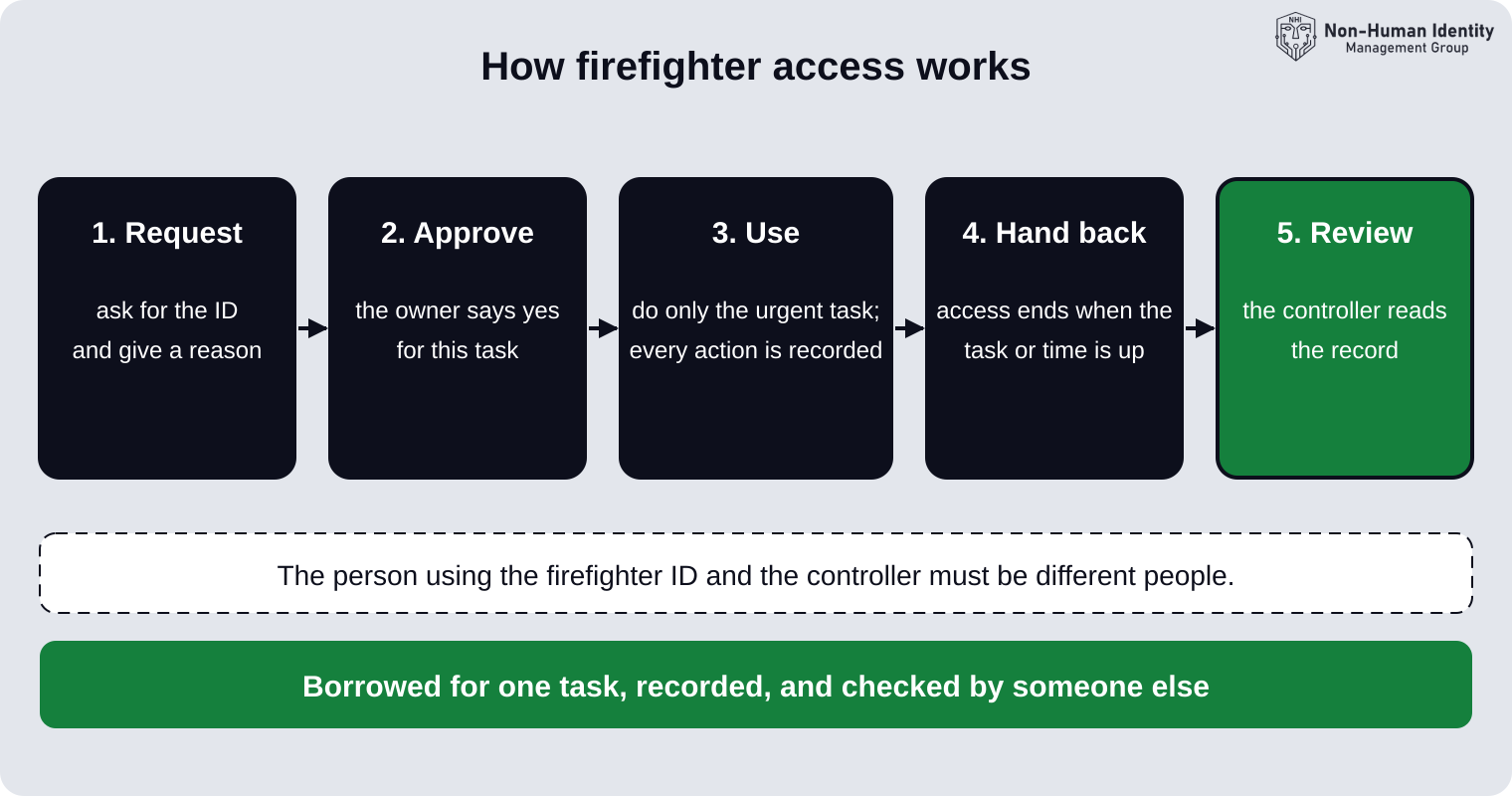
Sometimes a job needs more access than anyone normally holds, such as fixing a failed month-end run. Leaving powerful access with everyone, just in case, is risky. Firms use firefighter access instead. Think of the glass panel on a fire alarm: you can break it in an emergency, but everyone knows it was used.
SAP's own access control product calls this Emergency Access Management. A firefighter ID is a special SAP user with raised access.[3] A named owner approves who may use it. A named controller is told about the activity and reviews the records.[3] The person using it gives a reason code that explains why.[3] SAP's course says one person cannot be both controller and firefighter for the same ID.[3]
SAP security also covers keeping the software up to date. SAP releases security fixes on a set day, the second Tuesday of every month, and recommends applying them as a priority.[4]
A worked example
Kofi Kowal has just joined the SAP support team at Ochre Couriers, a fictional delivery firm. On his third week, the month-end run that pays drivers fails at 6pm.
The fix needs a setting that Kofi's normal roles do not allow. A colleague offers to lend him their login. Kofi remembers the fire alarm panel: the point is that everyone knows it was used. So he says no.
Instead, he requests the firefighter ID for payroll support. He picks the reason code for a failed payroll run and writes one line about the problem. The owner, the payroll systems lead, approves it for two hours.
Kofi logs in with the firefighter ID, changes the one setting and restarts the run. The drivers' pay goes through. He logs out after forty minutes, and his access ends.
The next morning, Nils Yilmaz, the controller, reads the session record. He sees the change Kofi described, and nothing else. He notes one question: could the setting be added to a normal support role, so this is not needed next month? The team agrees to look at it.
Kofi's manager is pleased. The work got done fast, and the record shows exactly what happened and why.
Myths and mistakes
| What people think | What is true |
|---|---|
| Copying a colleague's access is a quick, safe way to set up a new starter. | It copies every extra role they have collected. Give roles that match the new job. |
| Giving the all-powerful profile "just for now" is fine. | SAP lists it among access that needs protection.[2] Use firefighter access for urgent work. |
| Firefighter access is fine as long as it is approved. | Approval is half of it. Someone else must also review what was done.[3] |
| Role names tell you what a role does. | Names can mislead. Ask for what each role allows in plain words. |
| Only people have SAP users. | Programs that link SAP to banks and other systems often have their own users and passwords too. |
What can I do this week?
- Ask for a plain-words list of the SAP roles you hold, and question any you do not use.
- If you approve access, ask which users hold the most powerful access, and why.
- Find out who owns and who reviews each firefighter ID.
- Check that creating a supplier and paying it need two different people.
- Ask when SAP's monthly security fixes were last applied.
Checklist
- Every person has their own SAP user, and no logins are shared.
- Roles match jobs, and new starters are not given copies of other people's access.
- Very powerful access is held by almost nobody, and each case has a written reason.
- Risky pairs of duties, such as adding and paying a supplier, are split between people.
- Firefighter IDs have a named owner and a different named controller.
- Every firefighter session has a reason and is reviewed soon after.
- Program users that link SAP to other systems have owners and limited access.
- Access is reviewed on a schedule, and unused roles are removed.
Common questions
What is the difference between a role and a profile in SAP?
A role is what people usually work with: a bundle of tasks for a job. SAP groups the underlying authorisations into profiles, and role maintenance can create these for you.[1] Most firms manage access through roles rather than editing profiles directly.
What is SAP_ALL?
It is a profile that gives very wide access across the system. SAP lists it among the profiles holding critical authorisations that must be protected.[2] In live systems, we suggest no everyday user holds it. Urgent needs go through firefighter access.
Is firefighter access the same as break-glass access?
Yes, it is SAP's version of the same idea. Both give rare, powerful access for an emergency, with a recorded reason and a review afterwards. Firefighter is the name used in SAP's access control product. Our Break-Glass Accounts for Beginners page covers the general idea.
What is segregation of duties?
It means splitting risky tasks so one person cannot misuse the system alone. US government guidance describes it as making sure no user has enough privileges to misuse the system on their own.[7] In SAP, a common example is keeping supplier set-up and payment apart.
Do I need to learn transaction codes?
Not to understand the basics. Transaction codes are short names for SAP screens, and support staff use them daily. As a newcomer, it is more useful to know what your roles let you do, and who to ask when something seems wrong.
Where next?
Ready for the detail? Read the practitioner guide: SAP Identity and Access Security Guide. It goes further into critical authorisations and standard users, role design for newer SAP screens, and how system-to-system connections are secured.
Also useful:
- SAP Firefighter Access
- Break-Glass Accounts for Beginners
- Privileged Access Management for Beginners
- Segregation of Duties Guide
Related NHI Mgmt Group resources: SAP S/4HANA Non-Human Identities · SAP Threat Detection and Monitoring Guide · SAP and ERP Security
Key terms
- SAP
- Business software that many firms use to run finance, HR, buying, sales and supply.
- Role
- A bundle of permissions that fits a job and can be given to many users at once.
- The decision about what a signed-in user is allowed to do. In SAP, also a single permission inside a role.
- Emergency access
- Raised access for urgent work, given for a short time and watched closely.
- Break-glass access
- An emergency route to powerful access, used rarely and checked every time.
- Segregation of duties
- Splitting risky tasks so that one person cannot complete a fraud or a harmful change alone.
- Least privilege
- Giving each user or program only the access it needs, and no more.
- Access review
- A regular check that each person still needs the access they hold.
Sources and further reading
- Maintaining User Authorizations with Roles and Profiles. SAP Learning, SAP. https://learning.sap.com/courses/technical-implementation-and-operation-i-of-sap-s-4hana-and-sap-business-suite/maintaining-user-authorizations-with-roles-and-profiles, accessed 28 Nov 2026.
- Critical authorizations (protecting special roles and profiles, including SAP_ALL). SAP Help Portal, SAP. https://help.sap.com/saphelp_em92/helpdata/en/4b/65b7398b5a2d31e10000000a114084/content.htm, accessed 28 Nov 2026.
- Preparing Emergency Access Management. SAP Learning, course Discovering the Main Functionalities of SAP Access Control, SAP. https://learning.sap.com/courses/discovering-the-main-functionalities-of-sap-access-control/preparing-emergency-access-management_a02a6da6-e3aa-4d9f-a060-124b711e3a67, accessed 28 Nov 2026.
- SAP Security Notes and News. SAP Support Portal, SAP. https://support.sap.com/en/my-support/knowledge-base/security-notes-news.html, accessed 28 Nov 2026.
- Malicious Cyber Activity Targeting Critical SAP Applications. Cybersecurity and Infrastructure Security Agency (CISA), 6 April 2021. https://www.cisa.gov/news-events/alerts/2021/04/06/malicious-cyber-activity-targeting-critical-sap-applications, accessed 28 Nov 2026.
- User Management (AS ABAP): User Maintenance and Role Maintenance. SAP Help Portal, SAP NetWeaver 7.3, SAP. https://help.sap.com/SAPhelp_nw73/helpdata/en/e9/8b24b42425455b9dbe9e7573bdbc7c/content.htm, accessed 28 Nov 2026.
- Separation of duty (glossary entry, from NIST SP 800-192). NIST Computer Security Resource Center. https://csrc.nist.gov/glossary/term/separation_of_duty, accessed 28 Nov 2026.