A break-glass account is a highly privileged emergency account, kept locked away and unused, so that trusted people can still get into critical systems when the normal way of signing in has failed.
The name comes from the "break glass in case of emergency" boxes that hold a fire alarm key: you only open them when something has gone wrong, and everyone can see that you did. This guide is for newcomers, students, career changers and managers. It explains in plain English why organisations keep these accounts, how a controlled emergency sign-in works from start to finish, and how a small team can set one up safely.
By the end of this guide you will be able to:
- Explain what a break-glass account is and when it is used.
- Understand why it is both necessary and risky.
- Describe how emergency access is approved, used, recorded and closed down.
- Identify the first steps to set up and test a break-glass account.
Key takeaways
- It is an insurance policy. A break-glass account exists for the day your identity provider, multi-factor sign-in or admin accounts stop working, so you are not locked out of your own systems.
- Every use is an exception. Using it is controlled, approved, recorded and time-limited, and it is never used for everyday work.
- Few accounts, strong protection. Keep a small number, protect them with phishing-resistant sign-in such as a security key, and store the credentials securely in separate places.
- Alert on every sign-in. Because the account should almost never be used, any sign-in is a signal that someone needs to check straight away.
- Untested means unreliable. Check the account works on a schedule, or it may fail exactly when you need it.
What it is, in plain English
Most organisations control their systems through a few powerful administrator accounts. Over time they add good protections: sign-in through a central identity provider, multi-factor authentication (MFA), rules that block sign-ins from unknown places, and time-limited admin rights. Each protection is a good idea. But each one is also something that can break. If the identity provider has an outage, if a new sign-in rule is set up wrongly, or if every admin loses their phone, the people who need to fix things may find themselves locked out.
A break-glass account, also called an emergency access account, is a spare way in that does not depend on the things most likely to fail. It holds enough power to repair the problem, and it sits unused, locked away and watched, until a real emergency.
A helpful comparison is the spare key to a building kept in a sealed envelope in the manager's safe. Nobody carries it, nobody uses it to get in on a normal day, and if the seal is ever broken, people want to know why. Where the analogy breaks down: a lost door key affects one door, while a misused break-glass account can control an entire organisation's systems, so it needs much stronger protection and alerting than any envelope.
Microsoft, for example, recommends keeping emergency access accounts for situations where normal administrative accounts cannot be used, and advises not tying them to any individual user or employee device.[1]
Why it matters to you
- If you run a small business: being locked out of your own email and files for days is a real business risk. A tested emergency account is a low-cost way to reduce it.
- If you are new to a security job: you will be asked how the organisation recovers admin access. Break-glass accounts are also a favourite topic for auditors, because a poorly guarded one is a serious weakness.
- If you are a manager: you may be one of the people who approves or holds part of the emergency credentials, so you need to know your role before the emergency arrives.
Break-glass accounts sit in a tension. They are among the most powerful accounts you own, and they are often deliberately left out of some of the sign-in rules that protect other accounts, so that those rules cannot lock them out too. Microsoft recommends excluding emergency accounts from sign-in policies that block or restrict access, and making up for it with strong authentication and alerts on every use.[1] That combination is the whole idea: fewer dependencies, more watching.
US standards body NIST covers this ground in its SP 800-53 control catalogue. Control AC-2 is account management, and its enhancement AC-2(2) deals with automatically managing temporary and emergency accounts.[4]
How it works, step by step
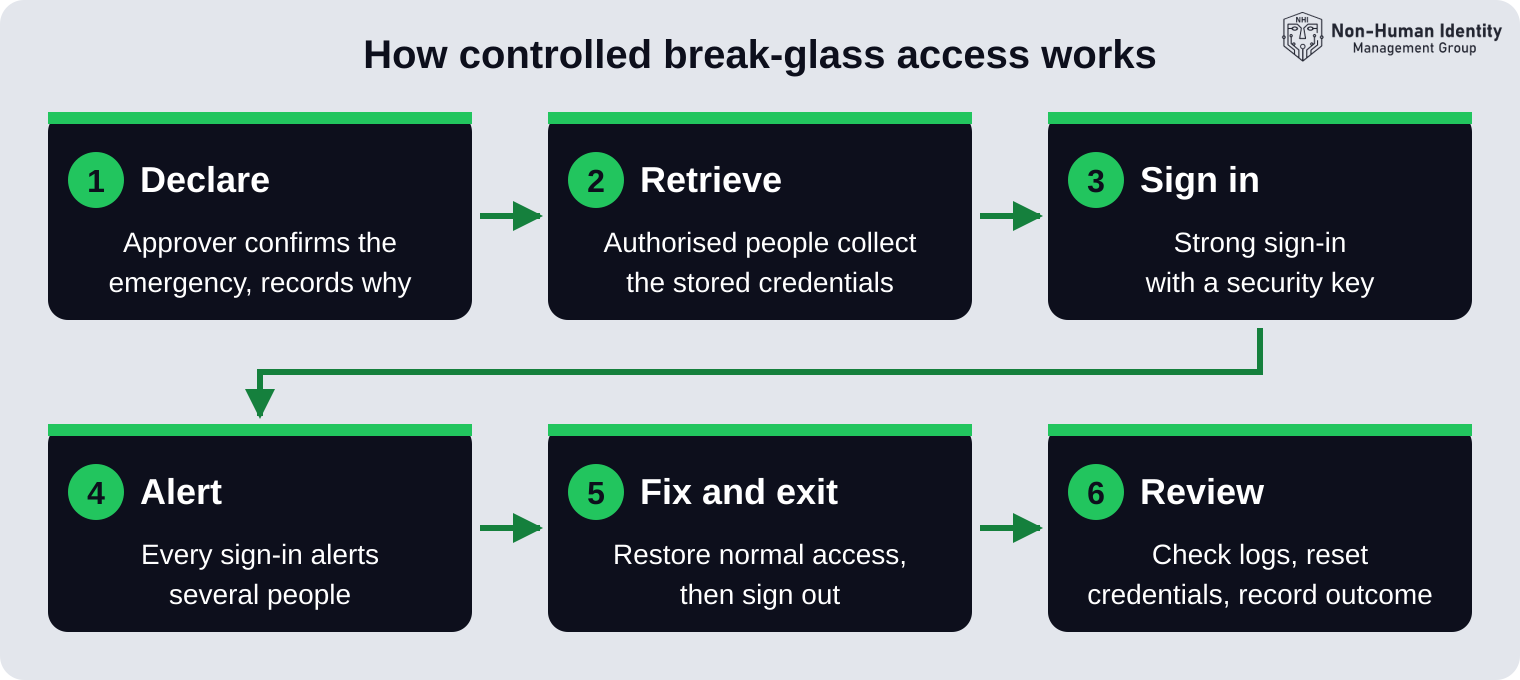
The details depend on the platform, but a well-run break-glass process follows the same shape.
- Prepare in advance. Create a small number of emergency accounts that do not rely on the systems they may need to fix. Protect them with strong sign-in, store the credentials securely, write down who may use them and switch on alerts for any sign-in.
- Declare an emergency. Something fails and normal admin access does not work. Someone with authority, named in your procedure, agrees that this is a genuine emergency and records the reason and the time.
- Retrieve the credentials. Authorised people collect the credentials from secure storage. Many organisations split them, so one person holds the password and another holds the security key, and nobody can act alone.
- Sign in and fix. The responder signs in, does only the work needed to restore normal access and notes what they did.
- Alerts fire. The sign-in triggers an alert to several people, so the use is visible straight away, even when it is legitimate.
- Close down. Once normal access works again, the responder signs out, the credentials go back to storage and, where the platform allows, the password is changed.
- Review. The team checks the logs, compares what was done with what was approved, and records whether this was a drill, a genuine emergency or misuse.
The table below shows how three large platforms describe emergency or top-level admin access in their own documentation. They are listed alphabetically and only as examples; the order is not a ranking.
| Platform | Account it describes | Points from its own guidance |
|---|---|---|
| Amazon Web Services (AWS) | Root user | Add MFA, do not create access keys for the root user, monitor and alert on its sign-in and use, and consider multi-person approval so no one person holds both the password and the MFA device.[2] |
| Google Cloud | Super administrator | Use a separate account for super admin work, protect it with a security key kept in a safe place, and use a smaller admin role for daily administration.[3] |
| Microsoft Entra ID | Emergency access accounts | Keep two or more cloud-only accounts, use phishing-resistant sign-in such as passkeys, alert on every use and check the accounts work at least every 90 days.[1] |
Useful distinctions
- Break-glass is not a reason to keep standing admin rights for staff. Everyday admins should use time-limited access, such as just-in-time access. The emergency account is the controlled exception that lets you do that safely.
- The account may hold its role permanently, but each use is time-limited. Microsoft recommends that its emergency accounts hold their top role as an active assignment, not one that has to be activated, so the account does not depend on the activation system.[1] The control comes from the process instead: approval to use it, alerts, a short window and a review afterwards.
- Emergency access for people is different from software credentials. Scripts, pipelines and AI agents are non-human identities, identities with their own accounts and credentials. We suggest that break-glass credentials are never placed in scripts, automation or AI agent tools, where they could be used without a person deciding to.
- Each important system may need its own way in. Your cloud provider, identity provider, password vault and key business applications may each need a separate emergency route that does not depend on the others.
A worked example
Northgate Pharmacy Group is a fictional chain of six pharmacies with 60 staff. All staff sign in to a cloud office suite through the company's identity provider. Aisha, the IT lead, and her colleague Tom both use time-limited admin roles.
Following advice from their IT support partner, Aisha sets up two emergency accounts. They have neutral names, are not linked to anyone's phone and each uses a hardware security key. The keys and the written sign-in details are sealed in envelopes in two different safes: one at head office, one at the largest branch. Using an account needs two people, and the operations director, Grace, must approve any use. Every sign-in sends an alert by email and text message to Aisha, Tom and Grace.
Four months later, Tom changes a sign-in rule late on a Friday. The rule is wrong, and on Monday morning nobody can sign in to the admin portal, including Aisha and Tom. Aisha calls Grace, explains the problem and gets approval. Grace notes the time and the reason. Aisha and a branch manager open one safe together and retrieve a key. Aisha signs in with the emergency account, switches the faulty rule off and confirms normal admin sign-in works again. The alert reaches Tom and Grace within a minute.
Aisha signs out, changes the emergency account's password, reseals the key and records what she did. On Tuesday the team reviews the sign-in logs and confirms that only the one change was made. They also agree that sign-in rules should be tested in a report-only mode first. The emergency account restored access quickly, but the team still lost an hour, and the real fix was a better change process.
Myths and misunderstandings
| What people think | What is true |
|---|---|
| A break-glass account is just a spare admin login. | It is a protected exception with rules: few people, approval to use, strong sign-in, alerts and a review afterwards. |
| Emergency accounts should skip MFA so they always work. | Removing strong sign-in makes them easy targets. Microsoft recommends phishing-resistant methods such as passkeys for these accounts.[1] |
| One emergency account is enough. | If that single account or its key fails, you are locked out again. Microsoft recommends two or more.[1] |
| Storing the password in our password manager is fine. | Not if the password manager depends on the system that has failed. Keep the credentials somewhere that still works in the emergency. |
| It is quicker to use the break-glass account for a busy afternoon. | Routine use turns it into an ordinary admin account with weaker oversight. Use it only for declared emergencies and drills. |
| If we never need it, we never need to test it. | Passwords expire, keys get lost and rules change. Untested accounts often fail on the day they are needed. |
Key terms
- Break-glass account
- An emergency credential used when normal access paths fail; it needs tight storage, strong authentication, dual control and alerting because it is so powerful.
- Emergency access
- Elevated access granted for urgent operational or recovery needs, under tighter monitoring and time limits, and reviewed afterwards.
- Privileged access
- Any elevated permission that can change systems, data or security settings.
- Standing access
- Privilege that stays available all the time, without fresh approval or checks.
- Just-in-time (JIT) access
- Granting permissions only when needed and removing them after use.
- Phishing-resistant MFA
- Sign-in factors that are hard to replay, intercept or trick out of someone, usually device-bound cryptographic methods such as security keys.
- Security key
- A small physical device that proves who you are by a cryptographic challenge rather than a shared secret.
- Dual control
- A rule that two authorised people must take part before a sensitive action can happen.
- Conditional access
- Sign-in rules that allow, block or challenge access depending on conditions such as risk, device or location.
- Audit log
- Time-stamped records of identity and access events, used to check who did what and when.
Common questions
What is a break-glass account?
It is an emergency administrator account kept unused and protected, so you can get back into critical systems if normal sign-in fails.
How many break-glass accounts should we have?
A small number. Microsoft recommends at least two for its cloud directory, so one failure does not leave you locked out.[1] Other platforms have their own guidance.
Who should be able to use it?
A short, named list of trusted people, written in your procedure. We suggest requiring two people to retrieve the credentials and a named approver to agree each use.
How often should we test it?
Regularly, and after major changes. Microsoft says to check its emergency accounts work at least every 90 days and when IT staff change.[1]
Should a break-glass account be linked to a real person?
Generally no. Microsoft advises against tying emergency accounts to an individual user or an employee's phone, so the account still works when that person leaves or the phone is lost.[1]
What should happen after it is used?
Preserve the logs, record why it was used and what was done, reset its credentials where possible and fix the cause of the emergency.
First steps
Three things you can do this week:
- Find out what you already have. List any accounts that are meant for emergencies, who knows the credentials and when they were last used or tested.
- Set up alerting. Make sure a sign-in to any emergency account sends an alert to more than one person, through a channel that does not rely on the system it protects.
- Write a one-page procedure and test it. Name who may approve use, who holds the credentials and what to record. Then run a short, approved drill, and treat the drill itself as a recorded, time-limited use with a review afterwards.
Checklist
- We have a small number of emergency accounts for each critical platform, and we know where they are.
- They do not depend on the identity provider, sign-in rules or devices they may need to bypass.
- They use phishing-resistant sign-in, such as security keys, kept in secure, separate places.
- No one person can use an emergency account alone.
- Every sign-in sends an alert to several people.
- Every use needs approval, has a recorded reason and is closed down as soon as normal access works.
- We test the accounts on a schedule and after major changes.
- Credentials are never stored in scripts, automation or AI agent tools.
Check your understanding
1. Why are break-glass accounts often excluded from some sign-in rules?
Answer: so a broken or wrong rule cannot lock them out too. The gap is covered with strong sign-in and alerts on every use.
2. Name two things that should happen every time the account is used.
Answer: for example, an approved, recorded reason before use, and an alert plus a review of the logs afterwards.
3. Why should break-glass credentials not be stored only in a password manager?
Answer: if the password manager depends on the system that has failed, you may not be able to reach the credentials.
4. Does having a break-glass account mean admins can keep permanent rights?
Answer: no. It is a controlled exception that makes time-limited admin access safer, not a reason to keep standing access.
Suggested learning pathway
- Start with how powerful accounts are managed in Privileged Access Management for Beginners.
- See how everyday admin rights can expire on their own in Just-in-Time Access for Beginners.
- Learn about strong sign-in in Multi-Factor Authentication for Beginners.
- Understand the sign-in system that most often needs a backup in Single Sign-On for Beginners.
- Learn about sign-in rules that can lock people out in Conditional Access for Beginners.
- For full design, custody and testing detail, see the Break-Glass Account Guide.
- For a ready-made procedure, see the Break Glass Access Procedure Template.
Standards and references
- Manage emergency access accounts in Microsoft Entra ID. Microsoft Learn, Microsoft, last updated 5 June 2026. https://learn.microsoft.com/en-us/entra/identity/role-based-access-control/security-emergency-access, accessed 27 Nov 2026.
- Root user best practices for your AWS account. AWS Identity and Access Management User Guide, Amazon Web Services. https://docs.aws.amazon.com/IAM/latest/UserGuide/root-user-best-practices.html, accessed 27 Nov 2026.
- Super administrator account best practices. Google Cloud Resource Manager documentation, Google. https://docs.cloud.google.com/resource-manager/docs/super-admin-best-practices, accessed 27 Nov 2026.
- SP 800-53 Rev. 5, Security and Privacy Controls for Information Systems and Organizations. National Institute of Standards and Technology (NIST). https://csrc.nist.gov/pubs/sp/800/53/r5/upd1/final.
Related NHI Mgmt Group resources: Privileged Access Management Guide · Credential Vaulting vs Just-in-Time Elevation · Non-Human Identities for Beginners