Telehealth security is keeping online health appointments, and the details shared in them, private and safe.
This guide is for small clinics, therapists, practice staff and students who run or support video and phone appointments. You do not need to work in IT to be affected: the clinician who picks the app and the receptionist who sends the link both shape how safe the visit is.
In short
- An online appointment passes through several places: the invite, the patient's device, the video service, the clinic and the records system.
- The video app matters, but so do the room you sit in, who can join the call and where recordings end up.
- In the US, health privacy rules apply to telehealth, and the pandemic-era leniency on video tools ended in August 2023.
- The basics help most: an approved service, your own account with a second sign-in check, a waiting room and a private space.
What you will learn
- Explain where an online appointment can leak.
- Spot a risky telehealth set-up.
- Check the basic safeguards your clinic should have.
- Ask your video supplier the right questions.
- Online appointment (telehealth)
- care given at a distance, by video, phone or a patient portal.
- Holding area (waiting room)
- a screen where callers wait until the clinician lets them in.
- Supplier agreement (business associate agreement)
- in the US, a contract that sets how a supplier must protect patient data.
What is telehealth security?
Think of a consulting room with a door that closes. Inside, a patient can speak freely, because only the right people are in the room. Telehealth security tries to build that same closed door online.
In plain terms, it means checking who joins the call and keeping the call protected. It also means picking a suitable service and taking care with anything saved afterwards. It also covers the devices and accounts at both ends.
Where the comparison stops working: a real room has one door. An online visit has several, including the invite link, the app, both devices and any recordings, and each one needs to be closed.
Why does it matter?
Health details are among the most private things people share. In the US, telehealth by covered health providers and health plans must follow the HIPAA Rules. These are the national health privacy rules.[1]
If you run a small clinic or practice
What could happen: staff use a free personal video app that the clinic has no contract with, and recordings sit on someone else's servers.
Check this: list every tool used for online visits, and whether each has a proper agreement with you.
If you are a clinician or therapist
What could happen: you take a session in a shared office, and a colleague overhears a patient's diagnosis.
Check this: use a private room or headphones, and confirm who the patient is at the start.
Next: HIPAA for Beginners
If you book appointments or are new to health IT
What could happen: you reuse one meeting link for every patient, and someone joins the wrong session.
Check this: send a new link for each visit, and never post links where others can see them.
What does it look like?
Here is a made-up appointment invite, with the details a clinic should check before it goes out.
Example only. All values are made up.
To: [email protected]
Subject: Your video appointment, Tue 00:00 (fake)
Join here: https://video.example.invalid/room/EXAMPLE-0000   (1)
Meeting passcode: FAKE-0000                                 (2)
You will wait in a waiting room until Dr Example admits you (3)
Please join from a private place, not public Wi-Fi           (4)
Session recorded: No                                         (5)
- A link for this visit only. In a real message, this line would contain a fresh link from the clinic's own service.
- A passcode adds a second lock for people who are not signed in.
- The waiting room lets the clinician check who is joining.
- Advice to the patient. Health officials suggest a private spot and no public Wi-Fi.
- Patients should know whether a session is recorded.
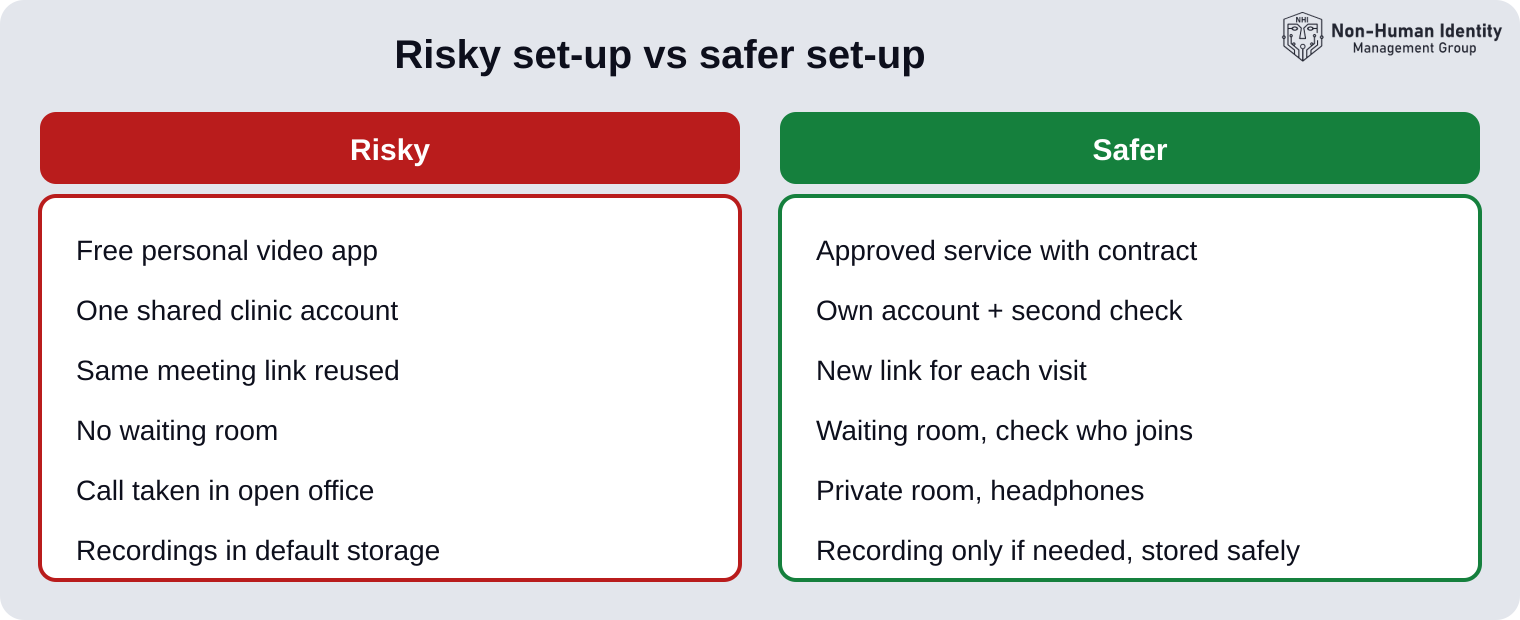
Why this is risky: some clinics reuse one link and skip the waiting room. Then anyone with an old invite could join a later session.
The safer way: a fresh link and passcode for each visit, a waiting room, and clear advice to the patient.
How does it work?
- Booking. The clinic sends an invite. Each visit should get its own link, and links should never be posted publicly.[5]
- Joining. The patient joins from their own device. US health officials suggest a private place, a password on home Wi-Fi and avoiding public Wi-Fi when sharing health details.[4]
- Checking who is there. The clinician admits people from a waiting room and asks who anyone unknown is.[5] For a new patient, US guidance says the provider must check their identity, by voice or in writing.[3]
- The call itself. The service should protect the call in transit, for example with encryption, which scrambles data so outsiders cannot read it. US guidance lists encryption among the points a risk check should cover.[3]
- Afterwards. Notes go into the health record. A supplier that stores recordings or transcripts handles patient data, so in the US it needs a business associate agreement.[3]
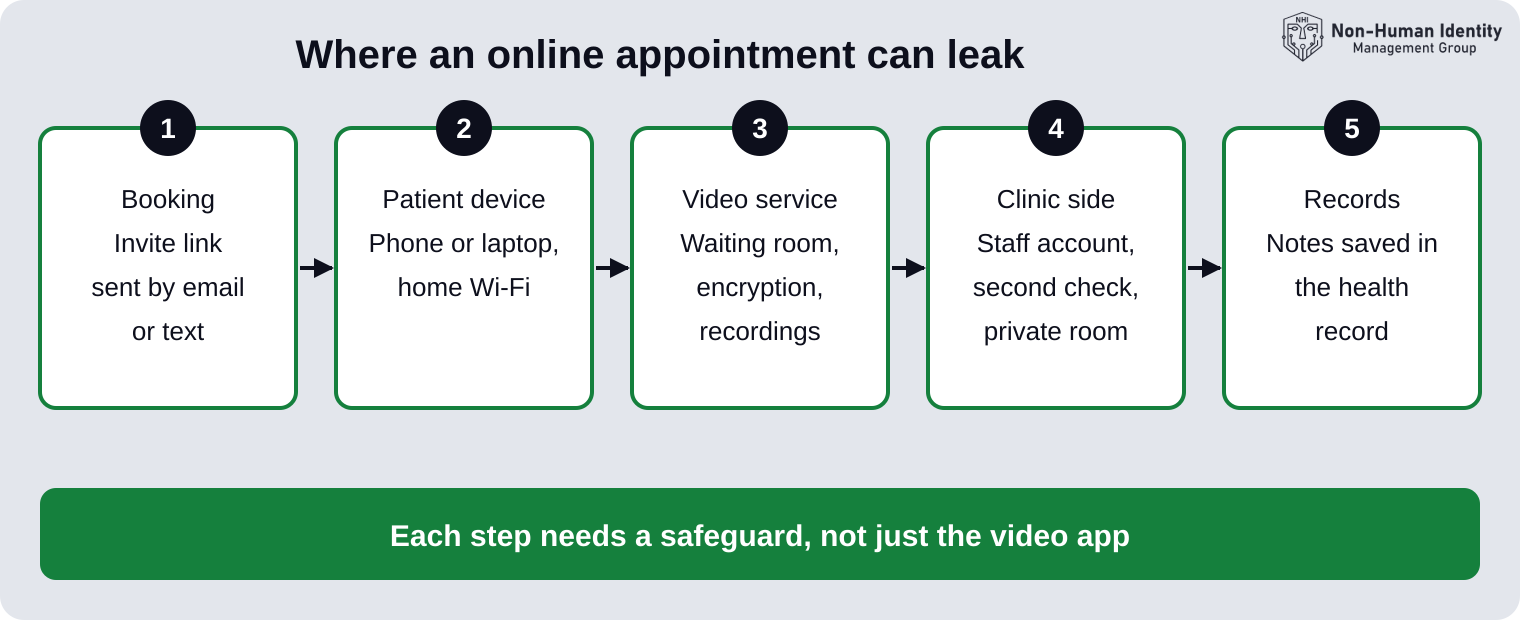
On the clinic side, staff accounts matter too. The UK's cyber security agency gives clear advice for meeting services. Use a strong, unique password and a second sign-in check on admin accounts. Keep the app up to date.[5]
A worked example
Fen Haddad is a counsellor at a small, fictional therapy practice. Bodhi Marlow is the practice manager and looks after its IT with help from an outside supplier.
During the pandemic, the practice started using a free video app on Fen's personal account. It was quick, and it worked. Two years later, Bodhi reads that the US leniency on such tools ended in August 2023.[2] He decides to review the whole set-up.
Bodhi thinks of the consulting room with a closed door, and walks through each door in turn. The same meeting link has been used for every client for months. There is no waiting room. Sessions are sometimes recorded "just in case", and the recordings sit in the app's default cloud storage.
Over the next month, Bodhi makes four changes. The practice moves to a paid service that signs a business associate agreement. Each counsellor has their own account with a second sign-in check. Every session gets a fresh link and a waiting room. Recording is switched off unless a client agrees and there is a clear reason.
Fen adds one habit of her own. She asks new clients to confirm their name and date of birth at the start, and she takes sessions in a closed room with headphones.
No leak had been reported. But the practice now knows where each door is, and who keeps it closed.
Myths and mistakes
| What people think | What is true |
|---|---|
| Any video app is fine for health visits. | In the US, providers must use vendors that follow the HIPAA Rules and will sign a business associate agreement.[1] |
| The pandemic rules still let us use anything. | That leniency ended at 11:59 pm on 9 August 2023, after a transition period.[2] |
| Security is only about the app. | The room, the device, the link, the account and any recordings all matter too. |
| Recording every session is safer. | Each recording is extra patient data to protect. Record only with a clear reason, and know where it is stored.[5] |
| A phone call needs no thought. | Calls still need a private setting where possible. If you share a space, lower your voice and avoid speakerphone.[3] |
What can I do this week?
- List every app and service your clinic uses for online visits, including phone and messaging tools.
- Check that each one has a proper agreement with the clinic.
- Turn on a waiting room and a fresh link for each visit.
- Switch on a second sign-in check for every staff account on the video service.
- Find out where recordings and transcripts are stored, and who can open them.
Checklist
- We use an approved telehealth service with a signed supplier agreement.
- Each staff member has their own account with a second sign-in check.
- Each visit has its own link, and links are never posted publicly.
- A waiting room is on, and clinicians check who joins.
- Clinicians take calls in a private space, or use headphones and a low voice.
- New patients' identity is checked at the start of the visit.
- Recording is off by default, and any recordings are stored safely.
- Apps and devices are kept up to date.
- Patients get simple privacy tips with their invite.
Common questions
Can I use a normal phone call for telehealth?
Yes, in many cases. US guidance says a phone company that only connects the call does not need a business associate agreement. A standard landline call is not covered by the electronic security rule. Apps and internet calls that record or store data are different.[3]
Does the video service need to sign an agreement with us?
In the US, usually yes. Providers must use vendors that follow the HIPAA Rules and will sign a business associate agreement. This applies especially when the service stores recordings or transcripts. Other countries have their own health privacy rules, so check locally.[1][3]
Is end to end encryption required?
Not by name. US guidance on phone and app visits asks providers to consider whether calls could be intercepted and whether the tool supports encryption. Strong encryption is a good sign, but the room, accounts and recordings still need care.[3]
What should patients do to stay safe?
Join from a private place, using their own device. Keep the device updated and the home Wi-Fi protected by a password. Avoid public Wi-Fi for health matters. If unsure about a caller, ring the clinic on its usual number.[4]
What about AI note-takers in sessions?
Treat them with care. The UK's cyber security agency warns that AI attendees may record or analyse meeting content. Check whether the tool can be switched off, where its notes go and whether patients have been told.[5]
Where next?
Ready for the detail? Read the practitioner guide: Telehealth Platform Security Guide. It goes further into patient identity checks, clinician access, records system connections and the HIPAA points that shape a platform's design.
Also useful:
- Healthcare Cyber Security for Beginners
- HIPAA for Beginners
- End to End Encryption for Beginners
- HIPAA Business Associate Agreements Guide
Related NHI Mgmt Group resources: Healthcare Identity Security Guide · Cyber Security for Dental and GP Practices Guide · HIPAA and Online Tracking Technologies
Key terms
- Telehealth
- Care given at a distance, by video, phone, monitoring devices or a patient portal.
- Protected health information
- In the US, health details that can identify a person and are covered by HIPAA.
- Business associate agreement
- A US contract that sets how a supplier must protect patient data it handles.
- Encryption
- Scrambling data so only people with the right key can read it.
- Multi-factor authentication
- A second sign-in check on top of a password, such as a code or a passkey.
- Risk assessment
- Looking at what could go wrong, how likely it is and what to do about it.
Sources and further reading
- HIPAA for telehealth technology. Telehealth.HHS.gov, US Department of Health and Human Services. https://telehealth.hhs.gov/providers/telehealth-policy/hipaa-for-telehealth-technology, accessed 28 Nov 2026.
- HIPAA and Telehealth (special topics, end of the COVID-19 enforcement discretion). Office for Civil Rights, US Department of Health and Human Services. https://www.hhs.gov/hipaa/for-professionals/special-topics/telehealth/index.html, accessed 28 Nov 2026.
- Guidance on How the HIPAA Rules Permit Covered Health Care Providers and Health Plans to Use Remote Communication Technologies for Audio-Only Telehealth. Office for Civil Rights, US Department of Health and Human Services, 10 June 2022. https://www.hhs.gov/hipaa/for-professionals/privacy/guidance/hipaa-audio-telehealth/index.html, accessed 28 Nov 2026.
- Telehealth privacy for patients. Telehealth.HHS.gov, US Department of Health and Human Services. https://telehealth.hhs.gov/patients/telehealth-privacy-for-patients, accessed 28 Nov 2026.
- Video conferencing services: security guidance for organisations. National Cyber Security Centre (UK). https://www.ncsc.gov.uk/guidance/video-conferencing-services-security-guidance-organisations, accessed 28 Nov 2026.