Healthcare cyber security is protecting the computers, devices and data that hospitals and clinics need to care for patients.
This guide is for clinicians, practice managers, people new to health IT and students. You do not need to work in IT to be affected: when systems go down, staff fall back to paper, tests slow down and appointments can be cancelled.
In short
- Hospitals depend on computers for records, test results, scans and medicines, so an attack can delay care.
- Criminals often target healthcare because downtime hurts quickly and organisations feel pressure to recover fast.
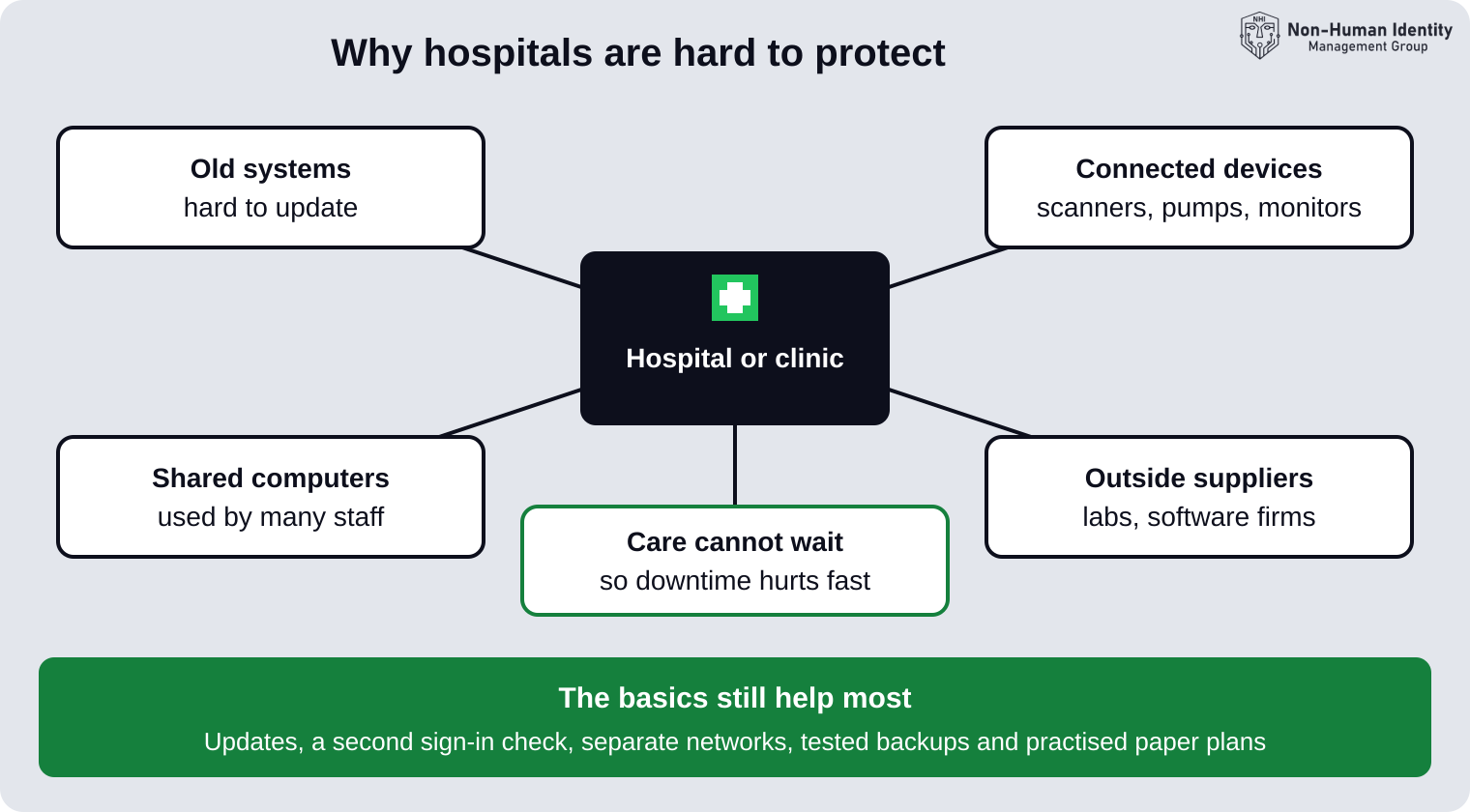
- Old systems, connected medical devices, shared computers and outside suppliers make healthcare harder to protect.
- Basic steps matter most: updates, a second sign-in check, separated networks, tested backups and practised paper plans.
What you will learn
- Explain why hospitals and clinics are attractive targets.
- Spot the warning signs of an attack on a ward or in a practice.
- Check the basic protections your team or practice should have.
- Ask what the plan is if the computers go down.
- Lock-and-ransom attack (ransomware)
- harmful software that locks computers or files, followed by a demand for payment.
- Connected medical device
- a medical machine, such as a scanner or infusion pump, that links to the hospital network.
- Paper fallback (downtime procedure)
- the agreed way of working by hand when computer systems are unavailable.
What is healthcare cyber security?
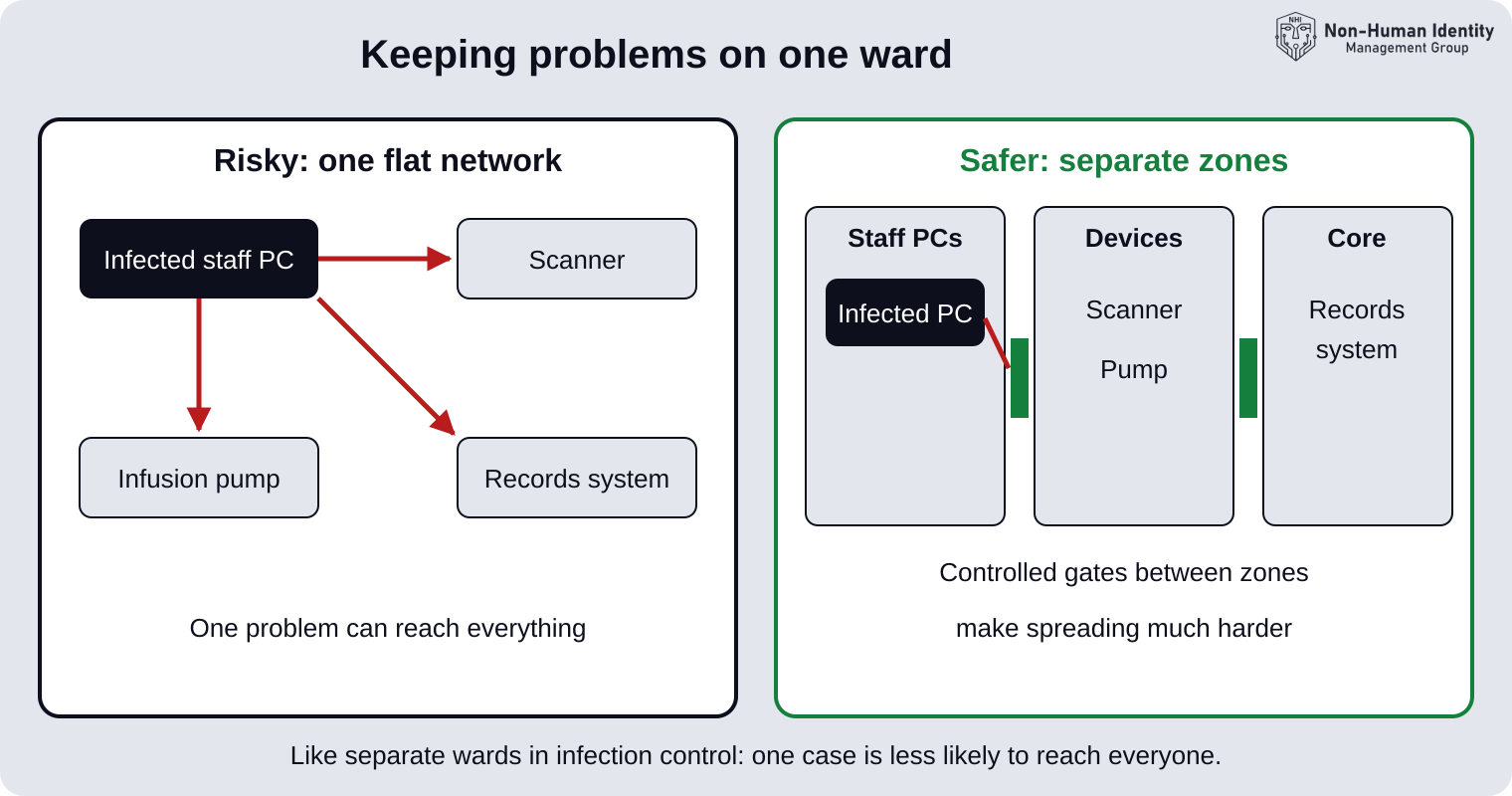
Think of how a hospital controls infection. Staff wash their hands, keep some patients on separate wards and plan for outbreaks. No single step is enough, but together they stop one case spreading to everyone.
Healthcare cyber security works in the same layered way. It protects the systems a hospital or clinic runs on. These include patient records, test results, scanners, medicine systems and email. It also covers medical machines that link to the network.
The aim is not only to keep data private. It is to keep care running safely, even when something goes wrong.
Where the comparison stops working: an infection shows symptoms. A cyber attack can stay hidden for weeks before anyone notices, and it can spread through suppliers far outside the hospital walls.
Why does it matter?
In healthcare, computer problems can quickly become patient problems. In 2024, criminals attacked Synnovis, a lab that runs blood tests for NHS hospitals. Blood tests in South East London were disrupted. Some operations and appointments were postponed or cancelled.[2]
If you are a nurse, doctor or other clinician
What could happen: you open a fake email on a shared ward PC and let an attacker in.
Check this: know who to call about a strange email or screen, and where the paper forms are kept.
Next: Phishing for Beginners
If you run a GP practice, pharmacy or clinic
What could happen: one stolen password locks your records system and you cannot see patients' notes.
Check this: make sure every account uses a second sign-in check and backups are tested.
If you are new to health IT
What could happen: an old scanner that cannot be updated sits on the same network as everyone's PCs.
Check this: ask whether medical devices are kept on their own separate part of the network.
If you manage a department
What could happen: systems go down overnight and nobody remembers how the paper process works.
Check this: ask when your team last practised working without computers.
Next: Business Continuity and Disaster Recovery for Beginners
What does it look like?
Attacks often start quietly. Here is a made-up note a ward might pass to the IT service desk when something seems wrong.
Example only. All values are made up.
Ward note to IT service desk, 02:10
From: Ward EXAMPLE-7, nurse in charge
1. Shared PC showed "Your files are locked" message    (1)
2. Results system very slow, then would not open      (2)
3. Email asked staff to "re-enter password" at
   login.example.invalid                              (3)
4. Infusion pump screen normal                        (4)
Action taken: PC unplugged from network, not switched off  (5)
- A ransom message on screen is a strong sign of an attack. In a real message, this line would contain the exact words on the screen.
- Systems slowing down or failing together can be an early sign.
- A fake sign-in page is a common way attackers get the first password.
- Devices may carry on working, but should still be reported, as they share the network.
- Disconnecting from the network, rather than switching off, is a common first step. Follow your own organisation's instructions.
Why this is risky: if the ward waits until morning, the attack may spread to more systems overnight.
The safer way: staff know the warning signs, report them straight away to a number they already have, and switch to paper while IT checks.
How does it work?
Most attacks on healthcare follow a similar path. Each step is also a chance to stop it.
- Getting in. An attacker tricks someone with a fake email, guesses a weak password or uses a system that has not been updated.
- Spreading. From one computer, they move across a flat network, where every system can reach every other. Old systems are easier to break into. In 2017, NHS organisations hit by the WannaCry attack were running Windows systems that had not been updated or were no longer supported.[1]
- Locking and stealing. They lock files with ransomware and may also copy patient data to put more pressure on the hospital.[2]
- Disruption. Records, results or scanners become unavailable. Staff switch to paper, and some care is delayed.
- Recovery. IT teams rebuild systems and restore data from backups. This can take days or weeks.
Defences match those steps. US health officials list a set of essential goals for healthcare organisations. They include fixing known weaknesses, email security, a second sign-in check, basic staff training, separate admin accounts and security rules for suppliers.[4] In England, organisations with access to NHS patient data and systems must use an online self-assessment tool for their data security.[5]
Medical devices need extra care. The US medicines regulator says devices can have security weaknesses that, if left unfixed, may lead to patient harm.[3] Many hospitals keep devices on their own separate part of the network, so a problem on staff PCs is less likely to reach them. This is called network segmentation.
A worked example
Zola Quist manages Quarry Pharmacy, a fictional community pharmacy with a small team. Elif Varga is one of the pharmacists.
On a Tuesday morning, Elif gets an email that looks like it is from the pharmacy's ordering supplier. It asks her to sign in to "confirm a delivery". The web address is slightly wrong, so she does not click. She forwards it to Zola instead.
Zola remembers the hospital's approach to infection: stop it spreading, then deal with it. She reports the email to the pharmacy's IT supplier and warns the rest of the team.
That afternoon, she checks a few basics with the supplier. Does every account use a second sign-in check? Yes, except one shared login on the dispensing PC. When was a backup last restored to test it? Nobody is sure.
Over the next month, Zola makes three changes. Each person now has their own login with a second sign-in check. The supplier runs a test restore, which works on the second attempt after a fix. And the team spends half an hour practising how to dispense on paper if the system goes down.
Zola also adds a sticker to each PC with the supplier's support details and the words "Something odd? Report it now."
No attack took place. But if one does, Quarry Pharmacy is now much better placed to keep serving patients.
Myths and mistakes
| What people think | What is true |
|---|---|
| Cyber security is only about keeping records private. | Privacy matters, but in healthcare the bigger worry is often care being delayed when systems go down.[2] |
| Small practices are too small to be targeted. | Many attacks are not aimed at one place. They hit whoever has a weak password or an old system. |
| Medical devices are the manufacturer's problem. | Makers and hospitals both have a part. Hospitals are urged to act on safety alerts and keep devices protected.[3] |
| We have backups, so we are fine. | A backup only helps if it can be restored. Test it, and keep at least one copy away from the main network. |
| Sharing one login on a busy ward saves time. | Shared logins make it hard to see who did what. Separate, quick sign-ins are safer.[4] |
What can I do this week?
- Find out who to call if a screen, email or system looks wrong, and save the details somewhere you can reach without a computer.
- Check that your own accounts use a second sign-in check.
- Ask where the paper forms are kept, and when the team last practised using them.
- If you manage IT or a practice, ask when a backup was last restored as a test.
- Ask whether medical devices are kept on a separate part of the network.
Checklist
- Every staff member has their own login, with a second sign-in check where possible.
- Computers and systems get security updates promptly, and old ones have a plan.
- Medical devices are listed and kept on their own separate part of the network.
- Backups are taken, kept apart from the main network and test-restored.
- Staff know the signs of an attack and how to report it straight away.
- Paper fallback procedures exist and have been practised.
- Suppliers who connect to your systems meet agreed security rules.
- Staff accounts are removed promptly when people leave.
Common questions
Why do criminals attack hospitals?
Because downtime hurts fast. Hospitals need computers to treat patients, so criminals hope they will pay quickly to get them back. Health data can also be valuable to criminals. Many hospitals also run older systems and many connected devices, which can give attackers more ways in.
What should I do if I think my ward or practice is under attack?
Report it straight away, using the number or contact your organisation gives you. Do not wait until the next day. Follow local instructions, which may include unplugging a computer from the network. Then switch to your paper procedures so patient care can carry on.
Is healthcare cyber security the same as patient privacy law?
No, but they overlap. Privacy laws set rules for how patient details are used and shared. Cyber security is the hands-on work of keeping systems and data safe and working. You can follow privacy rules and still be knocked offline by an attack.
Can a hacker take control of a medical device?
It is possible in some cases. Regulators have warned that some devices have security weaknesses that could affect safety if left unfixed. The usual defences are updates from the maker, keeping devices on a separate part of the network and reporting anything unusual.
Do small practices and pharmacies need to worry about this?
Yes. Small sites often have fewer IT staff and older equipment, and many attacks are not aimed at one place. A second sign-in check, updates, tested backups and a practised paper plan protect most of what matters.
Where next?
Ready for the detail? Read the practitioner guide: Hospital Clinical Network Segmentation Guide. It goes further into designing clinical network zones, identifying medical devices and controlling the traffic between them.
Also useful:
- Medical Device Security Guide
- Cyber Security for Dental and GP Practices Guide
- HIPAA for Beginners
- Ransomware for Beginners
- IoT Security for Beginners
Related NHI Mgmt Group resources: AI Security in Healthcare Guide · Medical Device Procurement Security Checklist · Incident Response for Beginners
Key terms
- Ransomware
- Harmful software that locks computers or files so criminals can demand payment.
- Phishing
- Fake messages or websites that trick people into giving away passwords or opening harmful files.
- Network segmentation
- Splitting a network into separate zones, so a problem in one is less likely to reach the others.
- Legacy medical device
- A medical machine still in use after its maker stopped fully supporting it, often hard to update.
- Multi-factor authentication
- A sign-in that needs a second check, such as a code or an app, as well as a password.
- Business continuity
- Keeping essential services, such as patient care, running during a disruption and recovering afterwards.
Sources and further reading
- Investigation: WannaCry cyber attack and the NHS. National Audit Office, 27 October 2017. https://www.nao.org.uk/reports/investigation-wannacry-cyber-attack-and-the-nhs/, accessed 28 Nov 2026.
- Synnovis cyber attack: statement from NHS England. NHS England, June 2024. https://www.england.nhs.uk/2024/06/synnovis-cyber-attack-statement-from-nhs-england/, accessed 28 Nov 2026.
- Medical Device Cybersecurity. US Food and Drug Administration. https://www.fda.gov/medical-devices/digital-health-center-excellence/cybersecurity, accessed 28 Nov 2026.
- Healthcare and Public Health (HPH) Cybersecurity Performance Goals. US Department of Health and Human Services, HHS Cyber Gateway. https://hhscyber.hhs.gov/cybersecurity-performance-goals.html, accessed 28 Nov 2026.
- Data Security and Protection Toolkit. NHS England. https://www.dsptoolkit.nhs.uk/, accessed 28 Nov 2026.