A VEX statement is a short note saying whether a known software flaw really affects a product.
This guide is for anyone who buys, builds or looks after software and gets long lists of security warnings. You do not need to write code to use it: if a supplier sends you a list of flaws, a VEX statement helps you see which ones need action.
In short
- Software is built from many parts, and a part can have a known flaw that the finished product never uses.
- A VEX statement says, for one flaw and one product, whether the product is affected, not affected, fixed or still being checked.
- "Not affected" should come with a reason, and "affected" should come with what to do.
- VEX helps teams spend time on the flaws that matter, but it is a claim from the writer, so check who wrote it and when.
What you will learn
- Explain what a VEX statement is in one sentence.
- Read the four answers a VEX statement can give.
- Spot a "not affected" answer that has no reason behind it.
- Ask a supplier for VEX information about the software you use.
- Known flaw (vulnerability)
- a weakness in software that someone could use to cause harm.
- Parts list (SBOM)
- a list of the pieces a piece of software is built from.
- Flaw status note (VEX)
- a short note saying whether a known flaw affects a product.
What is VEX?
Think of a car recall for a faulty airbag. Your car maker writes to say your model uses that airbag brand, but not the faulty batch. You do not need to book a repair.
VEX does the same job for software. Most programs are built from many ready-made parts. When a flaw is found in one part, warning lists flag every product that contains it. A VEX statement is the maker's answer for its own product. It says "this affects us", "it does not", "we have fixed it" or "we are still checking".[1]
VEX stands for Vulnerability Exploitability eXchange. "Exploitability" means whether the flaw can actually be used to cause harm in that product. The statement is written so that computers can read it as well as people.[1]
Where the comparison stops working: a recall letter comes from one trusted maker. A VEX statement can come from a supplier, a researcher or a tool, and its quality depends on how carefully the writer checked.[2]
Why does it matter?
Security tools often flag flaws in parts that the finished product never uses. The US national cyber security agency says VEX can cut these false alarms and save the questions customers would otherwise send to suppliers.[2]
If you buy software for your organisation
What could happen: a scan shows hundreds of flaws, and your team cannot tell which ones put you at risk.
Check this: ask your supplier whether they publish VEX information with their updates.
Next: SBOMs for Beginners
If you are new to IT or security work
What could happen: you spend days chasing a flaw that the product does not use, while a real one waits.
Check this: before you raise a flaw, look for the maker's status note on it.
If you build software
What could happen: customers keep asking about the same flaw, and your team answers each one by hand.
Check this: publish one clear status note per flaw and keep it up to date.
What does it look like?
Real VEX files are written in a format computers read. Here is a made-up one, simplified into plain words, from a fictional maker of a booking app.
Example only. All values are made up.
Author:      Example Software Ltd
Last update: 2026-11-01
Flaw:        EXAMPLE-FLAW-0000           (1)
Product:     ExampleBook app, version 4.2 (2)
Status:      not_affected                (3)
Reason:      vulnerable_code_not_present (4)
Note:        The faulty part of the library
             is left out when we build the app.
- In a real file, this line would contain the public ID number of the flaw, called a CVE.
- The exact product and version the answer applies to.
- One of four answers. This one says no fix is needed for this version.
- The reason for "not affected", picked from a short fixed list.
Why this is risky: a "not affected" answer is only as good as the checking behind it. If the reason is missing, or the note is old, you are trusting a guess.
The safer way: look for the author, the date, the exact version and a reason for each "not affected" answer. If one is missing, ask the supplier before you close the warning.
How does it work?
Here is how a VEX statement usually travels from the maker to you.
- A flaw is announced. A known flaw in a widely used part is given a public ID number.
- Warnings go off. Scanners (tools that check software for known flaws) flag every product that contains the part.
- The maker checks. The maker looks at whether its product really uses the faulty code, and in what way.
- The maker answers. It writes a VEX statement with one of four answers: not affected, affected, fixed or under investigation.[1] "Not affected" needs a reason or an explanation, and "affected" needs a note on what to do.[1]
- Your tools read it. Some scanners can read VEX files and hide flaws that the maker has marked as not affected.[4]
- The maker updates it. As the maker learns more, it issues new versions, so "under investigation" should later change to a final answer.[3]
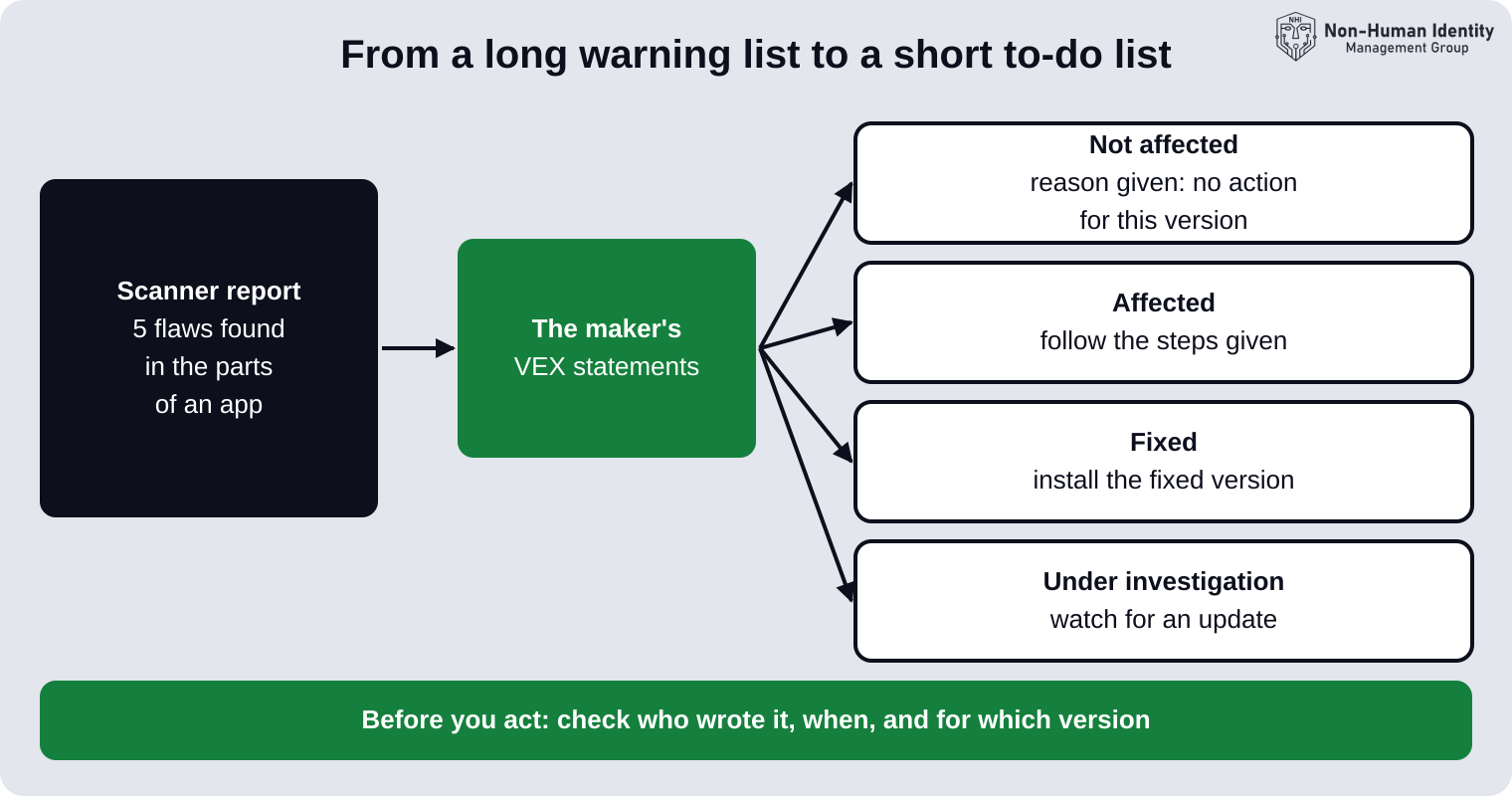
The four answers have fixed names in the most common formats, so tools can sort them.[1] For "not affected", the reason also comes from a short list. Examples include "the faulty part is not in the product" and "the faulty code is never run".[3]
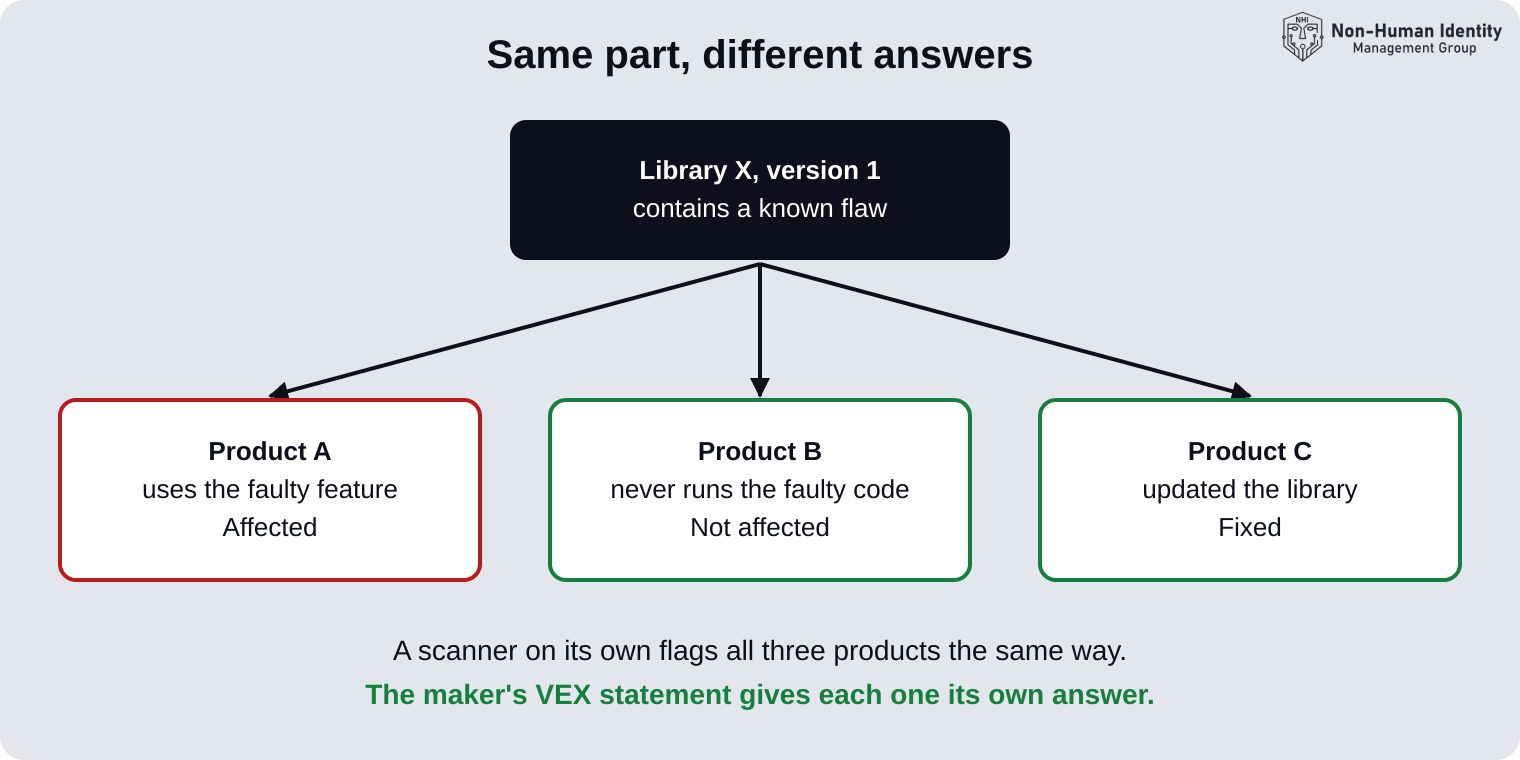
A VEX statement can be its own file, or it can travel with a software parts list (an SBOM). It does not need one.[1] CISA names three common formats: CSAF, CycloneDX and OpenVEX.[1]
A worked example
Quinn Grover looks after the computers for a small charity. Each month she runs a scanner over the charity's donor app, which a supplier provides.
This month the report lists 38 flaws. One is marked serious. It sits in a common part that handles log files. Quinn's manager, Wanda Pereira, asks whether they need to take the app offline.
Quinn remembers the airbag recall. The part is in the app, but that does not mean the faulty code is used. So she checks the supplier's security page and finds a VEX file for the app.
The file says the version the charity runs is "not affected". The reason given is that the faulty code is not in the build. It has an author, a date from last week and the exact version number.
Quinn checks the version on the charity's server. It matches. She loads the VEX file into the scanner, which hides that one flaw and keeps a note of why.
Two other flaws are marked "affected", with an update to install. Quinn books the update for that evening. One more is "under investigation", so she sets a reminder to look again next week.
She tells Wanda the app can stay online. The list of 38 has become three clear jobs. Quinn also asks the supplier to email her when the VEX file changes, so she does not rely on memory.
Myths and mistakes
| What people think | What is true |
|---|---|
| If a part has a flaw, every product using it is at risk. | Not always. The product may not include or run the faulty code. That is the gap VEX fills.[2] |
| "Not affected" means I never need to look again. | It applies to one product version. A new version, or new facts, can change the answer.[3] |
| VEX is the same as an SBOM. | An SBOM lists the parts. VEX says whether a known flaw in those parts affects the product.[1] |
| Any "not affected" answer can be trusted. | It is the writer's claim. Check who wrote it, when, and that it gives a reason. |
| VEX replaces installing updates. | For flaws marked "affected", you still need to follow the steps or install the fix. |
What can I do this week?
- Ask your main software suppliers whether they publish VEX information, and where.
- Check whether your scanner can read VEX files.
- Pick one serious warning from your last scan and look for the maker's status note on it.
- Agree who in your team decides when a "not affected" answer is good enough to close a warning.
Checklist
- We know which suppliers publish VEX information and where to find it.
- Each VEX statement we rely on names its author and date.
- The product and version in the statement match what we actually run.
- Every "not affected" answer gives a reason or an explanation.
- Every "affected" answer tells us what to do, and we have done it.
- "Under investigation" answers have a reminder to check again.
- Our scanner keeps a record of why each warning was hidden.
Common questions
What does VEX stand for?
VEX stands for Vulnerability Exploitability eXchange. In plain words, it is a way of sharing whether a known software flaw can actually be used against a particular product. It is written so that both people and security tools can read it.
Do I need an SBOM to use VEX?
No. A VEX statement can stand on its own. It works well alongside an SBOM, because the SBOM shows which parts a product contains and VEX says which known flaws in those parts matter. Many teams use the two together.
Who writes VEX statements?
Usually the software maker, because it knows how its product is built. CISA says researchers, open source projects, security tools and coordinators can also issue them. Give most weight to the maker's own statement, and check the author on any you rely on.
What should I do if a flaw is "under investigation"?
Treat it as not yet answered. Keep the warning open, follow any advice the maker gives in the meantime and check back for an update. The maker should later change the answer to affected, not affected or fixed.
Can a scanner use VEX for me?
Yes, some can. Certain scanners read VEX files and hide flaws the maker has marked as not affected, which shortens the list. Check that the tool keeps a record of what it hid and why, so you can review it later.
Where next?
Ready for the detail? Read the practitioner guide: VEX Guide. It goes further into the three file formats, the full list of reasons for "not affected" and how suppliers and customers build VEX into their daily work.
Also useful:
- SBOMs for Beginners
- CVE and CVSS for Beginners
- Vulnerability Management for Beginners
- Open Source Risk and Software Composition Analysis for Beginners
Related NHI Mgmt Group resources: EU CRA SBOM and Vulnerability Handling Requirements Guide · Software Supply Chain Security for Beginners
Key terms
- VEX
- A short note saying whether a known software flaw really affects a particular product.
- SBOM
- A list of the components a piece of software is built from.
- CVE
- A public ID number and record for one known software flaw.
- False positive
- A warning about a problem that turns out not to be a real risk.
- Component
- A ready-made part, such as a code library, that is built into a larger program.
- Justification
- The reason given in a VEX statement for saying a product is not affected.
Sources and further reading
- Minimum Requirements for Vulnerability Exploitability eXchange (VEX). CISA, April 2023. https://cisa.gov/sites/default/files/2023-04/minimum-requirements-for-vex-508c.pdf, accessed 28 Nov 2026.
- When to Issue VEX Information. CISA, November 2023. https://www.cisa.gov/sites/default/files/2023-11/When-to-Issue-a-VEX-508c.pdf, accessed 28 Nov 2026.
- OpenVEX Specification. OpenVEX project, GitHub. https://github.com/openvex/spec/blob/main/OPENVEX-SPEC.md, accessed 28 Nov 2026.
- VEX. Trivy documentation, Aqua Security. https://trivy.dev/latest/docs/supply-chain/vex/, accessed 28 Nov 2026.