A webhook is a message one app sends to another the moment something happens.
This guide is for small business owners, website owners and people starting out in IT. You do not need to write code to be affected: if your shop, booking system or chat tool connects to other services, it probably sends or receives webhooks.
In short
- A webhook lets an app tell another app "this just happened", such as "a payment went through".
- The message goes to a web address, and anyone who knows that address can try to send fake messages to it.
- Good services sign each message with a shared secret, so the receiving app can check it is genuine.
- Keep webhook secrets and secret web addresses out of code and chat, check every message, and change a secret if it leaks.
What you will learn
- Explain what a webhook is in one sentence.
- Spot why an unchecked webhook can be tricked.
- Check that your apps verify the messages they receive.
- Ask your developer or supplier where webhook secrets are kept.
- Automatic message (webhook)
- a message one app sends to another app's web address when an event happens.
- Receiving address (endpoint)
- the web address where an app waits for webhook messages.
- Shared stamp (signing secret)
- a secret both apps know, used to prove a message is genuine and unchanged.
What is a webhook?
Think of a parcel company that texts you when your parcel arrives. You do not have to keep phoning them to ask. They tell you once it happens.
A webhook works the same way for apps. Your app asks another service to send a message when something happens. That could be a new order, a payment or a form being filled in. When the event happens, the service sends a short message to your app's web address straight away.[1]
The other way is called polling. That means asking again and again whether anything is new. GitHub's guide says webhooks take less effort than polling and give updates in near real time.[1]
The app that sends the message is the sender. The app that waits for it is the receiver. The receiver's web address is called the endpoint.
Where the comparison stops working: you can usually tell a real text from your parcel company. An app cannot tell by looking. Unless it checks a hidden stamp on the message, a fake message can look exactly like a real one.
Why does it matter?
Webhooks often start real actions, like sending goods or opening an account. Stripe warns that without checks, an attacker could send fake messages. These could make a shop send orders or give someone access.[2]
Webhooks are linked to non-human identities (NHIs). A non-human identity is a digital identity, or the credential behind it, that represents a machine, application, automated process, service or AI agent. Here, the webhook secret is the credential. It proves the message came from the right app.
If you run an online shop
What could happen: a fake "payment received" message makes your shop send goods that nobody paid for.
Check this: ask your developer whether the shop checks the signature on payment messages.
If your team uses chat tools
What could happen: a chat web address pasted in a public place lets strangers post messages into your team channel.
Check this: treat chat webhook addresses like passwords, and never post them in public.
If you are new to coding
What could happen: you type the webhook secret into your code, and it ends up in a shared project.
Check this: read the secret from secure settings, not from the code itself.
What does it look like?
Here is a made-up webhook message from a payment service to a print shop's website. Most webhook messages are short text in a format called JSON (a simple way of writing labelled data).
Example only. All values are made up.
Sent to: https://shop.example.com/webhooks/payments   (1)
Signature: t=0000000000,v1=FAKE-SIGNATURE-0000          (2)

{
  "id": "evt_EXAMPLE_0000",                              (3)
  "type": "payment.succeeded",
  "amount": "49.00",
  "order": "EXAMPLE-ORDER-0000"
}
- The endpoint: the shop's web address that waits for messages.
- In a real message, this line would contain a time stamp and a signature made with the shared secret.
- An event number. The shop can note it, so it does not act on the same event twice.
Why this is risky: the endpoint is on the open web. If the shop acts on any message that arrives, a stranger could send a fake "payment succeeded" for an order they never paid for.
The safer way: the shop works out the signature itself, using the shared secret, and compares it with the one in the message. If they do not match, the shop ignores the message.[3] It also checks the time stamp, so an old message cannot simply be sent again.[2]
How does it work?
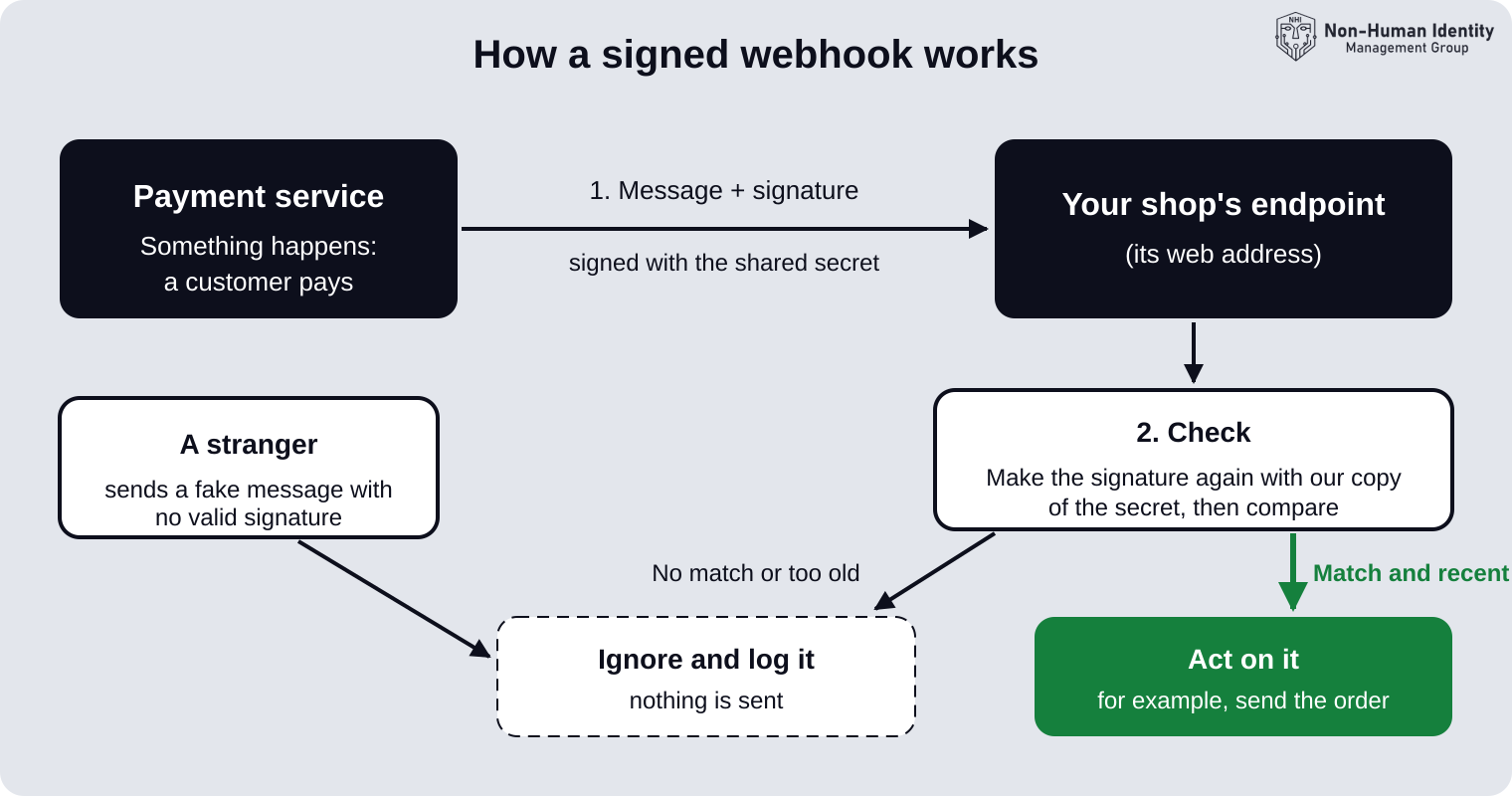
Here is how a signed webhook travels from one app to another.
- Sign up. You give the sending service your endpoint address and choose which events you want. The service gives you a signing secret.[2]
- Something happens. A customer pays, and the service writes a short message about it.
- Stamp. The service mixes the message with the secret to make a signature. This method is called HMAC (a way to make a code that only someone holding the secret can produce).[3]
- Send. The message and the signature travel to your endpoint over an encrypted web connection (HTTPS).[2]
- Check. Your app makes its own signature from the message and its copy of the secret. If the two match, and the time stamp is recent, the message is accepted.[2]
- Reply. Your app quickly says "got it". If it does not, many services try again later, so the same message may arrive more than once.[2]
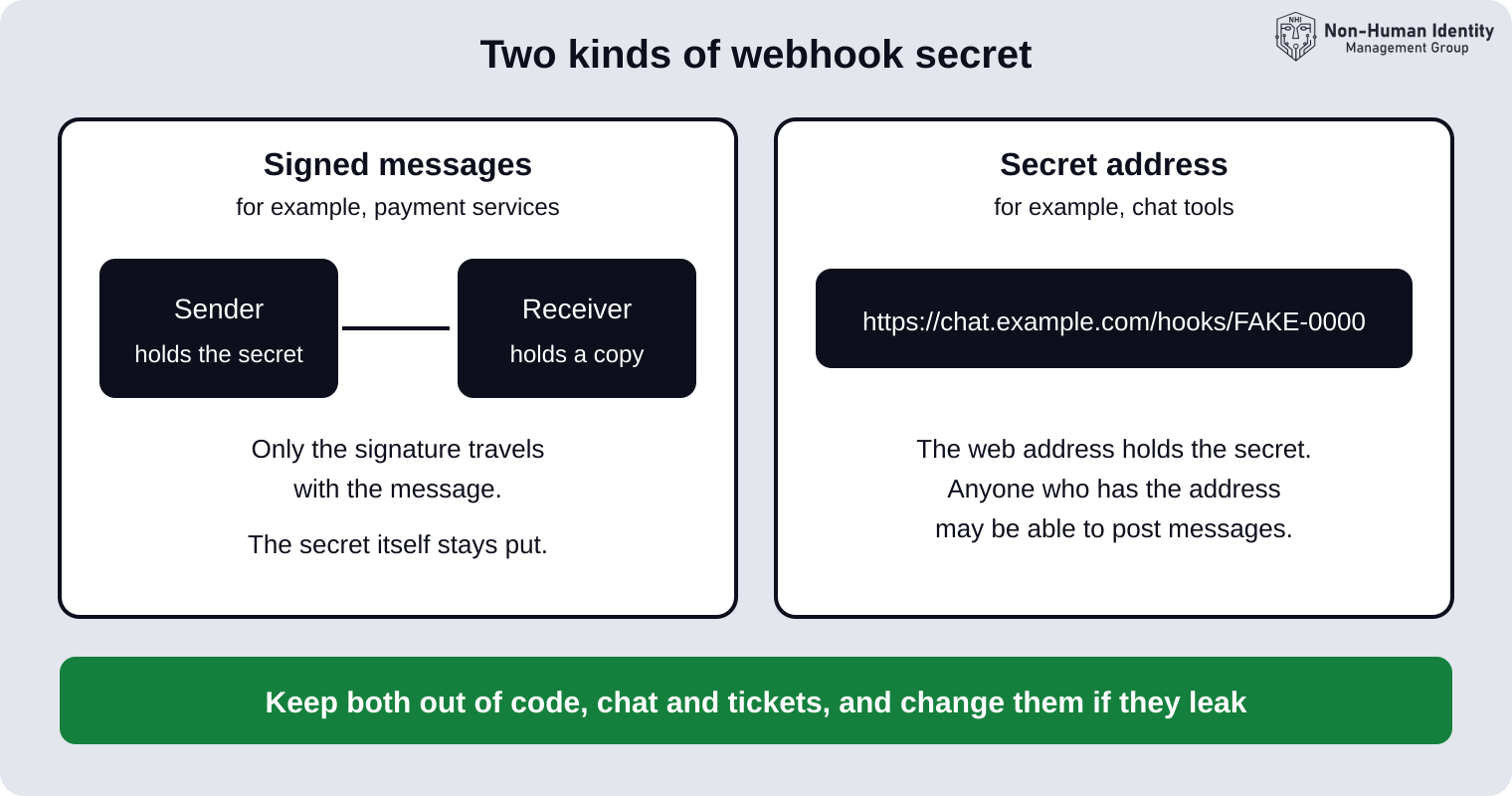
Some webhooks work differently. Chat tools often give you an incoming webhook address that lets apps post messages into a channel. Here the address itself is the secret. Slack's guide says its webhook address contains a secret and should not be shared online, including in public code projects.[4]
A worked example
Umar Lomax runs Bracken Printers, a fictional print shop that sells business cards online. A freelance developer, Orla Mbeki, built the shop's website.
One Monday Umar notices three orders marked "paid" that do not appear in the payment service's records. The cards are already printed and boxed.
He remembers the parcel texts. A message saying "your parcel is here" is only useful if it really comes from the parcel company. So he calls Orla.
Orla looks at the shop's code. It reads each payment webhook and marks the order as paid, but it never checks the signature. Anyone who found the address could post a fake "payment succeeded" message.
She turns on signature checks, using the payment service's own library. The shop now ignores any message without a valid signature or with an old time stamp. She also makes the shop note each event number, so a repeated message is not acted on twice.[2]
Next, Orla finds the signing secret typed straight into the code. She asks the payment service for a new secret, stores it in the hosting service's secure settings and retires the old one.[2]
Last, Umar adds one habit. Before sending a big order, staff check that the payment shows in the payment service's own dashboard.
The three boxes stay on the shelf. No more fake orders appear in the records available to him.
Myths and mistakes
| What people think | What is true |
|---|---|
| Nobody knows our webhook address, so it is safe. | Addresses leak through code, logs and guesswork. Check the signature on every message. |
| HTTPS means the message is genuine. | HTTPS protects the message on its way. It does not prove who sent it. The signature does that. |
| A message will only arrive once. | Services may resend messages. Note each event number and skip ones you have already handled.[2] |
| A chat webhook address is just a link. | For many chat tools the address is the secret. Anyone holding it can post as your app.[4] |
| Once set, a webhook secret never needs to change. | Change it on a schedule and straight away if you think it has leaked.[2] |
What can I do this week?
- List the services that send webhooks to your website or apps.
- Ask your developer whether each one checks the signature and the time stamp.
- Search your shared code and chat for webhook addresses and secrets.
- Move any secret you find into secure settings, then change it.
- Turn off webhooks you no longer use.
Checklist
- Every webhook endpoint uses HTTPS.
- Every incoming message is checked for a valid signature before the app acts on it.
- Old messages are rejected using the time stamp.
- Repeated messages are spotted by their event number.
- Signing secrets live in secure settings, not in code or chat.
- Chat webhook addresses are treated as passwords.
- Each webhook has a named owner, and unused ones are switched off.
- Secrets are changed on a schedule and after any suspected leak.
Common questions
Is a webhook the same as an API?
Not quite. With an API (a set of rules that lets one app ask another for data), your app asks and waits for an answer. With a webhook, the other service contacts your app when something happens. Many services offer both, and use webhooks to save you asking again and again.
What is a webhook secret?
It is a secret value that the sender and the receiver both know. The sender uses it to sign each message. The receiver uses its copy to check the signature. The secret itself does not travel with the message, so it must be kept private on both sides.
What should I do if a webhook secret leaks?
Change it at the sending service straight away, then update your app with the new value. Some services let the old and new secrets work side by side for a short time, which helps you switch without missing messages. Then check your records for odd events.[2]
Do no-code tools use webhooks?
Yes, often. Automation tools commonly start a task when a webhook message arrives, or send one when a task ends. The same rules apply: keep the addresses and secrets private, give each one an owner and switch off the ones you no longer need.
Why does my app need to reply quickly?
The sender waits for a short "got it" reply. If your app is slow, the sender may treat the delivery as failed and try again. Stripe advises replying first and doing slower work, such as updating accounts, afterwards.[2]
Where next?
Ready for the detail? Read the practitioner guide: Webhook Secrets Security Guide. It goes further into checking signatures correctly, changing secrets without missing messages, and logging and alerts for webhooks.
Also useful:
- Webhook HMAC Signing vs mTLS vs IP Allowlisting
- Webhook URL Leak Check
- API Keys for Beginners
- Secrets Rotation for Beginners
- NHI Foundation Level Training
Related NHI Mgmt Group resources: Non-Human Identities for Beginners · Leaked Secret Response for Beginners · API Security Guide
Key terms
- Webhook
- An automatic message one app sends to another app's web address when an event happens.
- API
- A set of rules that lets one app ask another app for data or actions.
- Payload
- The useful content of a message, such as the details of an order.
- Signing secret
- A secret used to make signatures that prove a message is genuine. If it leaks, others can make valid-looking messages.
- HMAC
- A method that mixes a message with a shared secret to make a code that shows the message is genuine and unchanged.
- Replay attack
- Sending a real, signed message again later to trigger the same action twice.
- HTTPS
- The secure version of a web connection, which protects data while it travels.
Sources and further reading
- About webhooks. GitHub Docs, GitHub. https://docs.github.com/en/webhooks/about-webhooks, accessed 28 Nov 2026.
- Receive Stripe events in your webhook endpoint. Stripe Documentation, Stripe. https://docs.stripe.com/webhooks, accessed 28 Nov 2026.
- Validating webhook deliveries. GitHub Docs, GitHub. https://docs.github.com/en/webhooks/using-webhooks/validating-webhook-deliveries, accessed 28 Nov 2026.
- Sending messages using incoming webhooks. Slack Developer Docs, Slack. https://docs.slack.dev/messaging/sending-messages-using-incoming-webhooks/, accessed 28 Nov 2026.