Data loss prevention (DLP) is a set of tools and rules that spot sensitive information, such as customer records or card numbers, and warn, block or record when it is about to leave your organisation in a way you do not allow.
This guide is for newcomers, students, career changers and managers who are not security specialists. It explains what DLP is, why it matters, how a DLP rule works from start to finish, a worked example, common myths and simple first steps a small team can take this week. No prior security knowledge is needed.
By the end of this guide you will be able to:
- Explain what data loss prevention means in plain English.
- Understand the three places data can be: stored, moving and in use.
- Describe how a DLP rule finds sensitive data and decides what to do.
- Identify three practical steps to start with DLP safely.
Key takeaways
- DLP watches sensitive data as it moves. It looks at email, file sharing, cloud apps and devices for information that should not leave.
- You must know what is sensitive first. DLP rules only work if you have decided which kinds of data matter, such as personal data or financial records.
- Rules can warn, block or just record. Many teams start by recording, then add warnings, and only block once the rules are accurate.
- Most leaks are mistakes, not crime. A file sent to the wrong person is a common problem that DLP is designed to catch.
- DLP is one layer. It works alongside access control, encryption, training and a plan for what to do when something goes wrong.
What it is, in plain English
Sensitive data is information that could harm people or your organisation if it got out, such as names and addresses, bank details, health records or a secret product plan. Data loss here means that kind of information ending up somewhere it should not, whether by accident or on purpose.
DLP tools look inside messages and files to find sensitive data, then apply rules you set. Microsoft describes DLP as the practice of stopping users from inappropriately sharing sensitive data with people who should not have it, and notes that its tools use more than a simple text search: keywords, patterns, checks on numbers such as card numbers, and machine learning.[1]
Security people often talk about three data states. Data at rest is stored, for example a file in a shared folder. Data in motion is travelling, for example an email being sent. Data in use is being worked on, for example copied to a USB stick. The US government definition of DLP covers all three states.[2]
A helpful comparison is a security scanner at an airport exit. Most bags pass straight through. When the scanner sees something that is not allowed, a person checks it, and the bag may be stopped. Where the analogy breaks down: an airport scanner looks at every bag the same way, while DLP only knows what to look for if you tell it, and it can miss data that is hidden, renamed or in a format it cannot read.
Why it matters to you
- If you run a small business: one customer spreadsheet emailed to the wrong address can mean a legal duty to report it, upset customers and lost trust.
- If you are new to a security job: DLP alerts are a common daily task, and learning to tell a real problem from a false alarm is a core skill.
- If you are a manager: DLP gives you evidence of how sensitive data is handled, which helps with audits and with showing customers you take care of their information.
Data does not only leak through hackers. The UK Information Commissioner's Office (ICO) lists "sending personal data to an incorrect recipient" and lost or stolen devices as examples of a personal data breach.[4] Under UK data protection law, a breach that must be reported has to be reported to the ICO no later than 72 hours after the organisation becomes aware of it.[4] A DLP warning that makes someone stop and check the address before sending can reduce how often that happens.
DLP also supports wider good practice. The Center for Internet Security (CIS) includes Data Protection as Control 3 in its widely used CIS Controls, with the aim to "identify, classify, securely handle, retain, and dispose of data".[3]
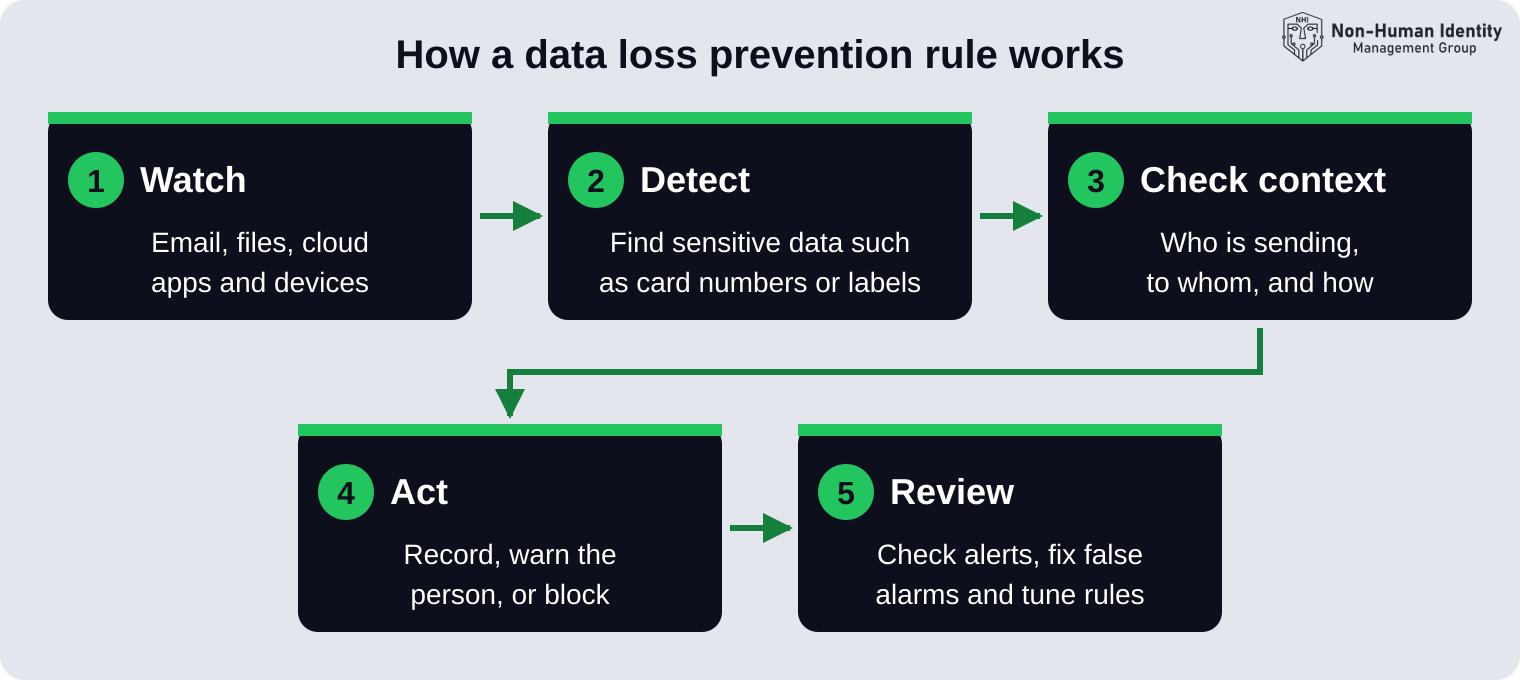
How it works, step by step
Products use different names, but the steps are similar.
- Decide what is sensitive. Agree which kinds of data matter, for example customer personal data, payment card numbers or contracts. This is often done through data classification: labelling data by how sensitive it is.
- Choose where to watch. Pick the places the rule covers, such as email, shared drives, cloud storage, chat or laptops. Microsoft calls these "locations".[1]
- Detect. The tool scans content for matches, for example a number that passes a card number check, a sensitivity label, or many records in one file.
- Check the context. The rule looks at who is sending, to whom and how. Sending customer data to a colleague is usually fine; sending it to a personal email address may not be.
- Act. The rule does what you chose: record it, show the person a warning, or block it. Google Workspace, for example, describes rules that block sharing, warn users before they share, or audit how sensitive content is used.[5]
- Review and improve. Someone looks at alerts, decides which were real, and adjusts the rules so there are fewer false alarms.
A common feature is a policy tip: a pop-up that tells the person their action may break a rule. Microsoft notes that a block can also allow the person to override it if they give a reason, which is recorded.[1] This turns DLP into a teaching tool as well as a control.
Many DLP tools also have a test mode. In Microsoft Purview this is called simulation mode: the rule records what it would have done, but takes no action, so you can see the impact before switching it on.[1] Other products use different words, such as "audit".[5]
| Data state | Everyday example | Where DLP might watch |
|---|---|---|
| At rest (stored) | A spreadsheet of customer addresses in a shared folder | File shares and cloud storage |
| In motion (moving) | An email with an attachment being sent outside the company | Email, chat and web uploads |
| In use (being worked on) | Copying a file to a USB stick or pasting text into a website | Laptops and browsers |
A worked example
Harbour Dental is a fictional practice with 25 staff. It keeps patient records in a cloud system and uses a cloud office suite for email and files. Leila, the practice manager, looks after IT with help from an outside support company.
Leila decides to try DLP on email. She starts small:
- What is sensitive: she chooses the built-in detector for UK National Insurance numbers and a custom rule for the practice's patient reference format.
- Where to watch: email sent outside the practice only.
- What to do: for the first month, record only. No one is warned or blocked.
After a month, Leila and the support company review the alerts. Most are fine: referral letters sent to a hospital the practice works with. A few are not: two spreadsheets sent to personal email addresses so staff could work from home. Leila adds the hospital as a trusted recipient, then switches the rule to show a warning for everyone else.
Three weeks later, Tom, a receptionist, types the first few letters of a name and his email app fills in the wrong patient's address. As he presses send, a warning appears saying the message contains patient information going outside the practice. Tom checks, sees the wrong address and corrects it. The warning did not remove the risk of mistakes, but it gave Tom a chance to catch this one. Leila still runs a short refresher for staff on checking recipients, and keeps the rule under review.
Myths and misunderstandings
| What people think | What is true |
|---|---|
| DLP stops all data leaks. | DLP reduces risk. It can miss data it does not recognise, such as a photo of a screen, and it only covers the places you have set it up to watch. |
| DLP is about catching dishonest staff. | Many alerts come from honest mistakes, such as the wrong recipient. Good DLP helps people correct errors. |
| Turn on blocking from day one. | Blocking untested rules often disrupts real work. Record first, review, then warn, then block where the rule is accurate. |
| Encryption makes DLP unnecessary. | Encryption protects data from people without the key. DLP is about whether data should be sent to a person at all, even if the channel is encrypted. |
| DLP is only for large companies. | Several common office suites include DLP features, sometimes on particular licence tiers, so a small team can start with one rule. |
Key terms
- Data loss prevention (DLP)
- The set of controls used to detect, block and report sensitive data moving in ways the organisation does not allow.
- Sensitive data
- Information that could harm people or operations if exposed, changed or misused, such as personal, financial or health data.
- Personal data
- Information that can identify a person directly or indirectly, such as a name, account number or location.
- Data classification
- Labelling data by how sensitive or important it is, so it can be handled with the right care.
- Data at rest
- Information stored on disks, databases, backups or cloud storage when it is not moving.
- Data in motion
- Information while it is being sent between systems, people or applications.
- Data in use
- Information being opened, changed, copied or processed by a person or application.
- False positive
- An alert that looks like a problem but is not a real issue.
- Data exfiltration
- The unauthorised transfer of data out of an organisation to a place an attacker controls.
- Insider threat
- Risk from a trusted person or account that misuses access, on purpose or by mistake.
Common questions
What does DLP stand for?
Data loss prevention. Some people say "data leak prevention". Both mean tools and rules that spot sensitive data leaving in ways you do not allow.
Does DLP read everyone's email?
DLP tools scan content automatically for patterns you choose. People only see the items that match a rule. You should tell staff that DLP is in use and why, and check your local privacy rules.
What is the difference between DLP and encryption?
Encryption scrambles data so only someone with the key can read it. DLP decides whether data should go somewhere at all. They work well together.
Will DLP slow people down?
A well-tuned rule affects only a small share of messages. Badly tuned rules cause many false alarms, which is why testing first matters.
Where should a small team start?
A sensible start is one type of sensitive data, one place such as outgoing email, and a record-only rule for a few weeks.
Does DLP help after a leak?
Yes, its records can show what was sent, by whom and when, which helps you decide whether you need to report a breach. It does not replace a response plan.
First steps
- List your sensitive data. Write down the three or four kinds of information that would cause the most harm if they leaked, and where each is kept.
- Check what you already have. Look in your email or office suite admin settings for terms such as "data loss prevention" or "data protection rules". Many include basic DLP.
- Start one rule in test mode. Create a single record-only rule for one data type on outgoing email. Review the results after two to four weeks before adding warnings.
- Tell your staff. Explain what DLP does, why, and what to do if they see a warning.
Checklist
- We have a short list of the kinds of data that count as sensitive for us.
- We know where that data is stored and how it is usually shared.
- At least one DLP rule covers outgoing email or file sharing.
- New rules start in test or record-only mode before warning or blocking.
- Someone reviews DLP alerts on a regular schedule.
- Any override of a block requires a reason that is recorded.
- Staff know DLP is in use and what a warning means.
- We know who decides whether a leak must be reported, and how quickly.
Check your understanding
1. What are the three data states, and can you give an example of each?
Answer: at rest (a stored file), in motion (an email being sent) and in use (copying a file to a USB stick).
2. Why do many teams start DLP rules in record-only or test mode?
Answer: to see how often the rule matches and how many alerts are false alarms before it starts warning or blocking people.
3. Is a file sent to the wrong person a data breach, even if nobody meant harm?
Answer: it can be. The ICO lists sending personal data to an incorrect recipient as an example of a personal data breach.
4. Does DLP replace encryption?
Answer: no. Encryption protects data from people without the key; DLP decides whether data should be sent at all.
Suggested learning pathway
- Data Security for Beginners: a related beginner guide to read next.
- Homomorphic Encryption for Beginners: a related beginner guide to read next.
- Shadow AI for Beginners: a related beginner guide to read next.
- For the wider basics a small organisation needs, start with Small Business Cybersecurity Basics Guide.
- For limiting who can open sensitive data in the first place, see Least Privilege for Beginners.
- To understand the words people mix up, read Data Loss vs Data Breach vs Data Leak.
- For labelling data before writing rules, see the Data Classification Guide.
- For the full practitioner view of DLP design and rollout, see the Data Loss Prevention (DLP) Guide.
- For cutting false alarms once rules are live, see the DLP Policy Tuning Guide.
- If something has already leaked, see What to Do After a Data Breach Guide.
Standards and references
- Learn about data loss prevention. Microsoft Learn, Microsoft, last updated 26 Jun 2026. https://learn.microsoft.com/en-us/purview/dlp-learn-about-dlp, accessed 27 Nov 2026.
- Glossary: data loss prevention (source CNSSI 4009-2022). Computer Security Resource Center, National Institute of Standards and Technology (NIST). https://csrc.nist.gov/glossary/term/data_loss_prevention, accessed 27 Nov 2026.
- CIS Critical Security Control 3: Data Protection. Center for Internet Security (CIS). https://www.cisecurity.org/controls/data-protection, accessed 27 Nov 2026.
- Personal data breaches: a guide. Information Commissioner's Office (ICO). https://ico.org.uk/for-organisations/report-a-breach/personal-data-breach/personal-data-breaches-a-guide/, accessed 27 Nov 2026.
- Get started with DLP. Google Workspace Admin Help, Google. https://knowledge.workspace.google.com/admin/security/about-dlp, accessed 27 Nov 2026.
Related NHI Mgmt Group resources: Endpoint DLP Guide · DLP vs Insider Risk Management · Data Loss Prevention Policy Template