Identity threat detection and response (ITDR) is the set of tools and practices used to spot when someone is misusing an account or attacking the systems that manage sign-in, and to stop them quickly.
Many attackers today do not break in; they log in, using a stolen password, a tricked approval or a stolen session. This guide is for newcomers, students, career changers and managers who are not security specialists. It explains ITDR in plain English, shows how detection and response work step by step, walks through a worked example and gives simple first steps for a small team.
By the end of this guide you will be able to:
- Explain what identity threat detection and response means.
- Understand why stolen accounts are hard to spot with traditional tools.
- Describe the warning signs and the basic response steps.
- Identify practical first steps to watch your accounts more closely.
Key takeaways
- Attackers often log in rather than break in. Verizon's 2025 Data Breach Investigations Report found credential abuse was a leading way attackers first got in, at 22% of the breaches it studied.[1]
- ITDR watches accounts and sign-in systems. It looks for unusual sign-ins, risky account changes and signs that the identity system itself is under attack.
- Detection is only half of it. Response means acting quickly: blocking sign-in, ending sessions, resetting credentials and undoing attacker changes.
- It covers software accounts too. Service accounts, API keys and other non-human identities can be stolen and misused in the same way.
- Prevention still comes first. Strong sign-in and fewer admin rights reduce how often ITDR has to act.
What it is, in plain English
An identity is how a system knows who or what you are: usually an account with a username, password and other sign-in factors. The systems that manage identities, such as the company sign-in service, are called identity providers. If an attacker gets control of an account, every system trusts them as if they were the real person.
The research firm Gartner introduced the term ITDR in 2022 to describe the tools and practices that defend identity systems. It said attackers were actively targeting identity and access management systems and that credential misuse had become a primary attack vector.[2]
ITDR has two halves:
- Detection: watching sign-ins and account activity for behaviour that looks wrong, such as a login from an unusual country minutes after one from the office.
- Response: taking action when something looks wrong, such as blocking the account, ending its active sessions and checking what it did.
A helpful comparison is a bank's fraud team. Your card works normally most of the time, but if it is suddenly used in two countries within an hour, the bank notices, blocks the card and calls you. ITDR does the same for accounts. Where the analogy breaks down: a bank mostly watches payments, while ITDR also watches changes to the account itself, such as a new security device being added or new admin rights being granted, which can matter even more.
Why it matters to you
- If you run a small business: one taken-over email account can be used to send fake invoices to your customers or reset passwords for your other services. Noticing early limits the damage.
- If you are new to a security job: identity alerts are some of the most common alerts you will handle, and knowing what normal sign-in looks like is a core skill.
- If you are a manager: stolen accounts are one of the main ways attackers get in, so you need to know who would notice and who would act.
Stolen accounts are hard to spot because the attacker uses a real username and password. To most systems, the activity looks normal. MITRE ATT&CK, a widely used public catalogue of attacker behaviour, lists this as technique T1078 Valid Accounts, used for getting in, staying in and gaining more rights.[3]
Attackers also go after the sign-in process itself. In a joint advisory on the group known as Scattered Spider, the US Cybersecurity and Infrastructure Security Agency (CISA) and the FBI described the group calling help desks to get passwords and multi-factor authentication reset, sending repeated sign-in prompts until a user approved one, and registering their own sign-in devices on stolen accounts to keep access.[4] Each of these leaves traces in identity logs that ITDR can watch for.
The UK National Cyber Security Centre (NCSC) advises logging and monitoring sign-in and authorisation events for signs of compromise, such as failed multi-factor steps, unexpected locations, password spraying or unusual lockouts.[5]
How it works, step by step
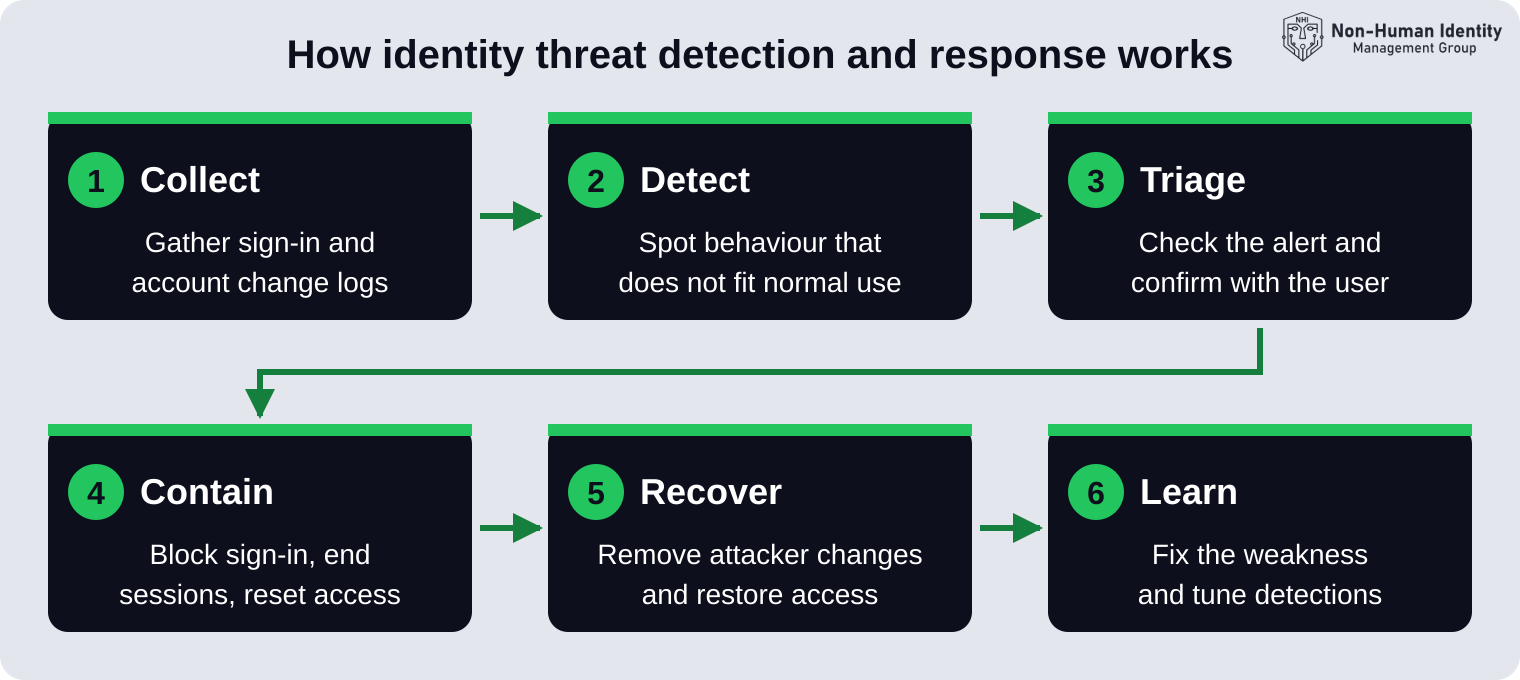
Products and teams differ, but the cycle is broadly the same.
- Know your accounts and switch on logging. Before any detection can happen, you need a list of your accounts, especially admin and software accounts, and sign-in and audit logs turned on and kept.
- Collect. Sign-in events and account changes are gathered from the identity provider, cloud services and other key systems, often into one place such as a security information and event management (SIEM) tool.
- Detect. Rules and behaviour analysis look for activity that does not fit normal use. Examples include sign-ins from unfamiliar places or devices, many failed logins across many accounts (password spraying), a flood of sign-in prompts, a new security device added to an account, or someone suddenly gaining admin rights.
- Triage. An analyst, or an automated rule, checks the alert. Is it a real person travelling, or an attacker? Often the quickest check is to contact the user through a separate, trusted channel.
- Contain. If it looks like misuse, act fast: block sign-in or require a fresh strong sign-in, end active sessions, reset passwords and revoke sign-in devices or tokens the attacker may have added.
- Recover. Find and undo what the attacker changed, such as email forwarding rules, new accounts or extra permissions, and restore normal access for the real user.
- Learn. Fix the weakness that let the attacker in, and adjust the detections so the next attempt is spotted sooner.
Some identity platforms include built-in risk detections. Microsoft Entra ID Protection, for example, documents detections such as these (several need a particular licence tier):[6]
| Detection name (Microsoft wording) | What it looks for, in plain words |
|---|---|
| Atypical travel | Two sign-ins from places so far apart that the same person could not normally travel between them in the time. |
| Unfamiliar sign-in properties | A sign-in from an internet address, location, device or browser the user does not normally use. |
| Password spray | A password was successfully guessed as part of an attack trying common passwords against many accounts. |
| Leaked credentials | The user's valid username and password have appeared in a known breach. |
| Anomalous token | A sign-in token with unusual features, which may mean a stolen session is being replayed. |
| Suspicious MFA authentication approval | A multi-factor approval with unfamiliar properties, suggesting the user may have been tricked. |
Other identity providers and security tools describe similar detections in their own words. The names above are Microsoft's, not universal terms.
Useful distinctions
- ITDR is not the same as identity security posture management (ISPM). ISPM looks for weaknesses before an attack, such as accounts without multi-factor authentication or too many admins. ITDR looks for attacks in progress. They work best together.
- ITDR is not the same as EDR. Endpoint detection and response (EDR) watches laptops and servers. An attacker using a stolen cloud account may never touch your devices, so EDR alone may miss it.
- A SIEM is a place, ITDR is a focus. A SIEM collects logs from many sources. ITDR can run inside a SIEM, inside an identity platform or in a separate tool; what makes it ITDR is the focus on identity misuse.
- Machine accounts need watching too. A stolen API key or service account password can be used from anywhere and often has no multi-factor check. We suggest including software accounts in your monitoring, for example by alerting when one is used from an unexpected place.
A worked example
Brightwell Accountants is a fictional firm with 25 staff using a cloud email and file service. Maya, the office manager, looks after IT with help from an outside support company.
After a client was sent a fake invoice from another firm's hacked mailbox, Maya and the support company set up some basic ITDR:
- Logging: they confirm sign-in and audit logs are switched on and kept for long enough to investigate.
- Alerts: they turn on the service's built-in alerts for risky sign-ins, new mailbox forwarding rules and new admin role assignments, sent to both Maya and the support company.
- A simple playbook: a one-page plan saying who checks an alert, how to contact the user by phone, and how to block sign-in and end sessions.
A few weeks later, an alert arrives on a Saturday: Daniel, a junior accountant, has signed in from another country an hour after signing in from home, and a new rule is forwarding his email to an outside address. The support company phones Daniel, who confirms he is at home and that he approved a sign-in prompt he did not expect the night before.
Following the playbook, they block sign-in for Daniel's account, end his active sessions, reset his password, remove an unknown sign-in device from his account and delete the forwarding rule. They check which emails were forwarded and tell the two affected clients. On Monday, Maya moves staff to sign-in methods that resist phishing, such as security keys, which CISA recommends against prompt flooding.[4]
The response did not undo everything: some emails had already been forwarded before the alert. But the attacker was locked out within hours rather than weeks, and no fake invoices went out.
Myths and misunderstandings
| What people think | What is true |
|---|---|
| Multi-factor authentication means we do not need ITDR. | MFA makes stolen passwords much less useful, but attackers also trick users into approving prompts, steal sessions or talk help desks into resets.[4] You still need to watch for misuse. |
| ITDR is a single product you buy. | It is a capability. Some of it may already be built into your identity provider or security tools; the rest is process and people. |
| Our antivirus will catch account takeover. | An attacker using a stolen cloud account may never touch your computers, so device tools may see nothing. |
| Every unusual sign-in is an attack. | Many alerts have innocent causes, such as travel or a new phone. Triage, often a quick call to the user, separates real attacks from false alarms. |
| Resetting the password is enough. | Attackers may keep access through active sessions, added sign-in devices, mail rules or new accounts. Check and remove all of these. |
Key terms
- Identity threat detection and response (ITDR)
- Finding misuse of credentials, unusual access and compromised identities, for people and machines, and acting on it.
- Identity provider
- The system that checks who a user or workload is and tells other applications they can be trusted.
- Account takeover
- Unauthorised use of a real account after an attacker gets valid access, often looking normal in logs.
- Password spraying
- Trying a few common passwords against many accounts to avoid lockouts and detection.
- MFA fatigue
- Repeated sign-in prompts that pressure a person into approving one without checking.
- Impossible travel
- A detection that flags two sign-ins from places too far apart to reach in the time between them; Microsoft calls its version "atypical travel".
- SIEM
- Security information and event management: a platform that collects logs from many sources, runs detection rules and supports investigation.
- UEBA
- User and entity behaviour analytics: comparing activity with expected patterns for people and machine identities.
- Identity security posture management (ISPM)
- Continuously checking identity settings, privileges and exposure to find weaknesses before attackers do.
- Privilege escalation
- Gaining higher permissions than originally held, for example from standard user to administrator.
Common questions
What does ITDR stand for?
Identity threat detection and response: spotting attacks on accounts and sign-in systems, and acting to stop them.
Do small businesses need ITDR?
They need the basics: sign-in logs switched on, alerts for risky sign-ins and account changes, and a clear plan for who acts. Much of this is built into common cloud email and identity services.
What are the most common warning signs of a taken-over account?
Sign-ins from unusual places or devices, unexpected sign-in prompts, new mailbox forwarding rules, new sign-in devices added to the account, and sudden new admin rights. The NCSC lists failed multi-factor steps, unexpected locations, password spraying and unusual lockouts as signs to watch for.[5]
Is ITDR the same as a SIEM?
No. A SIEM collects and searches logs from many sources. ITDR is focused on identity misuse; it may use a SIEM, an identity platform's own features or a separate tool.
What should I do first if I think an account is compromised?
Contain it: block sign-in or force a fresh strong sign-in, end active sessions, reset the password and remove any sign-in devices you do not recognise. Then check what the account did and changed.
Does ITDR cover service accounts and API keys?
It should. Software accounts can be stolen and misused like people's accounts, and they often have broad access and no multi-factor check, so they deserve the same monitoring.
First steps
Three things you can do this week:
- Check your logs. Confirm sign-in and audit logging is switched on in your main identity or email service, and find out how long logs are kept.
- Turn on built-in alerts for risky sign-ins, new admin role assignments and new mailbox forwarding rules, and send them to at least two people.
- Write a one-page response plan saying who checks an alert, how to contact the user through a trusted channel, and the steps to block sign-in, end sessions and reset access. Include a controlled way to restore access: approved, recorded and limited to the real user once their account is clean.
Checklist
- Sign-in and audit logs are switched on for our main identity and email services.
- Logs are kept long enough to investigate an incident found weeks later.
- We get alerts for risky sign-ins, new admin roles and new forwarding rules.
- Alerts go to more than one person, and someone checks them outside office hours.
- We have a written plan to block sign-in, end sessions and reset access quickly.
- Our plan includes removing attacker-added sign-in devices, mail rules and accounts.
- Service accounts and API keys are listed and included in monitoring.
- Help desk staff verify identity before resetting passwords or multi-factor settings.
- We review each incident and adjust our alerts afterwards.
Check your understanding
1. Why are stolen accounts hard to detect with traditional security tools?
Answer: the attacker uses a real username and password, so the activity looks like normal use to most systems.
2. What are the two halves of ITDR?
Answer: detection (spotting misuse of accounts and sign-in systems) and response (acting to stop it and recover).
3. Why is resetting the password not always enough?
Answer: the attacker may still have an active session, an added sign-in device, mail rules or new accounts, which all need removing too.
4. How does ITDR differ from identity security posture management?
Answer: posture management finds weaknesses before an attack; ITDR looks for attacks that are happening and helps you respond.
Suggested learning pathway
- Identity Security Posture Management for Beginners: a related beginner guide to read next.
- Credential Stuffing for Beginners: a related beginner guide to read next.
- Brute-Force Attacks for Beginners: a related beginner guide to read next.
- For the basics of accounts and access, start with Identity and Access Management for Beginners.
- For the sign-in control attackers try to get around, read Multi-Factor Authentication for Beginners.
- For the full practitioner view of detections, telemetry and response, see the ITDR Guide.
- For how ITDR and posture management fit together, see ISPM vs ITDR.
- For what to do when an account is taken over, see the Account Takeover Response Playbook.
- For rolling out an ITDR tool, see the ITDR tool rollout playbook.
Standards and references
- Verizon's 2025 Data Breach Investigations Report: Alarming surge in cyberattacks through third-parties. Verizon news release, 23 April 2025. https://www.verizon.com/about/news/2025-data-breach-investigations-report, accessed 27 Nov 2026.
- Gartner Identifies Top Security and Risk Management Trends for 2022. Gartner press release, 7 March 2022. https://www.gartner.com/en/newsroom/press-releases/2022-03-07-gartner-identifies-top-security-and-risk-management-trends-for-2022, accessed 27 Nov 2026.
- Valid Accounts, Technique T1078. MITRE ATT&CK Enterprise, v20, The MITRE Corporation. https://attack.mitre.org/techniques/T1078/.
- Scattered Spider, Cybersecurity Advisory AA23-320A. CISA and FBI, 16 November 2023, revised 21 November 2023. https://www.cisa.gov/news-events/cybersecurity-advisories/aa23-320a, accessed 27 Nov 2026.
- 10 Steps to Cyber Security: Identity and access management. National Cyber Security Centre (NCSC). https://www.ncsc.gov.uk/collection/10-steps/identity-and-access-management, accessed 27 Nov 2026.
- What are risk detections? Microsoft Entra ID Protection documentation, Microsoft Learn, last updated 21 October 2026. https://learn.microsoft.com/en-us/entra/id-protection/concept-identity-protection-risks, accessed 27 Nov 2026.
Related NHI Mgmt Group resources: ITDR vs SIEM · ITDR vs EDR · Identity Threat Hunting Guide