Workload identity federation lets a piece of software prove who it is with a short-lived token from a system it already trusts, and swap that token for temporary cloud access, instead of carrying a stored key or password.
This guide is for newcomers, students, career changers and managers who are not security specialists. It explains, in plain English, why stored cloud keys cause trouble, how the token swap works step by step, a worked example, common myths and simple first steps. It is about software signing in to other software. If you want the version for people signing in, read Identity Federation for Beginners instead.
By the end of this guide you will be able to:
- Explain what workload identity federation is and what problem it solves.
- Describe the token swap from start to finish.
- Identify the trust settings that decide which software gets access.
- Understand three practical first steps for replacing a stored key.
Key takeaways
- It replaces stored keys with borrowed trust. The software uses a token from a platform it already runs on, such as a build system or a Kubernetes cluster, rather than a long-lived key copied into its settings.
- The access it gets is temporary. The cloud hands back short-lived credentials that stop working on their own, so there is far less to leak and nothing to rotate by hand.
- The trust rules are now the thing to protect. Which tokens a cloud accepts is decided by a few settings. Loose settings can let the wrong software in.
- It is an NHI control. The workload is a non-human identity with an account and credentials; federation changes the kind of credential it uses.
- You can start with one pipeline. Replacing a single stored deployment key is a sensible first project for a small team.
What it is, in plain English
A workload is software that runs and signs in by itself: a script, a container, a build pipeline, a service or an AI agent. When a workload needs to reach a cloud account, it has to prove who it is. Traditionally it did that with a long-lived key: a secret string, created once, pasted into the workload's settings and valid until someone changes or deletes it.
A non-human identity (NHI) is an identity with an account and credentials that software, machines or AI agents use to act without a person present. NHI is the umbrella term, with two families: machines and devices, and software workloads.[1] A workload is in the second family, and the key it carries is its credential.
Workload identity federation changes how the workload proves who it is. The platform the workload already runs on, called the identity provider, gives it a signed token describing it ("this is the deploy job in repository X, on the main branch"). The workload sends that token to the cloud. The cloud checks the token against rules you set in advance and, if it matches, hands back short-lived credentials. Google describes this as letting workloads outside Google Cloud reach its resources without service account keys,[2] and Microsoft describes it as letting workloads reach Entra-protected resources without managing secrets.[4]
An everyday comparison is a visitor badge at an office. Instead of giving a contractor a permanent door key, reception checks a letter from the contractor's employer, confirms it names the right person and the right job, and prints a badge that works only today. Where the analogy breaks down: reception is a person making a judgement, while the cloud applies fixed rules to the token, so the quality of those rules matters a great deal.
Why it matters to you
- If you run a small business: a cloud key pasted into a build tool or a script is easy to copy into the wrong place. Federation removes that key, so there is one less secret to lose.
- If you are new to a security job: you will often be asked to find long-lived keys and replace them. Federation is the usual replacement for software that runs on a platform able to issue tokens.
- If you are a manager: fewer stored keys means fewer emergency key changes, fewer outages caused by expired secrets, and clearer records of which job used which access.
Stored keys cause trouble in ordinary ways. Google notes that service account keys are powerful credentials and can be a security risk if they are not managed correctly.[2] Microsoft says application secrets and certificates have to be stored securely and rotated regularly, and that services can go down if those credentials expire.[4] GitHub points out that federation means you do not have to copy cloud credentials into GitHub as long-lived secrets.[5]
There is also a change in how you look after the credential. A static credential, such as a stored key, stays valid until someone changes it, so it needs secure storage and scheduled rotation. A short-lived credential expires on its own, so rotation matters far less; the controls that matter are who can obtain it and how much access it grants.[1] With federation, the question "who can obtain it" is answered by your trust rules.
How it works, step by step
Each cloud uses its own names, but the flow is very similar. Platforms are listed alphabetically in the table below; the order is not a ranking.
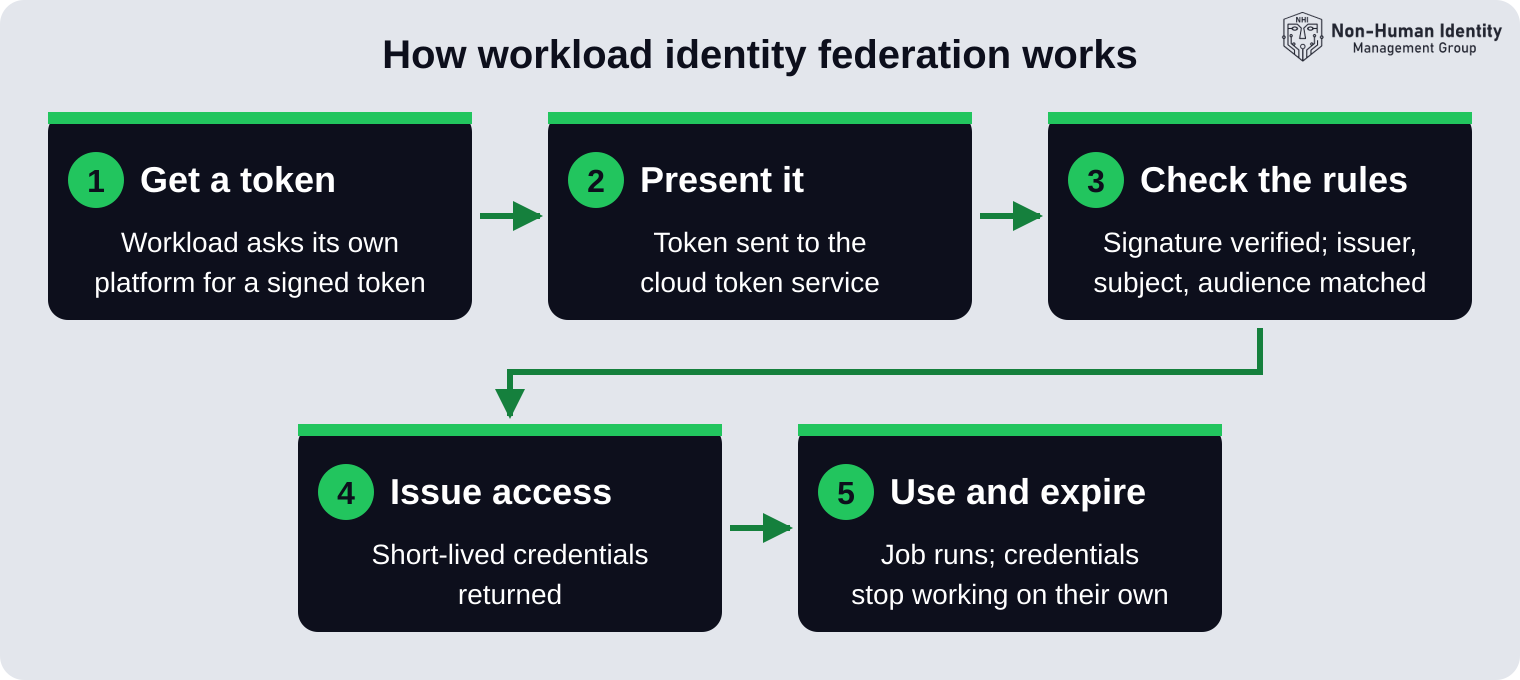
- Set up the trust. An administrator tells the cloud which identity provider to trust and which tokens to accept. The rules usually check three things inside the token: who issued it (the issuer), which workload it describes (the subject) and which service it was meant for (the audience).[4]
- Get a token. When the workload runs, it asks its own platform for a signed token. GitHub Actions, for example, generates an OpenID Connect token for each job, with claims that describe the workflow.[5]
- Present the token. The workload sends the token to the cloud's token service and asks for access.
- Check the token. The cloud verifies the token's signature with the issuer's published keys and compares its claims with the trust rules. If anything does not match, the request is refused.[4]
- Issue short-lived credentials. If the checks pass, the cloud returns temporary credentials. Google calls this exchange a token exchange and bases it on the OAuth 2.0 Token Exchange specification.[2][7]
- Use and expire. The workload does its job with those credentials. They stop working on their own, and the next run repeats the swap.
| Platform | What it calls the trust setting | What comes back |
|---|---|---|
| Amazon Web Services (AWS) | An IAM role whose trust policy names the identity provider, used with the AssumeRoleWithWebIdentity call | Temporary credentials (access key ID, secret access key and session token), one hour by default, configurable from 15 minutes up to the role's maximum of 1 to 12 hours[6] |
| Google Cloud | A workload identity pool and provider, with attribute mappings and attribute conditions | A short-lived federated token from the Security Token Service, used directly or to act as a service account[2] |
| Microsoft Entra ID | A federated identity credential on an app registration or user-assigned managed identity | An access token from the Microsoft identity platform[4] |
Useful distinctions
- Workload federation is not human federation. Single sign-on for staff also uses federation, but the person is in the loop. Here no person is present, which is why the trust rules must be precise.
- Short-lived is not the same as low-risk. Temporary credentials still work fully until they expire. Keep the permissions behind them small, following least privilege.
- The words differ by vendor. "Federated identity credential" is Microsoft's term and "workload identity pool" is Google's; AWS talks about roles and trust policies. The idea is the same.
- It needs a platform that can issue tokens. Software on an old server with no identity provider may still need a stored secret, kept in a vault and rotated. We suggest treating those as exceptions with an owner and a review date.
A worked example
Harbour Print is a fictional online printing firm with 25 staff. Its website is deployed by a build pipeline in a code hosting service. For three years, the pipeline used a cloud access key that Dev, the lead developer, created and pasted into the pipeline's secret settings. Nobody had changed it since.
After a security review, Dev and Mei, the operations lead, make three changes:
- Trust one job, not everything: they set up federation so the cloud accepts tokens only from Harbour Print's own repository, only for deployments from the main branch, and only with the expected audience value.
- Small permissions: the cloud role the pipeline receives can update the website and nothing else.
- Remove the old key: after two weeks of successful deployments, they disable the old key, wait a further week, then delete it.
A month later, a contractor accidentally publishes a copy of an old pipeline file. In the past it might have contained a working cloud key. Now it contains only the settings that ask for a token, which are useless outside Harbour Print's repository and branch. This does not make the pipeline safe from everything. Someone who could change the main branch could still trigger a deployment, so Harbour Print also protects that branch with required reviews and keeps an eye on cloud logs for unexpected deployments.
Myths and misunderstandings
| What people think | What is true |
|---|---|
| No stored key means nothing can go wrong. | The risk moves to the trust rules. A rule that accepts any repository, branch or audience can let the wrong workload in. |
| Federation is only for large cloud teams. | Common build tools and clouds include it. One pipeline is a realistic starting point for a small team. |
| Short-lived credentials can have broad permissions because they expire. | They work fully until they expire. Keep the role behind them as small as the job allows. |
| Once federation works, the old key can stay as a backup. | An unused key is still a working key. Disable it, confirm nothing breaks, then delete it. |
| Any value in the token is safe to match on. | Google advises mapping only attributes the user cannot change and that are not reused over time.[3] |
Key terms
- Workload identity federation
- A way for workloads in one environment to authenticate to another using short-lived tokens instead of stored credentials, based on trust between identity providers.
- Workload identity
- The identity given to a piece of software, such as a container or function, so it can authenticate to other services.
- Identity provider
- The system that authenticates a user or workload and issues the trust signal, such as a token, that other systems rely on.
- OpenID Connect (OIDC)
- An identity layer built on OAuth 2.0 that issues compact signed tokens and publishes keys so others can check them.
- JSON Web Token (JWT)
- A compact, signed token that carries claims between systems so they can check identity without a shared session store.
- Subject claim
- The value inside a token that says who or what the token represents, such as a repository and branch.
- Audience
- The intended recipient of a token, so a token issued for one service is not accepted by another.
- Trust policy
- A rule stating which identities may assume a role or receive access, and under which conditions.
- Token exchange
- Swapping one token for another, usually with a narrower scope or for a different system.
- Short-lived credentials
- Credentials that expire quickly, which shrinks the window in which a stolen copy can be used.
- Service account key
- A stored credential a workload uses to authenticate without a person present; the kind of secret federation replaces.
- Least privilege
- Giving each user, process or system only the access it needs, for only as long as it needs it.
Common questions
What is workload identity federation in one sentence?
It lets software swap a token from a platform it already trusts for temporary cloud access, so it does not need a stored key.
Is it the same as single sign-on?
No. Both use federation, but single sign-on is for people. Workload identity federation is for software, with no person involved. See Identity Federation for Beginners for the human side.
How long do the credentials last?
It depends on the platform and your settings. On AWS, for example, credentials from AssumeRoleWithWebIdentity last one hour by default, and can be set from 15 minutes up to the role's maximum session length of 1 to 12 hours.[6]
Do we still need a secrets vault?
Usually yes. Some systems cannot use federation, and other secrets, such as database passwords, still need a safe home. Federation reduces how many secrets you store; it does not remove the need to manage the rest.
What is the biggest mistake to avoid?
Trust rules that are too broad. With a multi-tenant provider such as GitHub, Google advises an attribute condition so that only tokens from your own organisation or repository are accepted.[3]
Can AI agents use it?
Yes, where they run on a platform that can issue tokens. An AI agent is a software workload, and so an NHI, and it can be given federated access in the same way as any other workload.[1]
First steps
Three things you can do this week:
- Find the stored keys. List the cloud keys pasted into build tools, scripts and servers, with who owns each one and when it was last changed.
- Pick one pipeline. Choose a build or deployment pipeline that runs on a platform able to issue tokens, and follow your cloud's federation guide for it. The GitHub Actions to AWS walkthrough is one worked path.
- Retire the old key carefully. Once federated runs succeed, disable the old key first, watch for failures, then delete it. If something breaks, re-enabling the key should be a short, approved and recorded step with a date to switch it off again, not a quiet return to the old way.
Checklist
- We have a list of stored cloud keys used by software, each with an owner.
- At least one pipeline uses federation instead of a stored key.
- Our trust rules check the issuer, the subject (such as repository and branch) and the audience.
- Trust rules never accept a whole platform, such as every repository on a public code host.
- The role behind each federated workload has only the permissions that job needs.
- Old keys are deleted once federation works, not kept as a backup.
- Only a few administrators can change trust rules, and changes are logged and reviewed.
- Cloud logs show which federated workload used which role, and someone checks them.
Simple measures that show progress: the number of stored cloud keys still in use, the share of pipelines using federation, and the number of trust rules reviewed in the last quarter.
Check your understanding
1. What does the workload send to the cloud instead of a stored key?
Answer: a signed token from the platform it runs on, which the cloud checks before issuing short-lived credentials.
2. Name the three token values that trust rules usually check.
Answer: the issuer (who made the token), the subject (which workload it describes) and the audience (which service it is for).
3. Why are short-lived credentials controlled differently from stored keys?
Answer: they expire on their own, so rotation matters far less; what matters is who can obtain them and how much access they grant.
4. Why should the old key be deleted after moving to federation?
Answer: an unused key still works if someone finds it, so keeping it as a backup keeps the original risk.
Suggested learning pathway
- Start with Non-Human Identities for Beginners for the wider picture.
- For the human sign-in side, read Identity Federation for Beginners.
- For the tokens themselves, read JSON Web Tokens for Beginners.
- For the first-credential problem federation helps with, read The Secret Zero Problem for Beginners.
- For the full practitioner design, see the Workload Identity Federation Guide.
- For hardening build pipelines, see the GitHub Actions OIDC Federation Hardening Guide.
- For short-lived credentials more widely, see the Dynamic Secrets and Ephemeral Credentials Guide.
- NHI Foundation Level Training
Standards and references
- Non-Human Identities for Beginners. NHI Mgmt Group. https://nhimg.org/what-are-non-human-identities-beginners-guide, accessed 27 Nov 2026.
- Workload Identity Federation. Google Cloud IAM documentation, Google. https://docs.cloud.google.com/iam/docs/workload-identity-federation, accessed 27 Nov 2026.
- Best practices for using Workload Identity Federation. Google Cloud IAM documentation, Google. https://docs.cloud.google.com/iam/docs/best-practices-for-using-workload-identity-federation, accessed 27 Nov 2026.
- Workload identity federation. Microsoft Entra Workload ID documentation, Microsoft Learn. https://learn.microsoft.com/en-us/entra/workload-id/workload-identity-federation, accessed 27 Nov 2026.
- OpenID Connect. GitHub Actions documentation, GitHub. https://docs.github.com/en/actions/concepts/security/openid-connect, accessed 27 Nov 2026.
- AssumeRoleWithWebIdentity. AWS Security Token Service API Reference, Amazon Web Services. https://docs.aws.amazon.com/STS/latest/APIReference/API_AssumeRoleWithWebIdentity.html, accessed 27 Nov 2026.
- RFC 8693: OAuth 2.0 Token Exchange. Internet Engineering Task Force (IETF), Proposed Standard, January 2020. https://www.rfc-editor.org/rfc/rfc8693.
Related NHI Mgmt Group resources: Cloud Workload Identity Guide · Cross-cloud workload identity federation · How to audit Entra workload identity federated credentials