The secret zero problem is the question of how a piece of software safely gets its very first credential, the one it needs before it can fetch any other secret.
Putting passwords and keys in a secrets vault is good practice, but software needs a credential to open the vault. If that first credential is just pasted into a file, you have moved the problem rather than solved it. This guide explains the idea in plain English for newcomers, students, career changers and managers. It covers why it matters, the main ways platforms hand software its first identity, a worked example, common myths and first steps.
By the end of this guide you will be able to:
- Explain what secret zero means and why it is hard.
- Describe how a platform can vouch for software so it does not need a stored first secret.
- Identify where secret zero is hiding in your own systems.
- Understand three practical first steps to reduce it.
Key takeaways
- Every vault has a front door. Software needs some credential to reach a secrets vault. That first credential is secret zero.
- Stored first secrets are the weak spot. A key in a config file, image or script is only as safe as everywhere that file goes.
- Let the platform vouch for the software. Cloud and container platforms can prove what a workload is and hand it a short-lived identity, so nothing needs to be pasted in.
- Trust has to start somewhere. You cannot remove trust altogether; you can move it to a place that is better protected and easier to check.
- Where a stored secret remains, control it. Make it single-use or short-lived, narrowly scoped, owned and monitored.
What it is, in plain English
A secret is a credential that proves software is allowed to do something: an API key, a password, a token or a certificate. A secrets vault is a protected store for those secrets, so they are not scattered across code and servers.
Software that uses secrets is a non-human identity (NHI): an identity with an account and credentials that software, machines or AI agents use to act without a person present.[1] Before it can fetch secrets from a vault, it has to prove who it is to the vault. Whatever it uses to do that is secret zero: the first credential, the root of everything that follows.
HashiCorp, which makes the Vault secrets tool, calls this the secure introduction challenge: getting the first secret to the software, and having the software prove it is the rightful recipient. Once that first step is done safely, later secrets can be handed out based on that trust.[2]
An everyday comparison is a key safe outside a holiday cottage. All the cottage keys are inside, which is tidy and secure, but the guest still needs the code for the key safe. If the owner writes that code on a sticky note on the door, the key safe adds little. Where the analogy breaks down: a holiday guest is a person who can be told a code privately by phone, while software has no private channel of its own, so the first credential has to come from something the software already runs on.
Why it matters to you
- If you run a small business: a vault login stored in a script or config file can unlock every secret in that vault if the file leaks.
- If you are new to a security job: when you review a "secured" system, asking "how does this software log in to the vault?" quickly shows whether the security is real.
- If you are a manager: removing stored first secrets reduces both leak risk and the emergency work of changing keys after a leak.
The problem grows with scale. AWS notes that it is challenging to securely distribute credentials to each server, especially servers created automatically, and that you must also update the credentials on each one whenever you rotate them.[4] The same is true of containers and build jobs that start and stop all day.
It also changes how you look after the credential. A static credential, such as a key in a file, stays valid until someone changes it, so it needs secure storage and scheduled rotation. A short-lived credential expires on its own; what matters is who can obtain it and how much access it grants.[1] Good answers to secret zero replace the first kind with the second.
How it works, step by step
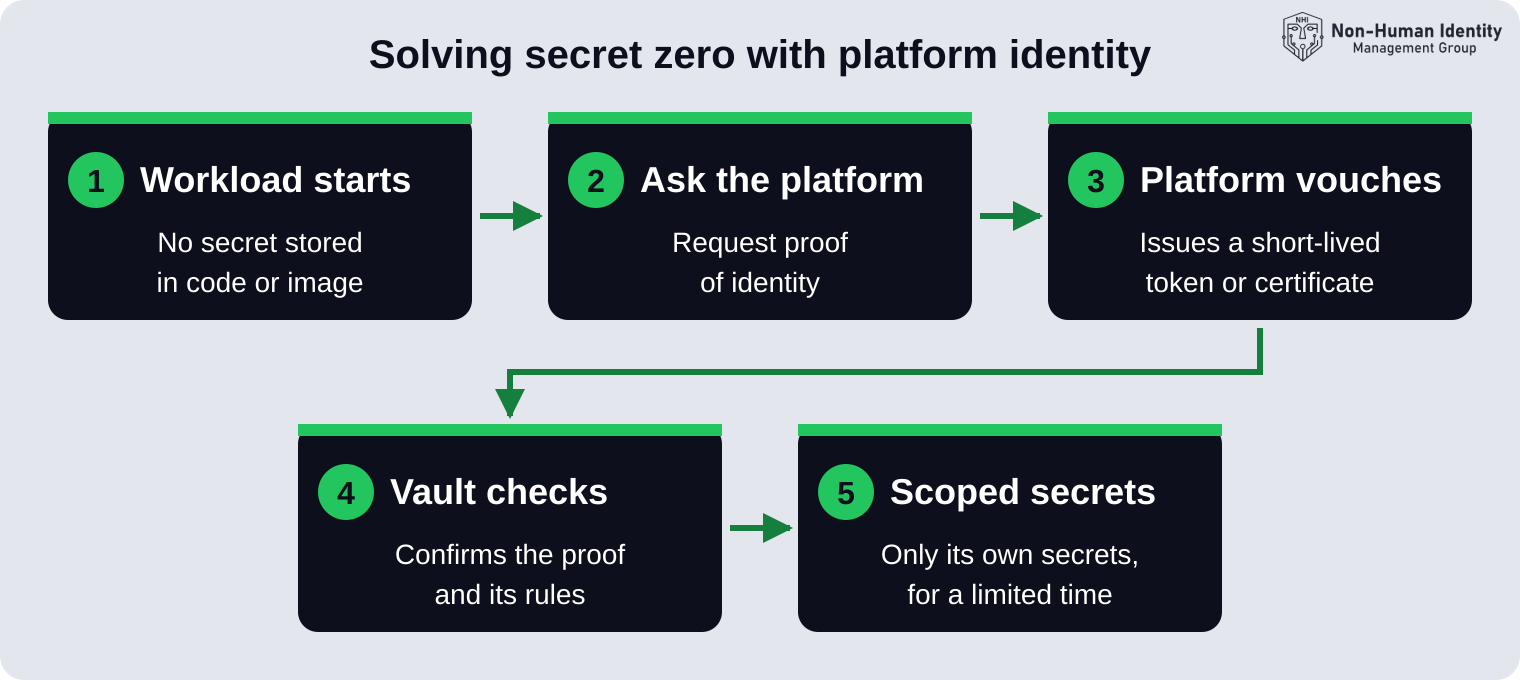
The most common safe pattern is to let the platform the software runs on vouch for it. HashiCorp calls this platform integration.[2]
- Give the workload an identity at set-up. An administrator attaches an identity to the server, container or function when it is created, such as a cloud role or managed identity. No secret is copied into the software.
- The workload starts and asks its platform. When it needs access, the software asks the platform it runs on for proof of who it is. On AWS, for example, an application on a server with an IAM role retrieves temporary credentials from the instance metadata service.[4]
- The platform issues a short-lived credential. The proof is a token or certificate that expires on its own. Microsoft says applications using managed identities obtain tokens without managing any credentials, and that the credentials are not even accessible to the user.[3]
- The vault or service checks the proof. The vault confirms the proof with the platform and checks its own rules about which workload may have which secrets.[2]
- The workload gets only its own secrets. The vault returns a narrowly scoped, time-limited token for that workload's secrets.
- Renew and expire. The short-lived credentials are refreshed while the workload runs and stop working when they expire or when the workload is removed.
There are a few main ways to deliver that first identity. The table describes them in general terms; the right choice depends on where the software runs.
| Approach | How the first identity arrives | Fits best when |
|---|---|---|
| Platform identity (cloud roles, managed identities) | The cloud attaches an identity to the server or service and issues short-lived credentials on request.[3][4] | The software runs on a cloud platform that supports it. |
| Workload identity federation | A token from the platform the software runs on, such as a build system, is swapped for short-lived cloud access.[6] | The software runs in one system, such as a pipeline, and needs access to another. |
| Attestation-based identity (for example SPIFFE) | An identity system checks facts about the node and workload before issuing short-lived identity documents.[5] | Many services across mixed environments need to identify each other. |
| Trusted orchestrator | A deployment tool that is already trusted creates a credential for each new machine and injects it at start-up.[2] | The machines have no platform identity, such as some on-premises servers. |
Useful distinctions
- Secret zero is moved, not deleted. With platform identity, the root of trust becomes the platform and whoever can attach identities there. Protect those admin rights carefully.
- A trusted orchestrator still holds a powerful credential. HashiCorp describes the orchestrator as already authenticated with privileged permissions,[2] so it becomes the thing to guard.
- Attestation means checking evidence, not taking a claim at face value. Workload attestation is proving that software is running in the expected, trusted place before it receives an identity.
- Environment variables are not a vault. Moving a key from a file into a variable changes where it sits, not whether it can be copied.
A worked example
Lakeside Books is a fictional online bookshop with 30 staff. Its order service runs on cloud servers and reads a database password and a payment API key from a secrets vault. Ola, the developer who built it, made the vault login token part of the server image so the service could start on its own. That token never expired.
During a review, Ola and Ravi from operations notice that anyone with a copy of the server image would also have the vault token, and through it every secret the order service uses. They make three changes:
- Platform identity: they attach a cloud role to the order servers and configure the vault to accept that role's identity for the order service only.
- Narrow access: the vault rules let the order service read only its own two secrets, through a token that expires after a short time and is renewed while the service runs.
- Retire the old token: after a week of successful starts, they revoke the old vault token and rebuild the image without it.
A few months later, a copy of an old server image turns up in a shared storage area. The token inside it was revoked months earlier, and newer images carry no vault login at all. This does not remove every risk. Someone who could change the cloud role or the vault rules could still grant access, so Lakeside Books limits those admin rights to two people and alerts on changes.
Myths and misunderstandings
| What people think | What is true |
|---|---|
| Once secrets are in a vault, the problem is solved. | The software still needs a way into the vault. If that is a stored key, the risk has moved, not gone. |
| Encrypting the config file fixes it. | The software then needs the decryption key, which is another secret zero. |
| Secret zero can be removed completely. | Trust has to start somewhere. The aim is to place it in a well-protected platform rather than in a file. |
| Platform identity means nobody can misuse access. | Anyone who controls the workload, or who can change its role, can still use the access. Keep roles narrow and admin rights few. |
| This only matters for large cloud estates. | A single script with a vault token in it has the same problem. Small teams can fix it one service at a time. |
Key terms
- Secret zero
- The first credential software needs to reach a secrets store or protected system; the root trust that everything else depends on.
- Secret
- A credential that proves a non-human identity may act, such as an API key, token, password or certificate.
- Secrets vault
- A central, encrypted store for secrets such as API keys, passwords, certificates and tokens.
- Managed identity
- An identity the cloud provider manages for a compute resource, so it can authenticate without credentials stored in code.
- Instance Metadata Service (IMDS)
- A local endpoint a cloud server reads its own settings from, including temporary credentials where a role or identity is attached.
- Workload attestation
- Proving that a workload is running in an expected, trusted environment before it is given access.
- SVID
- A SPIFFE Verifiable Identity Document: a short-lived certificate or token that represents a workload's identity.
- Bootstrap credential
- A temporary secret used to get a new identity into its first trusted session; it should be time-bound, single-use and recorded.
- Short-lived credentials
- Credentials that expire quickly, which shrinks the window in which a stolen copy can be used.
- Secrets sprawl
- The uncontrolled spread of credentials across code, cloud settings, pipelines and configuration files.
Common questions
What is secret zero in one sentence?
It is the first credential a piece of software needs before it can fetch any of its other secrets.
Why is it called secret zero?
Because it comes before secret number one. Every other secret depends on it, so if it leaks, the others can follow.
Is a managed identity a secret?
There is still a credential behind it, but the platform creates, delivers and renews it. Microsoft notes that with managed identities the credentials are not even accessible to you.[3] That removes the stored first secret you would otherwise have to protect.
What if our software runs somewhere with no platform identity?
A trusted deployment tool can create a credential for each new machine as it starts.[2] We suggest making that credential single-use or short-lived, narrowly scoped and logged.
Does this apply to AI agents?
Yes. An AI agent is a software workload and so an NHI.[1] It needs its first credential like any other workload, and the same patterns apply.
Is a key in an environment variable acceptable?
It is better than a key written into source code, but it is still a stored secret that can be read or copied. Treat it as a stop-gap with an owner and a plan to replace it.
First steps
Three things you can do this week:
- Ask the question. For each important application, write down how it logs in to its vault or cloud account, and where that first credential lives.
- Pick one service on a cloud platform. Replace its stored first credential with the platform's own identity feature, such as a cloud role or managed identity, and give it access to only its own secrets.
- Retire the old credential carefully. Once the new route works, revoke the old one. If you must bring it back to restore service, do so as a short, approved and recorded exception with a date to remove it.
Checklist
- We know how each important application gets its first credential.
- No vault token or cloud key is built into code, images or shared config files.
- Applications on cloud platforms use the platform's identity feature where it is available.
- Each workload can read only its own secrets.
- Any remaining first credential is short-lived or single-use, owned and monitored.
- Only a few administrators can attach identities to workloads or change vault access rules.
- Changes to those identities and rules are logged and reviewed.
- Old first credentials are revoked once a better route works.
Simple measures that show progress: the number of applications still using a stored first credential, the share using platform identity, and the age of the oldest first credential still in use.
Check your understanding
1. Why does putting secrets in a vault not fully solve the problem?
Answer: the software still needs a credential to get into the vault, and that first credential has to be protected too.
2. How does platform identity help with secret zero?
Answer: the platform vouches for the software and issues a short-lived credential, so no first secret has to be stored in the software.
3. Where does the root of trust sit once you use platform identity?
Answer: in the platform and in whoever can attach identities or change access rules there, so those admin rights need strong protection.
4. Why is encrypting a config file not a full answer?
Answer: the software then needs the decryption key, which becomes a new secret zero.
Suggested learning pathway
- Start with Non-Human Identities for Beginners for the wider picture.
- For where stored secrets often leak, read Secrets in Code for Beginners.
- For the token swap used by pipelines, read Workload Identity Federation for Beginners.
- For attestation-based workload identity, read SPIFFE and SPIRE for Beginners.
- For the full practitioner design, see the Secret Zero Bootstrap Guide.
- For short-lived credentials more widely, see the Dynamic Secrets and Ephemeral Credentials Guide.
- For cloud platform identities, see the Cloud Workload Identity Guide.
- NHI Foundation Level Training
Standards and references
- Non-Human Identities for Beginners. NHI Mgmt Group. https://nhimg.org/what-are-non-human-identities-beginners-guide, accessed 27 Nov 2026.
- Secure introduction of Vault clients. HashiCorp Developer, HashiCorp. https://developer.hashicorp.com/vault/tutorials/app-integration/secure-introduction, accessed 27 Nov 2026.
- What are managed identities for Azure resources? Microsoft Learn, Microsoft. https://learn.microsoft.com/en-us/entra/identity/managed-identities-azure-resources/overview, accessed 27 Nov 2026.
- IAM roles for Amazon EC2. Amazon EC2 User Guide, Amazon Web Services. https://docs.aws.amazon.com/AWSEC2/latest/UserGuide/iam-roles-for-amazon-ec2.html, accessed 27 Nov 2026.
- SPIFFE overview. SPIFFE project documentation, Cloud Native Computing Foundation. https://spiffe.io/docs/latest/spiffe-about/overview/, accessed 27 Nov 2026.
- Workload identity federation. Microsoft Entra Workload ID documentation, Microsoft Learn. https://learn.microsoft.com/en-us/entra/workload-id/workload-identity-federation, accessed 27 Nov 2026.
Related NHI Mgmt Group resources: Secrets Management Guide · Secret Zero Bootstrap Guide · Cloud Workload Identity Guide