An Active Directory attack is an attempt to take control of the system that runs a company's Windows sign-ins.
This guide is for people new to IT work and small business owners with a Windows office network. It is written for defenders: it explains what attackers aim for and what to check, not how to attack.
In short
- Active Directory decides who can sign in to which computers, files and apps, so attackers aim for it.
- Most attacks start with one ordinary account and then use weak passwords, old settings or too many admins.
- Whoever controls Active Directory can control every account and computer it manages.
- Fewer admins, long passwords for software accounts, admins kept to safe computers and regular checks close many routes.
What you will learn
- Explain why attackers aim for Active Directory.
- Name the common kinds of attack in plain words.
- Spot the weak settings that make these attacks easier.
- Ask the right questions of your IT team or supplier.
- Company sign-in system (Active Directory)
- Microsoft's central list of a company's people, computers and permissions, used to check sign-ins.
- Main sign-in server (domain controller)
- the server that holds the Active Directory list and checks each sign-in.
- Top admin (Domain Admin)
- an account that can change almost anything in Active Directory.
What is an Active Directory attack?
Think of the building manager's office. It holds every key, the key-cutting machine and the list of who may go where. A burglar who gets in there does not need to pick any other lock.
Active Directory, often called AD, is that office for many Windows networks. It is Microsoft's system for storing user accounts, computers and groups, and for checking each sign-in. The servers that run it are called domain controllers. You can read how it works in Active Directory for Beginners.
An Active Directory attack is any attempt to misuse it. Attackers usually start with one ordinary account, perhaps from a phishing email. They then look for weak spots that let them climb, step by step, towards the top admin accounts.
Where the comparison stops working: a real office has one door. Active Directory is reached over the network by every computer and account in the company. By default, every user can read enough of it to see much of how it is set up.[1]
Why does it matter?
Security agencies from six countries wrote joint advice on these attacks. They call Active Directory the most used sign-in system in company networks. They say whoever controls it can reach every system and user it manages.[1][2] The US National Security Agency adds that attackers can then reach email, files and apps, and hide there.[3]
The advice names the usual weak points. These are loose default settings, tangled permissions and old sign-in methods.[4]
If you are new to IT work
What could happen: you use your admin account on a normal laptop, and the password is stolen from it.
Check this: keep a separate admin account, used only on admin computers.
If you run a small business with a Windows server
What could happen: one tricked staff member leads to every computer being locked by ransomware.
Check this: ask your IT supplier how many people are top admins, and why.
If you look after software accounts
What could happen: a program's account with a short password is cracked, and it is an admin.
Check this: list software accounts in admin groups. Give each a long, managed password.
If you manage an IT team
What could happen: years of small changes leave hidden routes to admin.
Check this: ask for a yearly check of who can control the top admins.
What does it look like?
You will rarely see an attack directly. What you can see are the weak settings that make it easier. Here is a made-up review of a small company's Active Directory.
Example only. All values are made up.
AD review: corp.example.invalid (made-up company)
Top admins (Domain Admins):         9 people        (1)
backup-svc-0000: in Domain Admins,
  password last changed 2019                       (2)
Admins signing in to staff laptops: yes             (3)
Old sign-in method (NTLMv1) allowed: yes            (4)
Leavers' accounts still switched on: 4              (5)
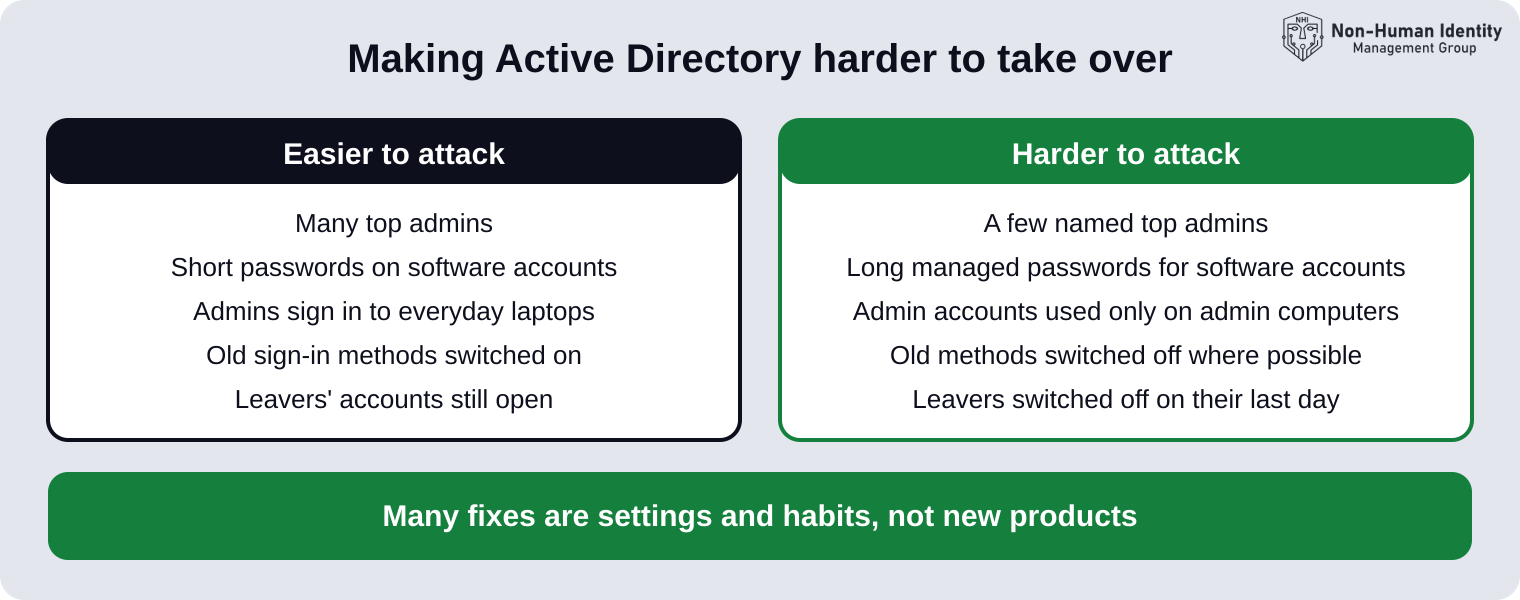
- Many top admins means many accounts that could hand over the network.
- In a real file, this line would contain a program's account with a powerful role and an old password, a common target for password cracking.
- Admin passwords used on normal laptops can be picked up there.
- Old sign-in methods are weaker and easier to abuse.
- Unused accounts can be used by an attacker without anyone noticing.
Why this is risky: each line is a step on the route from one ordinary account to full control.
The safer way: keep two or three named admins. Give software accounts long passwords and only the rights they need. Admins sign in only to admin computers. Old methods are switched off and leavers are removed.
How does it work?
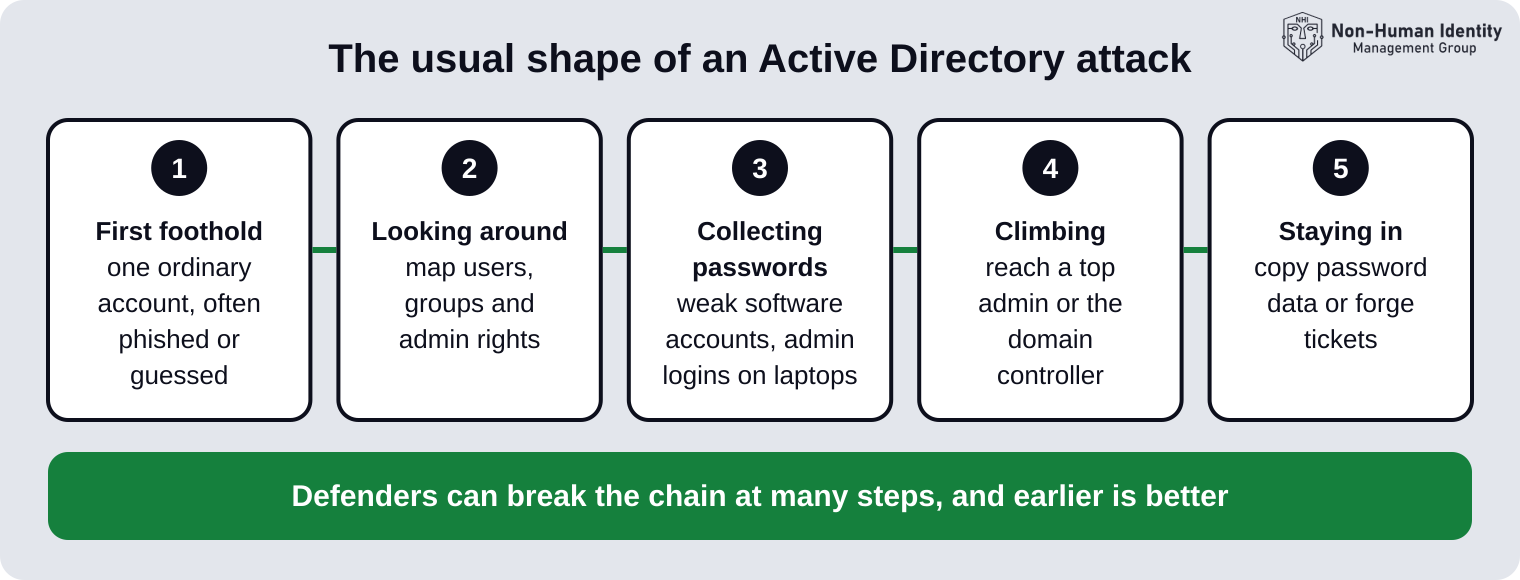
Most Active Directory attacks follow a similar shape. Knowing the shape helps you see where to put defences.
- A first foothold. The attacker gets one ordinary account, often by phishing or by trying a few common passwords against many accounts. That second trick is called password spraying.[1]
- Looking around. Because ordinary users can read much of Active Directory, the attacker maps the accounts, groups and admin rights.[1]
- Collecting passwords. They look for weak spots. One is Kerberoasting: asking for a sign-in ticket for a program's account, then guessing its password offline, away from any alarms.[1] Another is lifting admin passwords from computers where admins have signed in.
- Climbing to the top. With a powerful enough account, they reach the domain controllers.
- Staying in. At the top, some techniques copy the stored password data or forge sign-in tickets. A forged master ticket is called a Golden Ticket. Recovery from this kind of compromise can mean resetting a special account's password twice, plus many other passwords.[1]
A worked example
Quinn Jovanovic has just joined Birch Couriers as a junior IT technician. The company has 80 staff, one office and a Windows network run on Active Directory. Her manager, Hana Delmar, asks her to help with a security review.
Quinn starts with the list of top admins. She expects two or three names. She finds nine. Three are former staff, and one is an account called "scanner-svc", made years ago so the office scanner could save files.
Hana explains why that matters. If an attacker phished any staff member, they could read the same list. A program's account with an old password and admin rights is an easy target.
Next, Quinn notices that the IT team signs in to staff laptops with their admin accounts to fix problems. She learns that this can leave admin passwords behind on those laptops.
Hana and Quinn agree a short plan. They switch off the three former staff accounts. They take scanner-svc out of the admin group, as it only needs to save files to one folder, and give it a long new password. Each IT person gets separate everyday and admin accounts. A new rule says admin accounts are only used on two admin computers.
Quinn sets a reminder to repeat the admin list check every three months. Hana adds the plan to the company's risk log, with the bigger jobs, such as switching off old sign-in methods, booked for testing next month.
Myths and mistakes
| What people think | What is true |
|---|---|
| Attackers need special access to see how our Active Directory is set up. | By default, every user can read much of it. Assume an attacker with one account can map it. |
| Software accounts are safe because nobody signs in with them by hand. | They are often targets, because their passwords are old and their rights are broad. |
| Having more admins makes support faster, so it is worth it. | Every extra admin is another account that hands over the network if stolen. |
| Multi-factor sign-in solves Active Directory attacks. | It helps a lot at the front door. Inside the network, some older sign-in methods do not use it. |
| Once we reset the attacker's password, they are out. | After a full takeover, recovery is a planned project. Get expert help. |
What can I do this week?
- Ask for the list of top admin accounts and question every name on it.
- Check which software accounts sit in admin groups.
- Make sure IT staff use a separate account for admin work.
- Switch off accounts belonging to people who have left.
- Ask whether your network still allows old sign-in methods, and whether there is a plan to switch them off.
Checklist
- Top admin groups hold only a few named people.
- Each admin has a separate everyday account.
- Admin accounts sign in only to computers set aside for admin work.
- Software accounts have long, managed passwords and only the rights they need.
- Leavers' accounts are switched off on their last day.
- Old, weaker sign-in methods are switched off where possible.
- Someone reviews who can control the top admin accounts on a schedule.
- There is a tested plan, and expert help, for recovering Active Directory after an attack.
Common questions
Why do attackers go after Active Directory?
Because it controls sign-ins for the whole network. Security agencies from six countries say that control of it gives access to every system and user it manages. It is a shortcut. One takeover replaces breaking into each computer.
What is Kerberoasting in simple terms?
It is a way to guess a program's account password offline. Any user can ask for a sign-in ticket for some program accounts, and part of that ticket can be tested against guesses. Long, managed passwords make the guessing far harder. See Kerberoasting for Beginners.
What is a Golden Ticket?
It is a fake sign-in ticket. An attacker makes it after stealing a special secret from Active Directory. It can let them act as almost anyone. It means the attacker already had top control, so recovery needs a careful, planned response.
Is Microsoft Entra ID the same as Active Directory?
No. Entra ID is Microsoft's cloud sign-in service. Active Directory runs on servers in your own network. Many companies link the two, so a weakness in one can affect the other. See Active Directory vs Entra ID.
We are a small business. Does this apply to us?
Yes, if your office has a Windows server that staff sign in to. Small networks often have fewer checks, not fewer weak spots. Asking your IT supplier about admin numbers, separate admin accounts and leavers is a good start.
Where next?
Ready for the detail? Read the practitioner guide: Top 10 Active Directory Security Risks. It goes further into each risk, the first fix, the events to watch and the deep-dive guide for each.
Also useful:
- Active Directory for Beginners
- Kerberoasting for Beginners
- Pass-the-Hash and Pass-the-Ticket for Beginners
- Kerberos for Beginners
- Active Directory Security Checklist
Related NHI Mgmt Group resources: Active Directory and Entra ID Hardening Guide · BloodHound and Active Directory Attack Path Guide · Active Directory Domain Compromise Response Playbook
Key terms
- Active Directory
- Microsoft's directory service for managing accounts, sign-ins and permissions in company networks.
- Domain controller
- The server that checks sign-ins for users, computers and programs in Active Directory.
- Password spraying
- Trying a few common passwords against many accounts, to avoid lockouts.
- Kerberoasting
- Requesting a sign-in ticket for a program's account and trying to crack its password offline.
- Golden Ticket
- A forged sign-in ticket made from stolen top-level secrets, giving long-lasting access.
- DCSync
- Misusing copying rights to ask a domain controller for stored password data.
- Service account
- An account a program uses to do its job, rather than a person.
Sources and further reading
- Detecting and mitigating Active Directory compromises. Australian Signals Directorate's Australian Cyber Security Centre with CISA, NSA, the Canadian Centre for Cyber Security, NCSC-UK and NCSC-NZ, first published September 2024, updated September 2026. https://www.cyber.gov.au/sites/default/files/2026-11/Detecting%20and%20mitigating%20Active%20Directory%20compromises%20%28September%202026%29.pdf, accessed 28 Nov 2026.
- Detecting and Mitigating Active Directory Compromises. Cybersecurity and Infrastructure Security Agency (CISA). https://cisa.gov/resources-tools/resources/detecting-and-mitigating-active-directory-compromises, accessed 28 Nov 2026.
- NSA Jointly Releases Guidance for Mitigating Active Directory Compromises. National Security Agency, 26 September 2024. https://www.nsa.gov/Press-Room/Press-Releases-Statements/Press-Release-View/Article/3917556/nsa-jointly-releases-guidance-for-mitigating-active-directory-compromises/, accessed 28 Nov 2026.
- Detecting and mitigating Active Directory compromises. National Cyber Security Centre (New Zealand), 26 September 2024. https://www.ncsc.govt.nz/protect-your-organisation/detecting-and-mitigating-active-directory-compromises/, accessed 28 Nov 2026.