An AI image or video generator is a tool that makes new pictures or clips from a written description.
This guide is for anyone who has seen AI-made pictures online and wants to know how they are made and what to watch for. You do not need to use these tools to be affected: AI-made images and videos already turn up in adverts, news feeds and scam messages.
In short
- You type a description, called a prompt, and the tool builds a new image or clip to match it.
- Most tools start from random noise and clean it up, step by step, until it looks like your description.
- The results can look real but contain mistakes, and they can be used to fake people or events.
- Check before you trust or share, avoid using real people's faces without permission, and look for labels that show AI was used.
What you will learn
- Explain in plain words how an AI image generator works.
- Spot common signs that a picture or clip may be AI-made.
- Check the main risks before you use AI images at work.
- Ask the right questions about labels, ownership and real people's faces.
- Written request (prompt)
- the words you type to tell an AI tool what you want it to make.
- Faked person or event (deepfake)
- an AI-made image, video or voice that shows a real person doing or saying something they did not.
- Made-by-AI label (content credentials)
- information attached to a file that records how it was made and changed.
What is an AI image or video generator?
Think of a police sketch artist. A witness describes a face, and the artist draws someone who fits the words. The drawing looks convincing, but it is not a photo of anyone.
An AI image generator works in a similar way. You type a prompt, such as "a red bicycle by a canal at sunset". The tool then makes a brand new picture to match. Video generators do the same for short moving clips.
These tools are a kind of generative AI, which means AI that creates new content rather than just sorting or searching it. They learned what things look like by studying very large numbers of pictures and videos.
Where the comparison stops working: a sketch artist takes time and signs the drawing. An AI tool can make many images quickly, and many leave no visible sign that a machine made them.
Why does it matter?
AI pictures are useful for ideas, drafts and design. The same tools can also make fake but believable images of real people and events, and they raise questions about who owns the result.
If you scroll social media or read the news
What could happen: you share a dramatic photo that turns out to be AI-made and never happened.
Check this: before you share, look for the same image from a trusted news source.
If you use AI images for your business
What could happen: you put an AI image in an advert, then find you may not own it the way you thought.
Check this: read the tool's terms on commercial use before you publish.
If you handle payments or approvals
What could happen: a video call or clip seems to show your boss asking for an urgent payment.
Check this: confirm any unusual request through a second, known channel before acting.
What does it look like?
Here is a made-up example of a request to an image tool, and notes on what came back.
Example only. All values are made up.
Tool:   ExampleImageMaker (FAKE)
Prompt: "Busy farmers market, morning light,   (1)
         stall selling apples, photo style"
Result: image_0000_EXAMPLE.png
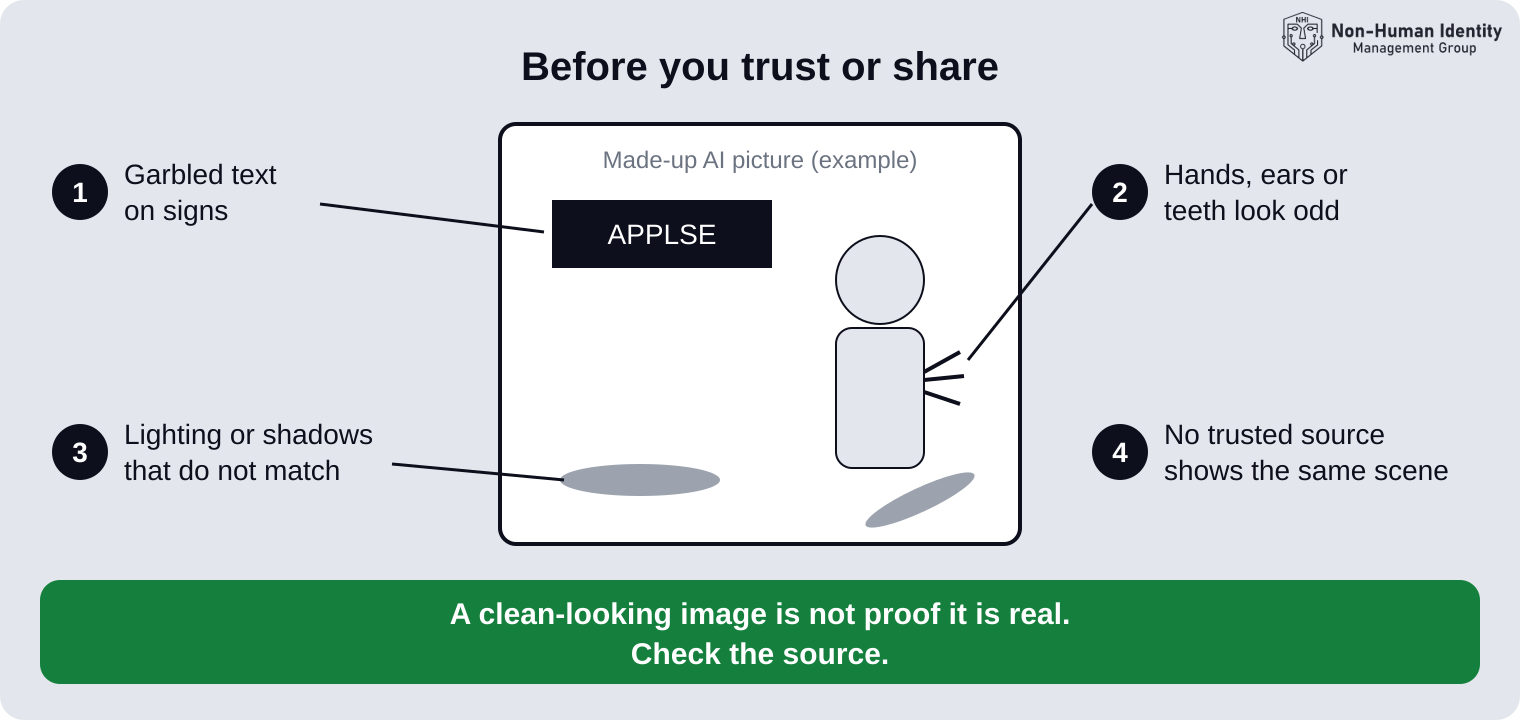
  - stall sign reads "APPLSE FRESH"            (2)
  - one shopper has six fingers                (3)
  - file info: "Made with AI" label            (4)
Shared as: "Our market this morning!"          (5)
- The prompt describes the scene. It names no place or person.
- Garbled writing on signs is a common slip in AI images, though newer tools make fewer.
- Odd hands, ears or teeth are another common slip. Better tools can get these right, so a clean image is not proof it is real.
- In a real file, this line would show a label the tool attached. Not every tool adds one, and labels may not survive when files are copied.
- The caption claims an invented scene happened this morning.
Why this is risky: the picture is fine as an illustration. The caption turns it into a false claim. People who see it may believe the event happened.
The safer way: say plainly when an image is AI-made. Keep any label the tool added. Do not pass it off as a photo of something that happened.
How does it work?
Most image tools today use a method called diffusion. In plain words, the tool learns to turn static into a picture.[1]
- Learning. Before you ever use it, the tool studies a huge set of pictures and their descriptions. It learns how words link to shapes and colours.
- Your prompt. You type a description. The tool turns your words into numbers it can work with.
- Start with noise. The tool begins with random speckles, like a badly tuned old TV screen.[1]
- Clean up, step by step. Over many rounds, it removes a little noise each time, steered by your prompt, until a clear picture is left.[1]
- Video adds time. Video tools work on small chunks of space and time together, so each frame fits the next.[2]
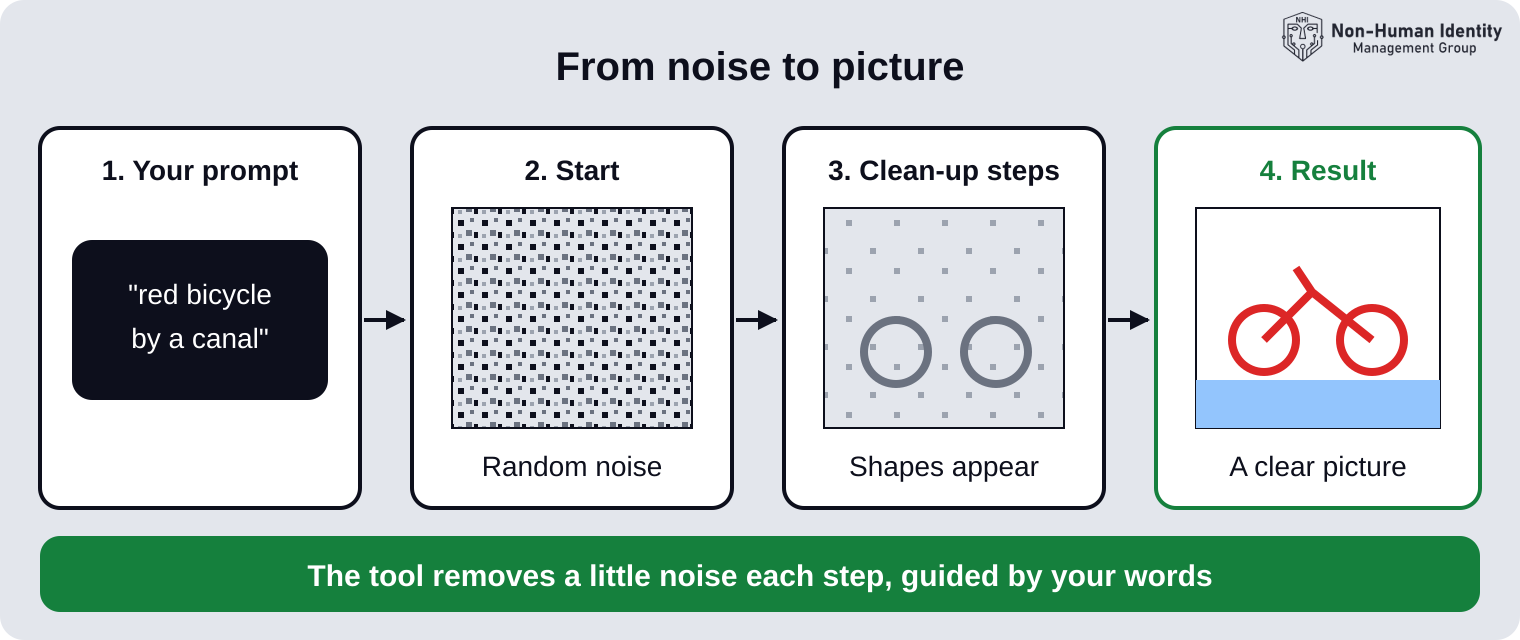
The tool does not understand the world the way people do. One video maker says its model can get basic physics wrong, such as how glass breaks. It adds that objects can appear from nowhere in long clips.[2] That is why small details are worth a closer look.
Some tool makers now add hidden marks or labels. One approach adds an invisible watermark (a hidden marker built into the pixels) when the image is made. Its checker can only spot marks from that maker's own tools and listed partners.[4] Another approach, content credentials, attaches a record of how the file was made and changed, which anyone can check.[5]
A worked example
Victor Huang runs a small bike repair shop. He wants a picture for a flyer about his spring tune-up offer.
He types a prompt into an image tool: "friendly bike mechanic fixing a blue bike in a sunny workshop". Soon he has four options. He likes one, but the mechanic has an odd, melted-looking hand. He asks for another version, and that one looks right.
Victor thinks of the sketch artist. The picture fits his words, but it is not his shop or his staff. So he adds a small line to the flyer: "Image created with AI."
His friend suggests a different idea. "Why not make a picture of a famous cyclist holding your flyer?" Victor says no. Using a real person's face without permission could mislead customers. Some tools also have rules on making images of real people.
Next he checks the tool's terms. They say he may use the images for business. He also learns that in the US, a prompt alone is not enough to make him the legal author.[3] That means someone else could reuse a similar image. He decides that is fine for a flyer, but he will pay a designer for his logo.
A week later a customer sends him a viral photo of a "giant bike made of ice". Victor searches for it on two news sites and finds no trace. He tells the customer it looks AI-made and does not share it.
Myths and mistakes
| What people think | What is true |
|---|---|
| You can always spot an AI image by its hands. | Newer tools often get hands right. Check the source, not just the details. |
| The AI copies and pastes bits of real photos. | Most tools build a new image from noise, guided by patterns they learned.[1] They can still produce results that look close to existing work. |
| If I made it with AI, I own it. | In the US, prompts alone do not make you the author. The rules differ between countries.[3] |
| Every AI image carries a label. | Some tools add labels or hidden marks, and others do not. Labels may not survive every copy or screenshot. |
| It is just a joke, so faking a real person is harmless. | Fake images of real people can mislead others and damage reputations. Ask permission, or do not do it. |
What can I do this week?
- Pick one dramatic image in your feed and check whether a trusted source shows it too.
- Read the terms of any AI image tool you use, especially on business use.
- Agree a simple rule at work: label AI-made images and never show them as real photos.
- Set up a check for unusual payment requests, even ones that come by video.
Checklist
- I label images and clips I make with AI.
- I do not use a real person's face or voice without their permission.
- I check the source before I share a surprising image or video.
- I have read the terms of the AI tools I use for work.
- I keep any labels the tool adds instead of removing them.
- I confirm unusual requests seen in a video or call through a second, known channel.
- I use AI images for ideas and drafts, and pay for original work where I need to own it.
Common questions
Can I use AI-made images in my business?
Often yes, but it depends on the tool's terms and where you live. Some tools allow business use and some limit it. Ownership is less clear than for a photo you take yourself. For things you must own, such as a logo, a human designer is the safer choice.
How can I tell if a picture is AI-made?
Often you cannot be sure by looking. Garbled text, odd hands and mismatched shadows are clues, but good images may show none. Check whether trusted sources show the same scene, and look for labels or content credentials attached to the file.
Is it legal to make an AI image of a real person?
Sometimes not, and the answer varies by country, by person and by what the image shows. Some places have laws on fake images of real people, and many tools ban it in their rules. We suggest getting clear permission first, and never using a real person's likeness to mislead.
How do AI video generators differ from image generators?
They use similar ideas but also have to keep frames consistent over time. That makes video harder, so clips are often short and can show odd movement, such as objects appearing from nowhere or physics that looks wrong.
Do watermarks prove where an image came from?
They help, but they are not a full answer. A watermark checker usually spots only marks from certain tools. A missing mark does not prove an image is real, and a label may not survive a copy or screenshot.
Where next?
Ready for the detail? Read the practitioner guide: AI Image, Video, Voice and Music Models Hub. It goes further into which tools are active, their costs and commercial terms, and which carry provenance marks.
Also useful:
- Content Provenance for Beginners
- Deepfakes and AI Fraud for Beginners
- Generative AI for Beginners
- AI Content Provenance and C2PA Guide
Related NHI Mgmt Group resources: Deepfake and Synthetic Media Laws Map · Deepfake Awareness Training for Staff · Deepfake Detection Buyer's Guide
Key terms
- Generative AI
- AI that creates new text, images, video or sound from a request.
- Prompt
- The words you type to tell an AI tool what to make or do.
- Deepfake
- AI-made media that shows a real person doing or saying something they did not.
- Synthetic media
- Images, video or audio made or heavily changed by AI.
- Provenance
- A record of where a file came from and how it was changed.
- Copyright
- The legal right to control copying and use of an original work.
Sources and further reading
- Understanding pipelines, models and schedulers. Diffusers documentation, Hugging Face. https://huggingface.co/docs/diffusers/main/en/using-diffusers/write_own_pipeline, accessed 28 Nov 2026.
- Video generation models as world simulators. OpenAI, 15 February 2024. https://openai.com/index/video-generation-models-as-world-simulators/, accessed 28 Nov 2026.
- Copyright Office Releases Part 2 of Artificial Intelligence Report (NewsNet). US Copyright Office, 29 January 2025. https://www.copyright.gov/newsnet/2025/1060.html, accessed 28 Nov 2026.
- SynthID. Google DeepMind. https://deepmind.google/models/synthid/, accessed 28 Nov 2026.
- Coalition for Content Provenance and Authenticity (C2PA). https://c2pa.org/, accessed 28 Nov 2026.