An AI acceptable use policy is a short set of rules for how staff may use AI tools at work.
This guide is for anyone who uses AI chat tools at work, or who has been asked to write rules for them. You do not need to be technical to need one: if your staff can open a chatbot in a web browser, your business already has AI in use.
In short
- An AI policy tells staff which AI tools they may use, and for what.
- The most important rule is about data: what may and may not be typed into an AI tool.
- A good policy also says a person must check AI answers before they are used.
- Keep it short, name an owner, give people a safe way to ask for new tools and review it often.
What you will learn
- Explain what an AI acceptable use policy is for.
- Spot the five rules that most policies need.
- Check whether your team already uses AI tools nobody approved.
- Ask the right questions before you write or sign off a policy.
- Rules for using AI (AI acceptable use policy)
- a written list of what staff may and may not do with AI tools at work.
- AI used without approval (shadow AI)
- AI tools that staff use without the organisation knowing or agreeing.
- AI chat tool (chatbot)
- a program you type questions into that writes answers back in plain language.
What is an AI acceptable use policy?
Think of the safety sign next to the power tools in a school workshop. It does not ban the tools. It says who may use them, what to wear and what never to cut.
An AI acceptable use policy does the same job for AI tools at work. It is usually a few pages long. It tells staff which tools are approved, what kinds of information they may type in, and when a person must check the answer.
Many firms already have an acceptable use policy for email, laptops and the internet. An AI policy can be a new section of that, or a short page of its own. Either way, it sits under a wider set of rules about how the business chooses and manages AI, often called AI governance.
Where the comparison stops working: a workshop sign sits next to the machines. AI tools are a click away on any phone or laptop, so the rules must travel with your staff, not stay on a wall.
Why does it matter?
Staff are already using AI, with or without rules. In a 2024 survey of 31,000 office workers, 78% of those using AI said they brought their own AI tools to work.[1] A clear policy turns that hidden use into safe, open use.
If you run a small business
What could happen: a staff member pastes a customer list into a free chatbot, and the data leaves your control.
Check this: ask your team which AI tools they use each week, with no blame for honest answers.
Next: Shadow AI for Beginners
If you work in HR or operations
What could happen: you are asked to write the policy, but nobody owns the list of approved tools.
Check this: agree one named owner for the policy and the tool list before you write a word.
If you use AI tools in your job
What could happen: an AI answer with a made-up fact goes into a report with your name on it.
Check this: read and check every AI answer before you send or publish it.
What does it look like?
Here is a made-up one-page policy for a small charity. Real policies are often longer, but the core rules look like this.
Example only. All values are made up.
EXAMPLE CHARITY: AI USE RULES (v0.1, FAKE)
Owner: Operations Lead (example only)          (1)
Approved tools: ExampleChat Work account only  (2)
Never type in: names, addresses, case notes,
  passwords, or anything marked Confidential   (3)
Always: a person checks AI output before use   (4)
New tool? Ask [email protected] first        (5)
Concerns or mistakes: report the same day      (6)
Review date: every 6 months
- In a real file, this line would name the person who keeps the rules up to date.
- Approved tools are the ones the business has checked and set up, often a paid work account.
- The data rule. In a real file, this line would list the kinds of information that must never go into an AI tool.
- Human review. AI can write wrong answers that sound right.
- A safe route to ask for a new tool, so people do not just sign up on their own.
- A no-blame way to report a slip, so it can be fixed quickly.
Why this is risky: without written rules, each person guesses. Some will paste private data into free tools. The UK's national cyber security agency advises against typing sensitive details into public AI chat tools. It warns that the company running the tool can see what you type.[2]
The safer way: a short policy that people can read in five minutes, backed by approved tools that are easy to use. A rule that is hard to follow is often ignored.
How does it work?
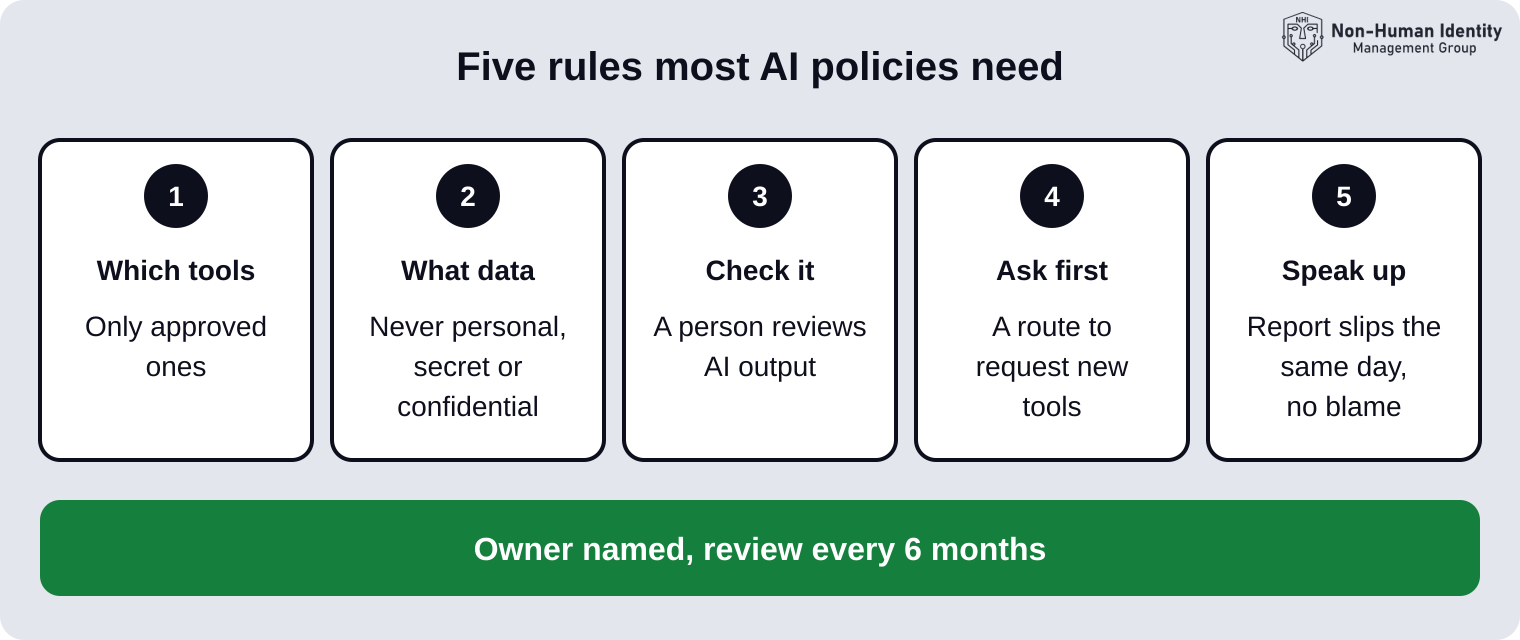
A policy only works if people know it, can follow it and can ask questions. Most follow these steps.
- Find out what is in use. Ask staff which AI tools they already use, and for what. Make it safe to answer honestly.
- Choose approved tools. Pick tools the business has checked. Work accounts often give the business more control over data than free personal accounts. Check each tool's terms.
- Write the data rule. Say plainly what must never go into an AI tool, such as personal details, passwords and confidential files.
- Add the checking rule. A person reads and checks AI output before it is sent, published or used to make a decision about someone.[3]
- Give people a route. Explain how to ask for a new tool and how to report a mistake, with no blame.
- Review it. AI tools change fast. Set a review date and name who does it.
Some firms add more rules as they grow. One common rule says when to label content that AI helped to make. Another covers AI tools that can act on their own, such as sending emails or booking meetings. These are called AI agents. If your staff use them, the policy should say what the agents may connect to and who checks their work.
A worked example
Tariq Hussain is the operations lead at Northgate Housing Trust, a fictional housing charity with forty staff.
One Monday a manager tells him she found a letter to a tenant that looked AI-written. It had the tenant's full name and repair history in it. Tariq asks around. Most staff use AI tools, mostly free ones on their own phones. Nobody had told them not to.
Tariq thinks of the workshop sign. Banning the tools would just push their use out of sight. So he writes rules instead.
First he sends a short, no-blame survey asking which tools people use and for what. Writing letters and summing up long reports come top.
Next he talks to the IT supplier. The charity already pays for an office suite with an AI assistant included. Tariq makes that the approved tool, because it is covered by the charity's existing contract.
Then he writes a one-page policy. It says: use the approved tool only, never type in tenant names or case notes, and always read the answer before it goes out. It also gives an email address for tool requests and a promise of no blame for reported slips.
He runs a 20-minute team session with real examples. Two people ask for an AI tool for meeting notes, and he adds it to the review list.
Six months later he reviews the policy. Staff use the approved tool more, and three slips were reported early and fixed.
Myths and mistakes
| What people think | What is true |
|---|---|
| Banning AI keeps us safe. | Bans often push use onto personal phones, where you have less control. Approved tools and clear rules usually work better. |
| A policy needs to be long to be thorough. | Long policies are rarely read. Put the key rules on one page and link to detail. |
| If the AI wrote it, the AI is responsible. | The person who uses the output is responsible for it. AI answers can be wrong but sound sure.[3] |
| Free and paid AI tools handle data the same way. | Terms often differ between personal and business accounts. Read each tool's terms. |
| Once written, the policy is done. | AI tools change often. Review the policy on a set date. |
What can I do this week?
- Ask your team which AI tools they use, with no blame for the answer.
- Name one owner for AI rules and the list of approved tools.
- Write down the data rule: what must never be typed into an AI tool.
- Check whether your existing software already includes an AI tool you could approve.
- Share a one-page draft and ask staff what is unclear.
Checklist
- The policy has a named owner and a review date.
- It lists the approved AI tools, or says where the list is kept.
- It says plainly what information must never go into an AI tool.
- It says a person checks AI output before it is used.
- It explains how to ask for a new tool.
- It explains how to report a mistake, with no blame.
- Staff have read it and had a chance to ask questions.
- It covers AI tools that can take actions, if your staff use them.
Common questions
Do small businesses really need an AI policy?
Yes, if staff use AI tools at all. A small business can lose customer trust from one leaked file. One page can cover most of the risk. It needs the data rule, the checking rule and a list of approved tools.
Should the AI policy be separate from our IT policy?
Either works. Many firms add an AI section to their existing acceptable use policy so staff have one place to look. Others keep a short separate page. What matters is that staff can find it and that it does not contradict your other rules.
What information should staff never put into AI tools?
Personal details about customers or staff, passwords and keys, and anything marked confidential are the usual starting list. The exact list depends on your business and on which tools you have approved. We suggest writing it as plain examples staff will recognise.
Can we just block AI websites?
You can block some, but staff can still reach AI tools on personal phones. Blocking without offering an approved option tends to push use out of sight. Most organisations do better with approved tools, clear rules and a way to ask for more.
Who should own the AI policy?
One named person, often in operations, IT or compliance. They keep the approved tool list, answer questions and run the review. In larger firms a small group from legal, IT, security and the business agrees the rules, but one person still holds the pen.
Where next?
Ready for the detail? Read the practitioner guide: AI Governance Policy Template. It goes further into roles, risk levels for AI uses and how to handle AI from suppliers.
Also useful:
- AI Acceptable Use Policy Template
- Shadow AI for Beginners
- Acceptable Use Policies for Beginners
- AI Governance for Beginners
- AI Copilots at Work for Beginners
Related NHI Mgmt Group resources: AI Acceptable Use Policy vs AI Security Policy · Block vs Sanction vs Coach · AI Usage Control and Shadow AI
Key terms
- Acceptable use policy
- A written set of rules for how staff may use the organisation's IT, now often including AI tools.
- Shadow AI
- AI tools used at work without the organisation knowing or approving them.
- Generative AI
- AI that creates new text, images or other content from a request.
- Chatbot
- A program you type questions into that replies in plain language.
- Hallucination
- An AI answer that sounds right but is wrong or made up.
- Data loss prevention
- Tools and rules that help stop sensitive information leaving the organisation.
Sources and further reading
- AI at Work Is Here. Now Comes the Hard Part (2024 Work Trend Index Annual Report). Microsoft and LinkedIn, 8 May 2024. https://www.microsoft.com/en-us/worklab/work-trend-index/ai-at-work-is-here-now-comes-the-hard-part, accessed 28 Nov 2026.
- ChatGPT and large language models: what's the risk? National Cyber Security Centre (UK), 14 March 2023. https://www.ncsc.gov.uk/blog-post/chatgpt-and-large-language-models-whats-the-risk, accessed 28 Nov 2026.
- Artificial Intelligence Playbook for the UK Government. UK Government, 10 February 2025. https://www.gov.uk/government/publications/ai-playbook-for-the-uk-government/artificial-intelligence-playbook-for-the-uk-government-html, accessed 28 Nov 2026.