An AI search engine searches the web for you and writes one answer, with links to its sources.
This guide is for anyone who has seen an AI answer at the top of their search results and wondered how far to trust it. You do not need any technical knowledge to use these checks.
In short
- AI search runs web searches, picks some pages, and has an AI write a summary with links.
- The answer is only as good as the pages it picked and the summary it wrote.
- AI answers can be wrong, and the providers say so themselves.
- For health, money, law or contact details, open the sources and check an official site.
What you will learn
- Explain how an AI search tool builds its answer.
- Spot the signs that an answer needs checking.
- Check an answer against its sources in a minute or two.
- Decide when a quick look is enough and when it is not.
- Answer tool (AI search engine)
- a search tool that writes you an answer instead of only listing links.
- Source link (citation)
- a link in the answer to the page that a point came from.
- Made-up answer (hallucination)
- when an AI states something that sounds right but is not true.
What is an AI search engine?
Think of a helpful library assistant. You ask a question, they pull a few books, read the bits that matter and give you a short summary, with page notes. AI search does the same with web pages.
A normal search engine gives you a list of links, and you do the reading. An AI search engine does the reading for you. It runs searches, picks pages, and then a large language model (an AI program trained on lots of text to write words) writes an answer.[1]
You may see it as an AI box at the top of search results. You may also meet it in a chat app that searches the web when needed.[1][2]
Where the comparison stops working: a library assistant can tell you how sure they are. An AI answer often sounds just as confident when it is wrong.
Why does it matter?
AI answers save time, but they can mix up facts or lean on a poor page. Google's own help page says its AI answers can and will make mistakes.[3]
If you look up health or money questions
What could happen: you act on a summary that left out a key warning.
Check this: open the sources and look for an official or expert site.
If you search for a help line or website
What could happen: the answer shows a wrong or fake contact detail, and you call a scammer.
Check this: take phone numbers only from the company's own site, your bill or your card.
Next: Phishing for Beginners
If you use AI search at work
What could happen: a wrong figure ends up in a report or a reply to a customer.
Check this: check any fact you pass on against the page it came from.
What does it look like?
Example only. All values are made up.
Q: How do I cancel my ExampleFlix plan?
AI answer:
  Go to Account > Plan > Cancel. [1]                  (1)
  Or call support on 0000 000 0000. [2]               (2)
  Refunds are given for unused months.                (3)
Sources:
  [1] help.examplefix.example.com                     (4)
  [2] best-deals-blog.example.invalid
- A step with a source link. Open it to check.
- A phone number taken from a blog, not the company's own site.
- A claim with no source link at all.
- The source name is spelt slightly differently from the company's name.
Why this is risky: the answer mixes a sourced step, a number from an unofficial page and a claim with no source, all in the same confident tone.
The safer way: follow the steps on the company's own help page, and take contact details only from there.
How does it work?
- You ask. You type or say a question in plain words, just as you would ask a person.
- It searches. The tool runs a web search. Google says its AI features may run several related searches at once, called query fan-out.[1]
- It picks pages. It chooses some pages and passages to use, and some tools use another company's search results. OpenAI says ChatGPT search may send search terms to outside providers such as Bing.[2]
- It writes. The AI model writes an answer from those passages. Basing an answer on found pages like this is called grounding.
- It shows links. The answer comes with links to the pages it used, so you can open them and check the details yourself.[2]
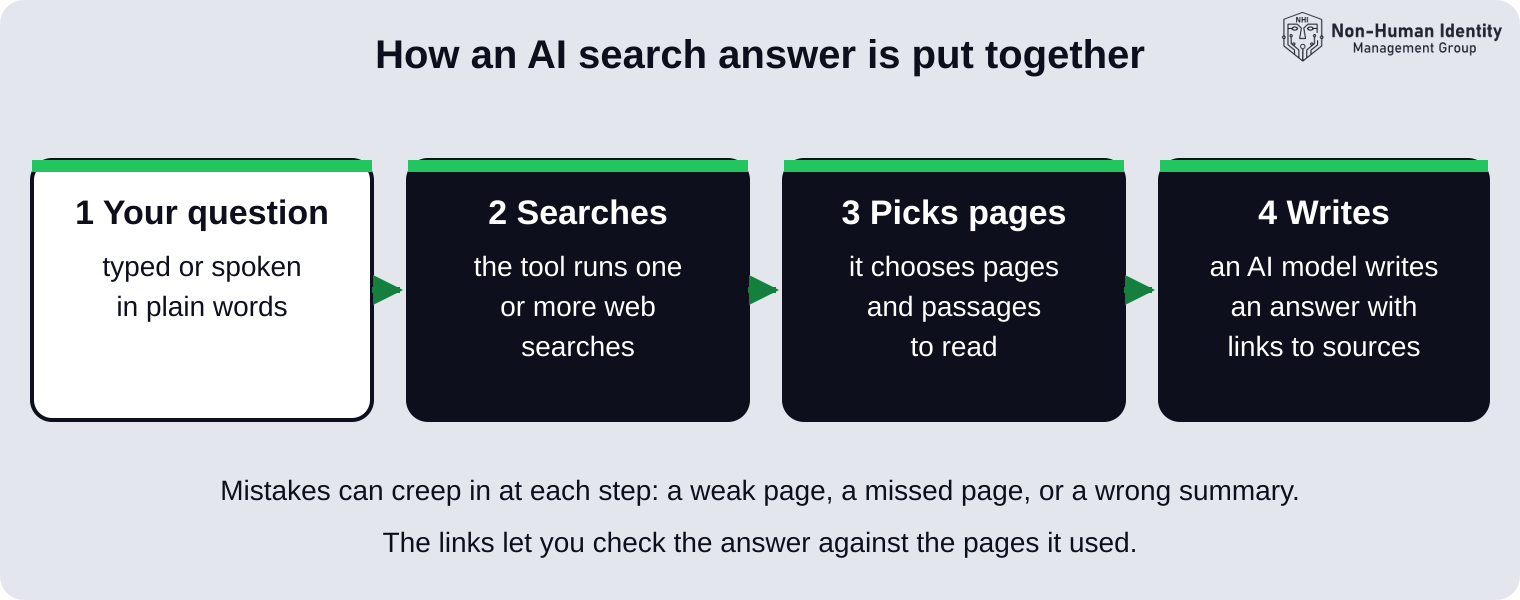
So how does it choose its answers? It favours pages its search finds useful for your question, then the AI sums them up. Providers publish only part of how this works.[1] Two tools can give different answers to the same question.
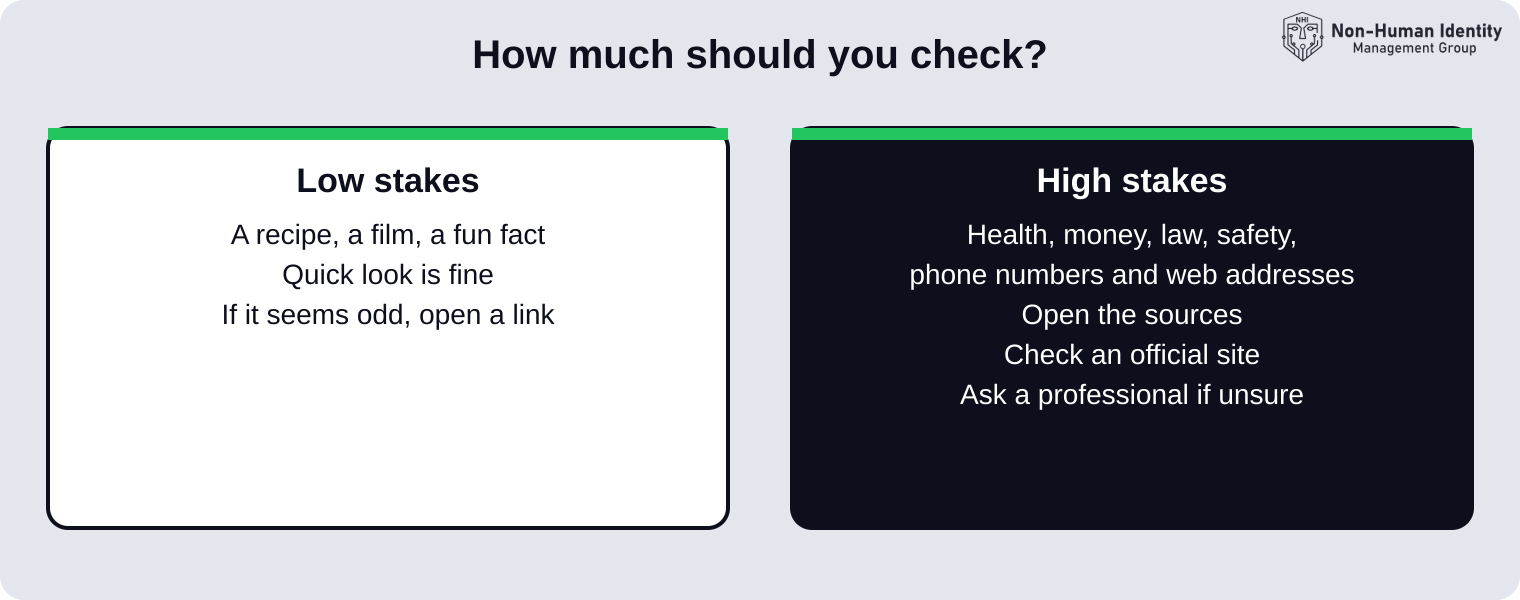
When to trust it depends on what is at stake. Google's advice is to check important information in more than one place.[3]
A worked example
This story is made up to show how it can happen.
Victor Huang is a retired teacher in Ohio. His flight home has been cancelled, and he wants to rebook fast. He asks an AI search tool for the airline's help line.
The answer is quick and clear. It gives a phone number and says the airline can rebook him over the phone for a small fee. Victor nearly dials it.
Then he notices the small source link next to the number. He taps it. It goes to a travel deals blog, not the airline. He remembers a tip from his daughter: get phone numbers from the company itself.
Victor opens the airline's app instead. The rebooking option is right there, and the app shows no fee for a cancelled flight. The help line on the airline's own website is a different number from the one in the AI answer.
Later he reads the blog page again. It is an old page, and the number on it may not belong to the airline at all. He uses the feedback button on the AI answer to report it.
What made the difference: Victor checked where the key fact came from before acting on it.
Myths and mistakes
| What people think | What is true |
|---|---|
| If it has a source link, it must be right. | A link shows where a point came from, not that it is true. The summary can also differ from what the page says. |
| AI search knows the answer. | It summarises pages it found. If those pages are wrong or old, the answer can be too. |
| A confident tone means a correct answer. | AI writes in the same tone whether it is right or wrong. Providers warn that answers may include mistakes.[3] |
| The top answer is from the company I asked about. | It may draw on blogs, forums or old pages. Check the source names. |
| What I type into AI search stays private. | Search terms and rough location may be shared with partner search providers. Read the tool's privacy page.[2] |
What can I do this week?
- Next time you see an AI answer, open one of its source links and compare.
- Save the official websites of your bank, phone company and doctor as bookmarks.
- Take contact details only from those bookmarks, your bill or your card.
- Try the same question in two tools and see if the answers agree.
- Use the feedback button when you spot a wrong answer.
Checklist
- I know an AI answer is a summary of pages, not a fact check.
- I open the sources for anything about health, money, law or safety.
- I get phone numbers and web addresses from official sites only.
- I look for claims in the answer that have no source link.
- I check whether the source is the real organisation or a third party.
- I avoid typing private details, such as account numbers, into AI search.
Common questions
How does AI search choose its answers?
It runs one or more web searches, picks pages that seem to match your question, and has an AI model sum them up. Providers explain only part of how pages are picked, so the same question can get different answers in different tools.[1]
Can I trust AI search answers?
Partly, and more for low-stakes questions. Providers say answers may include mistakes.[3] Use AI search as a starting point. For anything that matters, open the source links and check an official site before you act.
Why do AI answers sometimes make things up?
An AI model writes words that fit the pattern of a good answer. It can fill gaps with words that sound right but are wrong. Using found pages lowers this risk, but a weak page or a poor summary can still produce errors.
Is AI search worse than normal search?
Not worse, just different. Normal search shows you pages and you judge them. AI search judges and sums up for you, which is faster but hides the details. The checks on this page give you back that control.
What do AI search tools do with my questions?
They process them to find answers, and some share search terms with partners. OpenAI, for example, says ChatGPT search may share search terms and rough location with providers such as Bing.[2] Read each tool's privacy page.
Where next?
Ready for the detail? Read the practitioner guide: AI Answer Engines Hub. It goes further into where each engine's results come from, how citations and ads appear, and the controls publishers have.
Also useful:
- AI Search Engines Compared
- AI Hallucination Business Risk Guide
- AI and Privacy for Beginners
- AI on Phones and PCs for Beginners
Related NHI Mgmt Group resources: AI Search Timeline · AI Chatbot Free Plans Compared · Browser Privacy and Security Settings Guide
Key terms
- Answer engine
- A search tool that writes one answer, with links, instead of only listing pages.
- Large language model
- An AI program trained on lots of text that predicts and writes words.
- Hallucination
- When an AI states something that sounds right but is false or made up.
- Grounding
- Basing an AI answer on found sources, such as web pages, rather than memory alone.
- Retrieval-augmented generation
- A way of building AI tools that look up information first, then write an answer from it.
- Citation
- A link or note in an answer that shows which source a point came from.
Sources and further reading
- AI features and your website. Google Search Central. https://developers.google.com/search/docs/appearance/ai-features, accessed 28 Nov 2026.
- ChatGPT search. OpenAI Help Center. https://help.openai.com/en/articles/9237897-chatgpt-search, accessed 28 Nov 2026.
- Learn about AI Overviews (Google Search Help). Google. https://support.google.com/websearch/answer/14901683, accessed 28 Nov 2026.