An API gateway is one front door that checks and directs requests that apps send to several services.
This guide is for new IT staff, junior developers and anyone who keeps hearing the term in project meetings. You do not need to write code. If your organisation has a phone app, a website or partners that connect to its systems, there is a good chance a gateway sits in the middle.
In short
- An API gateway sits in front of many services and receives every request first.
- It can check who is calling, limit how often they call, send each request to the right place and record it.
- It is a useful first check, but each service still has to check what each caller may see.
- Look after the gateway's own settings and keys carefully, because it is a single point that many things depend on.
What you will learn
- Explain what an API gateway does in one sentence.
- Name the four jobs a gateway usually does with each request.
- Spot the mistake of trusting the gateway to do every security check.
- Ask useful questions about the gateway your team runs.
- Software doorway (API)
- a set way for one program to ask another program for data or actions.
- Front door for APIs (API gateway)
- a service that receives API requests first, checks them and passes them on.
- Speed limit (rate limit)
- a cap on how many requests a caller can send in a set time.
What is an API gateway?
Think of the post room in a large office. Every parcel arrives there first. Staff check the label, refuse anything suspicious, write it in the log book and take it to the right desk.
An API gateway does the same for software requests. An API is a doorway one program uses to ask another for something, such as "show this customer's orders". Modern apps often have many small services behind them, one for orders, one for payments and one for stock. Instead of each service facing the outside world, they all sit behind one gateway.
When a phone app sends a request, the gateway receives it first. It checks the request, then forwards it to the right service and passes the answer back. Microsoft's documentation, for example, describes its gateway as accepting API calls and routing them to the right backend service.[1]
Where the comparison stops working: a post room checks the outside of a parcel, not what the person at the desk is allowed to open. A gateway is similar. It can check that a caller is signed in. The service behind it usually has to decide whether that caller may see a particular record.
Why does it matter?
A gateway is where many security checks happen in one place. Set up well, it turns away a lot of bad traffic early. Set up badly, it can give a false sense of safety.
If you are new to IT work
What could happen: you are asked to "just open up" a new API on the gateway, and it goes live with no sign-in check.
Check this: ask what checks apply to each new API before it is switched on.
If you are a junior developer
What could happen: you skip checks in your service because "the gateway does security", and one customer can read another customer's orders.
Check this: make sure your service checks that the caller owns the record they asked for.
Next: APIs for Beginners
If you look after a business's apps
What could happen: a partner's program sends far too many requests and slows the service for everyone.
Check this: ask whether each partner has a rate limit and whether anyone is told when it is hit.
Next: API Keys for Beginners
What does it look like?
Gateways are set up with rules. Here is a made-up, simplified rule card for one API. Real products each use their own format.
Example only. All values are made up.
# gateway rule card for the orders API
address:     https://api.example.com/orders
send to:     orders-service.example.invalid
sign-in:     token from our login service required  (1)
api key:     EXAMPLE-KEY-0000-FAKE                  (2)
rate limit:  100 requests a minute per caller        (3)
log:         every request, kept for 90 days         (4)
admin login: admin / FAKE-admin-0000                 (5)
- Callers must show a pass, called a token, from a trusted login service.
- In a real file, this line would hold a key typed straight into the settings.
- Callers who go over the limit are turned away for a while.
- Records help the team spot misuse and fix faults.
- In a real file, this line would hold the gateway's own admin password.
Why this is risky: lines 2 and 5 put secrets in a file that many people can read. Anyone who copies the admin password may be able to change every rule.
The safer way: keep keys and admin passwords in a locked secrets store, not in the rule file. Give each admin their own login with a second check. Treat a gateway API key as a way to count and limit callers, not as proof of who they are. Amazon's documentation says not to use its gateway's API keys for sign-in or permission checks.[2]
How does it work?
Here is what usually happens to each request.
- Arrive. A phone app, website or partner system sends a request to the gateway's address.
- Check who is calling. The gateway looks at the key, token or certificate sent with the request. Checking who someone is, is called authentication.[1]
- Check the limits. The gateway counts requests. If a caller sends too many, it can reply with an error that means "too many requests" and ask them to slow down.[3]
- Send it on. The gateway forwards the request to the right service, sometimes adjusting it on the way.[1]
- Record it. The gateway writes logs and figures that the team can use to spot problems.[1]
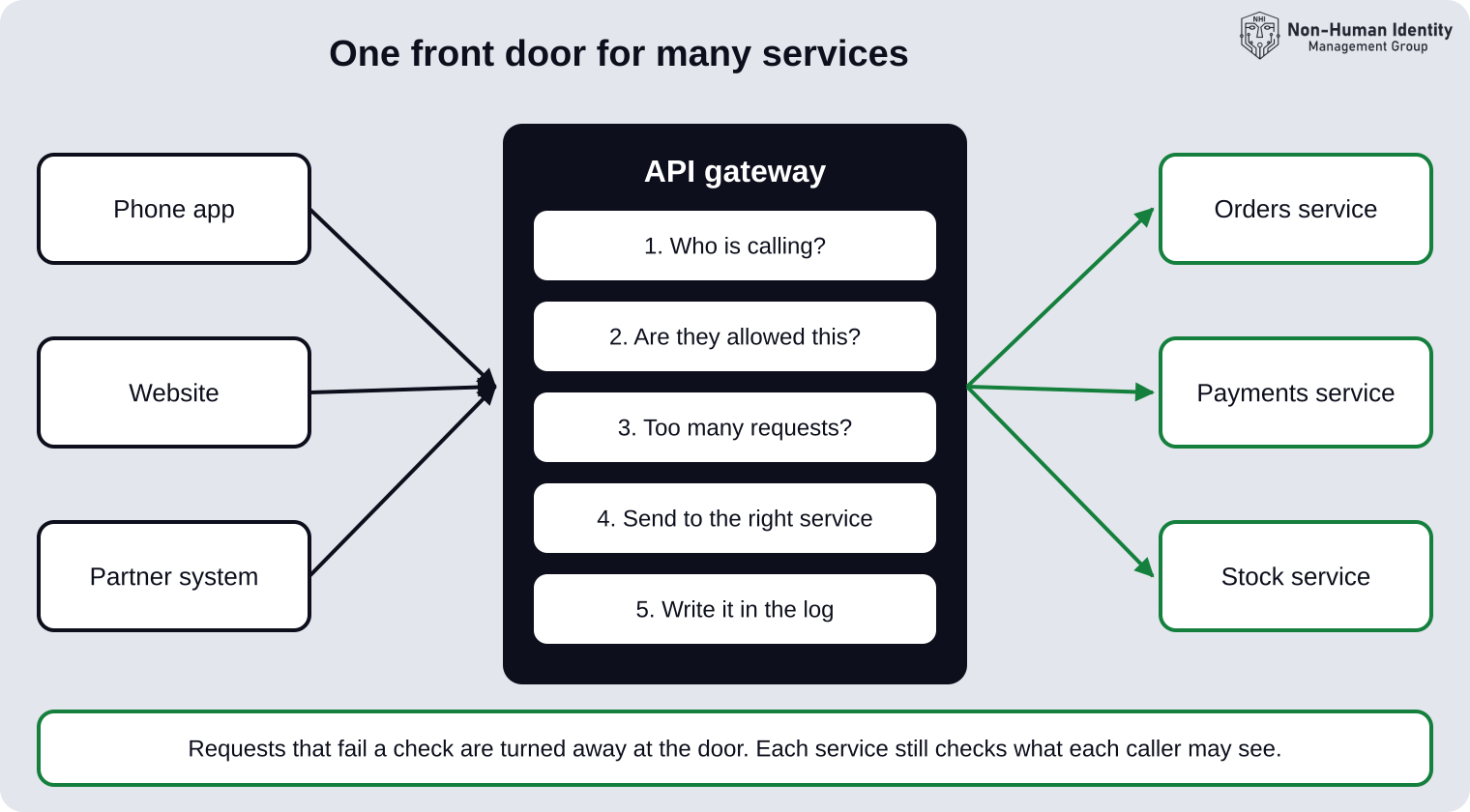
A gateway can also do a quick permission check, such as "this caller may use the orders API". That is a broad check. The finer question, "may this caller see order number 1234?", depends on data only the service has. A well-known list of API risks advises checking this in every part of the service that looks up a record from a caller's request.[4] Checking what someone may do is called authorisation.
A gateway is a close cousin of a reverse proxy, a server that sits in front of websites and passes visitors through. A gateway adds API-specific jobs, such as keys, limits per caller and usage records.
A gateway is one layer, not the whole plan. A US standards body has published guidance on protecting APIs. It covers checks before an API is released and checks while it runs.[5]
A worked example
Zola Dube runs Cobble Studio, a fictional company that builds booking apps for small shops. Gita Pajari has just joined as a junior developer.
In her first week, Gita adds a new feature: shop owners can download a list of their bookings. She puts the new API behind the company's gateway. The gateway already checks that callers are signed in, so she assumes the job is done.
Before release, Zola asks her to test with two made-up shop accounts. Signed in as the first shop, Gita changes the shop number in the request to the second shop's number. The second shop's bookings come back.
The gateway did its job. The caller was signed in, so it let the request through. It had no way to know which shop's bookings that caller should see.
Gita adds a check in her service. Now it compares the shop number in the request with the shop linked to the caller's sign-in. If they do not match, it refuses. She tests again, and the second shop's bookings no longer come back.
Zola also asks her to add a rate limit for the new feature on the gateway. A full download is heavy work for the database. They note the change in the release record.
Gita writes one line in the team's notes: "The gateway checks who you are. The service checks what you may see."
Myths and mistakes
| What people think | What is true |
|---|---|
| We have a gateway, so our APIs are secure. | A gateway handles shared checks. Each service still needs its own checks on which records a caller may see.[4] |
| An API key proves who is calling. | Some gateway keys are for counting and limiting use. One major provider says not to use them for sign-in or permissions.[2] |
| Rate limits are an exact ceiling. | One major provider says its limits are best-effort targets, and that some traffic can go over them.[3] |
| Rate limits will protect our budget. | One provider advises not to rely on its usage plans to control costs, and to watch spending separately.[2] |
| The gateway is just plumbing, so anyone in IT can change it. | Its rules protect every service behind it. We suggest named admin logins, a second check and a review of every rule change. |
What can I do this week?
- Ask which gateway your organisation uses and who owns its settings.
- Ask for a list of the APIs behind it and whether each one requires sign-in.
- Check whether partners and apps have rate limits, and who is told when a limit is hit.
- Check that gateway keys and admin passwords are kept in a secrets store, not in rule files.
- If you write services, test that one account cannot read another account's records.
Checklist
- Every API behind the gateway is listed, with an owner.
- Every API requires callers to sign in, unless it is meant to be public and that is recorded.
- Services behind the gateway check which records each caller may see.
- Rate limits are set for each caller or partner, and alerts go to a named person.
- Gateway logs are kept and someone looks at them.
- Gateway admins use named logins with a second check.
- Keys and passwords for the gateway live in a secrets store.
- Rule changes are reviewed and recorded before they go live.
Common questions
Is an API gateway the same as a firewall?
No, but they overlap. A firewall decides which network traffic may pass, mostly by address and port. A gateway understands API requests, so it can check tokens, apply limits per caller and route to the right service. Many organisations use both. See Firewalls for Beginners.
What is the difference between an API gateway and a reverse proxy?
A gateway is a kind of reverse proxy with extra API features. Both sit in front of servers and pass requests through. A gateway adds jobs such as checking API keys and tokens, limits per caller and usage records. See API Gateway vs Reverse Proxy.
Do small teams need an API gateway?
Not always. A single small app may manage with checks in its own code. A gateway helps once you have several services, outside partners or a need for shared limits and logs. Many cloud providers offer one as a managed service, so you do not have to run your own.
What happens if the gateway goes down?
Usually, nothing behind it can be reached, because all requests pass through it. That is why teams often run more than one copy and watch its health closely. The same single-point logic applies to security: whoever controls the gateway's settings controls the front door.
Is an AI gateway the same thing?
Similar idea, different traffic. An AI gateway sits in front of AI model services and adds jobs such as tracking AI usage and costs or filtering prompts. See AI Gateway vs API Gateway for how the two compare.
Where next?
Ready for the detail? Read the practitioner guide: API gateway buyer's guide. It goes further into the features to require, how to compare products and the questions to ask suppliers.
Also useful:
- API Gateway Security Guide
- OWASP API Security Top 10 for Beginners
- API Security for Beginners
- Reverse Proxies for Beginners
- JSON Web Tokens for Beginners
Related NHI Mgmt Group resources: API gateway health check · API Key Management Guide · Non-Human Identities for Beginners
Key terms
- API
- A set way for one program to ask another program for data or actions.
- API gateway
- A front door for APIs that checks, limits, routes and records requests.
- Authentication
- Checking who or what is making a request.
- Checking what a caller is allowed to see or do.
- Rate limiting
- Capping how many requests a caller can send in a set time.
- API key
- A secret code a program sends to identify itself to an API.
- Access token
- A short-lived pass from a login service that a caller shows with each request.
Sources and further reading
- Microsoft Learn, "What is Azure API Management?", last updated 13 October 2025. https://learn.microsoft.com/en-us/azure/api-management/api-management-key-concepts (accessed 28 Nov 2026).
- Amazon Web Services, "Usage plans and API keys for REST APIs in API Gateway", Amazon API Gateway Developer Guide. https://docs.aws.amazon.com/apigateway/latest/developerguide/api-gateway-api-usage-plans.html (accessed 28 Nov 2026).
- Amazon Web Services, "Throttle requests to your REST APIs for better throughput in API Gateway", Amazon API Gateway Developer Guide. https://docs.aws.amazon.com/apigateway/latest/developerguide/api-gateway-request-throttling.html (accessed 28 Nov 2026).
- OWASP, "API1:2023 Broken Object Level Authorization", OWASP API Security Top 10 2023. https://api-security.owasp.org/editions/2023/en/0xa1-broken-object-level-authorization/ (accessed 28 Nov 2026).
- NIST, "Guidelines for API Protection for Cloud-Native Systems", SP 800-228, June 2025, updated March 2026. https://csrc.nist.gov/pubs/sp/800/228/upd1/final (accessed 28 Nov 2026).