An API is a set of rules that lets one piece of software ask another for data or a service.
This guide is for students, managers and new IT staff who keep hearing the word "API" and want a plain answer. You do not need to write code: if your business takes card payments online or shows a map on its website, it already relies on APIs.
In short
- An API, short for application programming interface, is how one app asks another app for something.
- The asking app sends a request. The other app sends back a response, often as plain text data.
- Weather apps, online payments, maps and "sign in with" buttons all use APIs.
- Because APIs hand out data, each one needs to check who is asking and what they may see.
What you will learn
- Explain what an API is in one sentence.
- Spot the APIs behind apps you use every day.
- Read the main parts of a simple API request and response.
- Ask a supplier the basic questions about the APIs your business uses.
- Messenger between apps (API)
- a set of rules one program uses to ask another for data or a service.
- The question and the answer (request and response)
- the message an app sends to an API, and the reply it gets back.
- An API's address (endpoint)
- the web address an app sends a particular kind of request to.
What is an API?
Think of ordering in a restaurant. You read the menu, tell the waiter what you want, and the waiter brings your dish. You never walk into the kitchen.
An API plays the waiter's part between two pieces of software. The menu is the API's list of things you can ask for. The order is called a request. The dish that comes back is the response. The kitchen is the other company's system, with its data and code, which stays out of sight.
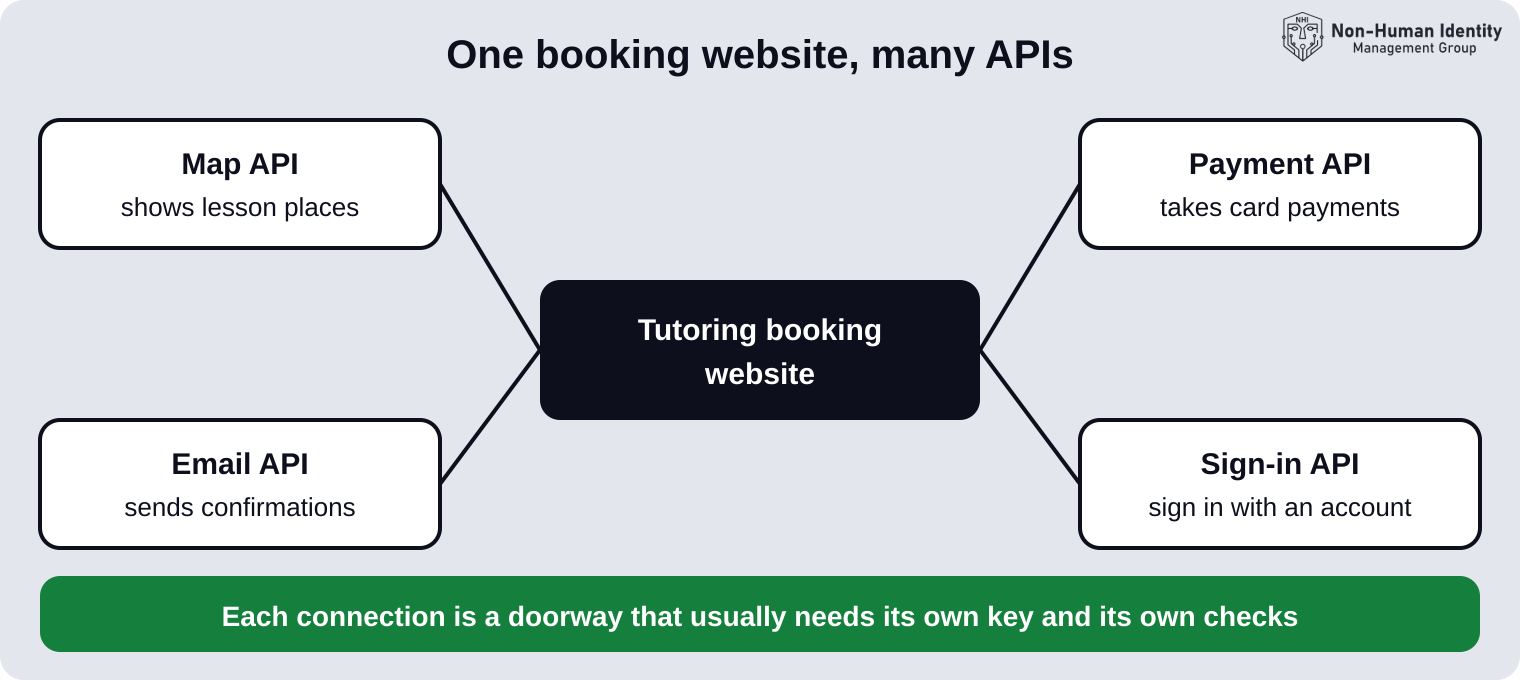
APIs save a lot of work. A booking website does not need to build its own maps. It asks a map company's API for a map and shows it on the page.[1] In the same way, a shop asks a payment company's API to take a card payment.
Most of the APIs people talk about today work over the web, using the same system your browser uses to load pages.[2]
Where the comparison stops working: a waiter can see who is sitting at the table. An API usually sees only a message and, often, a secret code attached to it. It has to decide from those alone whether to serve the order.
Why does it matter?
APIs connect almost everything online, and many of them hand out data. The UK's National Cyber Security Centre notes that APIs can be used to reach services and databases, change data and even handle sign-in.[3] So a weak API can become a back door into that data.
If you manage a team or a business
What could happen: a supplier's API leaks your customers' data, and you did not know your systems were connected to it.
Check this: ask for a simple list of the outside services your systems connect to.
If you are new to IT work
What could happen: you paste a test request, with its secret key, into a public chat or forum.
Check this: remove keys and tokens before you share any request with anyone.
Next: API Keys for Beginners
If you are a student learning to build apps
What could happen: your app trusts whatever an API sends back, or sends far more data than the screen needs.
Check this: ask only for the data you need, and check what comes back.
What does it look like?
Here is a made-up conversation between a weather app on your phone and a weather company's API.
Example only. All values are made up.
REQUEST from the app
GET https://api.example.com/weather?town=Exampleton    (1)
Key: EXAMPLE-KEY-0000-FAKE                              (2)

RESPONSE from the API
Status: 200 OK                                          (3)
{ "town": "Exampleton", "temp_c": 14, "sky": "cloudy" }  (4)
- The method and endpoint. GET means "please send me something". The address says what is wanted.
- In a real file, this line would contain the app's secret API key, which tells the weather company which app is asking.
- A status code. 200 means "it worked". A code such as 404 means "not found".
- The answer, written in JSON, a plain text format for sending data between programs.
Why this is risky: nothing here is secret except the key. If the key is copied, someone else can send requests as if they were this app, and the weather company may bill the app's owner.
The safer way: the key is kept out of the app's code and out of shared messages. It is stored safely and only has the access the app needs.
How does it work?
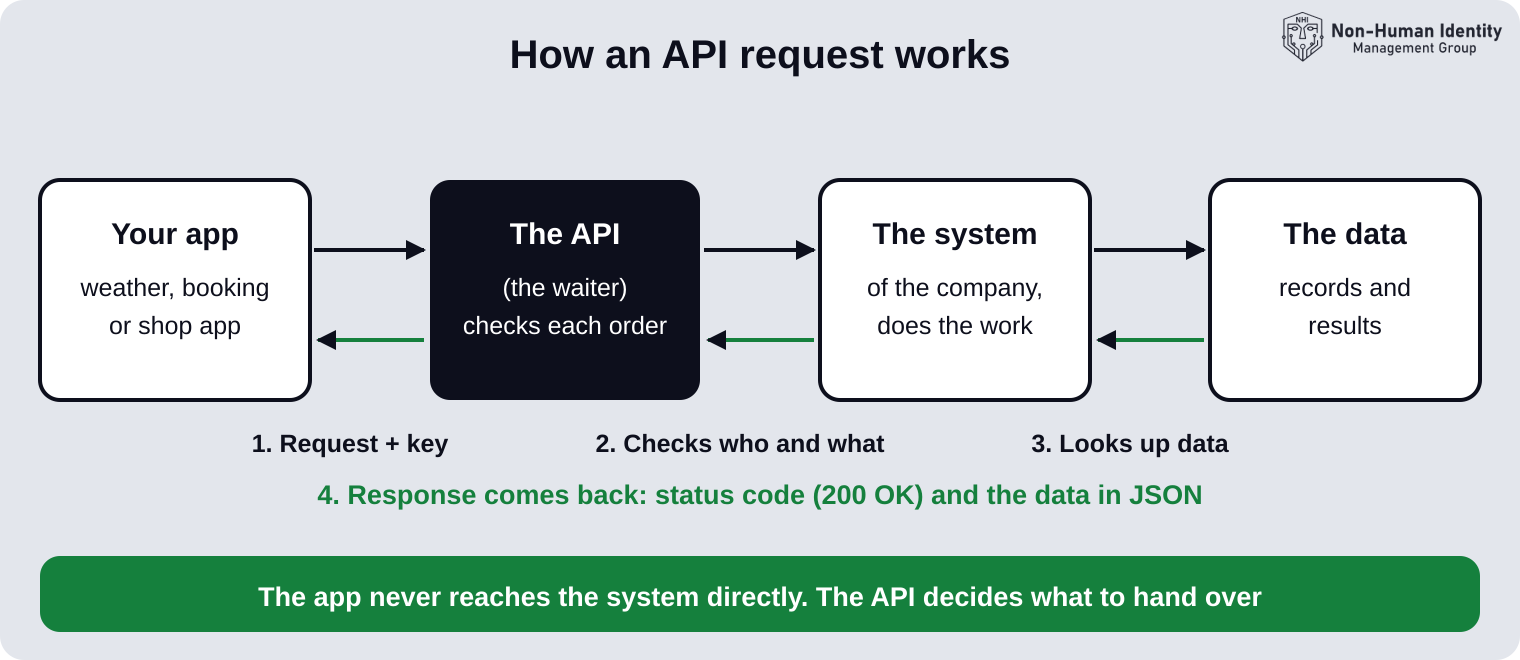
Most web APIs follow the same simple pattern each time an app asks for something.
- The app writes a request. It picks an endpoint and a method. GET asks for data. POST sends new data, such as a booking.[2]
- It proves who it is. Many APIs ask for a key or token with each request, so they know which app or user is asking.
- The API checks the request. A well-built API checks that the caller may do this action on this record, every time.[5]
- The system does the work. Behind the API, the company's system looks up the data or carries out the action.
- The API sends a response. It returns a status code and, often, data in JSON.[4]
A worked example
Kemal Delmar runs Teal Tutors, a fictional tutoring firm with fifteen tutors. Odile Thorne, a freelance developer, is building the firm's new booking website.
In their first meeting, Odile keeps saying "API". Kemal stops her. "Explain it like I'm a customer," he says.
Odile reaches for the restaurant. "Your website is the diner. It doesn't cook. It orders from other kitchens through waiters, which are the APIs."
She sketches four waiters on a page. A map API shows parents where each lesson is. A payment API takes card payments. An email API sends booking confirmations. A sign-in API lets parents sign in with an account they already have.
Kemal asks the obvious next question. "So who checks those waiters can be trusted?"
Odile explains that each API gives the site a secret key. She will store each key in the hosting service's secure settings, not in the code. Each key will have only the access it needs.
Kemal asks for one more thing: a short list naming every outside service the site connects to, with the person responsible for each key. Odile agrees to keep it updated.
When the payment company later asks all customers to replace their keys, Kemal knows straight away which one to change, and who does it.
Myths and mistakes
| What people think | What is true |
|---|---|
| APIs are only for programmers to worry about. | APIs carry business and customer data, so managers need to know which ones they rely on. |
| If no web page links to an API, nobody can find it. | APIs can often be found and called directly. Each one needs proper checks. |
| A valid key means the caller may see anything. | A key shows which app is asking. The API still has to check what that caller may see.[5] |
| Hiding data on the screen is enough. | If the API sends extra data, it can be read even when the screen does not show it. Send only what is needed. |
What can I do this week?
- Pick one app you use daily and list the outside services it seems to connect to.
- Ask your developer or supplier for a list of the APIs your business uses.
- Check that every API key has a named person who looks after it.
- Remove keys and tokens before you share a request in a chat or forum.
Checklist
- I can explain an API as a waiter between two apps.
- We have a list of the outside APIs our systems use.
- Each API key has a named owner.
- Keys are stored safely, not in code or shared messages.
- Each key has only the access its job needs.
- Our own APIs check who is calling and what they may see on every request.
Common questions
What does API stand for?
API stands for application programming interface. "Application" means a program. "Interface" means the meeting point where two things connect. So an API is the meeting point where one program can ask another for data or a service, following agreed rules.
Is an API the same as a website?
No, but they are close relatives. A website sends pages for people to read in a browser. A web API sends data for programs to use, usually as plain text such as JSON. Both often use the same web technology underneath.
What is an API key?
An API key is a secret code an app sends with its requests, so the API knows which app is asking. It works like a password for software. Anyone who copies a valid key may be able to use it. See API Keys for Beginners.
What is a REST API?
REST is a popular style for building web APIs. Each kind of thing, such as a booking, has its own web address. Apps use methods like GET and POST to read or change it. You will see the term in job adverts and supplier documents.
Why do attackers go after APIs?
Because APIs hand out data directly to programs. If an API forgets to check who may see which record, a caller can sometimes ask for other people's data. The API Security for Beginners guide explains the common weak spots and checks.
Where next?
Ready for the detail? Read the practitioner guide: Secure API Design Guide. It goes further into designing APIs that are safe by default, where identity checks belong and how to limit the data an API returns.
Also useful:
- API Security for Beginners
- API Keys for Beginners
- How the Web Works for Beginners
- OAuth 2.0 for Beginners
- API Security Guide
Related NHI Mgmt Group resources: API Security Checklist · API Inventory Template · Non-Human Identities for Beginners
Key terms
- API
- A set of rules that lets one piece of software ask another for data or a service.
- Endpoint
- The web address an app sends a particular kind of API request to.
- API key
- A secret code an app sends with its requests to show which app is asking.
- JSON
- A plain text format for sending structured data between programs.
- REST API
- A common style of web API where each kind of thing has its own web address.
- Webhook
- A message one service sends to another automatically when something happens, such as a payment.
Sources and further reading
- Introduction to web APIs. MDN Web Docs, Mozilla. https://developer.mozilla.org/en-US/docs/Learn_web_development/Extensions/Client-side_APIs/Introduction, accessed 28 Nov 2026.
- Overview of HTTP. MDN Web Docs, Mozilla. https://developer.mozilla.org/en-US/docs/Web/HTTP/Guides/Overview, accessed 28 Nov 2026.
- Securing HTTP-based APIs. National Cyber Security Centre (UK). https://www.ncsc.gov.uk/collection/securing-http-based-apis, accessed 28 Nov 2026.
- Working with JSON. MDN Web Docs, Mozilla. https://developer.mozilla.org/en-US/docs/Learn_web_development/Core/Scripting/JSON, accessed 28 Nov 2026.
- OWASP API Security Top 10 2023, API1:2023 Broken Object Level Authorization. OWASP Foundation. https://owasp.org/API-Security/editions/2023/en/0xa1-broken-object-level-authorization/, accessed 28 Nov 2026.