A reverse proxy is a server that takes visitors' requests and passes them to the right server behind it.
This guide is for students, people new to IT work and anyone who looks after a website. You do not need to set one up to be affected: if your business has a website or app, a reverse proxy may already sit in front of it.
In short
- A reverse proxy sits in front of your web servers. Visitors talk to it, not to the servers.
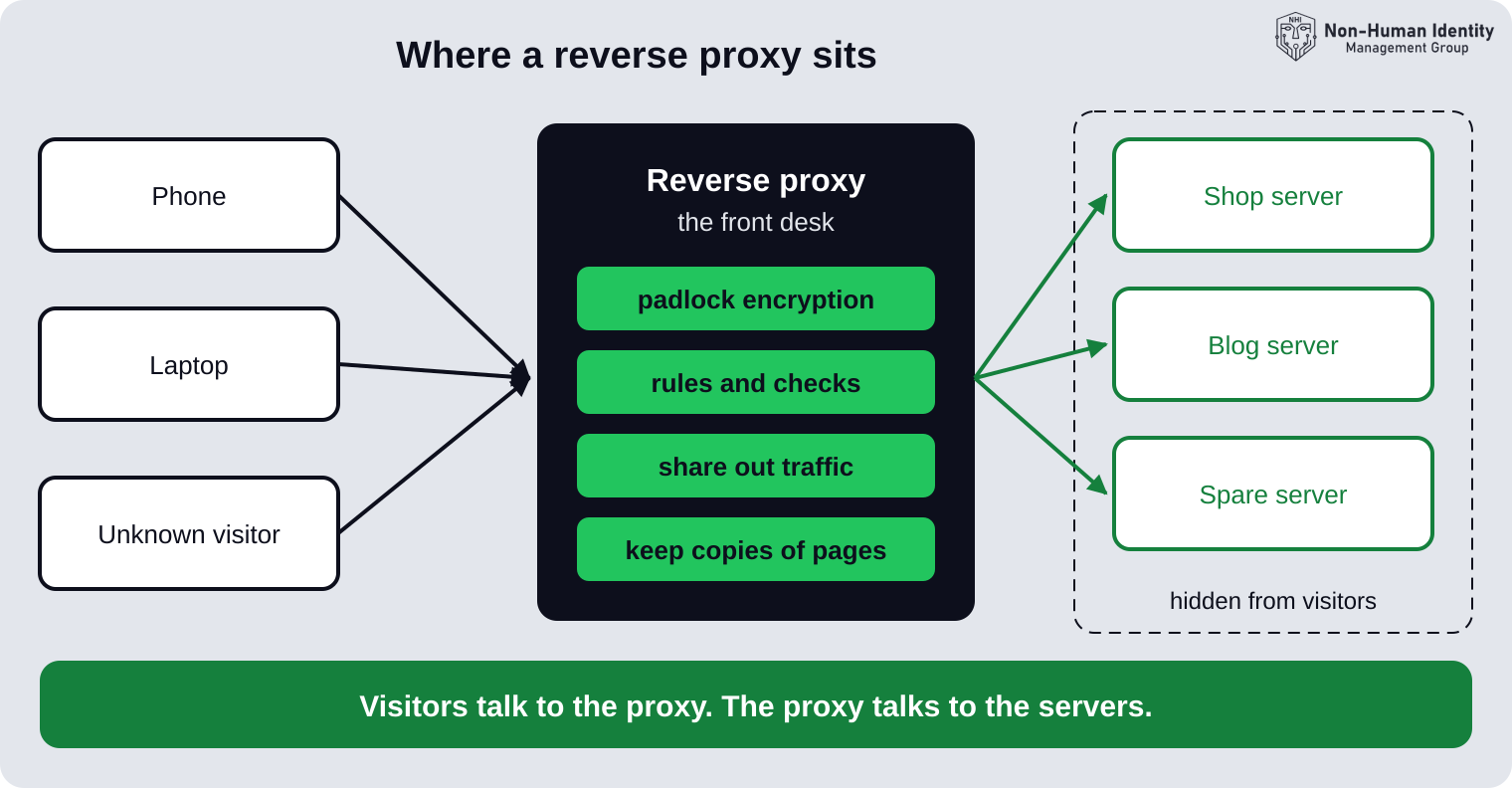
- It can share out traffic, keep copies of pages, handle the padlock encryption and hide the servers behind it.
- Because every request passes through it, it is a good place for checks and logs.
- It is also a high-value target, so keep it updated, lock down its admin pages and do not trust every label a request carries.
What you will learn
- Explain what a reverse proxy does in one sentence.
- Spot the difference between a forward proxy and a reverse proxy.
- Check whether your own website sits behind one.
- Ask the right questions about how it is kept safe.
- Go-between server (proxy)
- a server that passes messages on for someone else.
- Back-room server (origin server)
- the server that really holds the website or app.
- Sharing out the work (load balancing)
- spreading visitors across several servers so none gets overloaded.
What is a reverse proxy?
Think of the switchboard at a large office. Callers ring one main number, and the operator puts each call through to the right desk. The callers never learn the desk numbers.
A reverse proxy does the same job for a website. Visitors' browsers send their requests to the reverse proxy. It passes each request to a server behind it, gets the answer and sends it back. To the visitor, the reverse proxy looks like the website itself.[3]
The internet rules for web traffic call this kind of go-between a gateway, also known as a reverse proxy. It acts like the real website to the visitor, then forwards the request inward to one or more other servers.[1]
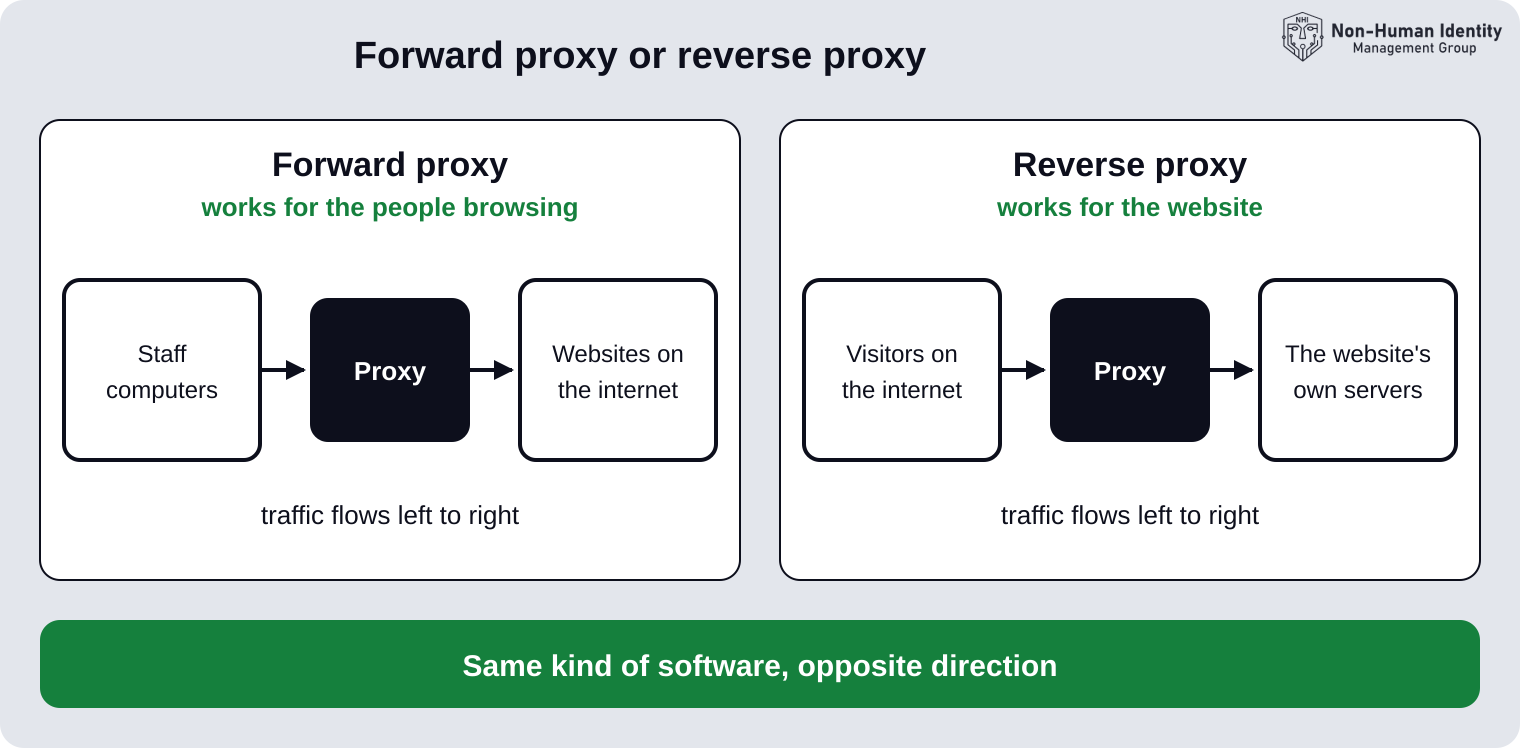
Why "reverse"? An ordinary forward proxy works for the people browsing. It sits in front of their computers and goes out to websites for them. A reverse proxy works for the website. It sits in front of the servers and takes traffic coming in.[5]
Where the comparison stops working: a switchboard operator only connects calls. A reverse proxy can also read, change, block or answer requests itself, so it does far more than pass them on.
Why does it matter?
Many websites already use a reverse proxy. Some get one as part of their web host. Every visitor passes through it, so it can help a lot. It can also cause trouble if it is set up badly.
If you are new to IT work
What could happen: you fix a server but the website still breaks, because the problem was in the reverse proxy in front of it.
Check this: draw the path a visitor's request takes, from browser to server, and name each box on it.
If you run a small business website
What could happen: your site slows down or falls over when lots of people visit at once.
Check this: ask your web host whether a reverse proxy or content delivery service sits in front of your site.
If you are learning to build websites
What could happen: your app trusts a label in the request that says who the visitor is, and someone fakes it.
Check this: only trust visitor details added by a reverse proxy you run yourself.
What does it look like?
A reverse proxy is set up with a short settings file. Here is a made-up one, written in plain words rather than a real product's format.
Example only. All values are made up.
# front door for www.example.com
listen on: port 443 with the site's padlock certificate   (1)
send /shop requests to: shop-server.example.invalid       (2)
send /blog requests to: blog-server.example.invalid       (2)
share load across: web-1 and web-2 (example.invalid)      (3)
add label: visitor address = address seen by this proxy   (4)
admin page: open to everyone, password FAKE-0000          (5)
- The proxy handles the encrypted padlock connection for the website.
- Different parts of the website go to different servers behind it.
- Visitors are shared between two servers, so one can rest or fail without the site going down.
- The proxy adds a label telling the servers which address the visitor came from.
- In a real file, this line would contain a risky admin setting that anyone could reach.
Why this is risky: line 5 leaves the proxy's admin page open. Apache's own guide warns that anyone who can reach an unprotected balancer admin page can change how traffic is routed.[3]
The safer way: the admin page is reachable only from inside the company network, with strong login checks. The servers behind the proxy accept traffic only from the proxy.
How does it work?
Here is what happens when someone opens a page on a website that uses a reverse proxy.
- The request. A visitor's browser asks for a page. The website's address points to the reverse proxy, not the servers behind it.
- The padlock. The proxy often handles the encrypted connection (the padlock in the browser), which saves the servers that work.[5]
- The checks. The proxy can apply rules, such as who may log in or which requests to block, before anything reaches the servers.[3]
- The hand-off. It picks a server and passes the request on. It often adds labels, such as the visitor's address, because the server would otherwise only see the proxy.[2]
- The reply. The server answers the proxy. The proxy may keep a copy for next time, then sends the page back to the visitor.[2]
One detail matters a lot. A label such as the visitor's address is only a claim. The internet standard for this label says it cannot be relied on to be correct. Anyone along the way, including the visitor, can change it.[4] So a server should trust only labels added by a proxy its own team runs.
A worked example
Hugo Sorensen runs Hazel Couriers, a fictional delivery firm. Customers track parcels on its website. Amara Engel looks after the firm's IT as a part-time contractor.
Every December the tracking site slows to a crawl. Hugo asks Amara why.
Amara explains that the site runs on one server, which faces the internet directly. Every visitor hits that one machine. She suggests a reverse proxy, like a switchboard in front of the office. Visitors will call one number, and the proxy will put them through to whichever server is free.
She sets up a second web server and puts a reverse proxy in front of both. The proxy handles the padlock connection and shares visitors between the two servers. It also keeps copies of pages that rarely change, like the help page.
Next, Amara makes the servers accept traffic only from the proxy. Now strangers cannot reach them directly. She locks the proxy's admin page so it opens only from the office network.
Then she checks one more thing. The tracking app records each visitor's address from a label in the request. She sets the app to trust that label only when it comes from their own proxy.
In December the site stays up. When one server needs an update, Amara takes it out of the rotation and the other keeps serving customers. Hugo notices only that the complaints have stopped.
Myths and mistakes
| What people think | What is true |
|---|---|
| A reverse proxy and a forward proxy are the same thing. | They can run the same software, but they face opposite ways. One works for people browsing, the other works for a website.[5] |
| Once a proxy is in front, the servers are safe. | A proxy hides the servers and adds a checkpoint. The servers still need updates and should accept traffic only from the proxy. |
| The visitor's address in the request is always right. | It is a label that can be changed along the way. Trust it only from proxies you run.[4] |
| The proxy's admin page is fine left open on the internet. | An open admin page can let someone change where traffic goes. Restrict it tightly.[3] |
| A reverse proxy is the same as a web application firewall. | A web application firewall is a filter that checks requests for attacks. It often runs on a reverse proxy, but a proxy alone may not filter attacks. |
What can I do this week?
- Ask your web host or IT team if a reverse proxy sits in front of your website.
- Draw the path a visitor's request takes, from browser to server.
- Check that the proxy's admin page cannot be reached from the internet.
- Ask whether the servers behind the proxy accept traffic only from the proxy.
Checklist
- You know which reverse proxy or service sits in front of each website.
- The proxy software is kept up to date.
- The proxy's admin page is reachable only from trusted places, with strong logins.
- The servers behind the proxy accept traffic only from the proxy.
- Apps trust visitor labels only when they come from your own proxy.
- The proxy keeps logs of requests, and someone knows where to find them.
- Padlock certificates on the proxy are renewed before they expire.
Common questions
What is the difference between a proxy and a reverse proxy?
A forward proxy works for the people browsing and goes out to websites on their behalf. A reverse proxy works for a website and takes in traffic from visitors on its behalf.[5] Both are go-betweens, but they face opposite ways and protect different things.
Is a load balancer a reverse proxy?
Often, yes. Many reverse proxies can share visitors across several servers, which is load balancing.[3] Some load balancers work at a lower level and only pass traffic through. See the Load Balancer Security Guide for the detail.
Does a reverse proxy make my website secure?
Not on its own. It hides the servers behind it and gives you one place to add checks and logs.[3] The proxy itself must be kept updated and locked down, and the website still needs its own security.
What are common reverse proxy tools?
Widely used web servers such as NGINX and Apache can act as reverse proxies, and their documentation explains how.[2][3] Many hosting and content delivery services also run one for you, so you may already use one without setting it up.
How is a reverse proxy different from an API gateway?
An API gateway is a reverse proxy with extra jobs. It serves apps that talk to other apps, and can check keys and limit how often they call. See API Gateway vs Reverse Proxy for a side-by-side comparison.
Where next?
Ready for the detail? Read the practitioner guide: Proxies and Forward vs Reverse Proxy Security Guide. It goes further into hardening settings, trusted forwarding headers, logging and how to roll out changes safely.
Also useful:
- Web Application Firewalls for Beginners
- TLS and HTTPS for Beginners
- Load Balancer Security Guide
- CDN Security Guide
Related NHI Mgmt Group resources: API Gateway vs Reverse Proxy · Network Security for Beginners · DDoS Attacks for Beginners
Key terms
- Reverse proxy
- A server that takes requests for a website and passes them to the servers behind it.
- Forward proxy
- A server that goes out to websites on behalf of the people browsing.
- Origin server
- The server that really holds the website or app, behind the proxy.
- Load balancing
- Sharing visitors across several servers so none is overloaded.
- Caching
- Keeping copies of pages so they can be sent again quickly.
- TLS
- The encryption behind the padlock in your browser, which protects data on its way.
- Web application firewall
- A filter that checks web requests and blocks ones that look like attacks.
Sources and further reading
- RFC 9110, HTTP Semantics, section 3.7 Intermediaries. IETF, June 2022. https://www.rfc-editor.org/rfc/rfc9110.html, accessed 28 Nov 2026.
- NGINX Reverse Proxy. NGINX Documentation, F5. https://docs.nginx.com/nginx/admin-guide/web-server/reverse-proxy/, accessed 28 Nov 2026.
- Reverse Proxy Guide. Apache HTTP Server Version 2.4 Documentation, Apache Software Foundation. https://httpd.apache.org/docs/2.4/howto/reverse_proxy.html, accessed 28 Nov 2026.
- RFC 7239, Forwarded HTTP Extension, section 8.1. IETF, June 2014. https://www.rfc-editor.org/rfc/rfc7239.html, accessed 28 Nov 2026.
- What is a reverse proxy? Cloudflare Learning Center, Cloudflare (vendor explainer). https://www.cloudflare.com/learning/cdn/glossary/reverse-proxy/, accessed 28 Nov 2026.