Apple Intelligence is the set of AI features built into newer iPhones, iPads and Macs.
This guide is for anyone with a recent Apple device who wants to know where their requests go when they use these features. You do not need to be technical: if you use writing help, photo tools or Siri on a newer device, the choices here decide what leaves your phone.
In short
- Many Apple Intelligence features run on your device, so the request stays on it.
- Bigger jobs go to Apple's Private Cloud Compute, which Apple says uses your data only for that request and does not store it.
- The ChatGPT extension is off by default. If you turn it on, requests you send to it go to OpenAI.
- A built-in report shows which requests went to Apple's cloud, so you can check for yourself.
What you will learn
- Explain the three places an Apple Intelligence request can go.
- Check which requests left your device, using the built-in report.
- Decide whether to use the ChatGPT extension, and how to control it.
- Spot the settings that share data for improving Apple's services.
- Done on your phone (on-device processing)
- the AI work happens on your device, and the request does not leave it.
- Apple's private AI servers (Private Cloud Compute)
- Apple computers that handle bigger AI jobs and, Apple says, keep nothing afterwards.
- Add-on AI service (extension)
- an outside AI service, such as ChatGPT, that you can choose to connect.
What is Apple Intelligence?
Think of cooking at home versus using a hired kitchen. You cook most meals at home. For a big job, you take food to a hired kitchen. The owner promises to clear it all away when you leave.
Apple Intelligence works in a similar way. It is a group of AI features, such as help with writing, pictures and alerts. Many run on the device itself. For example, Apple says the model that sorts your priority notifications runs on your device.[1]
Some jobs need more computing power than a phone has. Those may go to Private Cloud Compute, Apple's own AI servers. Creating a picture from your description in Image Playground is one example.[1] It arrives on eligible devices with Apple's software updates, and the list of devices, languages and regions changes over time.[3]
Where the comparison stops working: you cannot walk into Apple's servers and check them. You rely on Apple's design and on outside researchers who inspect it. And the ChatGPT extension is a different kitchen, run by another company with its own rules.
This is an independent guide from NHI Mgmt Group, based on Apple's public documentation as of November 2026. It is not sponsored or reviewed by Apple. Product features change, so confirm settings against Apple's current documentation.
Why does it matter?
AI features often handle personal things: your messages, photos and notes. Knowing where a request goes helps you decide what to use, and when.
If you use an iPhone at home
What could happen: you ask for help with a private note and are not sure whether it left your phone.
Check this: open the Apple Intelligence & PCC Report and see which requests went to Apple's cloud.
If you set up a phone for a relative
What could happen: the ChatGPT extension is turned on during setup, and requests go to another company.
Check this: look at Apple Intelligence & Siri, then ChatGPT, and keep the confirm setting on.
If you use a work iPhone or Mac
What could happen: you send a client document to an add-on AI service your employer has not approved.
Check this: ask your IT team which Apple Intelligence features and extensions are allowed.
Next: Shadow AI for Beginners
What does it look like?
Here is a made-up report. It lists requests that went to Apple's cloud.
Example only. All values are made up.
Apple Intelligence & PCC Report (last 7 days)

Image Playground     request sent to PCC     (1)
Writing Tools        request sent to PCC     (2)
Size: 0000 KB   Device: EXAMPLE-iPhone

Not listed: notification summaries          (3)
Exported file: pcc-report-FAKE.json         (4)
- A picture request that needed more power than the phone has.
- A writing request that was handled off the device.
- Features that ran on the device do not appear, because the request stayed on the device.
- You can export the report as a file to keep or look through later.
Why this is risky: without the report, you would be guessing which requests left your phone.
The safer way: look at the report now and then, especially after you try a new feature.
How does it work?
Here is what happens when you use an Apple Intelligence feature.
- Your device tries first. Many features run on a model on the device, so the request stays there.[1]
- Bigger jobs go to Private Cloud Compute. Apple says this data is processed only to fulfil your request, and is not stored or made available to Apple.[1]
- The answer comes back. Results return to your device. Apple says it may collect limited details, such as request size and which feature was used, but not the content.[1]
- The ChatGPT extension is a separate path. It is off by default. When it is on, Siri asks before using ChatGPT unless you ask for ChatGPT by name.[4]
- You can check afterwards. The Apple Intelligence & PCC Report lists requests sent to Apple's cloud.[1]
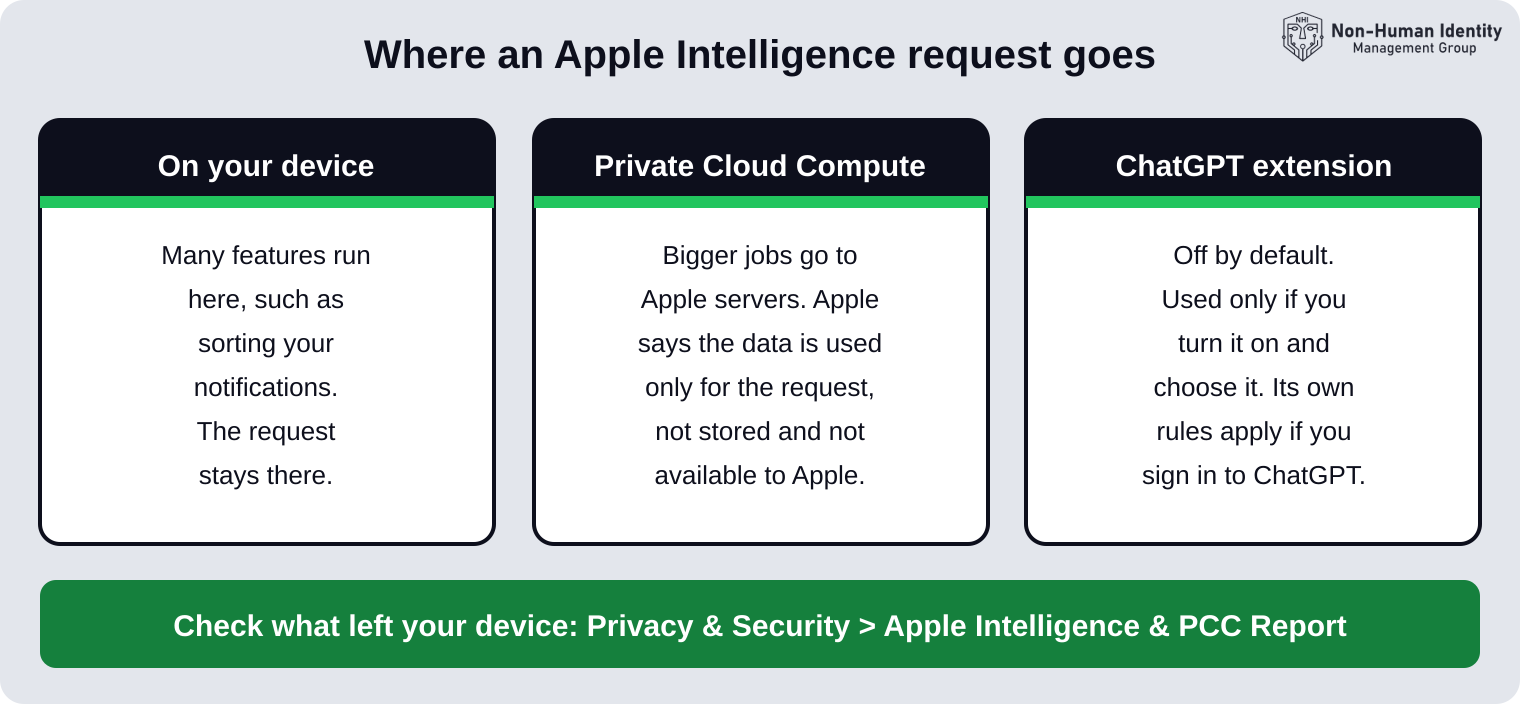
Apple has published how Private Cloud Compute is meant to work. It says no user data is kept in any form after the reply is sent. It also says it publishes the server software so that security researchers can inspect it.[2] These are Apple's own design promises, which outside researchers can test.
The ChatGPT extension follows different rules. Apple says that if you use it without signing in, OpenAI gets nothing tied to your Apple Account. OpenAI must also not store or train on your requests, unless the law requires it. Your IP address is hidden, but your rough location is shared. If you sign in to a ChatGPT account, OpenAI's own settings and policies apply, and it may keep your requests.[4]
A worked example
Amara Iyer is a retired teacher. Her new iPhone came with Apple Intelligence, and she has started using it to tidy up emails to her book club.
One evening she wants help with a sensitive email to her doctor's surgery. She wonders where her words would go. She thinks of the two kitchens: her own, and the hired one down the road.
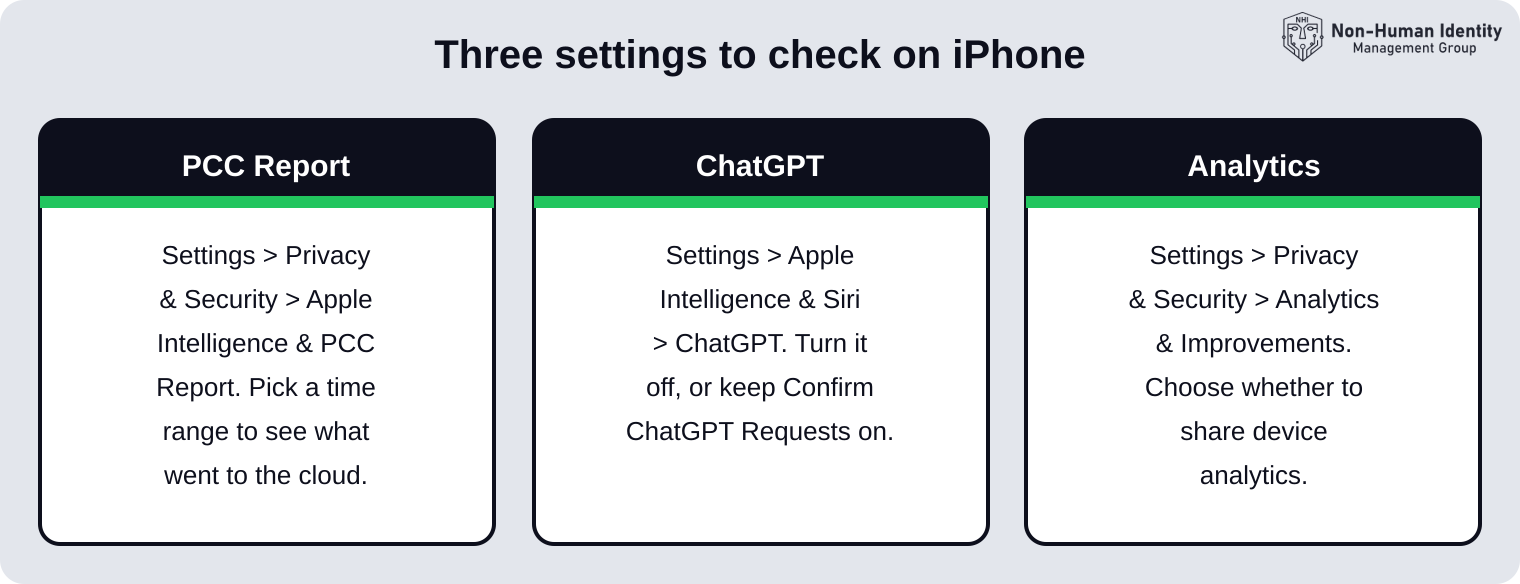
She opens Settings, then Privacy & Security, then Apple Intelligence & PCC Report. She picks the last seven days. Two picture requests from Image Playground are listed. Her email edits from earlier in the week do not appear, which tells her those stayed on her phone.[1]
Next she looks at Apple Intelligence & Siri, then ChatGPT. Her grandson Wren Ueda turned it on when he set up the phone. She decides she does not need it, and turns off Use ChatGPT.[4]
Then she writes her email and uses the writing help to make it shorter. She still leaves out her date of birth and NHS number. Those go in the surgery's own patient app instead.
Amara now has a simple habit. Every few weeks, she glances at the report. If a new feature appears there, she reads what it does before using it with anything private.
Myths and mistakes
| What people think | What is true |
|---|---|
| Apple Intelligence sends everything to the cloud. | Many features run on the device. Only bigger jobs go to Private Cloud Compute.[1] |
| Apple Intelligence and ChatGPT are the same thing. | ChatGPT is an optional extension from another company. It is off by default.[4] |
| There is no way to see what left my phone. | The Apple Intelligence & PCC Report lists requests sent to Apple's cloud.[1] |
| Signing in to ChatGPT through my iPhone changes nothing. | Once signed in, OpenAI's own account settings and policies apply to those requests.[4] |
| Because it is private, I do not need to check the answer. | Privacy and accuracy are different things. AI-written text can still contain mistakes, so read it before you send it. |
What can I do this week?
- Open the Apple Intelligence & PCC Report and look at the last seven days.
- Check whether the ChatGPT extension is on, and decide whether you need it.
- If you keep ChatGPT on, leave Confirm ChatGPT Requests switched on.
- Review Analytics & Improvements and choose what you share.
- If you have a work device, ask IT which AI features you may use.
Checklist
- I know many Apple Intelligence features run on my device.
- I know bigger jobs may go to Apple's Private Cloud Compute.
- I have looked at the Apple Intelligence & PCC Report.
- I have chosen whether the ChatGPT extension should be on.
- I know signing in to ChatGPT brings OpenAI's own rules into play.
- I have checked my Analytics & Improvements settings.
- I read AI-written text before I send it.
Common questions
Does Apple see what I ask Apple Intelligence?
For features on the device, the request stays there. For Private Cloud Compute, Apple says your data is used only for the request and is not stored or made available to Apple. It may collect limited details, such as request size, without the content.
How do I know if a request went to the cloud?
Open Settings, then Privacy & Security, then Apple Intelligence & PCC Report, and choose a time range. It lists requests sent to Private Cloud Compute. Features that stayed on your device do not appear. You can also export the report as a file.
Is the ChatGPT extension safe to use?
It can be, if you control what you send. It is off by default. Without signing in, Apple says OpenAI must not store or train on your requests. If you sign in, OpenAI's own policies apply. Keep private details out, and leave the confirm setting on.
Can I use Apple Intelligence on an older iPhone?
Usually not. Apple Intelligence needs a recent device with enough memory and storage, plus a supported language. Apple keeps the current list of devices, languages and regions on its support site, and it changes with each software update.
Should I use Apple Intelligence on a work phone?
Ask your IT team first. Many organisations decide which AI features and extensions staff may use, and some manage these settings for you. Sending work documents to an unapproved add-on service can break your employer's rules.
Where next?
Ready for the detail? Read the practitioner guide: Apple Intelligence Explained. It goes further into the full feature list, supported devices and regions, the developer models and how features have changed over time.
Also useful:
- Apple Intelligence Enterprise Security
- Apple Platform Security Explained
- AI and Privacy for Beginners
- Apple and Google Account Security for Beginners
Related NHI Mgmt Group resources: How Large Language Models Work · Shadow AI for Beginners · AI Hallucinations for Beginners
Key terms
- On-device AI processing
- AI work done on your own phone or computer, so the request does not leave it.
- Private Cloud Compute
- Apple's AI servers for bigger requests, designed so that data is used only for the request and not kept.
- Generative AI
- AI that creates new text, images or other content from a request.
- Data retention
- How long a service keeps your information before deleting it.
- Shadow AI
- Using AI tools at work without approval from the people responsible for IT and security.
Sources and further reading
- Apple Intelligence & Privacy. Apple Legal, Apple. https://www.apple.com/legal/privacy/data/en/intelligence-engine/, accessed 28 Nov 2026.
- Private Cloud Compute: A new frontier for AI privacy in the cloud. Apple Security Research, 10 June 2024. https://security.apple.com/blog/private-cloud-compute/, accessed 28 Nov 2026.
- How to get Apple Intelligence. Apple Support, Apple. https://support.apple.com/en-us/121115, accessed 28 Nov 2026.
- ChatGPT Extension & Privacy. Apple Legal, Apple. https://www.apple.com/legal/privacy/data/en/third-party-ai/, accessed 28 Nov 2026.