Personnel security means checking and caring for the people you trust, from hiring until they leave.
This guide is for managers, HR staff and small business owners who hire people and give them access. You do not need a security background: if staff can reach your money, customers or systems, how you hire and say goodbye matters.
In short
- Personnel security covers three stages: before someone joins, while they work for you, and when they leave.
- Background checks confirm that a person is who they say they are and can do the job they applied for.
- Checks should match the risk of the role. A cashier and a finance director need different levels.
- People change after they are hired, so good managers, a fair culture and a tidy exit matter as much as the first check.
What you will learn
- Explain what personnel security covers in one sentence.
- Check which roles in your team need more checks than others.
- Spot the steps that are often missed when someone leaves.
- Ask the right questions before you use a screening company.
- Pre-hire checks (background screening)
- checking a job applicant's identity, history and right to work before they start.
- Harm from within (insider risk)
- the chance that someone you trust causes harm, by mistake or on purpose.
- Saying goodbye safely (offboarding)
- the steps that remove a leaver's access and get your things back.
What is personnel security?
Think of finding a house-sitter. You check their references before you hand over the keys. You keep in touch while you are away. When they leave, you get every key back.
Personnel security works the same way for staff, contractors and temporary workers. The UK's National Protective Security Authority calls employment screening "the foundation of good personnel security".[1] Its guidance also says people and their circumstances change after they are hired.[2] So the work carries on after day one.
Most people you hire are honest. The point is not to treat staff as suspects. It is to make sure trust is earned, kept and handed back in a clear and fair way.
Where the comparison stops working: a house-sitter has one set of keys. A modern worker may hold many sign-ins, shared passwords and app connections, and they are easy to forget when the person leaves.
Why does it matter?
A hiring mistake or a messy exit can leave a door open long after the person has gone. Simple, fair steps lower that risk.
If you run a small business
What could happen: a new bookkeeper is given full access to the bank account before anyone checks their past jobs.
Check this: list the roles that touch money or customer data, and check those roles more carefully.
If you manage a team
What could happen: a team member under heavy stress starts behaving out of character, and nobody notices or offers help.
Check this: hold regular one-to-ones and know where to raise a concern in confidence.
If you work in HR
What could happen: a leaver's accounts stay switched on for weeks because nobody told IT.
Check this: make the leaving date trigger an access removal task, every time.
What does it look like?
Here is a simple role check card. It helps decide how much checking a job needs.
Example only. All values are made up.
ROLE CHECK CARD   Role: EXAMPLE Office Manager
Handles money or payments?        yes          (1)
Sees customer personal data?      yes          (2)
Can change system settings?       no
Level of checks: medium                        (3)
Checks: identity, right to work,
  last employer reference, basic record check  (4)
Written consent from applicant:   [ ] FAKE     (5)
- Roles that move money often need more checks.
- Access to personal data raises the level too.
- The level follows the risk of the role, not the person.
- In a real file, this line would list only the checks the role justifies.
- Get the applicant's written permission before the checks start.
Why this is risky: checking every role the same way wastes effort. It can also collect more personal data than you need.
The safer way: decide the level for each role in advance, write it down and apply it to every applicant for that role.
How does it work?
Personnel security follows a person through their time with you. Most employers work through these steps.
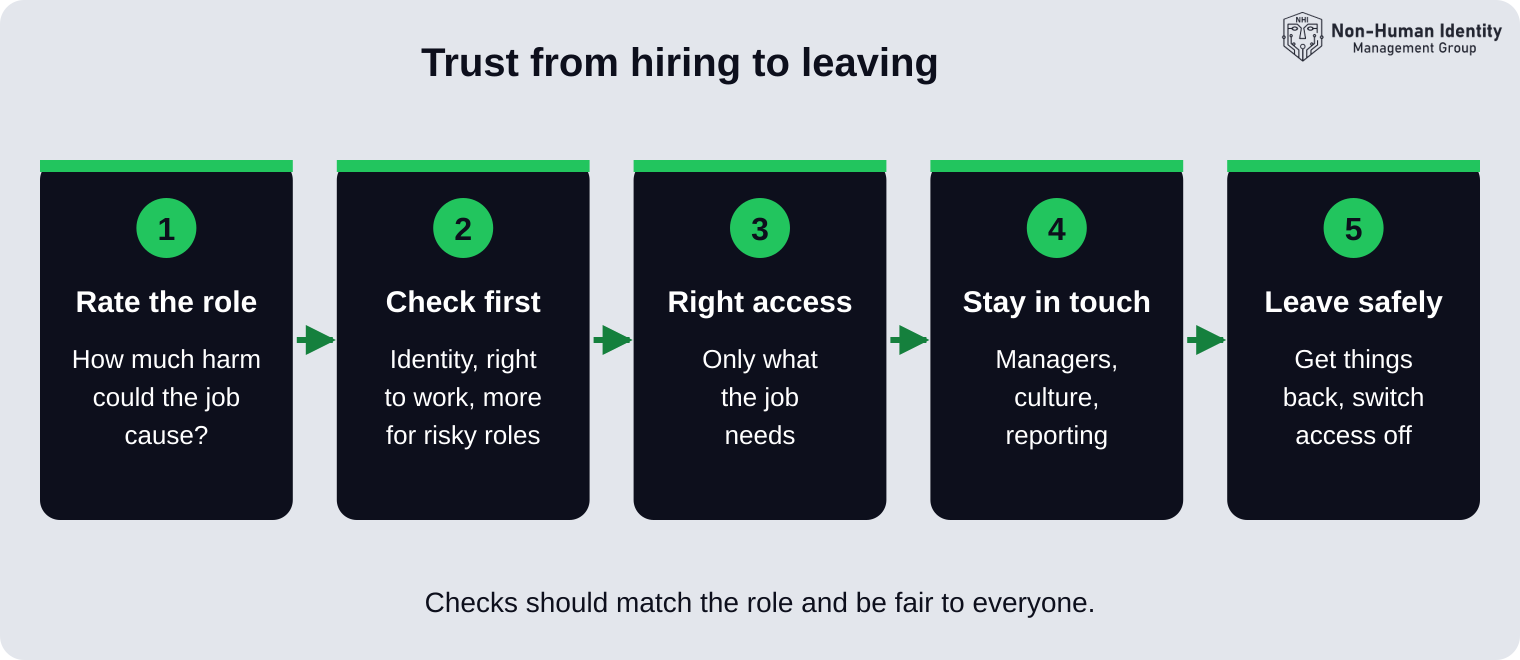
- Rate the role. Decide how much harm the job could cause if trust went wrong. UK guidance suggests matching the checks to the risks of the post.[1]
- Check before they start. At a basic level, this means confirming identity and the right to work. Higher-risk roles may add references, qualifications and a criminal record check.[1] UK government departments use their own baseline standard for these checks on civil servants.[4]
- Give only the access the job needs. Start small and add more only when there is a clear reason. This idea is called least privilege.
- Stay in touch while they work. UK guidance says line managers are usually best placed to spot worrying behaviour early. A culture where people report concerns helps too.[2]
- Say goodbye properly. A formal leaving process gets back passes, devices and papers, and removes access.[2]
Rules on checks differ by country. In the US, for example, the government says employers who use a screening company need the person's written permission first. They must also share the report before turning someone down because of it.[3] Those reports must later be disposed of securely, such as by shredding.[3] This guide explains the topic in general terms and is not legal advice, so check the rules where you hire.
A worked example
This story is made up to show how it can happen.
Bea Grover runs Elm Removals, a family firm with twelve staff. She needs an office manager who will handle customer bookings and pay suppliers.
In the past, Bea hired on a good chat and a handshake. This time she fills in a role check card. The job touches money and customer addresses, so she decides it needs a medium level of checks.
Umar Okafor applies and does well at interview. Bea tells him which checks she will run and gets his written consent. She confirms his identity and right to work, and calls his last employer to confirm his dates. Everything matches, and Umar starts on Monday.
On his first day, Bea gives Umar access to the booking system and the supplier payments screen. She holds back the main bank login until he has settled in and she has agreed payment limits with him.
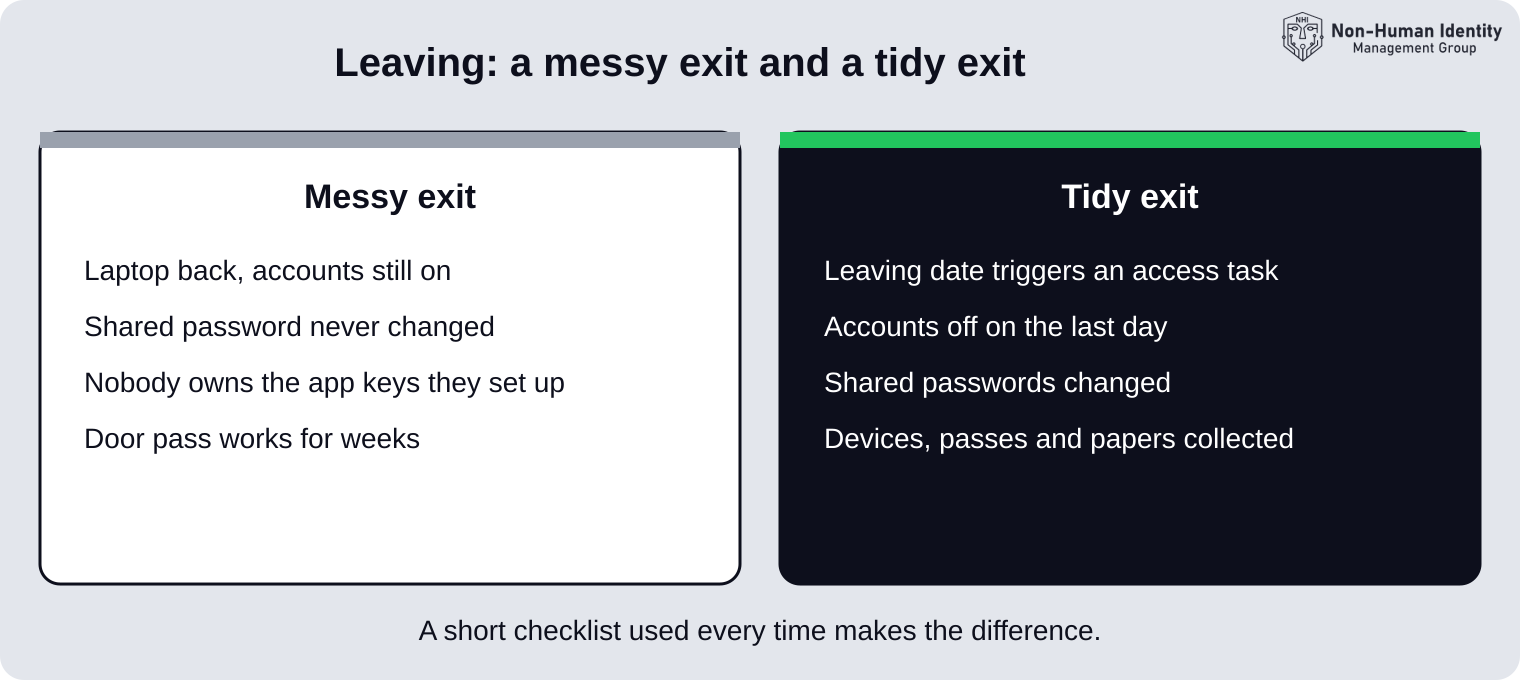
A year later, Umar moves to a new job. Bea uses the leaving checklist. She switches off his accounts on his last afternoon. She also changes the shared password for the van tracking app, which Umar had set up. She collects his laptop, keys and door fob.
What made the difference: Bea matched the checks to the role, kept access tight and used the same leaving list every time.
Myths and mistakes
| What people think | What is true |
|---|---|
| A clean background check settles the question for the whole job. | People and their circumstances change after hiring, so staying in touch matters too.[2] |
| Every applicant should get every possible check. | Match the checks to the risks of the role.[1] Extra checks collect more personal data than you need. |
| Personnel security means watching staff for bad behaviour. | Most of it is fair hiring, supportive managers and a tidy exit. Most staff are honest. |
| Taking back the laptop is enough when someone leaves. | Accounts, shared passwords, app connections and door passes also need to be dealt with.[2] |
| We can run checks quietly without telling the applicant. | In the US, screening reports need the person's written permission first.[3] Other countries have their own rules, so check before you start. |
What can I do this week?
- List the roles in your team that touch money, personal data or system settings.
- Write down the checks each of those roles needs, and stick to them.
- Make sure every leaver triggers a task to remove their access on their last day.
- Find the shared passwords and app accounts one person set up, and give each one a named owner.
- Tell your team how they can raise a worry in confidence.
Checklist
- Each role has a check level based on its risk.
- Applicants are told about checks and give consent where needed.
- Identity and right to work are confirmed before day one.
- New starters get only the access their job needs.
- Managers hold regular one-to-ones and know how to raise concerns.
- A leaving checklist is used every time, including shared passwords and app accounts.
- Screening records are kept only as long as needed and disposed of securely.
Common questions
What is personnel security?
It is how an employer decides whom to trust with access. It also keeps that trust healthy while the person works there, and ends it cleanly when they leave. It covers hiring checks, fair access, good management and a tidy exit for staff and contractors alike.
What does a basic background check include?
UK good practice starts with confirming identity and the right to work, plus a self-declared criminal record form. Riskier roles may add references, qualifications and a formal record check. The level should match the role, so a small business does not need every check for every job.[1]
Do I need permission to run a background check?
Often, yes. In the US, an employer using a screening company must get the person's written permission first.[3] Other countries have their own data protection and employment rules. Check the official guidance where you hire, and tell applicants which checks you plan to run.
Is personnel security the same as insider threat?
They overlap but are not the same. Insider threat is the harm a trusted person might cause. Personnel security is one set of ways to lower that risk: careful hiring, fair access, good management and clean exits. Technical controls and monitoring add other layers.
What is most often missed when someone leaves?
Shared passwords and app connections the person set up are often missed. Laptops and badges are easy to see, but a login to a supplier website or a key for a booking app is not. A short leaving checklist, used every time, helps catch these.
Where next?
Ready for the detail? Read the practitioner guide: Personnel Security and Background Screening Guide. It goes further into UK and US screening standards, data protection limits and checks for remote hires and contractors.
Also useful:
- Joiner, Mover, Leaver Processes for Beginners
- Insider Threats for Beginners
- Joiner, Mover, Leaver for Beginners
- Personnel Security Policy Template
Related NHI Mgmt Group resources: Insider Threat from Fake IT Workers Guide · Insider Risk vs Insider Threat · Small Business Cyber Security for Beginners
Key terms
- Personnel security
- Checking and managing the people who can reach sensitive data or systems.
- Background screening
- Checking a person's history before hiring them or giving them access.
- Insider threat
- Risk from a trusted person or account that misuses access, on purpose or by mistake.
- Least privilege
- Giving each person only the access their job needs, and no more.
- Joiner, mover, leaver
- The process that gives, changes and removes access as people join, move or leave.
- Separation of duties
- Splitting a sensitive task between two people so one person cannot do it all alone.
Sources and further reading
- A Good Practice Guide: Employment Screening. National Protective Security Authority (NPSA), April 2023. https://www.npsa.gov.uk/system/files/documents/npsa-employment-screening-a-good-practice-guide.pdf, accessed 28 Nov 2026.
- Ongoing Personnel Security: A Good Practice Guide, Edition 4. National Protective Security Authority (NPSA). https://www.npsa.gov.uk/system/files/documents/npsa-ongoing-personnel-security-ed-4.pdf, accessed 28 Nov 2026.
- Background Checks: What Employers Need to Know. US Federal Trade Commission and Equal Employment Opportunity Commission, February 2014. https://www.ftc.gov/business-guidance/resources/background-checks-what-employers-need-know, accessed 28 Nov 2026.
- Baseline Personnel Security Standard, version 7.0. UK Cabinet Office, June 2024. https://www.gov.uk/government/publications/government-baseline-personnel-security-standard, accessed 28 Nov 2026.