The NIST Cybersecurity Framework (CSF) is a free, voluntary guide from the US National Institute of Standards and Technology that describes the cyber security outcomes an organisation should aim for, grouped into six functions: Govern, Identify, Protect, Detect, Respond and Recover.
This guide is for newcomers, students, career changers and managers who have been told "we follow the NIST framework" and want to know what that means. It explains the six functions in plain English, shows how organisations actually use the framework through Profiles and Tiers, and walks through a worked example for a small company. It covers version 2.0, the current version, and links deeper guides rather than listing every outcome.
By the end of this guide you will be able to:
- Explain what the NIST CSF is and who it is for.
- Describe the six functions and what each one covers.
- Understand how Profiles and Tiers help an organisation plan improvements.
- Identify simple first steps to start using the framework.
Status: correct as at 27 November 2026, based on NIST CSWP 29 (The NIST Cybersecurity Framework 2.0) and the NIST Cybersecurity Framework web pages. Frameworks change; check the official text.
This guide explains the topic in general terms and is not legal advice.
Key takeaways
- It describes outcomes, not products. The CSF says what good looks like, such as "assets are known" or "incidents are contained", and leaves the how to you.
- Six functions cover the whole cycle. Govern sets direction; Identify, Protect, Detect, Respond and Recover cover understanding risk, defending, spotting, handling and recovering.
- Version 2.0 is for everyone. Released in February 2024, it is aimed at organisations of any size and sector, not only critical infrastructure.
- Profiles turn it into a plan. You record where you are today, choose where you want to be and work on the gap.
- It is not a certificate. There is no official NIST CSF certification; it is a way to organise and communicate your security work.
What it is, in plain English
A framework is a structure that helps you organise work. The NIST CSF gives organisations a common list of cyber security outcomes and a common language to talk about them. NIST describes the CSF Core as a taxonomy of high-level outcomes arranged as Functions, then Categories, then Subcategories.[1] Version 2.0 has six Functions and 22 Categories.[1]
The framework is deliberately flexible. NIST states that it does not prescribe how outcomes should be achieved, and that it may be adopted voluntarily, although some governments build it into their own policies.[1] NIST first created it in 2014; version 2.0, released on 26 February 2024, was its first major update and added a sixth function, Govern.[2]
A helpful comparison is a home health check list. It tells you the outcomes that matter (smoke alarms working, doors locked, a plan if there is a fire) without telling you which brand of alarm to buy. Where the analogy breaks down: the CSF is not a tick list you finish once. It is used repeatedly to compare where you are with where you want to be, and the right target differs for every organisation.
Why it matters to you
- If you run a small business: the CSF gives you a simple way to check you have thought about all the basics, not just antivirus. NIST publishes a Small Business Quick Start Guide for exactly this.[4]
- If you are new to a security job: the six function names are used everywhere, in reports, job adverts, audits and supplier questionnaires. Knowing them helps you follow the conversation.
- If you are a manager: the Govern function puts cyber security on the leadership agenda. NIST describes cyber security in CSF 2.0 as a major source of enterprise risk that senior leaders should weigh alongside financial and reputational risk.[2]
Because the CSF is widely recognised, it also helps different groups understand each other. Boards, IT teams, auditors and suppliers can all point at the same function or Category instead of arguing over terms.
How it works, step by step
First, the six functions. The wording in the middle column follows NIST's own descriptions.[1] The example Categories are a selection, not the full list.
| Function | What NIST says it means | Example Categories |
|---|---|---|
| Govern (GV) | Cyber security risk strategy, expectations and policy are set, communicated and monitored | Organizational Context (GV.OC), Risk Management Strategy (GV.RM), Roles, Responsibilities, and Authorities (GV.RR), Cybersecurity Supply Chain Risk Management (GV.SC) |
| Identify (ID) | The organisation's current cyber security risks are understood | Asset Management (ID.AM), Risk Assessment (ID.RA), Improvement (ID.IM) |
| Protect (PR) | Safeguards to manage cyber security risks are used | Identity Management, Authentication, and Access Control (PR.AA), Awareness and Training (PR.AT), Data Security (PR.DS) |
| Detect (DE) | Possible attacks and compromises are found and analysed | Continuous Monitoring (DE.CM), Adverse Event Analysis (DE.AE) |
| Respond (RS) | Actions are taken about a detected incident | Incident Management (RS.MA), Incident Analysis (RS.AN), Incident Mitigation (RS.MI) |
| Recover (RC) | Assets and operations affected by an incident are restored | Incident Recovery Plan Execution (RC.RP), Incident Recovery Communication (RC.CO) |
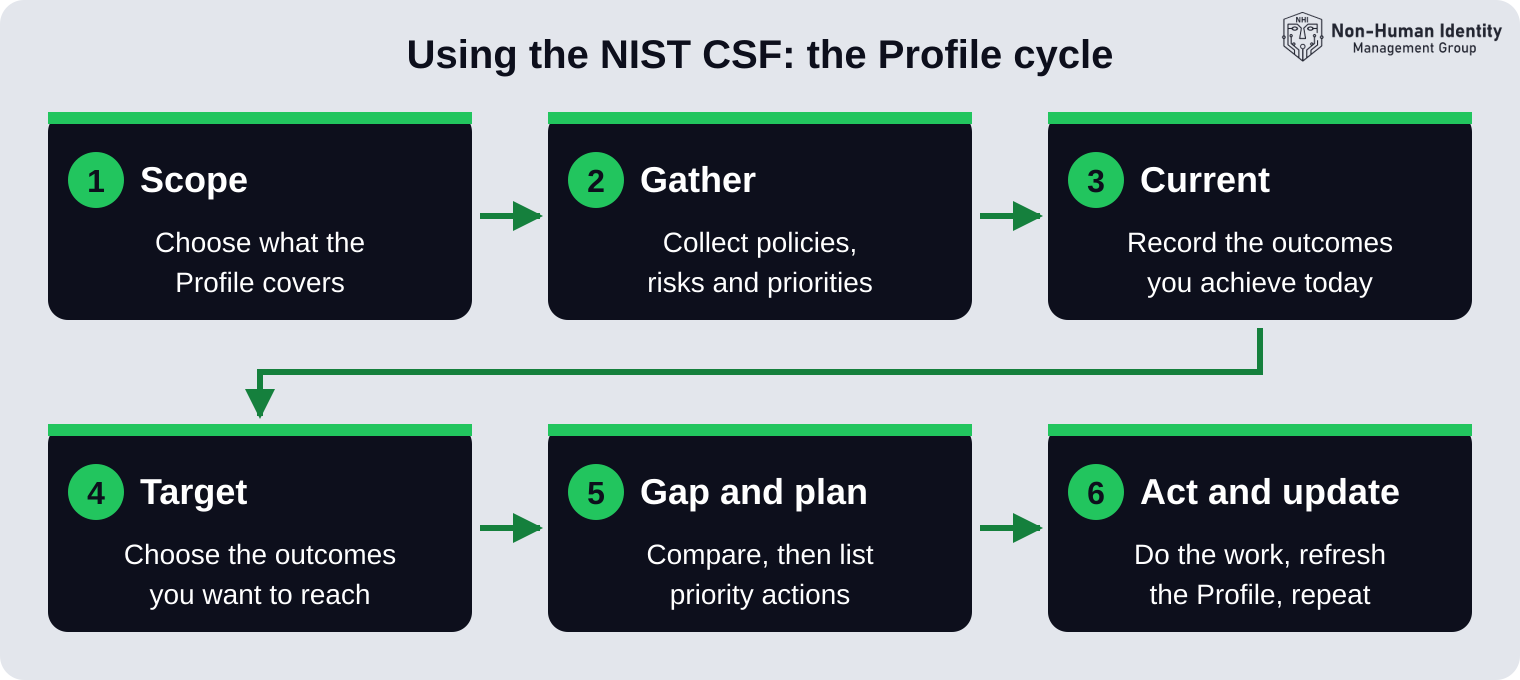
Govern sits in the middle of the other five: NIST says it guides how the others are pursued.[1] To use the framework, organisations create an Organizational Profile. NIST describes five steps.[1]
- Scope the Profile. Decide what it covers (the whole company, one business unit, one important system) and write down your assumptions.
- Gather information. Collect what you already have: policies, risk priorities, lists of important systems and any business impact analysis.
- Create the Profile. Write a Current Profile (the outcomes you achieve today, and how far) and a Target Profile (the outcomes you have chosen and prioritised as goals).
- Analyse the gaps and make a plan. Compare Current with Target and build a prioritised action plan.
- Implement and update. Do the work, then update the Profile. The cycle repeats as things change.
Two more pieces help along the way:
- Tiers: four levels that describe how rigorous your risk governance and management are: Partial (Tier 1), Risk Informed (Tier 2), Repeatable (Tier 3) and Adaptive (Tier 4).[1] A Tier is not a score for individual controls, and not every organisation needs Tier 4.
- Online resources: NIST publishes Informative References (mappings from CSF outcomes to other standards and regulations), Implementation Examples (notional steps that are not a required baseline) and Quick-Start Guides for particular audiences.[1]
Useful distinctions
- CSF versus a control catalogue. The CSF lists outcomes. Catalogues such as NIST SP 800-53 or ISO/IEC 27001 Annex A list specific controls. Many organisations use the CSF to organise and report, and a catalogue to decide exact controls.
- Organizational Profile versus Community Profile. Your own Profile describes your organisation. A Community Profile is a shared baseline for a sector or use case.[1] NIST's own incident response guidance, SP 800-61 Revision 3, is written as a CSF 2.0 Community Profile.[5]
- Identities include software. Subcategory PR.AA-01 covers identities and credentials for authorised users, services and hardware, so service accounts and API keys are in scope too. See Non-Human Identities for Beginners.
A worked example
Brightwater Logistics is a fictional delivery firm with 120 staff. A large customer asks in a questionnaire whether Brightwater "aligns with the NIST CSF". The finance director, Maria, asks the IT lead, Tom, to find out what that would take.
- Scope: Tom and Maria decide the first Profile covers the whole company, but focuses on the booking system and email, which matter most to customers.
- Current Profile: using the Small Business Quick Start Guide, they go through each function. They find strong backups (Recover) and antivirus (Protect), but no written list of systems (Identify), no named owner for cyber risk (Govern) and no one checking sign-in alerts (Detect).
- Target Profile: with the board, they choose targets for the next year: an asset list, a named risk owner reporting quarterly, multi-factor sign-in for all staff and a basic incident response plan. They agree that Tier 2 (Risk Informed) is a realistic first goal.
- Plan and act: Tom turns the gaps into a ten-item plan with owners and dates. Six months later they update the Current Profile and see four items closed.
Brightwater can now answer the questionnaire honestly: it uses the CSF to plan and report, shows its Profiles and explains what is still in progress. It does not claim to be "NIST certified", because no such certificate exists, and the framework alone does not make the firm secure. The work in the plan does that, step by step.
Myths and misunderstandings
| What people think | What is true |
|---|---|
| You can get NIST CSF certified. | NIST does not certify organisations against the CSF. You can use it, align to it and have it assessed by others, but there is no official certificate. |
| It is only for US government or critical infrastructure. | Version 2.0 is aimed at all organisations in any sector and of any size. |
| It tells you exactly which tools and settings to use. | It describes outcomes and leaves the how to you. Implementation Examples are illustrations, not requirements. |
| Everyone should aim for Tier 4. | Tiers describe rigour. The right target depends on your risks and resources; chasing the highest Tier can waste effort. |
| Govern is just paperwork. | Govern covers who owns risk, what the strategy is and how leaders oversee it. Without it, the other functions drift. |
Key terms
- NIST CSF 2.0
- The current version of the NIST Cybersecurity Framework, used to structure cyber risk management, governance and control mapping around six functions.
- CSF Core
- The central structure of Functions, Categories and Subcategories used to describe and manage cyber security outcomes.
- Function
- A high-level group of related security outcomes, such as managing risk, detecting events or recovering operations.
- Govern function
- The part of CSF 2.0 that makes cyber security accountability explicit, covering policy, oversight and risk direction.
- Organizational Profile
- A selected set of framework outcomes tailored to an organisation's needs, risk tolerance and capabilities, used to compare current and desired states.
- Current Profile
- The cyber security outcomes an organisation is achieving now, or attempting to achieve.
- Target Profile
- The cyber security outcomes an organisation wants to achieve, based on its risk strategy and mission needs.
- Implementation Tiers
- Levels from Partial to Adaptive that describe how an organisation approaches cyber risk and builds it into wider risk management.
- Risk assessment
- Identifying what could go wrong, how likely it is and how much damage it could cause, so actions can be prioritised.
Common questions
What are the six functions of the NIST CSF?
Govern, Identify, Protect, Detect, Respond and Recover. Govern was added in version 2.0.[2]
Is the NIST CSF mandatory?
NIST describes it as something that may be adopted voluntarily, though some governments and contracts require or refer to it.[1] Check your own contracts and regulators.
What changed from version 1.1 to 2.0?
The biggest changes were the new Govern function, a wider audience covering all organisations, and new Quick-Start Guides for groups such as small businesses and supply chain managers.[2] The NIST CSF 2.0 Guide covers the detail.
How is the CSF different from ISO 27001?
The CSF is a voluntary set of outcomes with no certificate. ISO/IEC 27001 is an international standard for running an information security management system, and organisations can be certified against it. Many use both. See ISO 27001 for Beginners.
Where should a small business start?
We suggest starting with NIST's Small Business Quick Start Guide and a simple Current Profile, then picking three or four gaps to close first.[4]
Is the CSF free?
Yes. The framework and its supporting resources are published free on the NIST website.[3]
First steps
Three things you can do this week:
- Read the Small Business Quick Start Guide (or the Quick-Start Guide that fits your role) to get a feel for each function.
- Write a one-page Current Profile. For each of the six functions, note in a sentence or two what you do today and what is missing.
- Name an owner. Agree who is accountable for cyber risk and when they will report to leadership. That is the start of Govern.
Checklist
- We know which version of the CSF we use (2.0).
- Someone is named as accountable for cyber security risk.
- We have a written list of our important systems and data.
- We have a Current Profile, even a short one, covering all six functions.
- We have agreed a Target Profile with leadership.
- Gaps are turned into a prioritised plan with owners and dates.
- We have a basic incident response plan and know how we would recover.
- We review and update the Profile at least once a year or after major changes.
Simple measures that show progress: the number of Target outcomes reached since the last review, how many plan items are on time, and whether leadership received a cyber risk update this quarter.
Check your understanding
1. Which function was added in CSF 2.0, and what does it cover?
Answer: Govern. It covers setting, communicating and monitoring cyber risk strategy, expectations and policy, and guides the other five functions.
2. What is the difference between a Current Profile and a Target Profile?
Answer: the Current Profile records the outcomes you achieve now; the Target Profile records the outcomes you have chosen as goals. The gap between them becomes your plan.
3. Does the CSF tell you which security products to buy?
Answer: no. It describes outcomes and does not prescribe how to achieve them.
4. Can an organisation be certified against the NIST CSF?
Answer: no official certificate exists. Organisations can align to it and use it to report, and certify against other standards such as ISO/IEC 27001 if they need a certificate.
Suggested learning pathway
- Start with how security fits the business in Governance, Risk and Compliance for Beginners.
- Learn how risks are rated in Cyber Risk Management for Beginners.
- Compare with a certifiable standard in ISO 27001 for Beginners.
- See where frameworks meet rules in Cyber Security Compliance for Beginners.
- For the full practitioner view of version 2.0, read the NIST CSF 2.0 Guide.
- For leadership and accountability, see the NIST CSF 2.0 Govern Function Guide.
- To build your own Profile, use the CSF 2.0 Organisational Profiles Template.
Standards and references
- The NIST Cybersecurity Framework (CSF) 2.0, NIST CSWP 29. National Institute of Standards and Technology (NIST), February 2024. https://nvlpubs.nist.gov/nistpubs/CSWP/NIST.CSWP.29.pdf, accessed 27 Nov 2026.
- NIST Releases Version 2.0 of Landmark Cybersecurity Framework. National Institute of Standards and Technology (NIST), 26 February 2024, last updated 19 February 2025. https://www.nist.gov/news-events/news/2024/02/nist-releases-version-20-landmark-cybersecurity-framework, accessed 27 Nov 2026.
- Cybersecurity Framework. National Institute of Standards and Technology (NIST). https://www.nist.gov/cyberframework, accessed 27 Nov 2026.
- NIST Cybersecurity Framework resources for small businesses, including NIST SP 1300, CSF 2.0 Small Business Quick Start Guide. National Institute of Standards and Technology (NIST). https://www.nist.gov/itl/smallbusinesscyber/nist-cybersecurity-framework-0, accessed 27 Nov 2026.
- SP 800-61 Rev. 3, Incident Response Recommendations and Considerations for Cybersecurity Risk Management: A CSF 2.0 Community Profile. National Institute of Standards and Technology (NIST), April 2025. https://csrc.nist.gov/pubs/sp/800/61/r3/final, accessed 27 Nov 2026.
Related NHI Mgmt Group resources: NIST SP 800-53 Guide · CIS Controls Guide · Incident Response for Beginners