Small business cyber security means simple habits that keep your accounts, devices and data safe from criminals.
This guide is for owners and staff of small firms, charities and clubs with no IT team. You do not need to be technical to be a target: if your business uses email, online banking or a laptop, criminals can try to reach it.
In short
- Most attacks on small firms use simple tricks, such as fake emails and stolen passwords, not clever hacking.
- Start with five free or low-cost basics: account checks, updates, backups, locked devices and checking odd requests.
- Protect your email first. Whoever controls it can often reset your other passwords.
- When you are ready, a UK government scheme called Cyber Essentials gives you a checklist to work to.
What you will learn
- Explain the five basics that protect most small firms.
- Spot the risky habits that criminals look for.
- Check your own email, devices and backups this week.
- Ask your IT supplier the right questions.
- Second check at sign-in (2-step verification)
- a code, app prompt or key you give as well as your password.
- Fix from the maker (security update)
- a free download that closes a weak spot in your software.
- Spare copy (backup)
- a second copy of your files, kept somewhere else, so you can get them back.
What is small business cyber security?
Think of locking up a shop at night. You lock the door, shut the windows and put the takings in the safe. Cyber security for a small business is the same routine, but for your email, laptops, phones and files.
It is not about buying costly kit. It is a short list of habits that close the doors criminals try first. The UK's National Cyber Security Centre says many of its small business tips take as little as 5 minutes and need no technical skill.[1]
The basics cover five things. Your online accounts, such as email and banking. Your devices, such as laptops and phones. Your files and customer records. The software on all of them. And the people who use them, because many attacks start with a trick played on a person.
Where the comparison stops working: a shop has one front door. Your business has a door for every account and device, and each one can be tried from anywhere in the world.
Why does it matter?
Small firms can look like easy targets. Few have an IT team watching. The National Cyber Security Centre says roughly half of small businesses have a cyber incident each year.[1]
If you own the business
What could happen: a criminal gets into your email, sends a fake invoice to a customer and the money goes to them.
Check this: turn on a second check at sign-in for your email and online banking.
If you look after the office computers
What could happen: ransomware, a kind of harmful software that locks your files until you pay, stops the business from working.
Check this: make sure there is a recent backup that is not plugged in all the time.
If you work for a small firm
What could happen: you click a link in a fake delivery email and type your work password into a copycat page.
Check this: if a message rushes you to log in or pay, check it another way first.
Next: Phishing for Beginners
If you pay an IT supplier
What could happen: you assume the supplier handles backups and updates, but nobody does.
Check this: ask them in writing what they look after and what is left to you.
What does it look like?
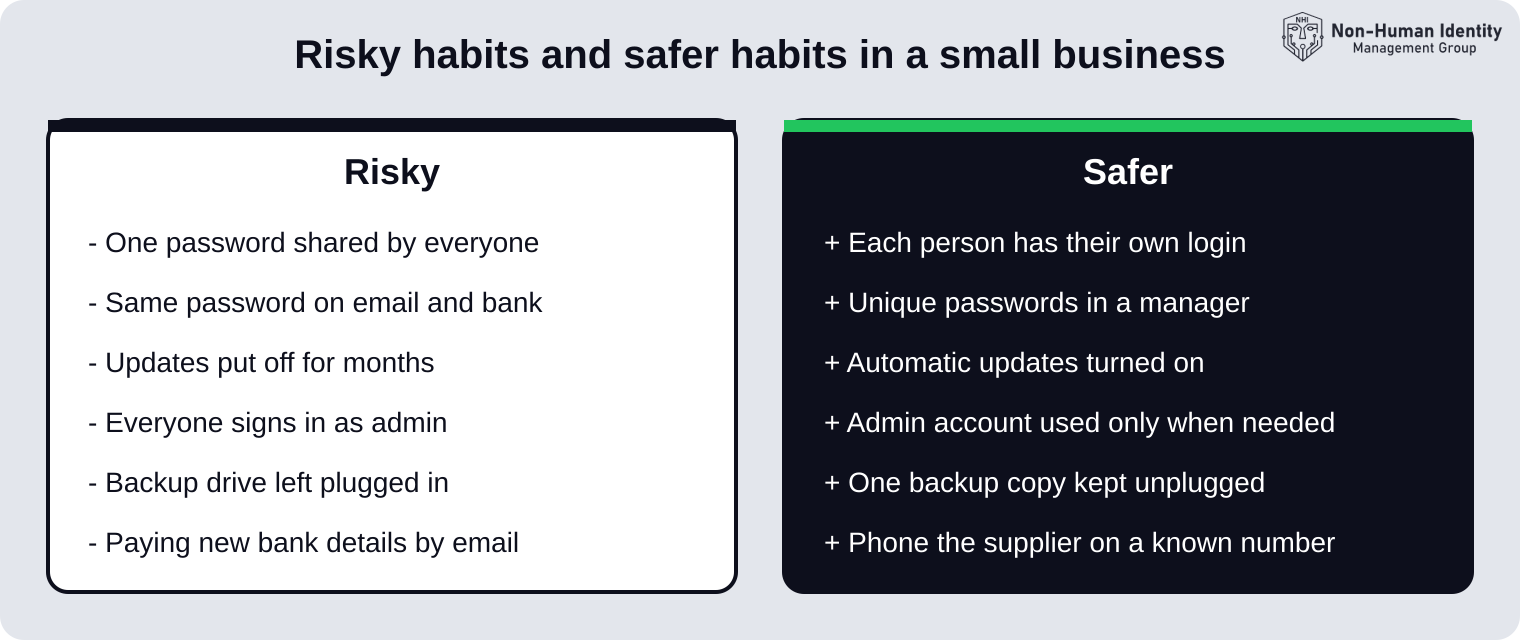
Here is a made-up note a shop owner might keep. It shows habits that make life easy for criminals.
Example only. All values are made up.
SHOP LOGINS (stuck on the back office wall)
Email:    [email protected]   pw: FAKE-Shop0000      (1)
Bank:     same password as email                    (2)
Laptop:   everyone uses the Admin login             (3)
Backups:  USB drive, always plugged in              (4)
Updates:  "remind me tomorrow" since EXAMPLE month  (5)
- In a real file, this line would contain the main email password, open to anyone who walks past.
- One password for two accounts: if one leaks, both can be opened.
- An admin login can change anything on the laptop. So can harmful software that runs under it.
- A backup that stays plugged in can be locked by ransomware too.
- Each skipped update leaves a known weak spot open.
Why this is risky: each line is a common shortcut. Together they give a criminal easy ways in. They also make it hard to recover.
The safer way: use a password manager and a different password for each account. Add a second check at sign-in. Give staff normal logins. Unplug one backup copy, and let updates install.
How does it work?
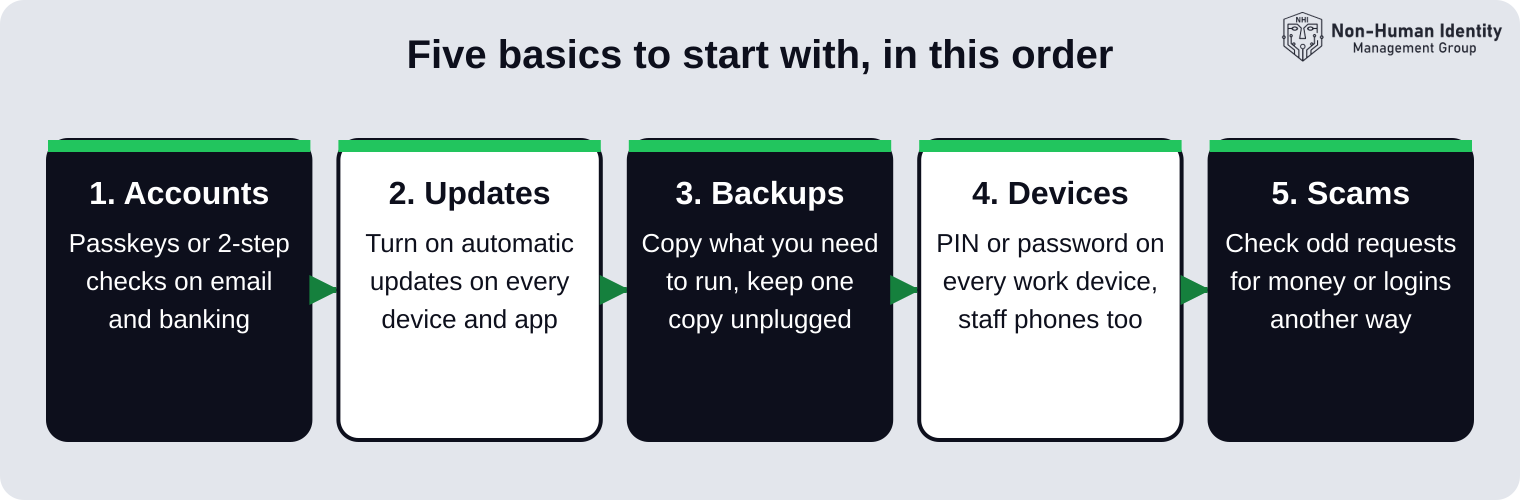
Most attacks on small firms follow a simple path. The basics break that path at several points. Here they are, in a sensible order.
- Lock down your accounts. Start with email and banking. Use a passkey, a sign-in that uses your phone or computer's lock instead of a password, where the service offers one. Otherwise use a strong, unique password and turn on 2-step verification.[2][7]
- Turn on updates. Updates fix weak spots that criminals use to get into devices. Set phones, laptops and apps to update by themselves.[3]
- Back up what you need to run. Copy your invoices, customer records and documents. Keep one copy on a drive that is unplugged when not in use, or in a cloud service with its own second check. Then test that you can get files back.[4]
- Lock every device. Use a 6-digit PIN or a strong password on every device used for work, including staff phones. Do day-to-day work in a normal account, not an admin one.[2][3]
- Check odd requests. If a message asks you to log in, pay or change bank details, check it using a phone number or website you already know.
Fake emails are the most common problem. In a 2025 UK government survey, phishing, meaning fake messages that trick people, was the most common type of attack. It was reported by 85% of businesses that had a breach or attack in the past year.[6]
Once the basics are in place, many UK firms work towards Cyber Essentials. It is a government-backed scheme that checks five areas: firewalls, secure settings, updates, who has access, and protection from harmful software.[5] Some customers ask suppliers for it.
A worked example
This story is made up to show how it can happen.
Owen Price runs a small flower shop in Cardiff with two part-time staff. The shop has one laptop, a card reader and a shared email address. Everyone knows the email password. It is also the password for the online bank.
One Monday a supplier's email arrives. It says the supplier has changed banks and asks Owen to pay this month's invoice to a new account. The email looks right and uses the supplier's name.
Owen nearly pays. Then he remembers a tip from his business network: always check new bank details by phone. He calls the supplier on the number from an old invoice. They say they have not changed banks. Their email had been taken over.
The near miss worries Owen, so he spends a Saturday on the basics. He gives each person their own email login. He turns on 2-step verification for email and the bank, and uses a password manager so every password is different.
He sets the laptop to install updates by itself. He makes a normal user account for daily work and keeps the admin one for changes. He buys a cheap external drive for backups and keeps it in the safe when it is not in use. Then he tries getting one file back, to check the backup works.
A month later, Owen's own email gets a sign-in attempt from abroad. The second check blocks it, and he gets an alert.
What made the difference: Owen checked the bank change by phone, then fixed the shared password that made the business an easy target.
Myths and mistakes
| What people think | What is true |
|---|---|
| We are too small to be a target. | Many attacks are automatic and hit any business they can reach. Small firms are affected every year.[1] |
| Cyber security costs a lot. | Most of the basics use features you already have, such as updates, screen locks and 2-step verification. |
| Our IT supplier handles all of it. | Some do, some do not. Ask them in writing what they cover, such as backups, updates and who has admin access. |
| A backup on a drive that is always plugged in is enough. | Harmful software can reach connected drives. Keep one copy unplugged when not in use.[4] |
| A strong password on its own keeps email safe. | Passwords leak and get guessed. Add a second check at sign-in, or use a passkey where offered.[7] |
What can I do this week?
- Turn on 2-step verification for your business email and online banking.
- Change any password you use on more than one important account.
- Set every work laptop and phone to install updates by itself.
- Make a backup of the files you need to run, then try getting one file back.
- Agree a rule: any change of bank details is checked by phone, on a number you already have.
Checklist
- Our email and bank use a passkey or 2-step verification.
- Each person has their own login, not a shared one.
- Important accounts each have a different password, kept in a password manager.
- Devices and apps install updates by themselves.
- Every work device, including staff phones, has a PIN or password.
- Daily work is done in a normal account, not an admin one.
- We have a recent backup, one copy is kept unplugged, and we have tested it.
- We check bank detail changes and payment requests by phone.
- We remove logins for people who have left.
Common questions
Where should a small business start with cyber security?
Start with your email. Turn on a passkey or 2-step verification and use a password nobody else knows. Email is often the key to resetting every other account. Then move on to updates, backups, device locks and checking odd payment requests.
Do I need to buy antivirus software?
Often not. The UK cyber security centre says modern devices come with virus protection and a firewall built in and turned on. Check they are still switched on. Phones that only install apps from the official store generally do not need extra antivirus.[3]
Is Cyber Essentials worth it for a very small firm?
It can be, especially if customers or contracts ask for it. It gives you a clear checklist and a certificate to show. The National Cyber Security Centre says prices are set by organisation size, starting from £320 plus VAT.[5] You can follow the checklist without paying for the certificate.
What should I do if we get hacked?
Stay calm and act quickly. Change the password on any account you think is affected, from a device you trust. Call your bank straight away if money is involved. In England, Wales and Northern Ireland, report it to Report Fraud. In Scotland, contact Police Scotland.[8]
How much time does this take?
The first steps take an afternoon for most small firms. The UK cyber security centre says many of its small business tips take as little as 5 minutes.[1] After that, a short check every few months keeps things on track.
Where next?
Ready for the detail? Read the practitioner guide: Small Business Cybersecurity Basics Guide. It goes further into backup set-up, the Cyber Essentials controls and what to do in the first hours after an attack.
Also useful:
- Small Business Cyber Security Checklist
- Top 10 Small Business Cyber Threats
- Small Business Incident Response Guide
- Password Security for Beginners
- What Is Cyber Security? A Beginner's Guide
Related NHI Mgmt Group resources: Cyber Essentials Guide · Backups for Small Businesses · Ransomware Basics for Small Businesses Guide
Key terms
- Multi-factor authentication
- Asking for two or more kinds of proof, such as a password and a code, before letting someone in. Also called 2-step verification.
- Passkey
- A way to sign in without a password, where a secret key stays on your device and the website keeps only a matching public key.
- Password manager
- A tool that creates, stores and fills in passwords, so each account can have its own.
- Security update
- A release from a software maker that fixes known weak spots.
- Phishing
- Fake messages or websites that trick people into giving away passwords, installing harmful software or sending money.
- Ransomware
- Harmful software that locks your files or systems and demands payment to unlock them.
- Cyber Essentials
- A UK government-backed scheme built around five basic controls that protect against common attacks.
Sources and further reading
- Small organisations guide to cyber security. National Cyber Security Centre (NCSC), published 9 April 2026, reviewed 21 July 2026. https://www.ncsc.gov.uk/collection/small-business-guide, accessed 28 Nov 2026.
- Secure your important online accounts (Small organisations guide to cyber security). National Cyber Security Centre (NCSC). https://www.ncsc.gov.uk/collection/small-organisations-guide-to-cyber-security/secure-your-important-online-accounts, accessed 28 Nov 2026.
- Protecting your devices (Small organisations guide to cyber security). National Cyber Security Centre (NCSC). https://www.ncsc.gov.uk/collection/small-organisations-guide-to-cyber-security/protecting-your-devices, accessed 28 Nov 2026.
- Backing up your data (Small organisations guide to cyber security). National Cyber Security Centre (NCSC). https://www.ncsc.gov.uk/collection/small-organisations-guide-to-cyber-security/backing-up-your-data, accessed 28 Nov 2026.
- Cyber Essentials overview. National Cyber Security Centre (NCSC). https://www.ncsc.gov.uk/cyberessentials/overview, accessed 28 Nov 2026.
- Cyber security breaches survey 2025. Department for Science, Innovation and Technology and Home Office, GOV.UK, 10 April 2025. https://www.gov.uk/government/statistics/cyber-security-breaches-survey-2025/cyber-security-breaches-survey-2025, accessed 28 Nov 2026.
- Secure your email (Small organisations guide to cyber security). National Cyber Security Centre (NCSC). https://www.ncsc.gov.uk/collection/small-organisations-guide-to-cyber-security/secure-your-email, accessed 28 Nov 2026.
- Report Fraud service goes live. Report Fraud (City of London Police), 4 December 2025. https://www.reportfraud.police.uk/news/report-fraud-service-goes-live/, accessed 27 Nov 2026.