A bearer token is a digital pass that works for whoever holds it.
This guide is for students, newcomers and anyone who has seen the word "Bearer" in an app setting or an error message. You do not need to write code to be affected: many apps and services you use hand out bearer tokens behind the scenes.
In short
- A bearer token is a pass that a service accepts from anyone who shows it.
- Most services do not ask who is holding the token, so a copied token can be as useful as a stolen password.
- Short lifetimes, narrow access and keeping tokens out of logs, links and chats all reduce the harm of a leak.
- A newer fix ties the token to a key the app keeps, so a copy alone should no longer be enough.
What you will learn
- Explain what "bearer" means in one sentence.
- Spot a bearer token sitting somewhere it should not be.
- Explain how a sender-constrained token makes a stolen copy less useful.
- Ask your team or supplier how their tokens are protected.
- Digital pass (token)
- a string of characters a service hands out after a sign-in, which an app then shows to get in.
- Holder's pass (bearer token)
- a token that works for whoever shows it, with no extra proof.
- Tied-down pass (sender-constrained token)
- a token that only works with a matching key that the right app keeps.
What is a bearer token?
Think of a banknote. The shop does not ask your name when you pay. Whoever holds the note can spend it.
A bearer token works the same way. After a person or a program signs in, a sign-in service hands out a token. The app then shows that token each time it asks another service for something. The official standard says any party in possession of the token can use it in the same way as any other holder.[1]
The word "bearer" just means "the one carrying it". You often see it in a request as the word Bearer followed by the token.
Where the comparison stops working: a banknote can only be spent once, and you notice when it is gone. A token can be copied without the owner noticing, and the copy may work just as well as the original until it runs out.
Why does it matter?
If someone copies a valid bearer token, they may not need a password at all. To the service, their requests can look just like the real app's.
Bearer tokens are also used by non-human identities (NHIs). An NHI is a digital identity, or the credential behind it, that represents a machine, application, automated process, service or AI agent. Programs, scripts and AI agents often carry bearer tokens with no person watching.
If you are studying IT or security
What could happen: you paste a token into a forum post to ask for help, and a stranger copies it.
Check this: replace any token with a fake value before you share code or error messages.
If you run a small online business
What could happen: a token for your shop's payment or stock system leaks, and someone acts as your app.
Check this: ask your supplier how long your tokens last and where they are kept.
If you look after support tickets or logs
What could happen: a log file or browser recording you attach to a ticket holds live tokens.
Check this: remove tokens from files before you upload or share them.
What does it look like?
Here is a made-up request from a stock app to a warehouse service. Most of the time you never see this, because the app sends it for you.
Example only. All values are made up.
GET /stock/levels HTTP/1.1
Host: warehouse.example.com
Authorization: Bearer FAKE-TOKEN-0000-EXAMPLE    (1)

# copied into the support ticket on Friday       (2)
# link shared in chat:
https://app.example.com/report?token=FAKE-0000   (3)
- In a real file, this line would contain the token. The word Bearer tells the service what kind of pass it is.
- The same request was pasted into a ticket, so everyone who can read the ticket now holds the token.
- A token placed inside a web address can end up in browser history and server records.
Why this is risky: anyone who reads the ticket or the link can copy the token. Until it runs out or is cancelled, the copy may work for them too.
The safer way: the standard says tokens should always travel over an encrypted (HTTPS) connection. It says they should not be put in web addresses, and should be short-lived, for example one hour or less.[1] Before sharing a request, replace the token with a fake value.
How does it work?
Here is the life of a bearer token, step by step.
- Sign in. A person or a program proves who it is to a sign-in service.
- Token issued. The sign-in service hands back a token. It usually has an expiry time and a scope (a list of what it may do).
- Token sent. The app adds the token to each request it makes.
- Checks. The receiving service checks that the token is genuine, in date and meant for it. The standard asks services to name the intended receiver inside the token, so a token for one service is not accepted by another.[1]
- Answer. If the checks pass, the request goes ahead. With a plain bearer token, the service does not ask who is holding it.
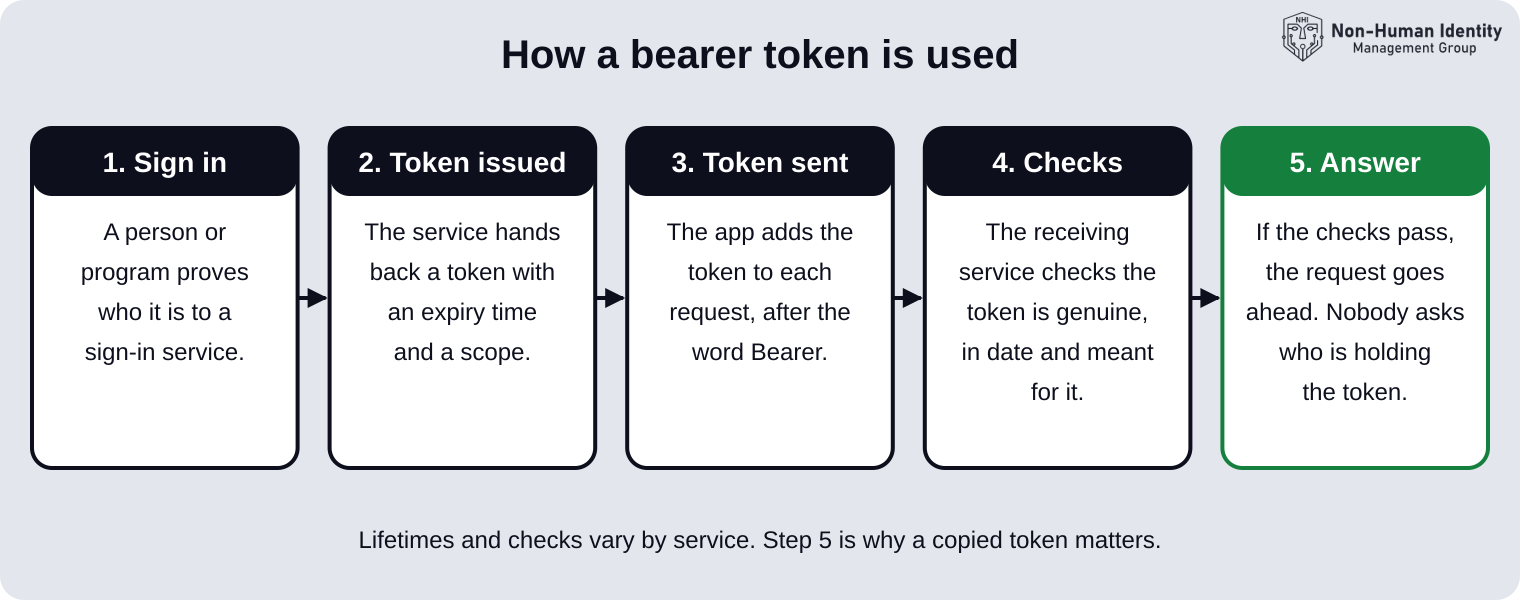
Step 5 is the weak spot. So security experts now suggest a fix called a sender-constrained token: a token tied to a secret key that only the right app holds. The current best-practice advice for OAuth (a common standard for handing out tokens) says services should use this where they can.[2]
There are two common ways to do it. In the first, called DPoP, the app signs a small, fresh proof for each request with its own private key. The service only accepts the token with a proof made by the matching key.[3] In the second, the app and service use mutual TLS, where both sides show a certificate (a digital ID card) when they connect. The token is tied to the app's certificate.[4]
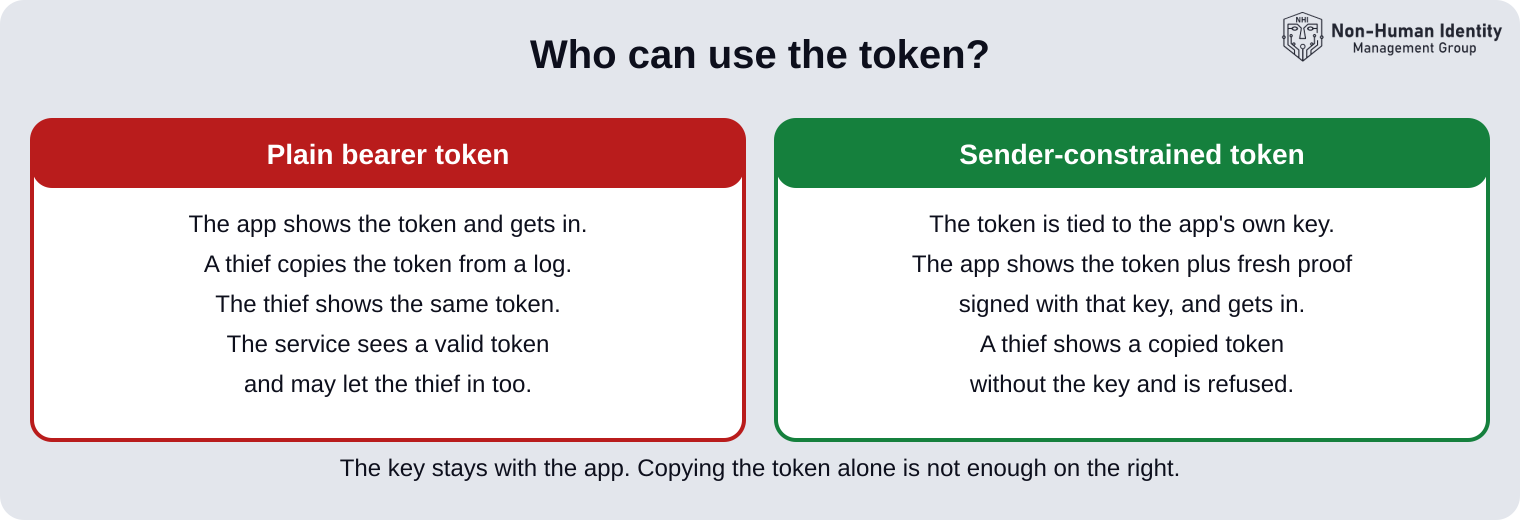
Tying a token down helps against copies, but it has limits. If an attacker can run code inside the app itself, they may still be able to use the token from there.[3] Short lifetimes and narrow scopes still matter.
A worked example
Quinn Falk runs a small online bakery. A freelance developer, Milo Ueda, connected the shop's website to a delivery service. The website uses a bearer token to book couriers.
One Monday, Milo spots a problem. On Friday he sent the delivery service's support team a log file to fix a bug. The log held the full request, token included.
Quinn thinks of a banknote left on a counter. You do not wait to see whether someone picks it up. So she asks Milo to cancel the token at the delivery service first. Once the cancellation has taken effect, the old copy should no longer give access.
Milo then checks the delivery service's records. He looks for bookings the shop did not make since Friday. He finds no unknown bookings in the records available to him.
Next they look at why the risk was there. The token lasted thirty days. Milo sets the new one to last one hour and to allow only courier bookings, not refunds.
He also changes his habits. He now strips tokens out of log files before he shares them.
Last, Quinn asks the delivery service whether it supports sender-constrained tokens. It does not yet, so she adds the question to her list for the next supplier review.
Myths and mistakes
| What people think | What is true |
|---|---|
| A token is not a password, so it is fine to share. | A valid bearer token may work for whoever holds it. Treat it like a password.[1] |
| HTTPS stops tokens being stolen. | HTTPS protects the token on the move. It does not help once the token is copied into a log, a ticket or a chat. |
| Tokens run out, so leaks do not matter. | A token can still be used until it runs out or is cancelled. Cancel a leaked token straight away. |
| A long-lasting token saves trouble. | The longer a token lasts, the longer a stolen copy may work. The standard suggests short lifetimes.[1] |
| Sender-constrained tokens solve everything. | They make a copied token much less useful, but code running inside the app may still misuse it.[3] |
What can I do this week?
- Search your team's tickets and chat for the word "Bearer" and remove any tokens you find.
- Ask each supplier how long their tokens last and what each one is allowed to do.
- Check that no web addresses in your systems carry tokens.
- Agree the order after a leak: cancel the token, check the records, then issue a new one.
- Ask whether your main services support sender-constrained tokens.
Checklist
- Tokens travel only over encrypted (HTTPS) connections.
- Tokens are short-lived and allowed to do only what the app needs.
- Tokens are kept out of web addresses, logs, tickets, screenshots and chat.
- Each token names the service it is meant for, and services check this.
- Every token used by a program has a named owner.
- There is a plan to cancel a leaked token quickly.
- Sender-constrained tokens are used where the service supports them.
Common questions
Why is it called a bearer token?
Because it works for its bearer, the one carrying it. The standard defines it as a token that any holder can use in the same way as any other holder. The service checks the token itself, not who is showing it.
Is every access token a bearer token?
Many are, but not all. Many services hand out bearer access tokens by default. A sender-constrained access token is the main exception, because it only works together with a key held by the right app. Ask the service which kind it issues.
What should I do if I leak a bearer token?
Cancel it at the service that issued it, straight away. Then check the service's records for actions you did not make, and issue a fresh token with a short life. Deleting the message or file that held it is not enough on its own.
Are cookies and bearer tokens the same thing?
No, but they are close. Both can prove you are signed in, and a copied cookie can be just as risky. The main difference is how they travel: a browser sends cookies by itself, while an app adds a bearer token on purpose. See Session Tokens and Cookies for Beginners.
What is DPoP?
DPoP is one way to make a token sender-constrained. The app keeps a private key and signs a small, fresh proof for each request. The service accepts the token only with a matching proof, so a copied token on its own should be refused.
Where next?
Ready for the detail? Read the practitioner guide: Session Cookies vs Bearer Tokens. It goes further into when to use each, how to harden both in web apps and how to move tokens out of the browser.
Also useful:
- DPoP Guide
- Mutual TLS for Beginners
- Access and Refresh Tokens for Beginners
- OAuth 2.0 for Beginners
- Non-Human Identities for Beginners
Related NHI Mgmt Group resources: Browser Storage Security Guide · Global Token Revocation Guide · mTLS Guide
Key terms
- Bearer token
- A token that works for whoever holds it, without strong proof that the holder is the right app.
- Access token
- A short-lived token an app shows to call a service, often a bearer token.
- Sender-constraining
- Tying a token to a particular app or connection, so a copy is harder to use elsewhere.
- DPoP
- A way to tie a token to an app's private key by sending a fresh signed proof with each request.
- Mutual TLS
- A secure connection where both sides show a certificate to prove who they are.
- Token revocation
- Cancelling a token before it would normally run out.
- Token lifetime
- How long a token stays valid before it runs out.
Sources and further reading
- RFC 6750: The OAuth 2.0 Authorization Framework: Bearer Token Usage. IETF, October 2012. https://www.rfc-editor.org/rfc/rfc6750.html, accessed 28 Nov 2026.
- RFC 9700: Best Current Practice for OAuth 2.0 Security. IETF, January 2025. https://www.rfc-editor.org/rfc/rfc9700.html, accessed 28 Nov 2026.
- RFC 9449: OAuth 2.0 Demonstrating Proof of Possession (DPoP). IETF, September 2023. https://www.rfc-editor.org/rfc/rfc9449.html, accessed 28 Nov 2026.
- RFC 8705: OAuth 2.0 Mutual-TLS Client Authentication and Certificate-Bound Access Tokens. IETF, February 2020. https://www.rfc-editor.org/rfc/rfc8705.html, accessed 28 Nov 2026.