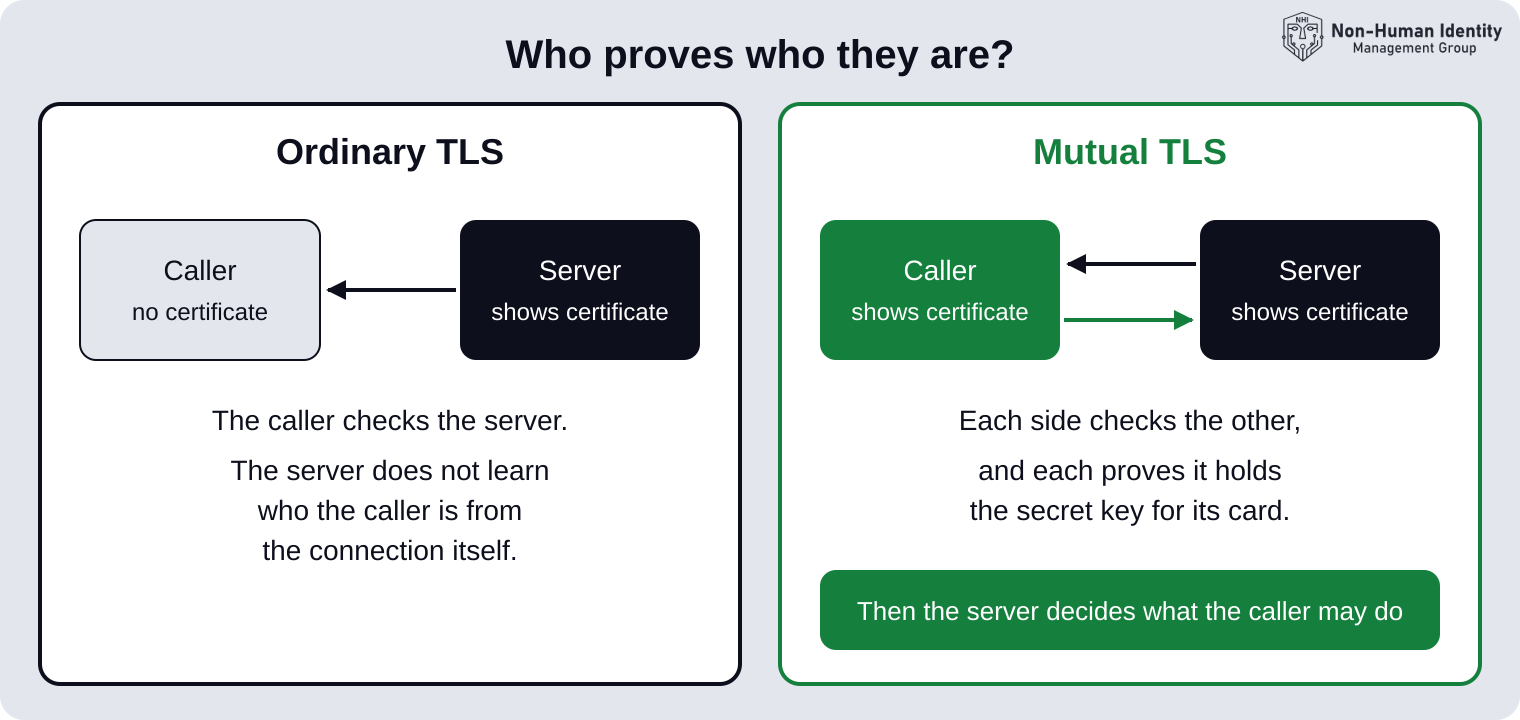
Mutual TLS (mTLS) is a secure connection where both sides prove who they are with a certificate.
This guide is for anyone who has heard "we use mTLS" and wants to know what it means. You do not need to write code. If your business connects to a bank, a payment service or a partner's system, you may be asked to look after a certificate for exactly this.
In short
- Ordinary secure web connections prove the server's identity. Mutual TLS makes the caller prove its identity too.
- Each side shows a digital ID card, called a certificate, and proves it holds the secret key that goes with it.
- Proving who you are is not the same as being allowed in. The server still decides what each caller may do.
- Certificates expire and keys can be stolen, so each one needs an owner, automatic renewal and care.
What you will learn
- Explain what mutual TLS adds to an ordinary secure connection.
- Spot a setting that quietly lets callers in without a certificate.
- Check who owns each certificate and when it expires.
- Ask whether a service checks what each caller is allowed to do.
- Digital ID card (certificate)
- a file that names a service and is signed by an issuer that others trust.
- Secret half (private key)
- the secret that proves a service really owns its certificate. It should stay with its owner.
- Both sides check (mutual TLS)
- a connection where the caller and the server each prove who they are.
What is mutual TLS?
Think of two couriers meeting to hand over a sealed parcel. Each shows a photo ID from an agency they both trust, and each checks the other before the parcel changes hands.
Mutual TLS works the same way for software. TLS (Transport Layer Security) is the technology behind the padlock in your browser. It encrypts the connection and lets you check the website's certificate. The TLS standard says the server side is always checked, while checking the client side is optional.[1]
Mutual TLS turns that optional half on. The server asks the caller for a certificate. The caller sends one and proves it holds the matching private key.[1] Now both sides know who is on the other end.
Where the comparison stops working: a photo ID can be copied by anyone who sees it. A certificate on its own is not enough. The caller must also prove it holds the private key, which it keeps and does not send.
Why does it matter?
Much of today's traffic is software talking to software. A service that calls another service is a non-human identity, meaning an identity used by software rather than a person. Mutual TLS gives it a strong way to prove who it is.
If you run a small business
What could happen: a partner's certificate for your payment link expires, and payments stop until someone renews it.
Check this: ask your supplier who owns the certificate and when it expires.
If you are new to IT work
What could happen: a setting meant for testing lets callers in with no certificate at all.
Check this: look for settings named "permissive" or "optional" and ask why they are on.
If you manage a technical team
What could happen: one stolen private key lets a stranger pose as a trusted service.
Check this: make sure each service has its own key, and that keys stay where they are used.
Next: Zero Trust for Beginners
What does it look like?
Here is a made-up settings card for one internal service.
Example only. All values are made up.
Service: billing.example.invalid
Caller check mode:  PERMISSIVE             (1)
Trusted issuer:     Example Internal CA    (2)
Allowed callers:    any valid certificate  (3)
Certificate owner:  (blank)                (4)
Expires:            FAKE 00/00/0000
- In a real file, this line would say if callers must show a card. "Permissive" lets plain links in too.
- Only certificates from this issuer are trusted. That part is good.
- Any service with a card may call billing, even ones with no need to.
- Nobody owns the card, so nobody may see when it is due to end.
Why this is risky: callers with no card can still get in. Callers with any card can do too much. And the end date could catch everyone out.
The safer way: switch to a mode that only lets in callers with a card. List the few callers that billing needs. Give the card an owner, and have it renewed for you.
How does it work?
This is a simplified view. The full detail is in the TLS standard and the practitioner guide.
- Issue certificates. Each service gets its own certificate from a certificate authority (a trusted issuer) that both sides accept.
- Server shows its card and asks for one. The caller starts the connection. The server sends its certificate and asks for the caller's.[1]
- Caller proves itself. The caller checks the server's certificate. Then it sends its own and signs with its private key, which shows it holds that key.[1]
- Server checks the caller. The server checks the certificate comes from an issuer it trusts and is in date.
- Server decides what is allowed. The connection is now encrypted and both sides know each other. The server still applies its own rules about what this caller may do.
Many teams use a service mesh (a layer that handles connections between services for them) to do this at scale. Istio, one such tool, gives each service a certificate and renews it automatically.[3] It has a "permissive" mode that accepts both mutual TLS and plain traffic, and a "strict" mode that accepts only mutual TLS. Istio's documentation says a mesh-wide policy with no mode set uses permissive.[3]
Mutual TLS can also make other passes harder to misuse. An internet standard lets a sign-in server tie an access token to a caller's certificate. A service can then check that the token is shown by the caller it was issued to.[2]
A worked example
Ayo Lacroix leads a small platform team at a fictional delivery firm. The tracking service calls the billing service over the internal network. Until now, billing accepted any request from inside the network.
Ayo adds a service mesh, which gives every service a short-lived certificate and renews it automatically. She starts in permissive mode, so nothing breaks. For two weeks she watches which services still send plain traffic. Two old jobs do, so the team moves them into the mesh.
Then Ayo switches billing to strict mode. She adds a rule that only tracking and invoicing may call billing's payment features. The rule uses each service's identity, not its network address.
Later, a developer's test tool tries to call billing directly. The connection is refused, because the tool has no valid certificate. The developer asks Ayo, and she explains how to get the tool its own certificate for the test area.
Ayo also writes down an approved way back. If strict mode breaks something critical, that one service may go back to permissive for up to a day. The reason is recorded and the cause is fixed.
Mutual TLS did not solve everything. A service that is taken over can still use its own valid certificate. So the team still keeps permissions narrow and watches the records.
Myths and mistakes
| What people think | What is true |
|---|---|
| The padlock already proves who the caller is. | Ordinary TLS checks the server. Checking the caller is optional, and that is what mutual TLS adds.[1] |
| A valid certificate means the caller may do anything. | A certificate proves identity. The service still has to decide what that identity may do. |
| Our mesh has mTLS, so all traffic is protected. | Not if it is left in a mode that also accepts plain traffic, or if some services sit outside it.[3] |
| Services can safely share one certificate. | Sharing blurs who is calling and widens the damage if a key leaks. Give each service its own. |
| Mutual TLS replaces access tokens. | They often work together. A standard even ties tokens to certificates.[2] |
What can I do this week?
- List the links that use client certificates. Add an owner and end date for each.
- Look for "permissive" or "optional" settings, and note where they are on.
- Pick one internal service and list which callers really need it.
- Set an alert that warns someone well before each certificate runs out.
Checklist
- We know which services and partners use client certificates, and each has an owner.
- Each service has its own certificate and private key. None are shared.
- Certificates renew automatically, and someone is warned before any expires.
- For internal traffic, we trust only the issuers we mean to.
- Permissive or optional modes are recorded exceptions with an end date.
- Each service checks which callers are allowed, not just that a certificate is valid.
- Private keys stay on the system or platform that uses them.
Common questions
What is the difference between TLS and mutual TLS?
In TLS, the caller checks the server's certificate. In mutual TLS, the server also asks for and checks a certificate from the caller, so both sides are checked. Both encrypt the connection. See Mutual TLS vs TLS.
Is mutual TLS used by people or by machines?
Mostly by machines. It is common between services, devices and the connections apps use to talk to each other. Some organisations also put certificates on staff laptops. The most common use is still software talking to software.
What happens when a certificate expires?
The other side is likely to refuse the connection, so the service that depends on it may fail. That is why automatic renewal and early warnings matter. Give every certificate a named owner, so someone notices before the date arrives.
What if a private key is stolen?
The thief may be able to pose as that service until the certificate is cancelled or expires. Short-lived certificates and keys that stay on their own system shrink that window. Cancel and replace the certificate as soon as you know.
Do I need a service mesh to use mutual TLS?
No. Gateways, proxies and apps can all ask for and check client certificates. A service mesh simply does it automatically between many services. Small setups often start with a gateway in front of one service. See API Gateway vs Service Mesh.
Where next?
Ready for the detail? Read the practitioner guide: Mutual TLS vs TLS. It goes further into how the two handshakes differ, where client certificates are checked and when each one fits.
Also useful:
- mTLS Guide
- mTLS vs Signed Tokens for Service Authentication
- SPIFFE and SPIRE for Beginners
- Non-Human Identities for Beginners
- NHI Foundation Level Training
Related NHI Mgmt Group resources: Certificate vs Federated vs Secret Based Machine Identity · Certificate Revocation Guide · Cloud Workload Identity Guide
Key terms
- Mutual TLS (mTLS)
- A secure connection where the caller and the server each show and check a certificate.
- Transport Layer Security (TLS)
- The technology that encrypts traffic between two systems and lets one check the other's identity.
- Client certificate
- A certificate that proves the identity of the caller, such as a device, app or service.
- Private key
- The secret half of a key pair. Whoever holds it can act as its owner.
- A trusted issuer that signs certificates, linking a name to a key.
- Service mesh
- A layer that handles connections between services, adding encryption, identity and rules without changing each service.
- Certificate revocation
- Marking a certificate as no longer trusted before it expires, for example after a key leaks.
Sources and further reading
- RFC 8446, The Transport Layer Security (TLS) Protocol Version 1.3. Internet Engineering Task Force (IETF), August 2018. https://www.rfc-editor.org/rfc/rfc8446, accessed 28 Nov 2026.
- RFC 8705, OAuth 2.0 Mutual-TLS Client Authentication and Certificate-Bound Access Tokens. Internet Engineering Task Force (IETF), February 2020. https://www.rfc-editor.org/rfc/rfc8705, accessed 28 Nov 2026.
- Security concepts. Istio documentation, The Istio Authors. https://istio.io/latest/docs/concepts/security/, accessed 28 Nov 2026.