A buffer overflow is a bug where a program puts more data into memory than the space allows.
This guide is for anyone who has seen "buffer overflow" in a security update and wondered what it means. You do not need to write code to be affected: almost every business runs software that gets fixes for bugs like this, so knowing why they matter helps you act on updates quickly.
In short
- A buffer overflow happens when data is too big for the space set aside for it, and the extra spills into nearby memory.
- The result can be a crash, damaged data, leaked data or, in bad cases, an attacker running their own code.
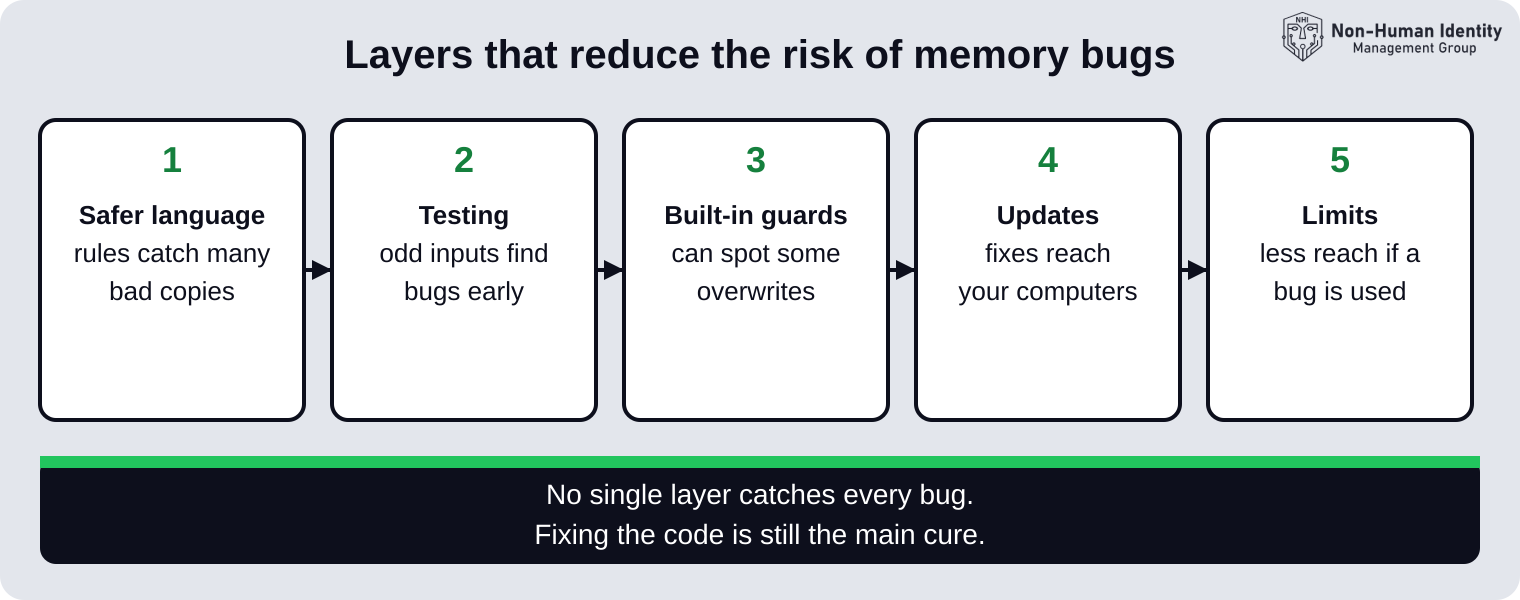
- Safer programming languages, careful testing and built-in guards reduce the risk. None of them catches every bug.
- If you do not write software, install security updates promptly and ask suppliers how they handle memory safety.
What you will learn
- Explain what a buffer overflow is in one sentence.
- Spot a security update that fixes a memory bug, and know why it matters.
- Check that your computers have their built-in protections switched on.
- Ask a software supplier how they find and reduce memory bugs.
- Holding space (buffer)
- a fixed amount of memory a program sets aside for some data, such as a name typed into a form.
- Memory mix-up (memory corruption)
- when data in memory is overwritten or read by mistake.
- Safer language (memory-safe language)
- a programming language whose rules check memory use for the developer.
What is a buffer overflow?
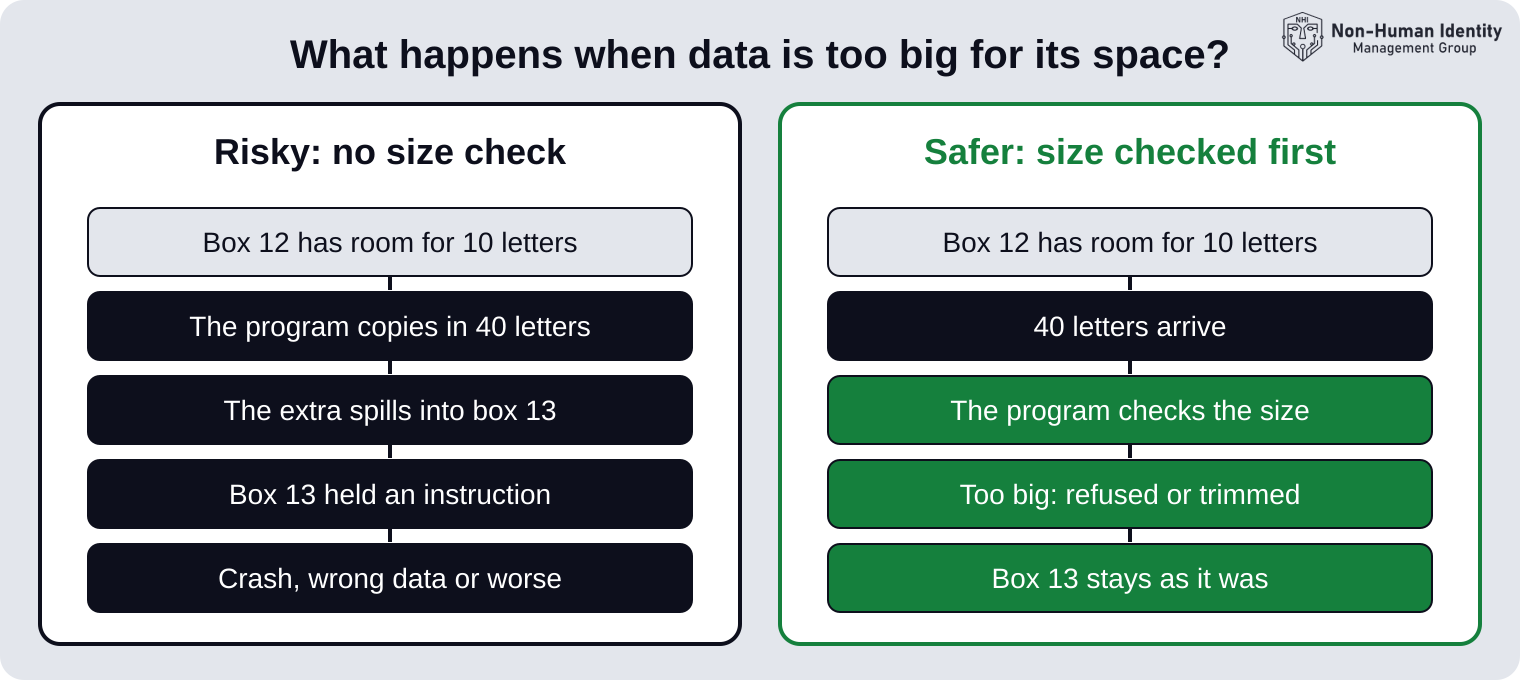
Think of a row of numbered post boxes. Someone forces a big parcel into box 12. It bursts through into box 13 and crushes the letter inside.
A computer program keeps its working data in memory, in spaces like those boxes. A buffer is one of those spaces, set aside for a fixed amount of data. If the program copies in more data than fits, and does not check the size first, the extra spills into the next space. This is a buffer overflow. It belongs to a wider family of bugs called memory corruption.
Sometimes the next space holds something unimportant, and nothing seems to happen. Sometimes it holds an instruction for the program, like a note in box 13 saying where to deliver everything. If that note is overwritten, the program may crash, or it may follow new directions.
Where the comparison stops working: post boxes are solid and you can see the damage. Computer memory is invisible and changes many times a second, and modern computers add guards that make an overflow harder to use.
Why does it matter?
US government security advice says these bugs may lead to damaged data, leaked data, crashes and attackers running code. It adds that attackers often use them to get a first way into a network.[1]
If you run a small business
What could happen: an old, unpatched program on your network has a memory bug that a stranger uses to get in.
Check this: make sure computers and business apps install security updates promptly.
If you are learning to code
What could happen: you copy text into a fixed space without checking its length, and your program crashes on a long name.
Check this: always check that data fits before you copy it, or use a language that checks for you.
If you buy software for your organisation
What could happen: a supplier ships software with repeated memory bugs, and you carry the risk.
Check this: ask suppliers how they test for memory bugs and whether they plan to use safer languages.
What does it look like?
You will rarely see the bug itself. You are more likely to see it in a supplier's security notice. Here is a made-up one for a label-printing app.
Example only. All values are made up.
SECURITY UPDATE  EXAMPLE-ADVISORY-0000
Product: LabelPrint Server (example.invalid)
Fixed in: version 0.0.0-FAKE
Issue: a very long address field can cause
       a buffer overflow                      (1)
Impact: the service may crash, or an attacker
        may be able to run code               (2)
Action: install the update                    (3)
- In a real message, this line would say which input is too long for its space.
- The notice says what could go wrong. A crash and a takeover can come from the same bug.
- The fix is an update from the supplier. You cannot repair the code yourself.
Why this is risky: until the update is in, a long address could crash the service, or worse. Anyone who can reach the service could send one.
The safer way: install the update soon, after a quick test. Meanwhile, make sure only the systems that need the service can reach it, and that it runs without administrator rights.
How does it work?
A buffer overflow becomes a security problem in four stages. Defenders can act at each one.
- The bug is written. A program sets aside a fixed space and later copies data into it without checking the length. Languages such as C and C++ let programs manage memory directly, so this mistake is easier to make.[3]
- Unexpected input arrives. Someone sends data longer than the program expects. Testing with huge numbers of odd inputs, called fuzzing, helps find these bugs before release.[1]
- Nearby memory is overwritten. Data spills past the end of the space, or before its start.[2] Some built-in guards, such as stack canaries (marker values that show an overwrite has happened), can spot this and stop the program.[1]
- The program misbehaves. It may crash, give wrong answers or be steered into running code. Computer protections such as ASLR (which shuffles where things sit in memory) make this harder, but attackers can sometimes get round them.[2]
Guards like canaries and ASLR are extra layers. The CWE catalogue of software weaknesses says they catch only some overflows and are not a complete solution. The lasting fix is code that checks sizes.[2] That is why CISA and the FBI suggest writing new code in memory-safe languages where practical, then moving the most exposed older code over time.[1]
A worked example
Reedgate Accountancy is a fictional firm with 40 staff. A small server in its office prints labels for client post. The label app is old and written in C.
Una Grieve looks after the firm's IT. One Monday she reads a security notice from the app's supplier. It says a very long address can cause a buffer overflow. The service might crash, or someone might run code on the server.
Una thinks of the overfull post box. The fix has to come from the supplier, because only they can change the code. So she tests the update on a spare machine that afternoon. It prints labels correctly, so she installs it on the office server the next morning.
Then she looks at who can reach the server. It only needs to talk to the firm's client system. She asks the firm's network supplier to block everything else. She also checks that the label service runs under an ordinary account, not an administrator one. If a similar bug turns up later, the damage it could do is smaller.
Last, she checks the server's built-in protections. They are switched on, as they should be.
At the next contract review, Una asks the supplier two questions. How do you test for memory bugs? Do you plan to move to a memory-safe language? The supplier says it now uses fuzzing and is rewriting the network part of the app.
The whole job takes Una about a day, spread over a week. Nothing went wrong, and the firm's exposure is now smaller.
Myths and mistakes
| What people think | What is true |
|---|---|
| A crash bug is just a stability problem. | The same memory bug can cause a crash or let someone run code. Treat it as a security issue until shown otherwise.[2] |
| Modern computers have solved this with built-in guards. | Guards catch some overflows and make others harder to use. They are extra layers, not a full fix.[2] |
| Turning off a protection to fix a compatibility problem is harmless. | Find another fix. If a protection must be relaxed, make it an approved, recorded, time-limited exception. |
| Testing with normal input is enough. | Overflows hide in unusual input. Add fuzzing and memory-checking tools to testing.[1] |
| This only matters to programmers. | Everyone who runs software depends on updates for these bugs, and buyers can ask suppliers about memory safety. |
What can I do this week?
- Check that computers, browsers and apps get security updates fast.
- Check that the built-in protections are on in each computer's security settings.
- List old services that face the internet. Let only the systems that need them reach them.
- Ask your suppliers how they test for memory bugs.
Checklist
- Security updates are applied promptly on all systems and apps.
- Built-in exploit protections are on, and any exception is approved and time-limited.
- Older or exposed services can be reached only by the systems that need them.
- Services run with the fewest rights they need, not as administrators.
- Developers use fuzzing and memory-checking tools in testing.
- New projects consider memory-safe languages first.
- Software suppliers are asked how they find and reduce memory bugs.
Common questions
Is a buffer overflow the same as a virus?
No. A buffer overflow is a mistake in a program's code. A virus is harmful software. An attacker may use a buffer overflow as a way in, and then install harmful software, but the bug and the attack are different things.
What is a memory-safe language?
It is a programming language whose rules check memory use for the developer. Many popular modern languages work this way. CISA and the FBI suggest using them for new code where practical, and moving the most exposed older code over time.[1]
How common are memory bugs?
Common in software written in C and C++. The Chromium project, which builds the core of the Chrome browser, says around 70% of its high severity security bugs are memory safety problems.[3] That is one project's figure, but it shows the scale.
Can I tell if my software has a buffer overflow?
Usually not as a user. Developers, testers and researchers find these bugs. Your part is to install updates promptly and read supplier security notices. Also keep old services out of reach of systems that do not need them.
Where next?
Ready for the detail? Read the practitioner guide: Memory Corruption Vulnerabilities Guide. It goes further into the main types of memory bug, how each protection works and how to run a defence programme for them.
Also useful:
- Application Security for Beginners
- Exploit Mitigations Guide
- Secure Coding for Beginners
- Zero Day Vulnerabilities for Beginners
Related NHI Mgmt Group resources: C and C++ Secure Coding Guide · Memory-Safe Languages Guide
Key terms
- Buffer overflow
- When software writes more data into a fixed-size memory space than it can hold, so nearby memory is overwritten.
- Memory corruption
- When data in memory is overwritten or read by mistake, causing crashes, odd behaviour or security exposure.
- Bounds checking
- Checking that data fits within its expected limits before it is copied or used.
- Memory-safe languages
- Programming languages whose rules or checks reduce common memory errors such as buffer overflows.
- ASLR
- A protection that shuffles where things sit in memory, making attacks less reliable without removing the bug.
- Data execution prevention (DEP)
- A protection that marks data areas so code placed there is not simply run.
Sources and further reading
- Secure by Design Alert: Eliminating Buffer Overflow Vulnerabilities. Cybersecurity and Infrastructure Security Agency (CISA) and Federal Bureau of Investigation (FBI). https://www.cisa.gov/resources-tools/resources/secure-design-alert-eliminating-buffer-overflow-vulnerabilities, accessed 28 Nov 2026.
- CWE-787: Out-of-bounds Write. MITRE Common Weakness Enumeration. https://cwe.mitre.org/data/definitions/787.html, accessed 28 Nov 2026.
- Memory safety. The Chromium Projects. https://www.chromium.org/Home/chromium-security/memory-safety/, accessed 28 Nov 2026.