Build provenance is a signed record of how, where and from what a piece of software was built.
This guide is for students, new developers and managers who keep hearing "SLSA" and "provenance" and want the plain meaning. You do not need to write code to be affected: the apps your business installs were built somewhere, and this is how you can check where.
In short
- Build provenance is a record that says which build system made a file, from which code, and how.
- When the build system signs that record, a change to the file or the record can be spotted.
- SLSA is a free, shared set of levels that says how trustworthy a build and its record are.
- Provenance shows where software came from. It does not prove the code inside is free of bugs or harm.
What you will learn
- Explain build provenance in one sentence.
- Spot what a provenance record tells you, and what it does not.
- Explain what the SLSA build levels mean in plain words.
- Ask a supplier simple questions about how they build software.
- Proof of origin (provenance)
- a record of where something came from and how it was made.
- Software factory (build system)
- the computers and steps that turn code people write into a file you can install.
- Seal (digital signature)
- a digital stamp that shows who made a record and that it has not been changed since.
What is build provenance?
Think of a certificate of origin on a crate from a factory. It names the factory, the batch and the date, and it carries the factory's stamp. If the crate is opened and refilled on the way, the stamp and the contents no longer match.
Software is made in a similar way. People write source code, the text instructions for a program. A build system turns that code into a finished file, such as an app installer or a package. Developers call that finished file an artifact.
Build provenance is a record made during the build. It says which build system made the artifact, how the build ran and what went into it.[1] When the build system signs it, anyone can check the record has not been changed.
SLSA, said "salsa", stands for Supply-chain Levels for Software Artifacts. It is a set of guidelines agreed across the industry, with levels that describe how well a build is protected.[2]
Where the comparison stops working: a factory stamp is checked by a person looking at it. A provenance record is checked by software, and it only helps if someone sets up that check.
Why does it matter?
Attackers have broken into build systems to slip harmful code into trusted software. Provenance helps people notice when a file did not come from the build it claims.
If you are a new developer
What could happen: a release is built on someone's laptop, so nobody can show which code went into it.
Check this: ask whether your team's releases are built by a hosted build service that records provenance.
If you manage a software team
What could happen: a customer asks for proof of how your software is built, and you have none.
Check this: find out which SLSA build level your releases meet today.
If you buy or approve software
What could happen: you install an update that was changed after it left the supplier's build system.
Check this: ask suppliers whether they publish signed provenance, and how you can check it.
Next: SBOMs for Beginners
What does it look like?
Real provenance is a file written for computers to read. Here is a simplified, made-up version in plain words.
Example only. All values are made up.
BUILD RECORD for example-app-0.0.0.zip
File fingerprint: 0000FAKE0000EXAMPLE       (1)
Built by: build-service.example.invalid     (2)
From code at: code.example.invalid/app      (3)
Code version: EXAMPLE-0000                  (4)
Build settings: release, no extra options   (5)
Signed by: build-service.example.invalid    (6)
- A short code worked out from the file's contents. Change one byte and it changes.
- Which build system made the file.
- Where the source code was kept.
- The exact saved version of the code that was used.
- Any settings passed into the build.
- Who sealed the record. In a real file, this line would contain the build service's signing identity.
Why this is risky: a record like this is only useful if someone checks it. If nobody compares it with what they expect, a swapped file can still get through.
The safer way: check the fingerprint, the build system and the code location against what you expect before you install or ship the file.
How does it work?
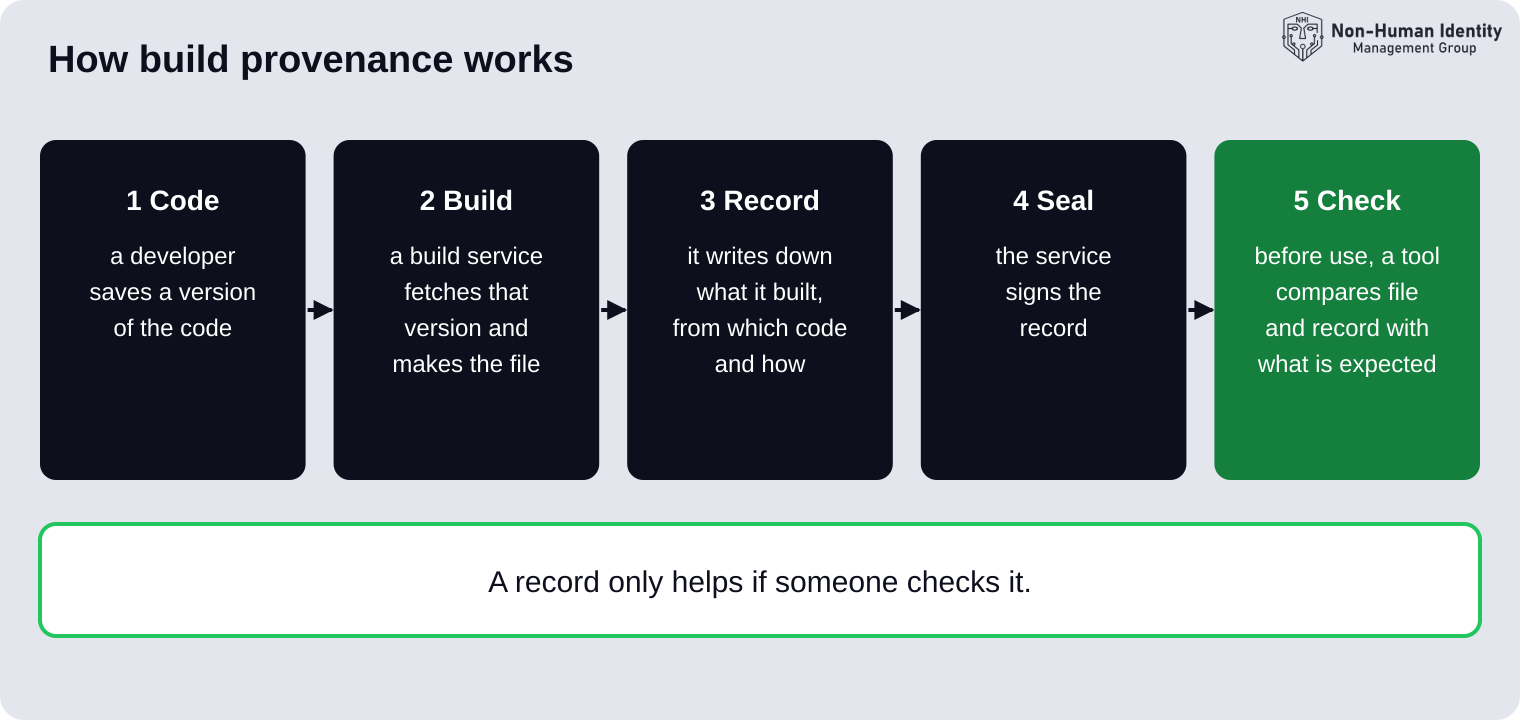
- A developer saves the code. The code sits in a shared store, with each saved version given its own ID.
- A build service makes the file. It fetches that exact code version and builds the artifact.
- The service writes the record. It notes the build system, the code version and the settings.[1]
- The service signs the record. Some services publish signed records to a public log. npm, a site for sharing JavaScript code, does this through a service called Sigstore.[4]
- Someone checks it before use. A tool compares the record with what is expected. GitHub, for example, offers a command that checks a file against its record.[3]
SLSA groups builds into levels. Each level makes it harder to fake the record or tamper with the build.[1]
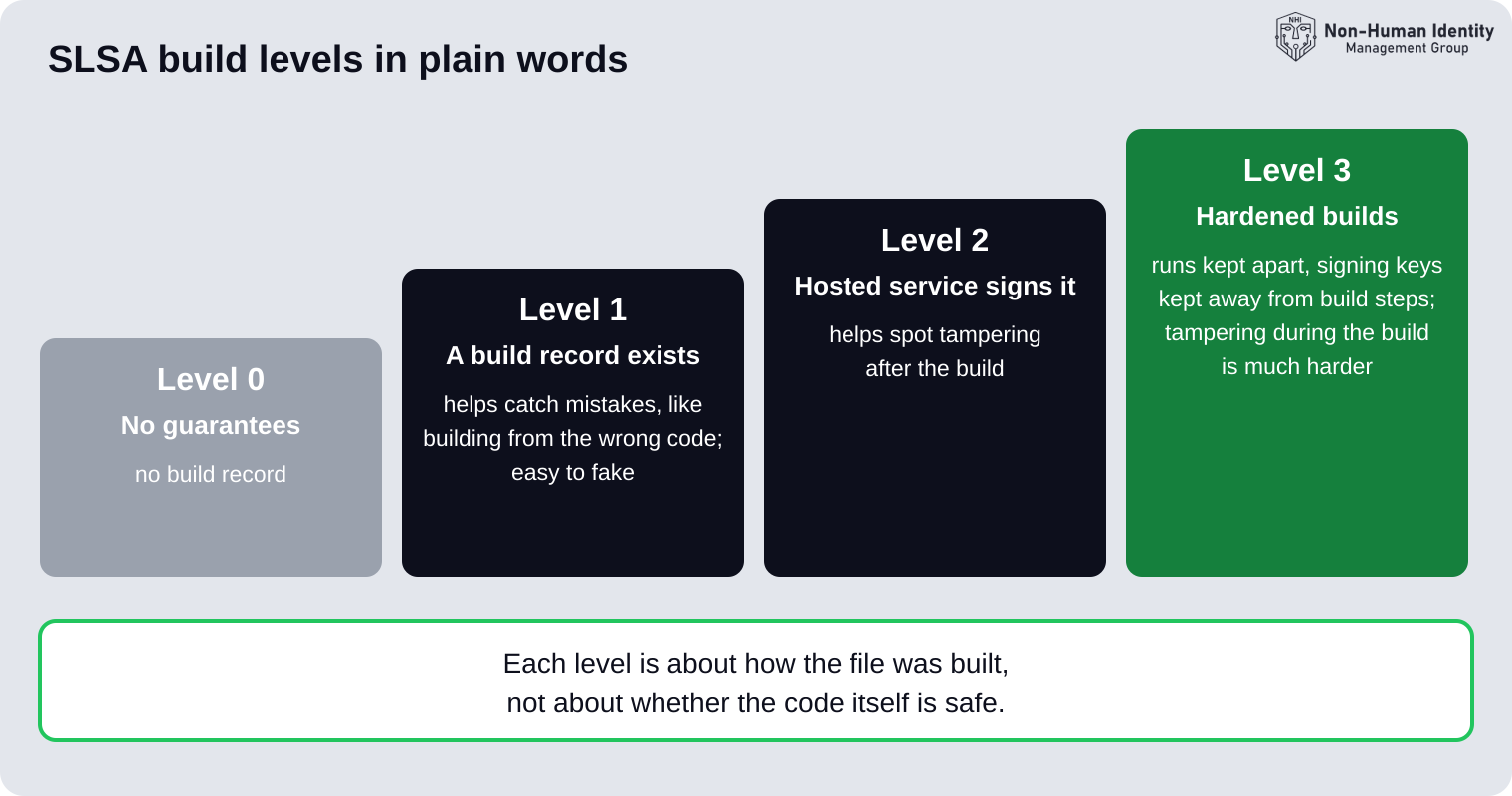
SLSA has limits that its own authors set out. It does not say whether the code was written securely. It also does not cover the parts a program uses from other people, each of which has its own level.[2]
A worked example
This story is made up to show how it can happen.
Calla Whitlock looks after IT at Thistle Accountants, a firm of twelve people. She wants a small free tool that turns scanned receipts into spreadsheets. The tool's website offers a download.
A forum post links to a "faster" copy hosted elsewhere. Calla skips it. Instead she goes to the project's own release page.
The release page says each file is built by a hosted build service and comes with a signed provenance record. Calla is not a developer, so she asks her contractor, Umar Yeboah, to help.
Umar runs the check that the project's page describes. It confirms the file was built by the project's own build service. It also confirms the build used the project's own code store, and that the file has not changed since. He also checks the file from the forum link. That copy has no matching record, so they do not use it.
Calla knows the record does not prove the tool is bug-free. So she also checks who looks after the project and when it was last updated. She notes the version she installed.
She adds one question to the firm's buying checklist: "Do you publish signed build records, and how do we check them?"
What made the difference: Calla got the file from the official source, and the record was checked before installing. The check is what turned the record into proof.
Real attacks show why the build matters. In the SolarWinds attack, a hidden tool sat on the company's build system. It quietly swapped a source file while the Orion product was being built.[5]
Myths and mistakes
| What people think | What is true |
|---|---|
| Provenance proves software is safe. | It shows where and how a file was built. npm says provenance does not promise that a package is free of harmful code.[4] |
| A signed file and provenance are the same thing. | A signature shows who signed. Provenance also records which build system, code version and settings were used. |
| Having a record is enough. | Someone has to check it against what they expect. An unchecked record gives little protection. |
| SLSA Level 3 covers every part of my software. | The level applies to that one build. Parts made by others have their own levels.[2] |
| SLSA is a paid certificate. | It is a free, open set of guidelines. Teams use it to measure and improve their own builds.[2] |
What can I do this week?
- Find out where your team's releases are built: on a laptop or on a hosted build service.
- Check whether your build service can produce signed provenance, and whether it is turned on.
- Pick one tool you install often and look for a signed build record on its release page.
- Add a question about build records to your supplier checklist.
- Read the SLSA build levels and note which one your releases meet today.
Checklist
- I can explain what build provenance is and what it does not prove.
- Our releases are built on a hosted build service, not on personal laptops.
- Our build service produces a signed provenance record for each release.
- We check provenance before we deploy or install important files.
- We know which SLSA build level our releases meet.
- We ask key suppliers how they build and sign their software.
- We get software from official release pages, not copies hosted elsewhere.
Common questions
What does SLSA stand for?
SLSA stands for Supply-chain Levels for Software Artifacts, and is said "salsa". It is a free, open set of guidelines with levels that describe how well a software build is protected. It is looked after as a cross-industry project, with its pages published under the Linux Foundation.
Is build provenance the same as an SBOM?
No, they answer different questions. An SBOM is a list of the parts inside a piece of software. Provenance is a record of how and where the software was built. Many teams publish both, because together they show what is inside and where it came from.
Which SLSA level should we aim for?
Many teams start by building on a hosted service that signs its records, which is the idea behind Level 2. Level 3 adds hardened builds and suits software that many people rely on. The practitioner guide explains how to choose a target level.
Do I need to be a developer to check provenance?
Not always, but it helps. Checking usually means running a short command or using a tool your platform provides. A non-developer can ask suppliers whether they publish signed records, and ask the IT team to check them before installing.
Would provenance have stopped the SolarWinds attack?
Not on its own. That attack changed code during the build, so a record from the same build could look normal. The hardened builds at SLSA Level 3 aim to make tampering during the build much harder, by keeping runs apart and guarding the signing keys.
Where next?
Ready for the detail? Read the practitioner guide: SLSA and Build Provenance Guide. It goes further into what is inside a provenance record, keyless signing and how to check provenance automatically before software is deployed.
Also useful:
- in-toto Attestations Guide
- Software Supply Chain Security for Beginners
- Code Signing for Beginners
- The SolarWinds Hack for Beginners
Related NHI Mgmt Group resources: Code Signing vs Artifact Attestation · CI/CD Pipeline Identity Security Guide · Sigstore Guide
Key terms
- Software provenance
- Evidence of where a piece of software came from, who made it and whether it was changed before use.
- SLSA
- A free set of guidelines with levels that describe how well a software build is protected.
- Artifact
- A finished file made by a build, such as an installer, package or container image.
- Build system
- The computers and steps that turn source code into an artifact.
- Attestation
- A signed statement about a piece of software, such as how it was built.
- Hash
- A short fingerprint worked out from a file's contents, which changes if the file changes.
- Sigstore
- A free service for signing software and recording signatures in a public log.
Sources and further reading
- SLSA v1.2: Build Track Basics. SLSA, The Linux Foundation. https://slsa.dev/spec/v1.2/build-track-basics, accessed 28 Nov 2026.
- SLSA v1.2: About SLSA. SLSA, The Linux Foundation. https://slsa.dev/spec/v1.2/about, accessed 28 Nov 2026.
- Using artifact attestations to establish provenance for builds. GitHub Docs, GitHub. https://docs.github.com/en/actions/security-for-github-actions/using-artifact-attestations/using-artifact-attestations-to-establish-provenance-for-builds, accessed 28 Nov 2026.
- Generating provenance statements. npm Docs, GitHub. https://docs.npmjs.com/generating-provenance-statements, accessed 28 Nov 2026.
- SUNSPOT: An Implant in the Build Process. CrowdStrike, 11 January 2021. https://www.crowdstrike.com/en-us/blog/sunspot-malware-technical-analysis/, accessed 28 Nov 2026.