AI in cloud security means using AI to defend online services, and protecting the AI you run there.
This guide is for managers, cloud newcomers and students who keep hearing about AI security assistants. You do not need to run servers to be affected: if your business uses cloud services, AI is likely already checking them, and you may be adding AI tools of your own.
In short
- Cloud providers use AI and pattern-spotting to flag odd activity in your account, and AI assistants can explain alerts in plain words.
- The AI can be wrong, so a person should check what it says before acting on anything big.
- AI tools you build or switch on in the cloud are new things to protect, with their own identities and data.
- Give AI tools only the access they need, keep records of what they do, and have a person approve risky actions.
What you will learn
- Explain the two sides of AI in cloud security.
- Spot when an AI suggestion needs a human check.
- Check who is responsible for each part of a cloud AI service.
- Ask your team how its AI tools log in and what they can reach.
- Pattern-spotting software (machine learning)
- software that learns what normal looks like from lots of examples, then flags what looks different.
- Security helper (AI assistant)
- an AI tool that reads alerts and records and answers questions about them in plain words.
- Hidden instructions (prompt injection)
- text that tricks an AI tool into doing something it should not.
What is AI in cloud security?
Think of a night guard watching a big building through hundreds of cameras. Now give the guard a fast helper who watches every screen at once. The helper says, "Look at camera 12. That door does not usually open at 3am."
That is the first side of AI in cloud security. A cloud account produces huge records of who logged in, what changed and where data went. AI and machine learning (software that learns patterns from examples) help sort through those records. They flag what looks unusual, and AI assistants can explain an alert in plain words.
The second side is protecting the AI itself. Many businesses now run AI tools on cloud services, such as a chatbot that answers customers or an AI agent that can take actions. Those tools have their own identities, read data and can be tricked. They need protecting like any other system.
Where the comparison stops working: a human helper knows when they are unsure. An AI helper can sound just as confident when it is wrong, and someone can slip it a note with false instructions.
Why does it matter?
AI can help small teams keep up with far more alerts than people could read. But it can also add new ways in, and it can make mistakes that look convincing.
If you manage a team that uses the cloud
What could happen: an AI tool is switched on with wide access, and nobody owns it.
Check this: ask for a list of AI tools in your cloud accounts, each with an owner.
If you are new to cloud or security work
What could happen: you act on an AI summary that left out a key detail.
Check this: open the original alert and records before you change anything.
If your business is building an AI tool
What could happen: a customer types hidden instructions, and the chatbot reveals data it can reach.
Check this: make sure the chatbot can only reach the data it truly needs.
What does it look like?
Here is a made-up alert summary written by an AI assistant for a small courier firm. It shows both the help and the need for a human check.
Example only. All values are made up.
AI SUMMARY (EXAMPLE) - cloud account: courier-demo
What happened: the service account "backup-bot" was
  used from a new country at 03:10.                     (1)
It listed every file store, then copied 40 GB.        (2)
Likely cause: a stolen key.                            (3)
Suggested action: turn off "backup-bot" now.           (4)
[ Approve ]  [ Ask a question ]  [ Dismiss ]          (5)
- In a real screen, this line would name the account and the place it was used from, taken from the cloud's records.
- A plain description of what the account did, which would take a person much longer to piece together.
- A guess, not a fact. The AI may be right or wrong.
- A suggested fix. Turning off a service account that real jobs depend on can break things.
- A person decides. The AI does not act on its own here.
Why this is risky: if staff approve every suggestion without looking, a wrong guess could shut down a working system or miss the real cause.
The safer way: treat the summary as a starting point. Check the original records, confirm who owns the account, then decide. Keep the approve button for a person, at least for actions that could cause harm.
How does it work?
Here is how both sides usually work, step by step.
- The cloud keeps records. Cloud services log logins, changes, network traffic and requests. These records are the raw material for spotting trouble.
- Software looks for odd patterns. Some cloud detection services use lists of known bad addresses plus machine learning to flag suspicious activity. For example, Amazon says its GuardDuty service works this way, and it can also watch some AI services.[1]
- An AI assistant explains. Tools such as Microsoft Security Copilot can turn alerts into short summaries and write search queries from plain questions. The user then reviews the answer.[2]
- A person decides. The team checks the facts and approves any big action, such as turning off a service account.
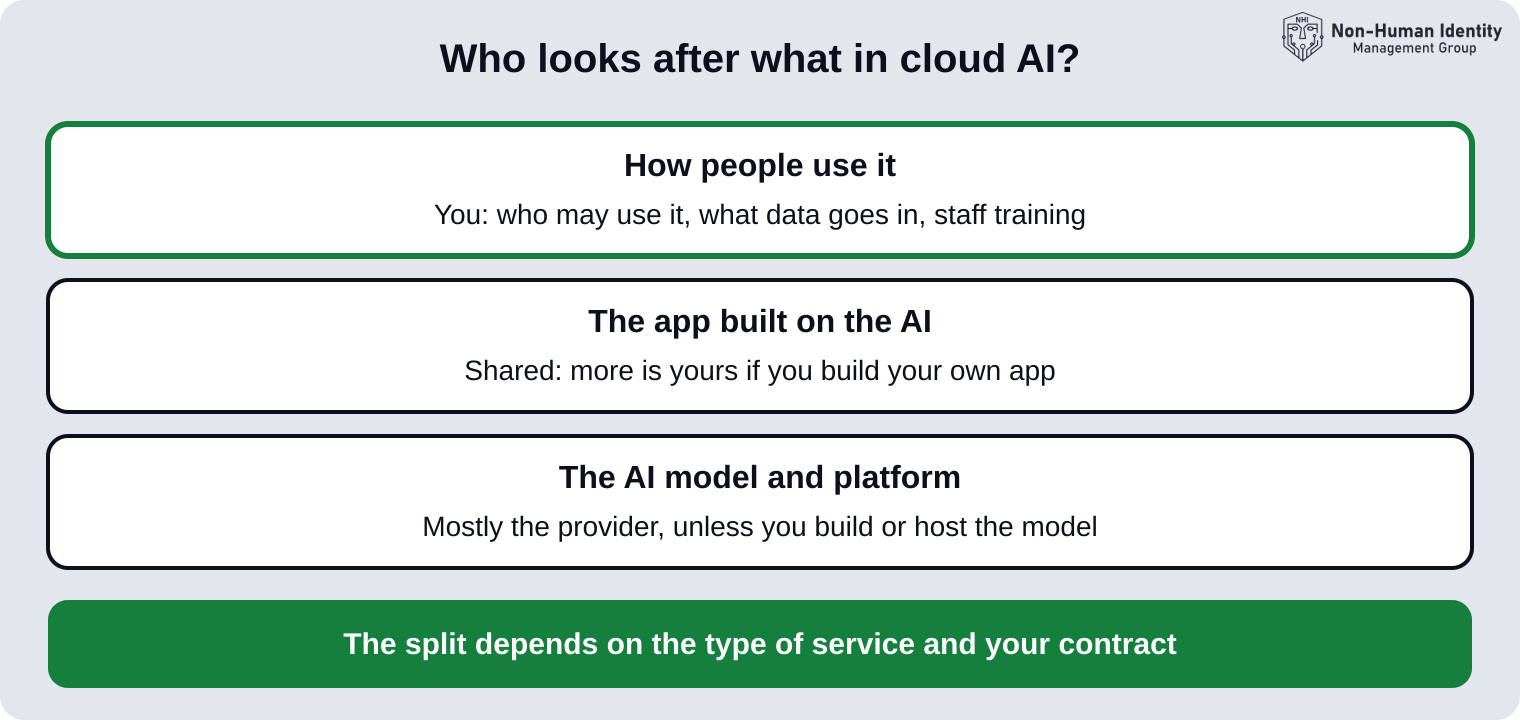
- Your own AI tools are protected too. Who looks after what depends on the kind of AI service you use. With a ready-made AI service, the provider handles more. If you build your own app on a cloud AI model, you take on more of the safety work.[3]
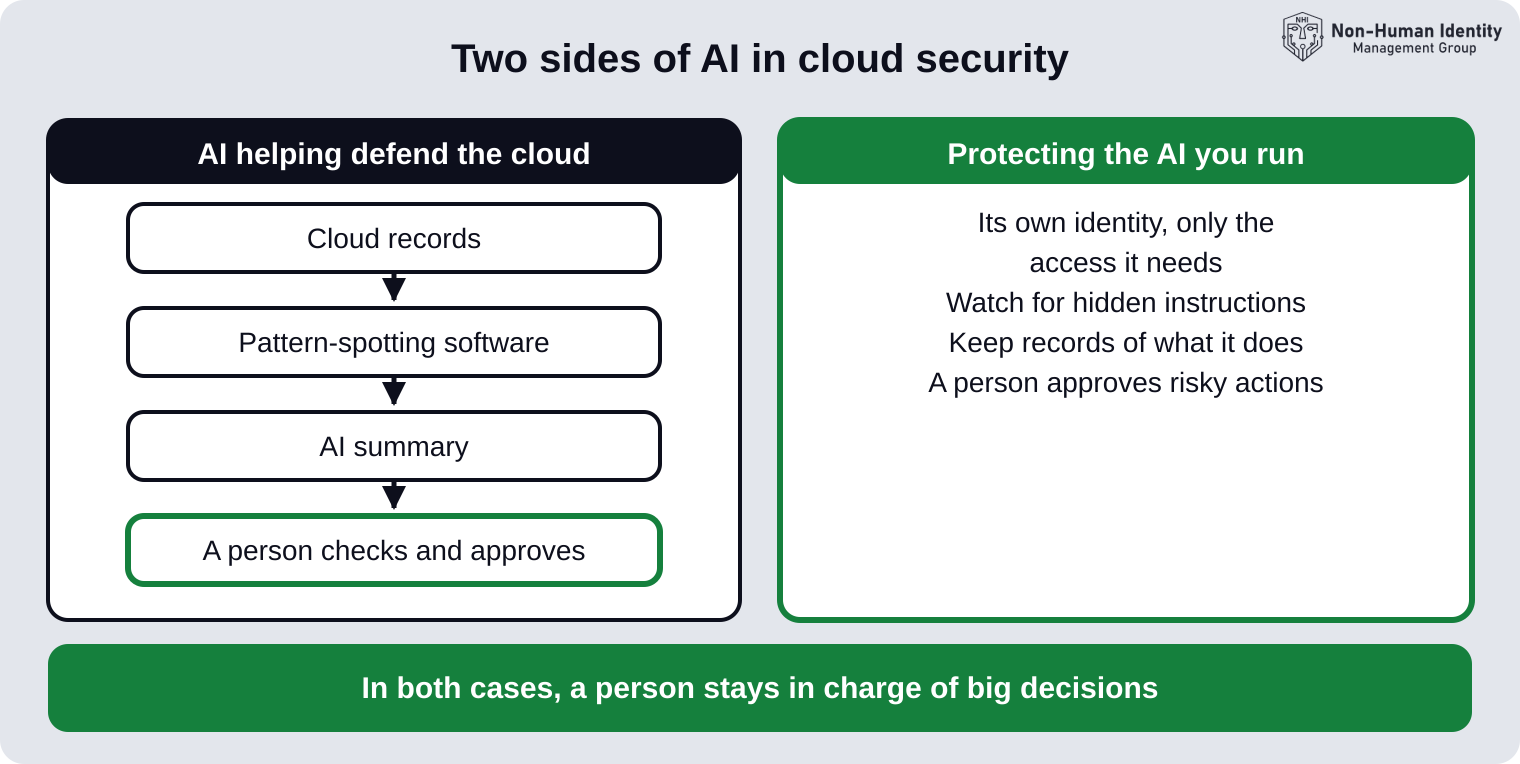
Protecting your own AI tools has some new problems. One is prompt injection: text in a message, web page or file that tricks the AI into ignoring its rules. OWASP, a respected security community, says it is unclear whether this can be fully prevented.[4] So the main defence is limiting what the AI can reach and do. OWASP suggests giving the tool only the access it needs and having a person approve risky actions.[4]
Each AI tool that logs in to other systems is a non-human identity (NHI): a digital identity used by software, not a person. Like any other, it needs an owner, limited access and records of what it does.
A worked example
Freya Erikson runs IT for Heron Couriers, a fictional delivery firm with sixty staff. Its booking system runs on a cloud service.
One Monday, the cloud's detection service flags an alert. Freya asks the firm's AI security assistant to explain it. The summary says a service account called "route-sync" was used from an unusual place, and it suggests turning the account off.
Freya remembers the night guard's helper. It is good at pointing at the right screen, but it can be wrong. So she checks the original records before acting.
She finds that route-sync is used by a partner firm's delivery app. The "unusual place" is the partner's new office. She calls her contact there, Lina Brandt, who confirms the move.
Freya dismisses the alert and writes a note saying why. Turning the account off would have stopped deliveries for the day.
The same week, the marketing team wants to switch on an AI chatbot for customers. Freya asks three questions. Which identity will it use? What data can it reach? Who approves it if it tries to change a booking?
The team limits the chatbot to delivery times only, with no access to customer addresses. Any refund or change goes to a person. Freya names herself as owner and turns on records of what the chatbot does.
Neither change needed deep AI knowledge. It needed a person to check, and clear limits on what each tool could do.
Myths and mistakes
| What people think | What is true |
|---|---|
| The AI checked it, so it must be right. | AI summaries are a starting point. A person should check the facts before big actions. |
| AI security tools replace the security team. | They help people work faster. People still decide, own the tools and handle what the AI gets wrong. |
| The cloud provider secures our AI app for us. | The provider covers more with ready-made services. If you build your own app, more of the safety work is yours.[3] |
| Good filters will block every trick. | Filters help, but hidden instructions may still get through. Limit what the AI can reach and do.[4] |
| An AI tool is just software, not an account to manage. | If it logs in to other systems, it is an identity. It needs an owner and limited access. |
What can I do this week?
- Ask which AI tools are switched on in your cloud accounts, and who owns each one.
- Check that detection services offered by your cloud provider are turned on.
- Agree a simple rule: a person approves any AI-suggested action that could stop a service or delete data.
- For each AI tool, write down which identity it uses and what data it can reach.
- Make sure records of what your AI tools do are being kept.
Checklist
- We know which AI tools run in or connect to our cloud accounts.
- Each AI tool has a named owner.
- Each AI tool has its own identity with only the access it needs.
- A person approves risky actions suggested or taken by AI.
- Staff check AI summaries against the original records before big changes.
- We keep records of what our AI tools do.
- We know which parts of each cloud AI service we are responsible for.
- Our cloud provider's detection services are switched on.
Common questions
Is AI already used in cloud security?
Yes. Cloud detection services use lists of known bad addresses and machine learning to flag odd activity. AI assistants that explain alerts and help write searches are also available from the big providers.
Can I trust an AI security assistant's answer?
Use it as a helpful first draft, not the final word. It can save a lot of reading, but it can miss details or guess wrong. Check the original records before you act on anything that could cause harm.
Does the AI model maker see what we type into a cloud AI service?
Not always, and it varies by service. For example, Amazon says outside model makers on its Bedrock service cannot see customer prompts and answers. Always read the data terms for the service you use.[6]
What is the biggest new risk when we run our own AI tool?
Often it is giving the tool too much access. If hidden instructions trick it, the harm is limited by what it can reach. A tool that can only read delivery times can leak far less than one that can read every record.
Where can I find official advice on building AI safely?
A good start is the UK's National Cyber Security Centre. With partner agencies, it published guidelines for building AI systems securely. They cover design, building, release and day-to-day running. That includes keeping logs and watching for trouble.[5]
Where next?
Ready for the detail? Read the practitioner guide: Cloud Detection and Response Guide. It goes further into how teams investigate cloud alerts, contain stolen logins in each cloud, and automate response safely.
Also useful:
- AI Security for Beginners
- Cloud Security for Beginners
- AI Agent Identity for Beginners
- Cloud AI Services Mapped
- Amazon Bedrock Security Guide
Related NHI Mgmt Group resources: Azure OpenAI and Azure AI Foundry Security Guide · Google Vertex AI Security Guide · Agent Controls and Monitoring Guide
Key terms
- Machine learning
- Software that learns patterns from examples instead of following fixed rules.
- AI security assistant
- An AI tool that explains alerts and records in plain words and suggests next steps.
- Prompt injection
- Hidden instructions in text that trick an AI tool into ignoring its rules.
- The split of security duties between a cloud provider and its customer.
- Non-human identity (NHI)
- A digital identity used by software, such as an AI tool or a service, rather than a person.
- Least privilege
- Giving an account or tool only the access it needs to do its job.
Sources and further reading
- What is Amazon GuardDuty? Amazon GuardDuty User Guide, Amazon Web Services. https://docs.aws.amazon.com/guardduty/latest/ug/what-is-guardduty.html, accessed 28 Nov 2026.
- What is Microsoft Security Copilot? Microsoft Learn, Microsoft. https://learn.microsoft.com/en-us/copilot/security/microsoft-security-copilot, accessed 28 Nov 2026.
- AI shared responsibility model. Microsoft Learn, Microsoft. https://learn.microsoft.com/en-us/azure/security/fundamentals/shared-responsibility-ai, accessed 28 Nov 2026.
- LLM01:2025 Prompt Injection. OWASP Top 10 for LLM Applications, OWASP GenAI Security Project. https://genai.owasp.org/llmrisk/llm01-prompt-injection/, accessed 28 Nov 2026.
- Guidelines for secure AI system development. National Cyber Security Centre (UK) and partner agencies, 27 November 2023. https://www.ncsc.gov.uk/collection/guidelines-secure-ai-system-development, accessed 28 Nov 2026.
- Data protection. Amazon Bedrock User Guide, Amazon Web Services. https://docs.aws.amazon.com/bedrock/latest/userguide/data-protection.html, accessed 28 Nov 2026.