A business phone system connects your office phones to each other and to the outside world.
This guide is for small business owners, office managers and people new to IT work. You do not need to be technical to be affected: if criminals get into your phone system, they can run up a large call bill, and the business is usually the one asked to pay it.
In short
- Most business phones now work over the internet, a method called VoIP. The system that runs them is often called a PBX.
- Criminals who get in can make costly calls to overseas or premium-rate numbers, often at night or over a weekend.
- Change default passwords, block call types you do not need and watch your call records for odd patterns.
- Old fax machines and alarm lines are part of the phone system too. Check them before your landlines move to digital.
What you will learn
- Explain what a business phone system does and how VoIP works.
- Spot the signs of phone fraud in a call record or bill.
- Check the basic settings that make fraud harder.
- Ask your phone supplier who pays if the system is misused.
- Phone over the internet (VoIP)
- calls carried as data over an internet connection, not an old copper phone line.
- Office phone system (PBX)
- the system that links your office extensions and routes calls in and out.
- Call fraud (toll fraud)
- when criminals use your phone system to make expensive calls that you are billed for.
What is a business phone system?
Think of an old-style switchboard in the back office. It links every desk phone, and it has lines to the outside world that run on your account. If the door to that room is left unlocked, anyone can walk in and dial.
A modern business phone system does the same job in software. The UK's National Cyber Security Centre calls it a private branch exchange, or PBX. It manages calls within an organisation and routes calls in and out. It can be a box in your office or a service in the cloud.[1]
Most systems now use VoIP (Voice over Internet Protocol), which sends your voice as data over the internet. That makes phones cheaper and more flexible. It also means the phone system can be reached and attacked over the internet, like any other computer.
Where the comparison stops working: a real switchboard room has a door you can see. A phone system's "door" is a login page or a network connection, and you may not notice it has been left open.
Why does it matter?
Criminals who get into a phone system can call costly overseas or premium-rate numbers. UK government security advice says this can mean hundreds or thousands of calls, and the business owner is expected to pay the bill.[1]
If you own a small business
What could happen: you come back after a bank holiday to a phone bill many times the usual size.
Check this: ask your supplier to block international and premium-rate calls you never make.
If you are new to IT work
What could happen: the phone system's admin page still has the password it shipped with, and someone finds it.
Check this: change every default password on the phone system and turn on a second sign-in check for admins.
If you run an office with alarms, lifts or a fax
What could happen: an old device may fail when your landline moves to digital, or a forgotten fax line stays open to attack.
Check this: list every device that uses a phone line, not just the desk phones.
What does it look like?
Here is a made-up page from a call record for one weekend. Each line is one call.
Example only. All values are made up.
CALL RECORD  System: EXAMPLE-PBX  Site: Example Dental
Date/time         From ext  To number          Mins  Cost
Fri 17:42         201       0000 000 001       3     0.10
Sat 02:13         299       +00 FAKE 0000 01   58    EXAMPLE  (1)
Sat 02:14         299       +00 FAKE 0000 02   59    EXAMPLE  (2)
Sat 02:15         299       +00 FAKE 0000 03   60    EXAMPLE
... 400 more calls from ext 299 ...                           (3)
- In a real file, this line would contain a long call to an overseas number in the middle of the night, when the office is shut.
- Calls start a minute apart from the same extension. That looks like a machine, not a person.
- Extension 299 does not belong to anyone on the staff list. It may be an old or test extension that someone found.
Why this is risky: each call costs money. Hundreds of them over a weekend can add up to a large bill before anyone looks.
The safer way: unused extensions are removed, overseas and premium-rate calls are blocked unless needed, and the supplier sends an alert when call volumes jump.[1]
How does it work?
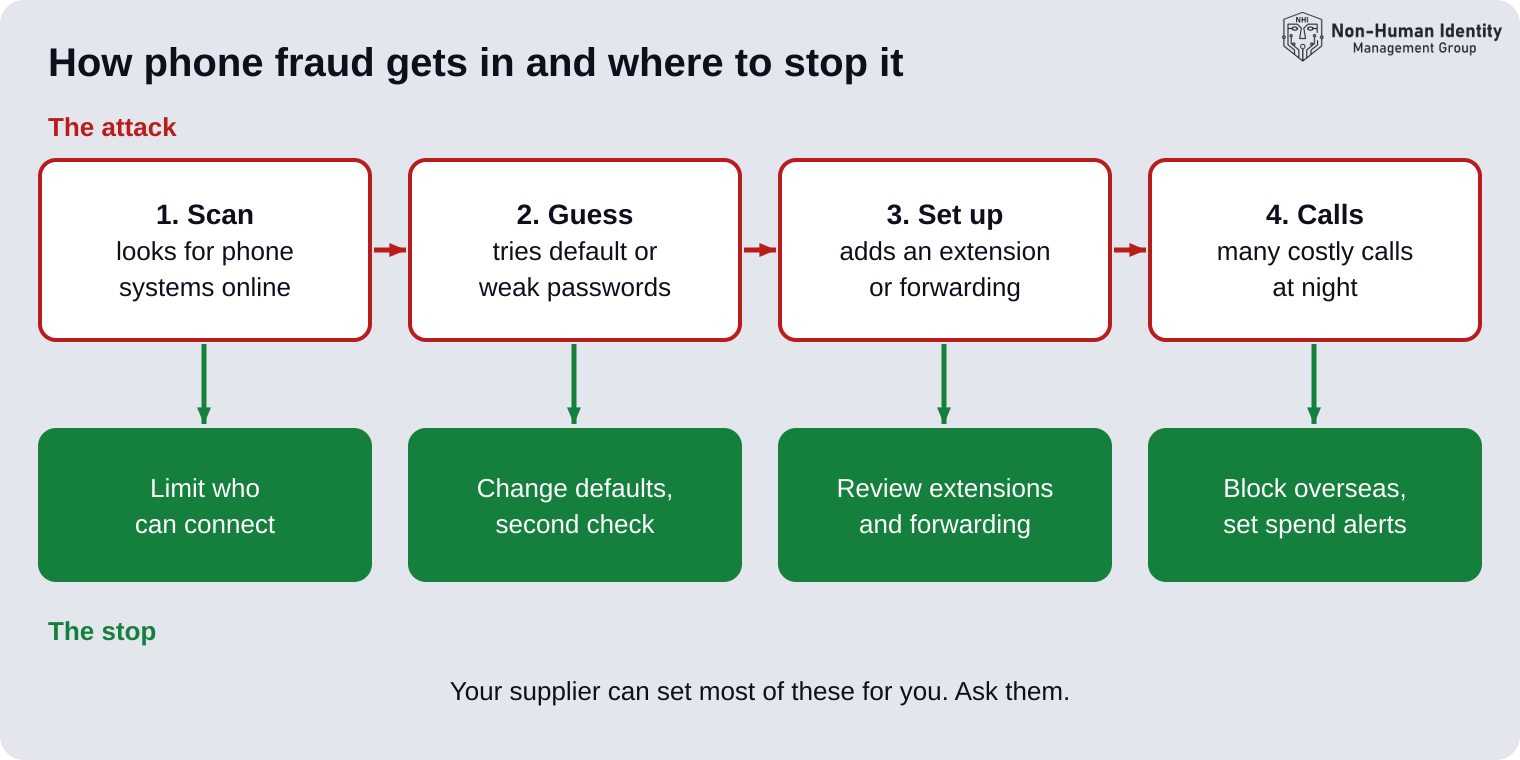
Here is how a typical phone fraud unfolds, and where it can be stopped.
- The search. Criminals scan the internet for phone systems that answer. Open connections and weak firewalls make systems easy to find.[1]
- The way in. They try default or weak passwords on the admin page or on user accounts.[1]
- The setup. Once in, they may add an extension or turn on call forwarding to an outside number.
- The calls. They make many calls to costly numbers, often when the office is closed.[1]
- The bill. The business usually finds out when the bill or an alert arrives.
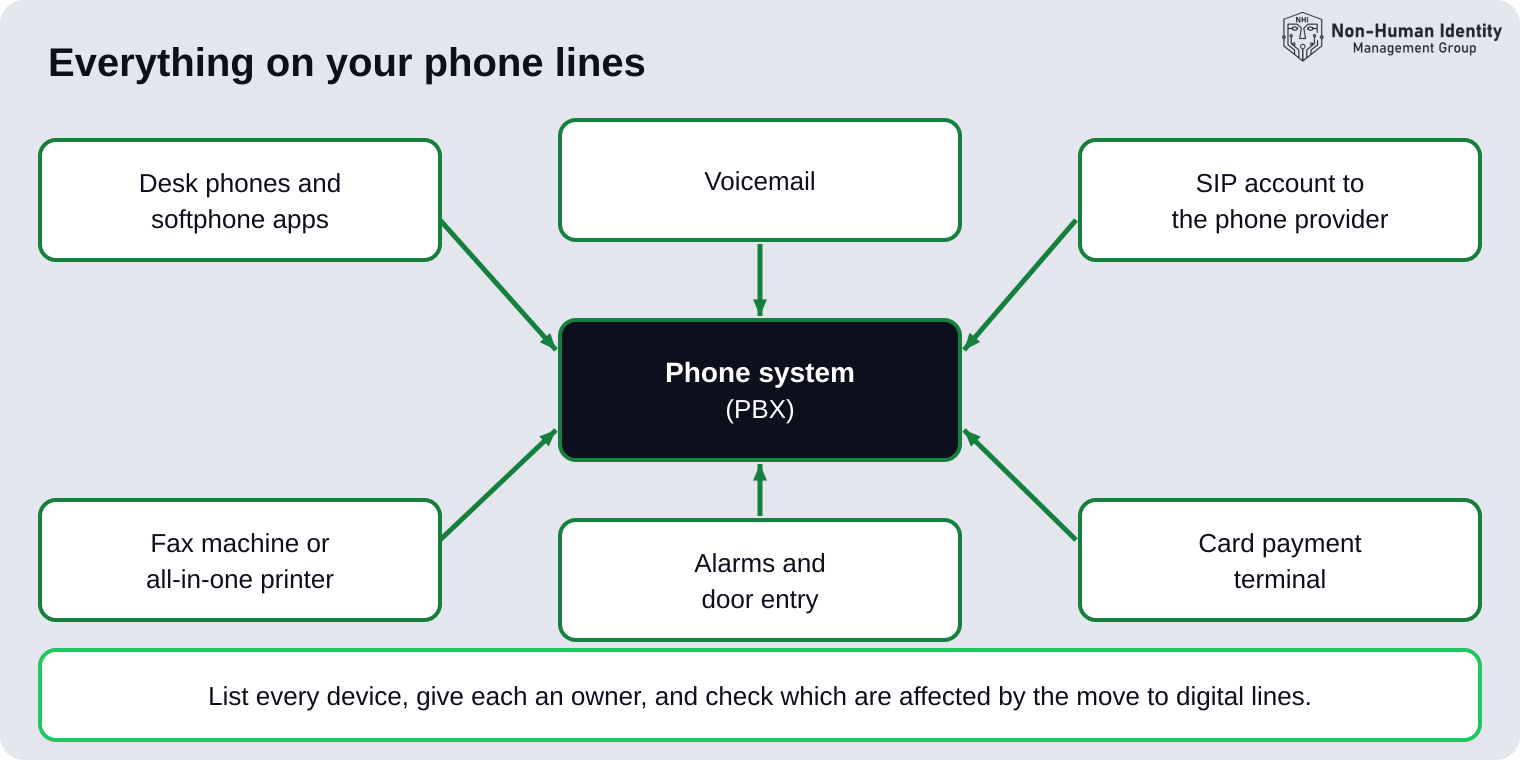
Your phone system also logs in to your phone provider with its own account and password. This is often called a SIP account. SIP is the set of rules VoIP uses to set up calls. That account is a kind of non-human identity (NHI). An NHI is a digital identity, or the credential behind it, that represents a machine, application, automated process, service or AI agent. It lets that thing sign in, do tasks and connect to other systems without a person. Anyone who copies the SIP account details may be able to make calls on your account. So it needs a strong password and an owner.
Larger systems often sit behind a session border controller (SBC), a kind of security gate for phone traffic between your system and the outside world. For example, Microsoft's Teams Phone service requires a certified SBC with encrypted connections when a business connects its own phone lines.[2]
Old fax machines need care too. In 2018, Check Point researchers showed that some all-in-one printers could be taken over by sending a fax, using only the fax number. HP released a fix. The researchers advised updating devices, keeping fax printers on a separate part of the network and unplugging unused fax lines.[3] In the UK, landlines are moving from the old copper network to digital. The government says all devices that rely on the old network, such as alarms and payment terminals, must be upgraded by January 2027.[4]
A worked example
Talia Pereira is the practice manager at Linden Dental, a fictional dental surgery with eight staff. The practice moved to an internet phone system two years ago.
On a Tuesday after a bank holiday, the phone provider emails her. Call spending on the account is far above normal. Talia remembers the switchboard room with the door left open.
She calls Bodhi Delmar, the IT supplier who set up the phones. He logs in and finds hundreds of overnight calls to overseas numbers. They all came from extension 299, a test extension he made during the install and never removed.
Bodhi deletes the extension straight away. He changes the admin password, which was still close to the maker's default, and turns on a second sign-in check. He also changes the password for the practice's SIP account with the provider.
Next, he asks the provider to block international and premium-rate calls, because the practice only calls local patients and suppliers. He sets a daily spending cap and an alert.
Talia then walks the building with a list. She finds an old fax machine on its own phone line that nobody has used for a year. She asks the provider to cancel that line.
Last, she reads the phone contract. It does not say who pays for fraud caused by a set-up mistake. She asks the provider and Bodhi to agree that in writing.
Myths and mistakes
| What people think | What is true |
|---|---|
| Our phone provider will cover any fraud. | The NCSC says the business owner is usually expected to pay. Check your contract.[1] |
| Phones are not really computers. | Internet phone systems are computers on your network and need updates and strong passwords. |
| We are too small to be targeted. | Criminals scan for any phone system they can reach. Size does not matter to a scan. |
| The fax in the corner is harmless. | Researchers have shown that some fax printers could be attacked with only a fax number.[3] Update it or unplug the line. |
| Voicemail PINs do not matter. | Default codes on extensions and voicemail are easy to guess. Change them. |
What can I do this week?
- Ask your phone supplier to block overseas and premium-rate calls you do not make.
- Change the admin password and any default extension or voicemail codes.
- Remove extensions and call forwarding rules nobody uses.
- Set a spending cap or alert with your phone provider.
- List every device on a phone line, such as a fax, alarms and card machines.
Checklist
- No default passwords remain on the phone system, extensions or voicemail.
- Admin access needs a second sign-in check.
- Only needed call types are allowed, and overseas and premium-rate numbers are blocked if unused.
- Unused extensions and forwarding rules have been removed.
- Spending alerts are on, and someone reads them.
- Phone system software is kept up to date.
- The SIP account password is strong, has an owner and is changed if anyone leaves.
- Every fax, alarm and payment device on a phone line has an owner and a plan for the move to digital.
- The contract says who pays for fraud caused by a set-up mistake.
Common questions
What is toll fraud?
Toll fraud is when criminals use your phone system to make expensive calls that you are billed for. They usually call premium-rate or overseas numbers. The NCSC calls this dial-through fraud and says the business is usually expected to pay.[1]
Is VoIP less secure than a normal landline?
Not by nature, but it is reachable over the internet, so it needs the same care as other computers. Strong passwords, updates, blocked call types and encrypted calls where offered make a VoIP system much harder to misuse.
How do I know if my phone system has been hacked?
Look for calls you do not recognise in the call record, especially at night or weekends, to overseas or premium-rate numbers. Other signs include new extensions, new call forwarding rules and a sudden jump in your bill or call volumes.
What is a session border controller?
It is a security gate for phone traffic. It sits between your phone system and the outside world, checks what passes through and can encrypt calls. Larger businesses and cloud calling services often use one, and some services require a certified one.
Do we still need our fax machine?
Maybe not. Check who still sends or receives faxes and why. If nobody does, ask your provider to cancel the line. If you keep it, update the device and put it on a separate part of the network. Also check it will work after the move to digital lines.
Where next?
Ready for the detail? Read the practitioner guide: Session Border Controller Security Guide. It goes further into encrypting call traffic, certificate set-up and locking down the gate between your phone system and the outside world.
Also useful:
- VoIP and SIP Security Guide
- Fax and Legacy Telephony Security
- SMS Pumping for Beginners
- Non-Human Identities for Beginners
Related NHI Mgmt Group resources: STIR/SHAKEN Caller ID Guide · Phone Scams for Beginners · Small Business Cyber Security Checklist
Key terms
- VoIP
- Voice over Internet Protocol, a way of carrying phone calls as data over the internet.
- PBX
- A private branch exchange, the system that links office extensions and routes calls in and out.
- Toll fraud
- Misuse of a phone system to make costly calls that the owner is billed for.
- SIP account
- The account, a non-human identity (NHI), that a phone system uses to connect to the phone provider and make calls.
- Session border controller
- A security gate that checks and can encrypt phone traffic between your system and the outside world.
- PSTN switch-off
- The move of UK landlines from the old copper phone network to digital lines.
Sources and further reading
- UK National Cyber Security Centre, "Private Branch Exchange (PBX) best practice", 20 Feb 2024. https://www.ncsc.gov.uk/guidance/private-branch-exchange-best-practice, accessed 28 Nov 2026.
- Microsoft Learn, "Plan Direct Routing". https://learn.microsoft.com/en-us/microsoftteams/direct-routing-plan, accessed 28 Nov 2026.
- Check Point, "Faxploit: Sending Fax Back to the Dark Ages", 12 Aug 2018. https://blog.checkpoint.com/2018/08/12/faxploit-hp-printer-fax-exploit/, accessed 28 Nov 2026.
- GOV.UK, "Moving landlines to digital technologies", 28 May 2025. https://www.gov.uk/guidance/moving-landlines-to-digital-technologies, accessed 28 Nov 2026.