Card testing is when criminals use a website's checkout to find out which stolen card numbers still work.
This guide is for anyone who runs or helps run an online shop, a booking site or a donation page. You do not need to be technical to be affected: if your site takes card payments, criminals can use it to check stolen cards, and your business pays part of the cost.
In short
- Criminals buy lists of stolen card details, but they do not know which cards still work.
- They use automated programs to try many cards on a real checkout, often with tiny payments.
- The shop can face fees, refunds, disputes and more of its real customers' cards being declined.
- A challenge such as a CAPTCHA, limits on repeated attempts and alerts on failed payments make your checkout a poor place to test.
What you will learn
- Explain what card testing is and why criminals do it.
- Spot the warning signs in your orders and payment reports.
- Check which basic protections your checkout already has.
- Ask your payment provider or developer the right questions.
- Checking stolen cards (card testing)
- trying stolen card details on a website to see which ones still work.
- Automated program (bot)
- software that repeats a task, such as filling in a form, many times very fast.
- Payment refused (decline)
- when the card's bank says no to a payment.
What is card testing?
Think of a thief with a bag of stolen keys. Before trying a big house, they quietly try each key in a garden shed to see which ones still turn. Card testing works the same way, and your checkout is the shed.
Criminals buy lists of stolen card details. Some cards have already been cancelled, so the lists are a gamble. To sort good cards from bad, they send the details through a real website's payment form. If the payment goes through, the card works. They can then use it for bigger purchases or sell it on.[1]
They rarely do this by hand. They use a bot, a program that fills in the payment form again and again, much faster than a person. Payment companies also call this carding, account testing or card checking.[1]
Where the comparison stops working: a shed owner might never notice a stranger at the lock. A shop usually leaves clues, such as a sudden pile of failed payments, if someone is looking.
Why does it matter?
The shop is not the one who lost the cards, but it still pays. Failed and fake payments can bring fees, refunds and disputes. Lots of refused payments can also make card banks see the shop as riskier. Then more real customers get declined, even after the attack ends.[1]
If you run a small online shop
What could happen: hundreds of tiny orders arrive overnight, and you pay fees on each attempt.
Check this: ask your payment provider which card testing protections are switched on.
If you run a charity donation page
What could happen: a flood of small "donations" hides card checking among real gifts.
Check this: set an alert for a jump in small or failed donations.
If you build websites for clients
What could happen: a payment form with no limits becomes a free testing tool for criminals.
Check this: make sure each checkout has a challenge and a limit on repeated attempts.
What does it look like?
Here is a made-up page from a small shop's payment report, the morning after a card testing attack.
Example only. All values are made up.
Time   Amount  Name         Card ending  Result
02:14  1.00    aaaa bbbb    0000         Declined   (1)
02:14  1.00    aaaa bbbb    1111         Declined
02:15  1.00    qwe rty      2222         Approved   (2)
02:15  1.00    qwe rty      2222         Declined   (3)
02:15  1.00    test test    3333         Declined
... 412 more attempts from the same few addresses   (4)
- A tiny amount at night, with a name that makes no sense.
- One card goes through. The criminal now knows that card works.
- The same card again with different details, as if guessing the missing parts.
- Far more attempts than real shoppers would make, in a short time.
Why this is risky: each attempt can cost a fee. The approved ones may turn into disputes. The pile of declines can hurt how card banks see the shop.[1]
The safer way: add a check that spots bots, a cap on tries and an alert on failed payments. Then the shop is a slow, noisy place to test cards.
How does it work?
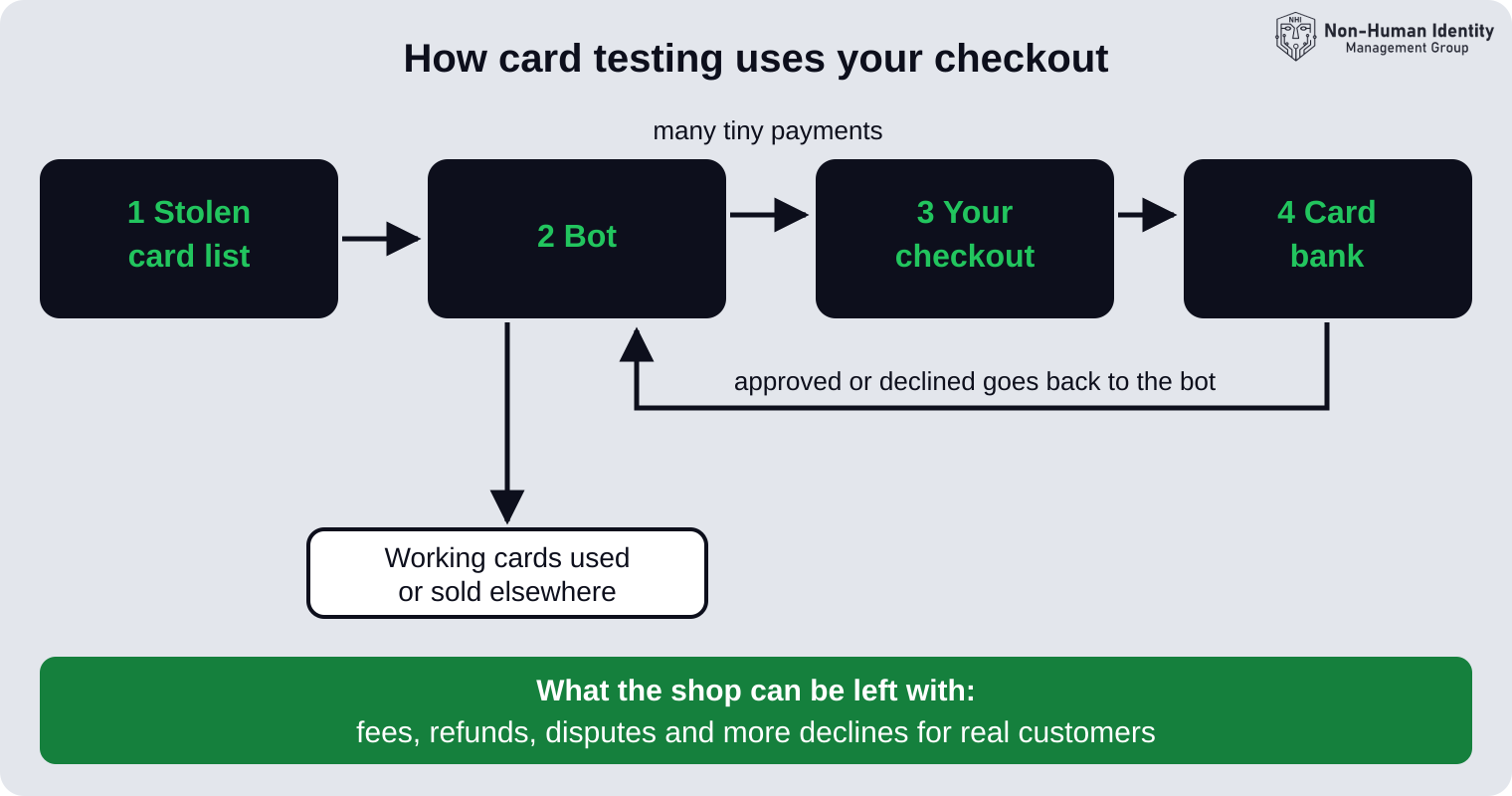
A typical card testing attack follows a few steps, from a stolen list to a quick cash-out.
- The stolen list. A criminal buys a batch of stolen card details. They do not know which cards still work.[2]
- The weak spot. They look for a checkout or donation form that lets anyone pay quickly, with no sign-in and no challenge. Small shops and charities are common targets.[3]
- The bot run. A bot sends many cards through the form, often with tiny amounts the real cardholder may not notice. Some attacks just save a card without paying, which may not show on the card owner's statement.[1]
- The answer. The card's bank approves or declines each attempt. That answer tells the criminal which cards are live.
- The cash-out. Working cards are used for bigger purchases elsewhere or sold on.[1]
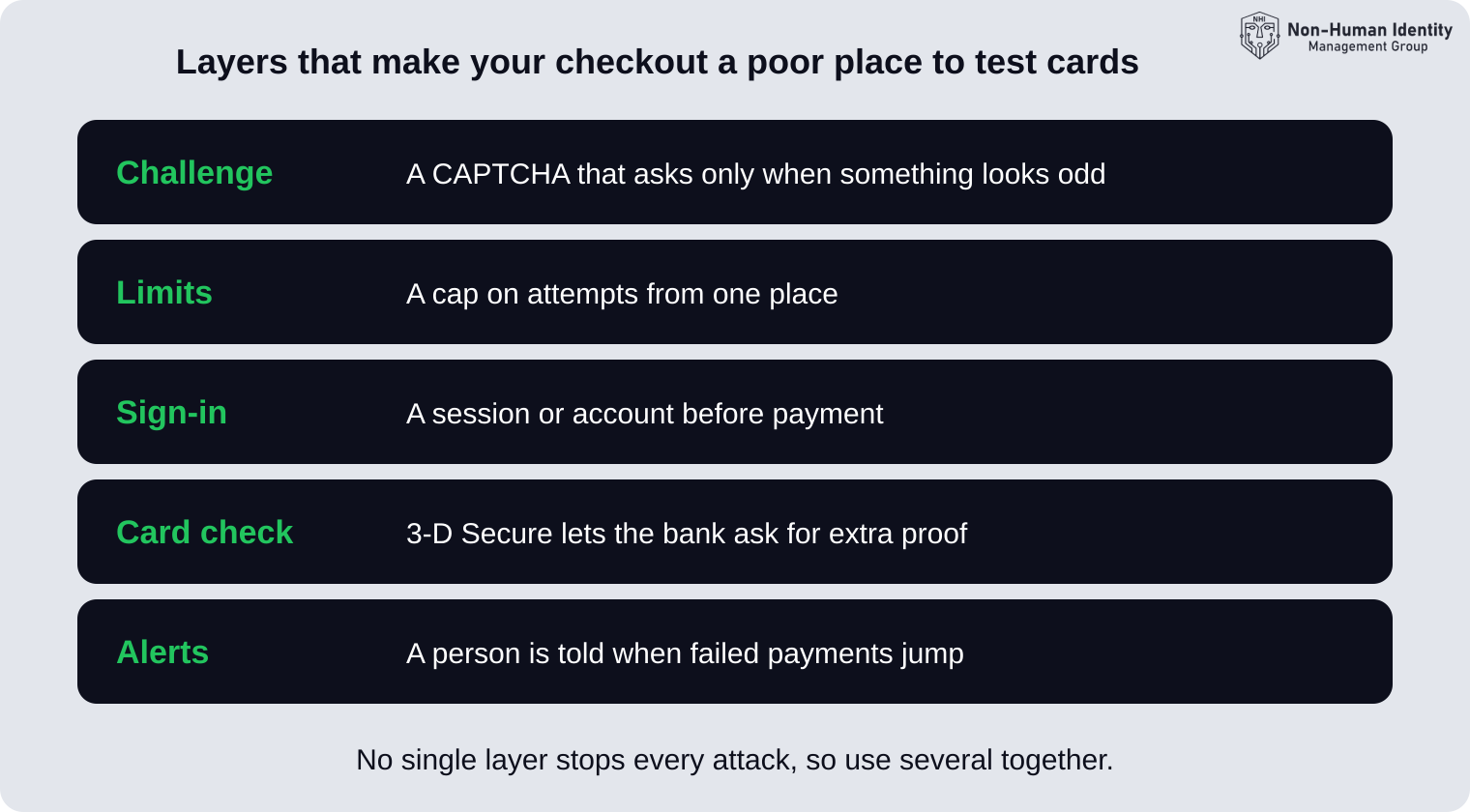
No single fix covers every attack, because criminals change their methods. Payment companies advise layers that work together.[1]
- A challenge. A CAPTCHA is a check that tries to tell people from bots. Many now run quietly in the background and only ask a question when something looks odd.
- Limits. Rate limiting caps how many tries can come from one place in a set time, such as payments from one internet address in a day.
- Sign-in first. Asking shoppers to sign in or start a proper session before paying makes the form harder to reach.
- A card check. 3-D Secure lets the card's bank ask the shopper for extra proof when a payment looks risky. This might be a code or a fingerprint on their phone.[4]
- Alerts. Someone is told when failed payments jump, so the attack is spotted sooner.
A worked example
Wren Yilmaz runs Bracken Kitchens, a fictional online shop selling pans and knives. Her friend Darius Sorensen built the site.
On Monday morning Wren opens her payment report. Overnight there are more than 400 payments of one pound each. Almost all were declined. The names on the orders are nonsense, such as "aaaa bbbb".
Wren remembers the thief and the shed. Someone has been trying keys on her lock.
She calls Darius. First, he checks the payment provider's dashboard. The attempts came from a handful of internet addresses in a few hours. He confirms the site's secret payment key has not leaked.
Next, Wren refunds the few payments that went through, so the real cardholders get their money back and are less likely to raise a dispute.[1]
Then Darius switches on the provider's built-in CAPTCHA for the checkout. He adds a limit on how many payments one address can try in a day. He also sets a rule that blocks orders below two pounds, since nothing in the shop costs less.
Last, Wren asks the provider to email her when failed payments jump above the normal level.
That night a few test payments arrive, then stop. Wren's real customers barely notice the change.
Myths and mistakes
| What people think | What is true |
|---|---|
| Declined payments cost me nothing. | They can bring fees and make banks see your shop as riskier.[1] |
| Only big shops get targeted. | Small shops and charities are common targets because their checks are often lighter.[3] |
| Blocking one internet address will stop it. | Attackers switch addresses. A rule on one signal alone is usually not enough.[1] |
| The tiny payments that got through are profit. | They were paid with stolen cards. Refund them to help avoid disputes. |
| A CAPTCHA annoys every customer. | Many modern challenges stay hidden unless something looks risky. |
What can I do this week?
- Look at your payment report for bursts of tiny or failed payments.
- Ask your payment provider which card testing checks are on for your shop.
- Ask your developer to add a challenge and a limit on repeated tries.
- Set an alert for a sudden rise in declined payments.
- Check that your secret payment key is stored safely and not in your website code.
Checklist
- The checkout uses the payment provider's recommended form, or has its own protections.
- A CAPTCHA or similar challenge guards the checkout and any "save card" form.
- Repeated tries from one place are limited.
- 3-D Secure is available on the checkout.
- Someone gets an alert when failed payments rise sharply.
- Suspicious payments that went through are refunded quickly.
- The secret payment key is kept out of website code.
- Website suppliers know the shop expects these checks, in writing.
Common questions
How do I know if my shop is being used for card testing?
Look for a sudden rise in failed payments, many tiny amounts and odd customer names, often at night. Payment providers say a spike in declines is the most common sign. If you see this, tell your provider and your developer the same day.
Should I refund the payments that went through?
Usually, yes. The money came from stolen cards, and the real owners are likely to dispute it. Refunding quickly can help avoid dispute fees. Check with your payment provider first, in case they want to review the payments.
Will a CAPTCHA put off real customers?
Rarely, if it is set up well. Many modern CAPTCHA tools work in the background and only show a puzzle when something looks unusual. Test the checkout yourself after adding one, on a phone and a computer.
Is card testing my fault?
No. The cards were stolen somewhere else. But an open checkout makes your shop an easy place to test them, and you bear some of the cost. Payment providers describe stopping it as a job shared between them, card companies and shops.
I see a tiny charge I do not recognise on my own card. What now?
Tell your card provider straight away. A small unknown charge can be a sign someone is testing your card before a bigger purchase. Your bank can block the card and send a new one. See Payment Fraud for Beginners.
Where next?
Ready for the detail? Read the practitioner guide: Card Testing and Carding Attacks Defence Guide. It goes further into detection signals, layered controls, measurement and lessons from real incidents.
Also useful:
- Online Shop Security for Beginners
- Bots and Bot Traffic for Beginners
- CAPTCHA and bot challenges
- Ecommerce Fraud and Chargeback Protection
Related NHI Mgmt Group resources: Ecommerce Store Security Checklist · Chargeback Management and Dispute Guide · Bot Management Guide
Key terms
- Card testing
- Trying stolen card details on a website to find out which ones still work.
- Carding
- Another name for testing and using stolen card details, often with bots.
- Bot
- A program that repeats a task automatically, much faster than a person.
- CAPTCHA
- A check that tries to tell a person from a bot.
- Rate limiting
- Capping how many requests can come from one source in a set time.
- Chargeback
- When a cardholder disputes a payment and the money is taken back from the shop.
- 3-D Secure
- A check that lets the card's bank ask the shopper for extra proof during an online payment.
Sources and further reading
- Protect yourself from card testing. Stripe Docs, Stripe. https://docs.stripe.com/disputes/prevention/card-testing, accessed 28 Nov 2026.
- OAT-001 Carding. OWASP Automated Threats to Web Applications, OWASP Foundation. https://owasp.org/www-project-automated-threats-to-web-applications/assets/oats/EN/OAT-001_Carding.html, accessed 28 Nov 2026.
- Bulletin: The threat of account testing to payment security. PCI Security Standards Council and NCFTA, 21 October 2020. https://listings.pcisecuritystandards.org/pdfs/PCI_SSC_NCFTA_Account_Testing_Bulletin_Final.pdf, accessed 28 Nov 2026.
- EMV 3-D Secure. EMVCo. https://www.emvco.com/emv-technologies/3-d-secure/, accessed 28 Nov 2026.