Online shop security means keeping your checkout, your customers' card details and their accounts safe from criminals.
This guide is for anyone who runs or helps run a small online shop. You do not need to write code to be affected: if your shop takes card payments, criminals may try to copy those cards at your checkout.
In short
- Web skimming is when criminals hide extra code on a checkout page to copy card details as shoppers type them.
- Orders still go through as normal, so the shop and its customers may not notice for some time.
- Common ways in are stolen admin passwords, out-of-date shop software and add-ons from other firms.
- Protect your admin login, keep software updated, know which scripts run at checkout and ask your payment provider about its own payment page.
What you will learn
- Explain what web skimming is and how card details get stolen.
- Spot the weak points in a small online shop.
- Check who can change your checkout page.
- Ask your web developer and payment provider the right questions.
- Checkout copying (web skimming)
- hidden code on a shop's payment page that copies card details.
- Small program on a web page (script)
- a piece of code that a web page loads to add a feature, such as a chat box.
- Shop control panel (admin login)
- the account you use to change your shop's pages, prices and settings.
What is online shop security?
Think of a fake card reader fitted over the slot of a cash machine. You use the machine as normal and get your cash, but a copy of your card goes to the criminal. Web skimming is the online version of that reader, and online shop security is about keeping it off your site.
A web page is built from many small programs called scripts. Some come from your shop software. Others come from outside firms, such as a chat box, reviews or visitor counters.
In web skimming, a criminal adds a script to your checkout page. A US government cyber agency lists the usual ways in. These include a weakness in the shop software, code loaded by an outside firm, or a stolen admin password.[1]
Online shop security also covers your customers' accounts. Criminals try leaked usernames and passwords from other sites on your login page. This is called credential stuffing.[3]
Where the comparison stops working: a fake card reader is something you can touch and inspect. A skimming script is invisible to shoppers, and it can be added or changed from far away.
Why does it matter?
Your customers trust you with their card details. If those details are copied, they may lose money, and your shop may lose their trust. The body that writes card security rules says these attacks have grown a lot.[2]
If you run a small online shop
What could happen: a skimmer copies cards for weeks before your bank or a customer tells you.
Check this: ask who can change your checkout page, and turn on a second sign-in check for them.
Next: PCI DSS for Beginners
If you build shops for clients
What could happen: an add-on you installed is changed by its maker's attacker and starts skimming.
Check this: keep a list of every script on the checkout page and why it is there.
If you handle customer support
What could happen: customers say their accounts were used for orders they did not make.
Check this: pass every report on, so someone can look for a pattern of break-ins.
What does it look like?
Here is a made-up list of the scripts that load on a small shop's checkout page. Your web developer can produce a list like this.
Example only. All values are made up.
Checkout page: scripts loaded on 28 Nov
shop-theme.js      from shop.example.com           (1)
payments.js        from pay.example.com            (2)
chat-widget.js     from chat.example.com           (3)
stats-0000.js      from cdn-FAKE.example.invalid   (4)
Last change to checkout page: 03:12, by admin      (5)
- Your own shop's code. Expected.
- Your payment provider's code. Expected.
- A chat box from an outside firm. Ask whether it needs to be on the checkout page at all.
- A script nobody remembers adding, from an unknown address. In a real file, this line would be the first one to investigate.
- A change made at 3am with the shared "admin" login. Nobody can say who made it.
Why this is risky: an unknown script on the checkout page could copy every card typed there. The shared login means you cannot see who added it.
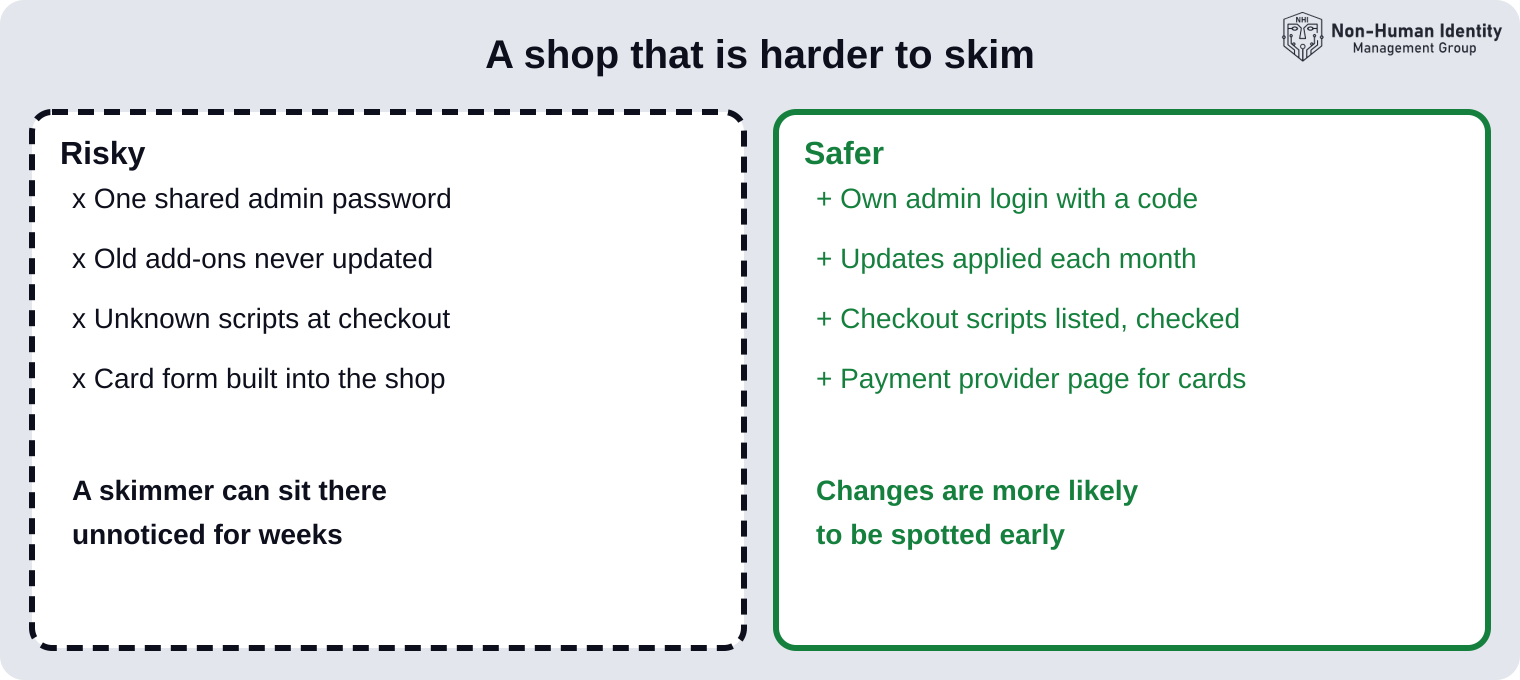
The safer way: keep a short list of approved checkout scripts and check it for changes. Give each person their own admin login with a second check.
How does it work?
This is a simple view so you can spot it. It is not a guide to doing it.
- The criminal finds a way in. This may be a stolen admin password, a shop add-on that was never updated, or an outside firm's script that was itself broken into.[1]
- They add hidden code. A small extra script goes onto the checkout page.
- Shoppers pay as normal. The order goes through, so nothing looks wrong.
- A copy goes to the criminal. The script sends the card details to a server the criminal controls.
- The problem shows up later. Often a bank or a customer spots fraud first and traces it back to the shop.
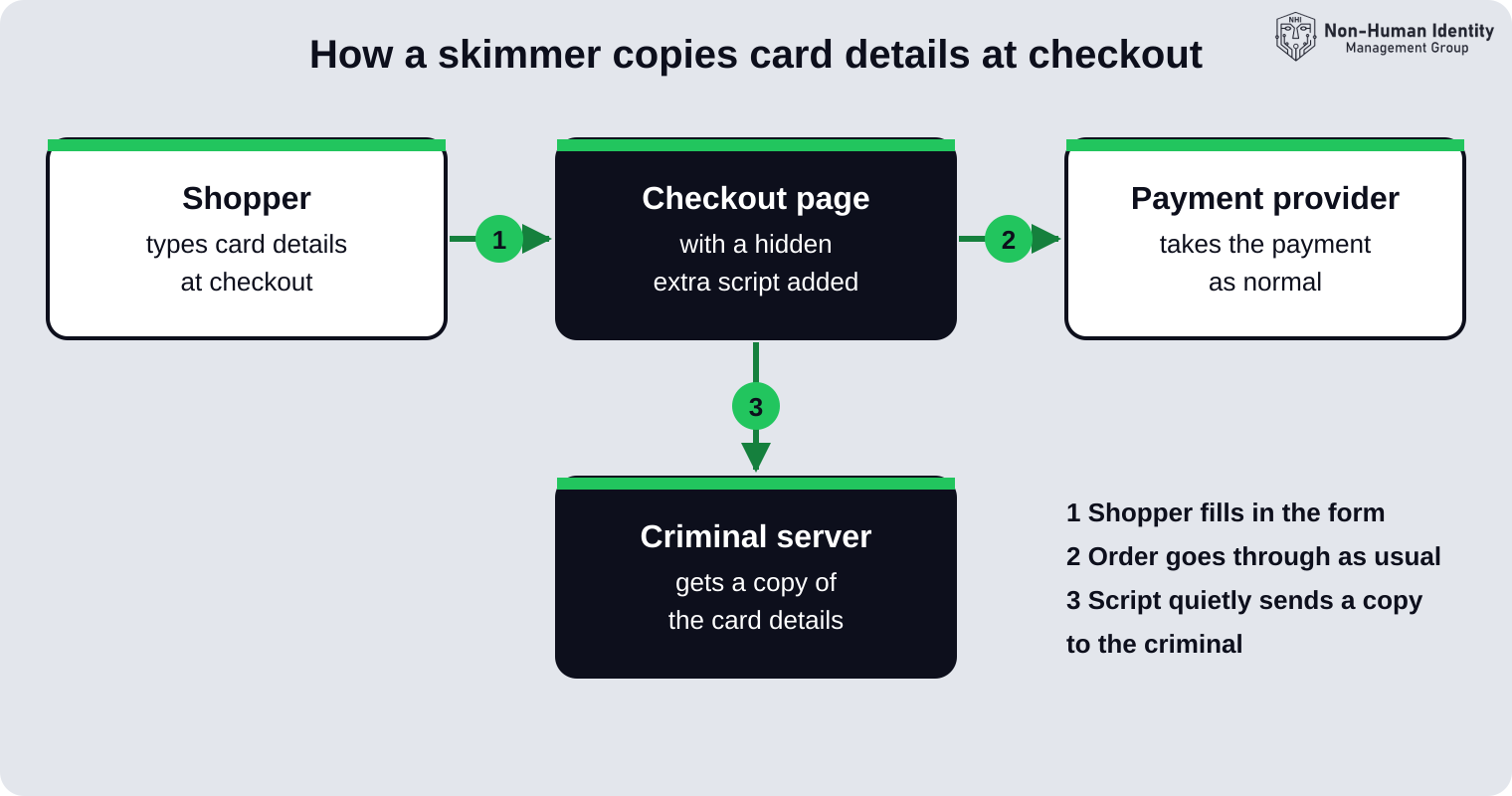
The card industry's security rules now ask shops to approve each script on the payment page, check it has not changed and watch for tampering.[2] The US cyber agency also advises keeping shop and payment software updated and checking web logs.[1]
A worked example
This story is made up to show how it can happen.
Aaron Jaramillo runs a small plant nursery that sells plants online. His shop runs on a popular shop platform with a few add-ons. He and two staff share one admin login.
One Monday his payment provider emails him. Several cards used at his shop have later been used for fraud. The provider asks him to check his site.
Aaron calls Siobhan Walsh, the web developer who built the shop. She lists the scripts on the checkout page. One of them loads from an address she does not recognise. The shop's records show it was added at night, using the shared admin login.
Siobhan takes the unknown script off the page and saves a copy for the investigation. She resets every admin password and gives each person their own login with a second sign-in check. Then she updates the shop software and removes two add-ons nobody uses.
Aaron tells his payment provider what they found and follows its steps. Because customers' personal data was involved, he also reports it to the UK data protection regulator. Its guidance says to do this within 72 hours where feasible, if there is a likely risk to people.[4]
Finally, Siobhan moves card entry onto the payment provider's own page. She also sets a monthly reminder to check the script list for changes.
What made the difference: Aaron acted on the first warning, and Siobhan could compare the page with a known list of scripts.
Myths and mistakes
| What people think | What is true |
|---|---|
| My shop is too small to be a target. | Criminals look for weak shop software and stolen admin logins, whatever the size of the shop.[1] |
| The padlock in the browser means checkout is safe. | The padlock protects data on its way to the site. It does not show whether the page itself has been changed. |
| My payment provider handles all of the security. | The provider protects its own systems. Your admin logins, add-ons and checkout page are still yours to look after. |
| If orders still work, nothing is wrong. | Skimming is built to leave orders working. Watch for unknown scripts and changes you did not make. |
| Customer accounts are safe because we use passwords. | Leaked passwords from other sites are tried on yours. An expert guide names a second sign-in check as the best defence against most password attacks.[3] |
What can I do this week?
- Give each person their own admin login and turn on a second sign-in check.
- Update your shop software and add-ons, and remove add-ons you do not use.
- Ask your web developer for a list of every script on the checkout page.
- Ask your payment provider which payment page options it offers and what each means for your shop.
- Offer customers a second sign-in check, if your shop can do it.
Checklist
- Each admin has their own login with a second sign-in check.
- Shop software and add-ons are updated at least monthly.
- Unused add-ons and old admin accounts are removed.
- We have a list of approved scripts on the checkout page.
- Someone checks that list for changes on a schedule.
- We know which payment page option our provider uses.
- We know who to call, and what to report, if cards are copied.
Common questions
What is web skimming and how do card details get stolen from checkout pages?
Web skimming is hidden code added to a shop's checkout page. As a shopper types their card details, the code sends a copy to the criminal. The payment still goes through, so nobody notices at first. Criminals often get in through weak admin logins or old add-ons.
How would I know if my shop has been skimmed?
Often a bank, payment provider or customer tells you first, because cards used at your shop turn up in fraud. Other signs are scripts you did not add, page changes you did not make and admin logins at odd hours.
Does using a payment provider make my shop safe?
It helps, but it does not cover everything. Your provider looks after its own systems. You still need to protect your admin logins, keep your shop updated and watch your checkout page. Ask your provider which of its payment page options suits your shop.
What should I do first if I think cards were copied?
Contact your payment provider and follow its steps. Ask your developer to save a copy of the page, then remove the unknown script and reset admin passwords. If personal data was involved, check whether you need to report it to your data protection regulator.
Where next?
Ready for the detail? Read the practitioner guide: Web Skimming Incident Playbook. It goes further into detection and triage, containment and recovery, and who to notify after a skimming attack.
Also useful:
- PCI DSS for Beginners
- PCI DSS for E-commerce Payment Page Scripts Guide
- Credential Stuffing for Beginners
- Payment Fraud for Beginners
Related NHI Mgmt Group resources: Shared Accounts for Beginners · Software Supply Chain Security for Beginners · Incident Response for Beginners
Key terms
- Web skimming
- A browser-side attack where hidden code copies payment or form details as a shopper submits them.
- Magecart
- A broad name for web skimming attacks on shop and payment pages.
- JavaScript
- The programming language most web page scripts are written in.
- PCI DSS
- The card industry's security rules for anyone who takes, handles or stores card payments.
- Credential stuffing
- Trying usernames and passwords leaked from one site on many other sites.
- Multi-factor authentication
- Asking for two or more kinds of proof, such as a password and a code, before letting someone in.
Sources and further reading
- E-Skimming (National Cybersecurity Awareness Month resource, with FBI recommendations). Cybersecurity and Infrastructure Security Agency (CISA), 2020. https://www.cisa.gov/sites/default/files/publications/NCSAM_ESkimming_2020.pdf, accessed 28 Nov 2026.
- New Information Supplement: Payment Page Security and Preventing E-Skimming (PCI DSS requirements 6.4.3 and 11.6.1). PCI Security Standards Council, 10 March 2025. https://blog.pcisecuritystandards.org/new-information-supplement-payment-page-security-and-preventing-e-skimming, accessed 28 Nov 2026.
- Credential Stuffing Prevention Cheat Sheet. OWASP Cheat Sheet Series. https://cheatsheetseries.owasp.org/cheatsheets/Credential_Stuffing_Prevention_Cheat_Sheet.html, accessed 28 Nov 2026.
- Personal data breaches: a guide (report a breach). Information Commissioner's Office (ICO). https://ico.org.uk/for-organisations/report-a-breach/personal-data-breach/, accessed 28 Nov 2026.