Change management is the simple process of planning, approving and recording changes to IT systems.
This guide is for people new to IT work, managers and anyone who has been asked to "raise a change". You do not need to be technical to be affected: one rushed change to a system your business relies on can stop sales or open a door to attackers.
In short
- A change is anything that alters how a system is set up, from an update to a new setting.
- Change management asks four questions first: what, why, what could go wrong and how do we undo it.
- Small, routine changes can be pre-approved. Big or risky ones need a second pair of eyes.
- A change nobody planned or recorded is a warning sign. It may be a mistake, or it may be an attacker.
What you will learn
- Explain what change management is in one sentence.
- Spot the parts of a good change request.
- Explain why every change needs a way back.
- Ask the right questions before you approve a change.
- Planned update (change)
- any alteration to how a system, app or device is set up.
- Request form (change request)
- a short record that says what will change, why, and how to undo it.
- Way back (rollback plan)
- the steps to put things back as they were if the change goes wrong.
What is change management?
Think of roadworks. A building firm cannot just dig up a busy street one morning. It books the work with the council, agrees a date and plans a diversion. If something goes wrong, there is a plan to fill the hole again.
Change management works the same way for IT systems. Before someone changes a server, an app or a network setting, they write down what they will do. Someone else checks the plan. The work happens at an agreed time, with a way to undo it ready. Afterwards, the change is recorded.
A change request (the written plan) is the heart of it. It does not need to be long. A few clear lines are often enough.
Where the comparison stops working: roadworks are easy to see. A change to a computer system is often invisible until something breaks, so the written record matters even more.
Why does it matter?
Many outages start with a change. In October 2021, Meta said a command run during routine maintenance cut off the links between its data centres. A tool meant to check such commands had a bug and did not stop it.[4]
Changes also matter for security. UK government cyber security advice says all changes should be authorised. It also says checks should make it hard for accidental or harmful changes to affect your systems.[1]
If you are new to IT work
What could happen: a "quick fix" you make on a live system takes it offline, and nobody knows what you changed.
Check this: ask your team how changes are raised before you touch anything live.
If you manage a team or a business
What could happen: a supplier pushes an update on your busiest day, and your tills or website stop.
Check this: agree with suppliers when changes may happen and who must be told.
Next: Business Continuity and Disaster Recovery for Beginners
If you are asked to approve changes
What could happen: you approve a change without reading it, and it opens access nobody meant to give.
Check this: look for the reason, the risk and the way back before you say yes.
What does it look like?
Here is a made-up change request for a small chain of chemist shops. Many teams use a ticket system, but a simple form works too.
Example only. All values are made up.
CHANGE REQUEST  CHG-0000-EXAMPLE
What:      Update the till software to version 0.0-FAKE   (1)
Why:       Supplier fix for card payment errors            (2)
Risk:      Medium. Tills could stop taking cards           (3)
When:      Tuesday 07:00 to 08:00, before shops open       (4)
Test:      Tried on the spare till in the back office
Way back:  Reinstall the old version, about 20 minutes     (5)
Approved:  Shop operations manager (not the person doing it) (6)
- In a real file, this line would name the exact system and version.
- The reason. A change with no clear reason is worth questioning.
- An honest guess at what could go wrong.
- A quiet time, so fewer people are affected if it fails.
- The rollback plan, with a rough time to undo it.
- Approval from someone other than the person making the change.
Why this is risky: without a plan, the update might go in at 09:00 on a busy morning. If it fails with no way back, shops may not be able to take cards until it is fixed.
The safer way: test first, pick a quiet time, have a way back ready and tell the people affected.
How does it work?
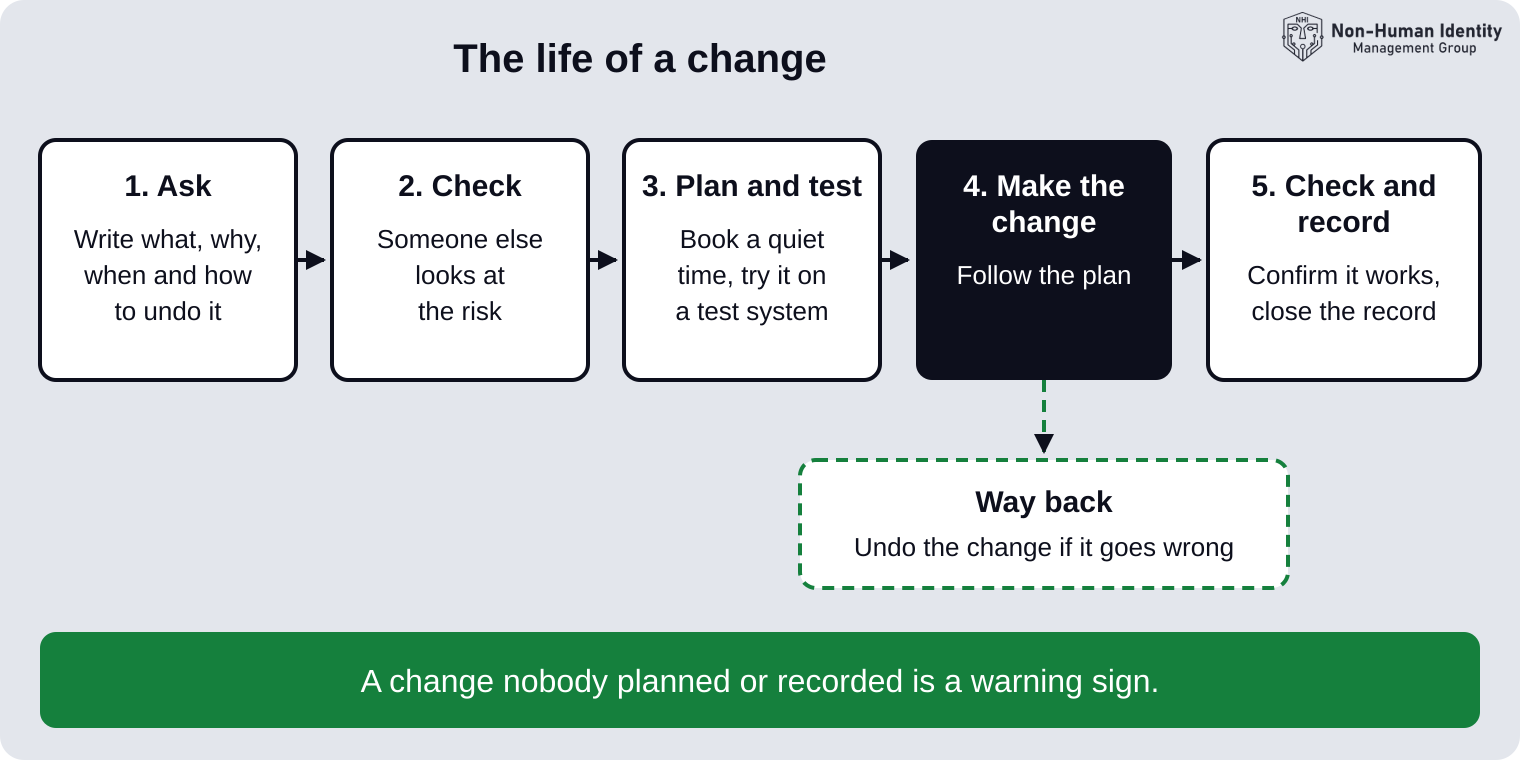
Most change processes follow the same simple steps.
- Ask. Someone writes a change request: what, why, when and how to undo it.
- Check. Someone else looks at the risk. A low-risk, routine change may be pre-approved. A risky one may go to a group that reviews changes, often called a change advisory board.
- Plan and test. The change is booked into a quiet time slot, called a change window. Where possible, it is tried on a test system first.
- Make the change. The work is done as planned. If it goes wrong, the team follows the way back.
- Check and record. The team confirms things work and closes the record with what really happened.
Emergencies happen. A fix for a serious security hole may need to go in today. An emergency change uses a faster route, but it still gets approval, a record and a check afterwards. The same UK advice says good change control should make it quick and easy to apply security updates, not slow them down.[1]
Records also help spot trouble. If a setting changed and there is no change request for it, someone should ask why. US government guidance describes this kind of control as a way to protect systems from improper changes.[2][3]
A worked example
Orla Engel looks after IT for Bracken Pharmacy, a fictional group of four chemist shops. The till supplier emails on a Thursday: "Please install our update today. It fixes a card payment problem."
Orla is tempted to do it at once. Then she remembers the roadworks. You do not dig up the high street at lunchtime.
She writes a short change request. It says what will change, why, and that the risk is medium, because a failed update could stop card payments. Her way back is to reinstall the old version, which the supplier says takes about 20 minutes.
She tests the update on the spare till in the back office. It works, and card payments go through.
Her manager, Juno Zamora, reads the request. Juno asks what would happen if it failed in all four shops at once. So Orla plans to update one shop first, then the other three an hour later.
On Friday at 07:00, Orla updates the first shop. One till shows an error. She follows her way back, and the till is working on the old version before the doors open. The other shops are not touched.
She tells the supplier, who sends a corrected update the next week. This time it works in every shop. Orla closes the change record with a note of what happened.
What made the difference: a way back, a second opinion and trying one shop first, rather than all four at once.
Myths and mistakes
| What people think | What is true |
|---|---|
| Change management is just paperwork. | A good change request can be a few lines. Its job is to make people think about risk and the way back. |
| It slows down security fixes. | Good processes have a fast route for urgent fixes, with a record afterwards.[1] |
| Small changes do not count. | Small changes can still break things. Routine ones can be pre-approved, but they should still be recorded. |
| Vendors test their updates, so we do not need to. | In July 2024, a faulty update from a security supplier caused Windows computers running its software to crash.[5] Testing and staged roll-outs reduce the impact. |
| The person doing the work can approve it. | A second person spots things the first one misses. That is the point of approval. |
What can I do this week?
- Find out how your team raises and approves changes. If there is no process, write a one-page form.
- Add a "way back" line to every change you plan.
- Agree a quiet time for changes with your suppliers.
- Pick three routine, low-risk changes that can be pre-approved.
- Ask who checks for changes that were never requested.
Checklist
- Every change has a short written request: what, why, when, risk and way back.
- Someone other than the person doing the work approves risky changes.
- Changes are tested first where possible.
- Changes happen at agreed quiet times, and affected people are told.
- There is a fast, recorded route for urgent fixes.
- Each change is closed with a note of what really happened.
- Unplanned changes are noticed and questioned.
- Suppliers follow the same rules for systems they manage for you.
Common questions
What counts as a change?
Anything that alters how a system is set up or works. That includes software updates, new settings, new user groups, firewall rules and hardware swaps. Teams usually agree a list of routine changes that are pre-approved, so people are not raising forms for every small task.
What is a change advisory board?
It is a group of people who review higher-risk changes. They may include IT staff, security staff and people from the business. They ask what could go wrong and whether the timing is right. Small teams often use one or two reviewers instead of a formal board.
What is a rollback plan?
It is the set of steps to put a system back as it was if a change goes wrong. It might mean reinstalling an old version or restoring a backup. A good rollback plan says roughly how long it takes and who will do it.
How is change management linked to security?
Closely. Attackers often change settings, add accounts or install tools. If every real change is recorded, an unrecorded one stands out. Approval also stops one person from quietly opening access that nobody else agreed to.
Do small businesses need change management?
Yes, but it can be light. A shared form, a second person to check risky changes and a note of what was done may be enough. We suggest starting with the systems your business cannot run without, such as tills, email and your website.
Where next?
Ready for the detail? Read the practitioner guide: Change Management Policy Template. It goes further into change types and approval levels, roles and responsibilities, and how to monitor that the policy is followed.
Also useful:
- Change Management Security
- SOC 2 CC8 Change Management Guide
- Security Misconfiguration for Beginners
- Business Continuity and Disaster Recovery for Beginners
Related NHI Mgmt Group resources: Patch Management Guide · Configuration management tool health check · Incident Escalation for Beginners
Key terms
- Change management
- The process of planning, approving, making and recording changes to IT systems.
- Change request
- A record that describes a planned change, why it is needed, its risk and how to undo it.
- Change advisory board
- A group that reviews higher-risk changes and advises whether they should go ahead.
- Change window
- An agreed time slot when changes may be made, usually when few people are affected.
- Emergency change
- An urgent change made faster than usual, with approval and a record completed as soon as possible.
- Change freeze
- A period, such as a busy season, when only urgent changes are allowed.
- Configuration drift
- When a system's settings slowly move away from what was agreed, often through unrecorded changes.
Sources and further reading
- 10 Steps to Cyber Security: Architecture and configuration. National Cyber Security Centre (UK). https://www.ncsc.gov.uk/collection/10-steps/architecture-and-configuration, accessed 28 Nov 2026.
- SP 800-128, Guide for Security-Focused Configuration Management of Information Systems. NIST, August 2011, updated 10 October 2019. https://csrc.nist.gov/pubs/sp/800/128/upd1/final, accessed 28 Nov 2026.
- Glossary: configuration control. NIST Computer Security Resource Center. https://csrc.nist.gov/glossary/term/configuration_control, accessed 28 Nov 2026.
- More details about the October 4 outage. Engineering at Meta, 5 October 2021. https://engineering.fb.com/2021/10/05/networking-traffic/outage-details/, accessed 28 Nov 2026.
- Falcon Content Update Preliminary Post Incident Report. CrowdStrike, July 2024. https://www.crowdstrike.com/en-us/blog/falcon-content-update-preliminary-post-incident-report/, accessed 28 Nov 2026.